Several browsers now include or integrate a VPN-branded or privacy-routing feature, but the label alone does not tell you what traffic is protected. Some features route only traffic from the browser. Others are paid, device-wide VPNs that happen to be purchased or managed from a browser menu. Safari and Tor Browser use privacy technologies with different architectures, while an operating system’s VPN settings may provide only a connection tool—not a VPN server service.
We reviewed current official documentation for 12 browsers and four operating systems. For each product, we recorded the feature name, traffic scope, provider, free or paid status, account requirements, data limits, location controls, platform restrictions, and rollout status. We did not run speed, leak, encryption, or logging tests.
If you are asking what browser has a built-in VPN, the more useful question is: What traffic does that feature actually protect?
Publisher disclosure: This report was produced by BearVPN, a VPN provider. BearVPN was not included in the 16-product sample. The study reviews public product documentation; it does not test network performance, security, leaks, or logging practices.
Key Findings at a Glance
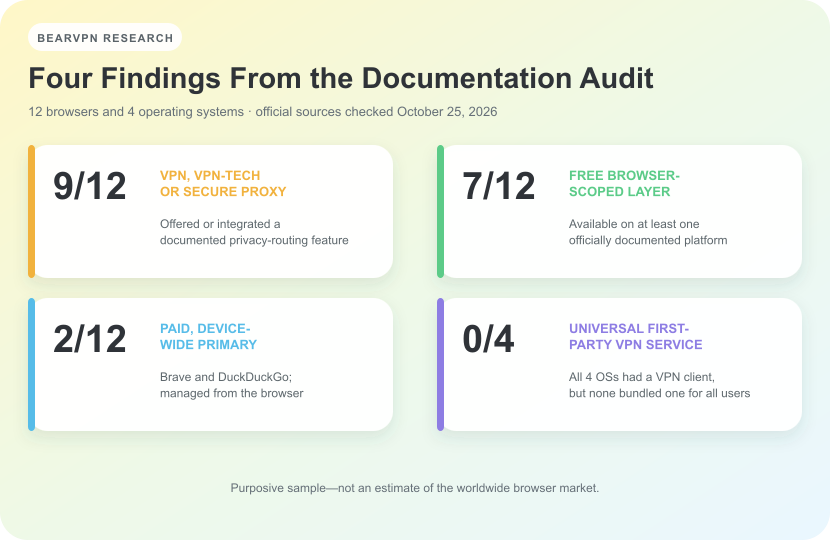
- 9 of 12 browser entries offered or integrated a feature documented as a VPN, a secure network that uses VPN technology, or a secure web proxy.
- 7 of 12 had a free browser-scoped layer on at least one officially documented platform—meaning the feature covered traffic inside that browser, not other apps on the device. Account requirements, data limits, server choices, and platform coverage varied.
- 2 of 12—Brave and DuckDuckGo—were primarily paid, device-wide VPN services managed from the browser.
- 4 of 4 operating systems included native VPN connection or configuration support, but 0 of 4 universally bundled a first-party VPN service for every user and device in the scope reviewed.
These figures describe a purposive sample of product entries, not the global browser market. Opera and Opera GX were counted separately because users search for and encounter them as separate products, although both are made by Opera. “Free” also does not mean unlimited or device-wide: Firefox has a monthly allowance and staged rollout, Edge has a smaller monthly allowance and traffic exclusions, and some features differ by platform.
Android has one important device-specific exception. Eligible Pixel 7-and-later phones and the Pixel Tablet include VPN by Google in supported regions. That does not make the service a standard feature on every Android device.
Quick Answer: Which Browsers Have a Built-In VPN?
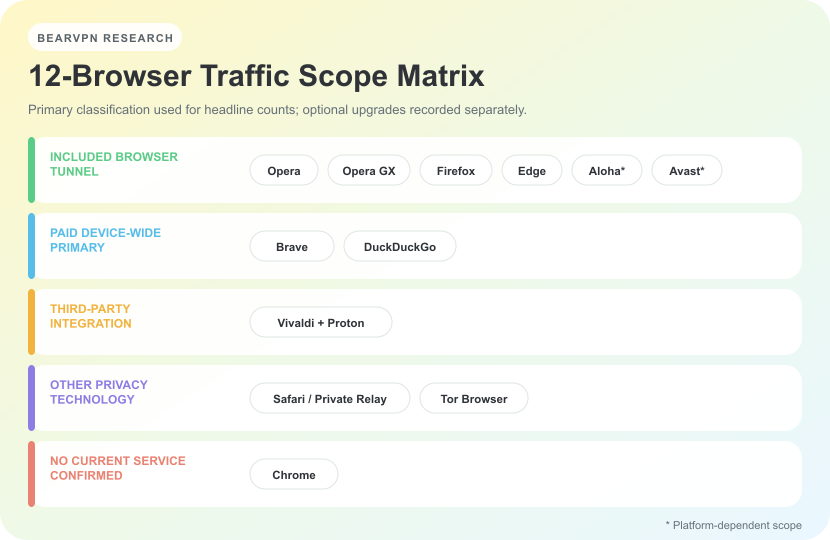
The table separates browser-only tunnels, full-device services, third-party integrations, and other privacy technologies. “Browser only” means traffic from other apps is not covered. “No current service confirmed” means we did not find a Chrome-provided VPN service in the current official documentation we reviewed; it is not a claim about every past or future version.
Documentation checked: October 25, 2026
What Does “Built-In VPN” Actually Mean?
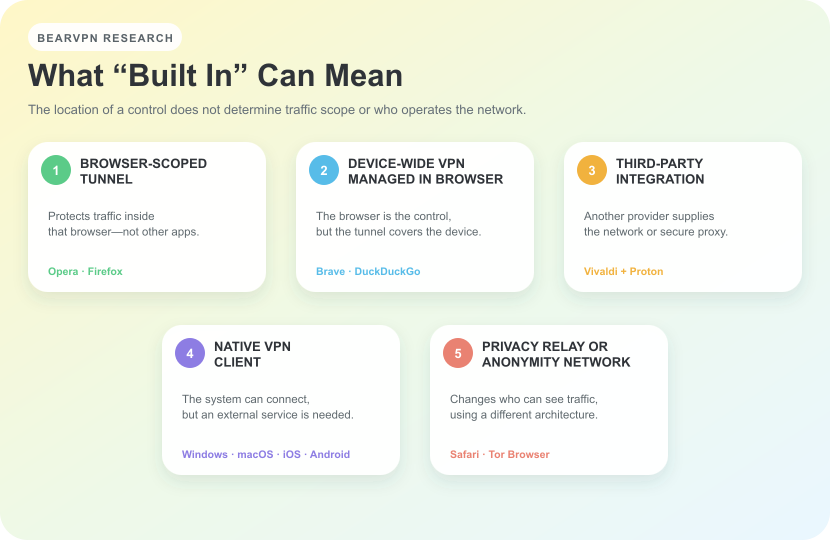
“Built in” reliably tells you where a control appears. It does not, by itself, tell you who operates the network, whether the service is free, or whether traffic from other apps is covered.
The products in this review fell into five practical groups:
- Browser-scoped tunnel. The browser includes access to a server network, but only traffic from that browser is routed through it. Opera’s free VPN and Firefox’s built-in VPN are examples.
- Device-wide VPN managed from a browser. The subscription is bought, installed, or controlled from the browser, but the documented protection extends to other apps. Brave and DuckDuckGo fit this group.
- Third-party integration. The browser provides a built-in entry point to another provider’s network. Vivaldi integrates Proton VPN as a secure web proxy for Vivaldi traffic.
- Native VPN client. An operating system supplies the connection interface and protocol support, but the user still needs a workplace, commercial provider, or self-hosted server. Windows 11 is the clearest example.
- Privacy relay or anonymity network. Safari can use iCloud Private Relay, while Tor Browser uses the Tor network. Both can change what a website or network observer sees, but neither should be reduced to an ordinary browser VPN.
This distinction matters because a browser-only feature does not automatically protect a mail app, game, cloud-storage client, torrent client, or a second browser. For a broader explanation of protection boundaries, see what a VPN hides—and what it does not.
Browsers With a Free Browser-Scoped VPN or Proxy
Seven entries had a free browser-scoped layer on at least one officially documented platform. They are grouped together because of traffic scope, not because their limits, providers, or technical designs are identical.
Does Opera Have a Built-In VPN?
Yes. Opera documents a free VPN built into its desktop and mobile browsers. The free tier does not require a separate extension or an Opera account, and Opera says it has no fixed data cap. Users can choose an optimal route or one of several broad regions rather than an unrestricted list of individual countries.
The important boundary is traffic scope. Opera’s current Free VPN page says the free service works inside the Opera browser and does not apply to internet use outside Opera. The separate VPN Pro subscription expands protection to the rest of the device. Opera’s Android help also describes the browser feature as a secure tunnel or proxy for browsing traffic.
This documentation review records what Opera says the feature covers. It does not independently verify Opera’s encryption, no-log, audit, or performance claims.
Does Opera GX Have a VPN?
Yes, on the supported desktop versions reviewed. Opera GX’s official Free VPN page describes a free, accountless VPN built into the browser on Windows and macOS. It covers activity inside Opera GX, not traffic from games or other apps. Opera’s paid VPN Pro is the broader, device-wide option.
We treated Opera and Opera GX as separate entries because they are separate products and answer separate search questions. That does not mean they represent two independent VPN providers. We also did not extend the desktop documentation to Opera GX Mobile, because the current official pages reviewed did not establish the same mobile feature scope.
Does Firefox Have a Free Built-In VPN?
The current answer is yes for eligible users, but availability is still conditional. Mozilla is progressively rolling out a free built-in VPN to supported desktop and Android users. Its current Firefox help page says the feature routes Firefox traffic through a secure proxy server, requires a Mozilla account, and includes a 50 GB monthly allowance.
The feature does not protect other apps. Mozilla explicitly distinguishes it from the separate Mozilla VPN subscription, which provides device-level coverage. The built-in feature started with Firefox 149, and Mozilla says users in a supported region may still not see it because rollout is staged. Firefox for Android has its own official help page; the current formal documentation we reviewed did not confirm equivalent availability in Firefox for iOS or iPadOS.
This is also a reminder that old answers can become inaccurate. An older Mozilla forum response saying Firefox had no built-in VPN no longer describes the 2026 product.
Does Microsoft Edge Have a VPN?
Microsoft Edge includes Edge Secure Network, which Microsoft says uses VPN technology. Eligible users signed into Edge with a personal Microsoft account receive 5 GB of protection per month. The feature is designed for Edge browsing rather than device-wide traffic.
The official Edge feature page lists several limits. Some streaming websites are not routed through Secure Network, users cannot choose a specific country, and the replacement location remains geographically similar to the user’s real location. The feature is not available on managed devices or in every region, and availability can vary by device type, market, and browser version.
For those reasons, Edge Secure Network should not be presented as an unlimited, country-selectable, full-device VPN.
Does Vivaldi Have a Built-In VPN?
Vivaldi integrates Proton VPN into its desktop browser. The free layer has no stated data limit, but users need a Vivaldi or Proton account. Paid Proton plans add location selection and other features.
The provider relationship and traffic scope are unusually clear in Vivaldi’s official help documentation. Proton supplies the VPN service, while Vivaldi provides the browser integration and account pathway. Vivaldi calls the feature a “secure web proxy”: it applies to Vivaldi web traffic, not the network traffic of other apps. The documentation says it does not even extend to Vivaldi Mail.
It is therefore accurate to say Proton VPN is integrated into Vivaldi. It would be inaccurate to imply that Vivaldi operates the server network or that the free integration protects the entire device.
Does Aloha Browser Have a VPN?
Yes, but the scope depends on platform and subscription. Aloha’s official support page says the free service is guaranteed to work within the browser. Premium options can add server selection and device-wide coverage on certain platforms.
A single cross-platform label would hide meaningful differences. In the support guidance available on October 25, 2026, Aloha described browser-only behavior by default across the reviewed platforms, while device-wide modes depended on platform and Premium status. The guidance described a device-wide option for Windows Premium, whereas the macOS response reviewed for this study still described browser-only coverage.
We therefore classified Aloha primarily as a browser-scoped VPN and marked its broader capabilities as platform-dependent rather than claiming that every Aloha installation protects the full device.
Does Avast Secure Browser Have a VPN?
Avast Secure Browser’s current FAQ describes a free browser-scoped VPN layer on at least one supported platform and broader PRO options. Exact location choices and device-wide availability vary by platform and subscription.
The important caveat is that Avast’s Secure Browser FAQ combines information for Windows, macOS, Android, and iOS behind device-specific views. A sentence describing Device-Wide VPN on one platform should not be copied across all four platforms. We therefore coded the free layer as browser-scoped and marked device-wide availability as platform- and subscription-dependent.
A browser-scoped tunnel can hide the browser’s public IP and route that browser’s traffic through the provider. It does not automatically cover email apps, games, cloud clients, or another browser. That distinction also affects who can still observe activity; see Can You Be Tracked With a VPN?.
Browsers That Manage a Paid, Device-Wide VPN
Brave and DuckDuckGo were the two entries whose primary documented VPN offering was paid, managed from the browser, and device-wide. Other browsers in the sample also sell or expose broader upgrades, but their primary comparable feature was a free browser-scoped layer.
Does Brave Have a VPN?
Yes. Brave Firewall + VPN is a subscription service available through Brave on Android, iOS, macOS, and Windows. Brave’s current VPN FAQ says it works at the network level across the entire device and every app, rather than only Brave tabs.
Users need Brave installed and must purchase the service through a Brave Premium account or the relevant app store. A trial may be available, but a time-limited trial is not the same as a continuing free tier. We did not include a price in the comparison because prices and store terms can change.
Brave shows why “managed from a browser” and “browser-only” are not synonyms: the control appears in Brave, while the documented traffic scope is device-wide.
Does DuckDuckGo Have a VPN?
Yes, through the paid DuckDuckGo subscription. Users install and manage the VPN from DuckDuckGo Browser on Windows, macOS, iOS, or Android, but the official VPN documentation says it protects connections across the full device, including other browsers and apps.
DuckDuckGo does not require a conventional username-and-password account on the initial device. The subscription uses a token, while adding other devices can involve email and one-time-passphrase authentication. The service can be used on multiple devices, subject to the current subscription conditions and regional availability.
DuckDuckGo may offer a trial, but the ongoing VPN is a subscription feature. Like Brave, it demonstrates that a browser can act as the installation and management interface for a device-wide VPN.
Privacy Features That Are Not Conventional VPNs
Safari and Tor Browser can both change what network observers or websites see. We did not classify either one as a conventional browser VPN because their architectures and documented purposes differ.
Is iCloud Private Relay a VPN?
Not in the conventional sense used in this comparison. Safari can use iCloud Private Relay when the user has iCloud+ and the feature is available in their region. Apple’s Private Relay documentation describes a two-relay design: Apple operates the first relay, while a separate content provider operates the second. The design aims to prevent one party from seeing both the user’s identity and destination.
Apple says Private Relay primarily protects Safari browsing and DNS requests. It does not provide the standard full-device, country-selectable experience people often expect from a consumer VPN. Users can maintain a general location or use a broader country-and-time-zone location, but they cannot freely choose any server country.
We therefore listed Safari under “privacy relay,” not “built-in VPN.” Private Relay can still be useful, but using a separate category makes its scope and architecture clearer.
Is Tor Browser a VPN?
No. Tor Browser routes its own traffic through the Tor network, using multiple relays rather than sending the connection to a single VPN provider. The Tor Project’s official documentation explains that websites see a connection from the Tor network instead of the user’s real IP address.
Only Tor Browser traffic is routed through Tor. Other apps and browsers are not protected unless separately configured. Tor also discourages treating country selection as an ordinary geolocation tool because changing circuit behavior can reduce anonymity. The project warns that Tor and VPNs have different privacy properties and does not generally recommend combining them without understanding the configuration.
Tor Browser should also not be confused with Tor VPN Beta, a separate project. Finally, hiding an IP address does not guarantee complete anonymity: logging into an identified account or providing personal information can still reveal who a user is.
Does Chrome Have a Built-In VPN?
We did not confirm a Chrome-provided built-in VPN service in the current official Chrome documentation reviewed for this study.
That wording is intentionally narrow. Chrome can use third-party VPN extensions from the Chrome Web Store, but those extensions are not services supplied by Chrome itself. ChromeOS has operating-system VPN configuration capabilities, which are separate from the Chrome browser. Google also provides VPN by Google on eligible Pixel devices, but that is a device service—not a Chrome feature.
For this negative finding, we reviewed Chrome’s official product and safety pages, searched its help documentation for VPN, proxy, and secure-network features, and checked the distinction between browser extensions, ChromeOS, and Pixel. Because companies can add new features, “not confirmed in the documentation reviewed on October 25, 2026” is more accurate than saying Chrome will never have a built-in VPN.
Do Windows, macOS, iOS, and Android Include a VPN?
All four operating systems can connect to a VPN, but a VPN settings screen is not the same as an included server service.
Does Windows 11 Have a Built-In VPN?
Windows 11 includes a built-in VPN client and configuration interface. Microsoft’s setup instructions tell users to choose “Windows (built-in)” as the provider, but they must still enter a server address, VPN type, and sign-in information supplied by a workplace or VPN service.
In this context, “provider” refers to the Windows connection component. It does not mean Microsoft supplies a free network of consumer VPN exit servers. Once configured, traffic scope and server locations depend on the external service.
Does macOS Have a Built-In VPN?
macOS includes native VPN configuration. Apple’s Mac setup guide says users need settings from an administrator or VPN provider, including the connection type, server address, account name, and authentication information.
That makes macOS a VPN client, not an included consumer VPN service. iCloud Private Relay is a separate iCloud+ feature and, as explained above, primarily protects Safari and DNS requests rather than acting as a general-purpose, country-selectable VPN.
Do iPhones and iPads Have a Built-In VPN?
iOS and iPadOS support VPN apps and configuration profiles. The Settings app includes VPN & Device Management, but the VPN service normally comes from an employer, school, or third-party provider. A settings entry alone does not give the device an Apple-operated VPN server connection.
iCloud Private Relay is again the separate exception people may confuse with a VPN. It is an iCloud+ privacy service focused on Safari browsing and DNS, not a universal Apple VPN for every app.
Does Android Have a Built-In VPN?
Android generally includes VPN client support, settings, and APIs for VPN apps. Google’s Android help tells users to obtain connection information from an administrator or install a VPN app. This is configuration support rather than a universal VPN service bundled with every Android phone.
The major exception is device-specific. Pixel 7-and-later phones and the Pixel Tablet can use VPN by Google at no extra cost in supported regions, subject to device, account, software, and location requirements. Users cannot treat that Pixel benefit as a feature of every Android device, and VPN by Google is not designed for choosing an arbitrary country to access regional content.
How to Check What a “Built-In VPN” Protects
Before relying on a VPN button in a browser or operating system, check six questions in the current documentation:
- Does it say “browser traffic” or “entire device”? This is the most important boundary. If the documentation only names the browser, assume other apps are outside the tunnel unless the provider says otherwise.
- Does it install a system VPN profile? A system profile can indicate broader routing, but it still does not prove every app is included. Look for exclusions and split-tunneling rules.
- Who provides the network? The browser company may operate the service, partner with another provider, or supply only a configuration interface.
- Is an account or subscription required? “Built in” does not necessarily mean free. Brave and DuckDuckGo manage paid services from the browser.
- Is there a data cap or excluded traffic? Firefox and Edge have monthly allowances, and Edge excludes some streaming traffic from Secure Network.
- Can you choose a country, a broad region, or no location at all? Hiding an IP address does not guarantee unrestricted location selection.
Also check the platform and version. A feature may exist on desktop but not mobile, or on Android but not iOS. It may be limited to certain regions or released gradually, as Firefox’s current rollout demonstrates.
If your main concern is an open network, our separate review explains what a VPN can and cannot protect on public Wi-Fi.
Methodology
Sample
We selected 12 browsers and four operating systems to cover products with clear search demand and meaningfully different implementations. The sample includes mainstream browsers, privacy-focused browsers, a gaming browser, integrated third-party services, privacy relays, an anonymity network, and operating-system VPN clients.
This was a purposive sample, not a random or market-share-weighted sample. Opera and Opera GX were counted separately because users encounter and search for them as separate products, although they share a vendor. The results should not be converted into claims about the percentage of all browsers worldwide.
Evidence reviewed
We prioritized current official sources in this order:
- Official help centers and technical documentation;
- Current official feature pages;
- Official release notes and product announcements;
- Official developer documentation.
Third-party articles were used only to find possible leads, not as final evidence for a product’s traffic scope. Each result was checked against the current official documentation available on October 25, 2026.
Fields coded
For each product, we recorded:
- official feature name and vendor terminology;
- whether a service and server network were included;
- browser-only or device-wide traffic scope;
- service provider;
- free, paid, and account requirements;
- data limits and location controls;
- extra app, extension, or profile requirements;
- platform, version, region, and rollout limits;
- evidence status, conflicts, and last-checked date.
Each browser received one mutually exclusive primary classification so that totals did not double-count products with optional upgrades. Additional capabilities were recorded separately. For example, Opera’s free VPN was classified as browser-scoped, while VPN Pro was recorded as an additional device-wide option.
How we handled an apparent absence
A company may not publish a page saying a feature does not exist. Before coding “No current built-in VPN service confirmed,” we reviewed the official feature overview, searched the help center for VPN, proxy, secure-network, and relay terms, checked current product distinctions, and separated extensions or hardware services from the browser itself.
Chrome was the only browser assigned this status. It should not be read as proof that a feature never existed or will never be launched.
What we did not test
We did not independently test:
- actual IP, DNS, or WebRTC leaks;
- encryption implementation;
- connection speed or reliability;
- logging or data-retention practices;
- censorship resistance;
- whether every official claim works as described on every device.
The study is a documentation audit. Statements about performance, privacy, security, or logging remain vendor claims unless supported by a separate test or independent audit.
Limitations
Product documentation can change quickly. Firefox’s built-in VPN was still in staged rollout, and availability could differ even within a supported region. Aloha and Avast require platform-specific reading, while Edge and several other features vary by market, device, or browser version.
Negative findings are inherently limited. For Chrome, we can report what we did not confirm in the reviewed official sources, but we cannot prove a feature is absent from every experimental build or future release.
Operating systems also contain exceptions that make broad labels risky. Android provides general VPN client support, while eligible Pixel devices separately include VPN by Google. Apple systems support VPN apps and profiles while offering Private Relay as a different type of privacy service.
Finally, this review measures documentation and disclosed product scope—not technical quality. A browser-only feature may be appropriate for browser traffic, and a full-device label does not by itself prove superior security, speed, privacy, or reliability.
Conclusion
Several browsers now include or integrate a VPN-branded feature, but they do not all provide the same thing. In our sample, the most common primary form was a browser-scoped tunnel. Brave and DuckDuckGo instead managed paid, device-wide services from the browser. Vivaldi integrated a third-party secure web proxy, while Safari and Tor Browser used different privacy technologies.
The same caution applies to operating systems. Windows, macOS, iOS, and Android all support VPN connections, but a settings screen usually means the system can connect to an external service—not that the operating-system vendor includes a universal VPN network.
The practical rule is simple: do not stop at the word “VPN.” Check the documented traffic scope, provider, platform, account requirement, data allowance, exclusions, and last-updated date. Those details determine whether a feature protects one browser, the full device, or merely supplies the tools needed to connect somewhere else.
Sources and Reproducibility
The following official pages were the principal evidence sources. Product availability and terms can change; readers should consult the current page as well as the study’s review date. Each browser received one mutually exclusive primary classification for the headline counts; optional upgrades and platform-specific exceptions were recorded separately.
Opera and Opera GX
- Opera Free VPN
- Opera desktop features help
- Opera Android VPN FAQ
- Opera iOS settings
- Opera GX Free VPN
Mozilla Firefox
Microsoft Edge and Windows
Brave
DuckDuckGo
Google Chrome, Android, and Pixel
- Google Chrome
- Chrome Help
- Chrome Help search results for VPN
- Connect to a VPN on Android
- Android VPN developer documentation
- VPN by Google on Pixel
Apple Safari, macOS, iOS, and iPadOS
- About iCloud Private Relay
- iCloud Private Relay security
- Set up a VPN connection on Mac
- Install or remove configuration profiles on iPhone