


BearVPN reviewed 10 official public Wi-Fi security documents and mapped their advice against 10 common risk scenarios. The result shows what HTTPS already protects, where a VPN adds coverage, when the tunnel may not apply, and which risks require other safeguards.
Disclosure: This study was produced by BearVPN, a VPN provider. No VPN products were tested or ranked.
The short answer
Public Wi-Fi is not automatically unsafe, but it is not automatically trustworthy either.
When HTTPS is correctly used, it protects the connection between your browser and the website from readable local interception. That has reduced one of the classic public Wi-Fi risks: someone on the same network simply reading ordinary web content, passwords or form entries sent as plaintext.
A VPN can add a separate encrypted path between your device and the VPN server. This can reduce what the local hotspot sees about traffic carried inside that tunnel, including traffic from apps whose own encryption is difficult for you to verify. But the protection begins only after the tunnel is established and applies only to traffic routed through it.
Neither HTTPS nor a VPN proves that a hotspot name is genuine. Neither makes a phishing site honest, closes local sharing services, patches vulnerable software or scans every file you download.
That is why a useful answer to “Is public Wi-Fi safe?” depends on three questions:
- What are you doing on the network?
- Which traffic is actually encrypted, and over what part of the path?
- What risks remain outside that protection?
Key findings at a glance
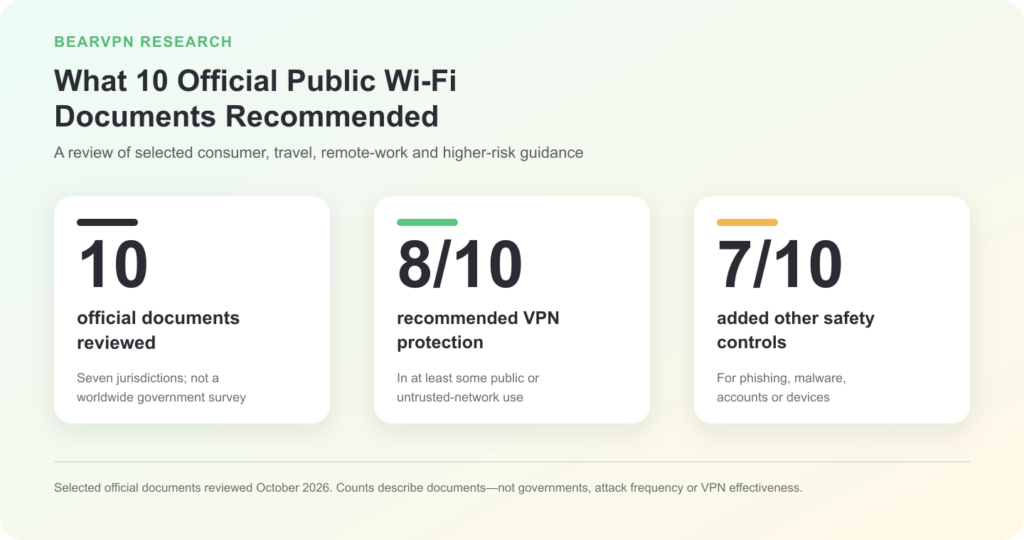
- 10 official documents reviewed. The sample includes consumer, travel, remote-work, organizational and higher-risk guidance. It is not a worldwide government survey.
- 8 of 10 explicitly recommended or prescribed VPN protection for at least some public- or untrusted-network use. The recommendation often depended on the audience, task or sensitivity of the data.
- 7 of 10 paired network advice with separate safeguards for phishing, malware, accounts or devices. The documents generally treated a VPN as one layer rather than a complete security system.
Five documents explicitly discussed HTTPS or TLS. Eight included updates to software, devices, applications or VPN components. Only two clearly explained material VPN limitations or routing boundaries, and only one explicitly described the captive-portal problem that can occur before a VPN tunnel is established.
These counts describe the selected official documents in this review. They are not a poll of governments and do not measure attack frequency, risk severity or VPN effectiveness.
Why official public Wi-Fi advice can sound contradictory
Official guidance does not always use the same level of caution.
The U.S. Federal Trade Commission tells general consumers that widespread encryption has made public Wi-Fi safer than it was during the earlier internet, when many websites did not encrypt connections. Its practical advice focuses on HTTPS, updates, strong passwords and two-factor authentication. The FTC also warns that a scam site can use encryption, so a padlock is not proof that the operator is trustworthy. (FTC)
The U.S. National Security Agency takes a more conservative position. Its guidance prefers a personal or corporate hotspot, advises against open Wi-Fi, and says national-security, defense and defense-industry teleworkers should use a trusted VPN if public Wi-Fi is unavoidable. That document is designed for readers with a lower tolerance for risk than the general consumer audience addressed by the FTC. (NSA)
Other documents fall between or alongside those positions. Canada’s Cyber Centre explains rogue hotspots and advises organizations and remote workers to avoid public Wi-Fi where possible, while Australia’s Cyber Security Centre says a VPN can help on public networks but does not stop malware, phishing or software vulnerabilities. New Zealand gives especially cautious advice to high-profile individuals. (Canada Cyber Centre, Australian Cyber Security Centre, New Zealand NCSC)
These positions are not necessarily in conflict. A general consumer reading an encrypted news site and a high-profile employee opening sensitive work systems do not have the same risk tolerance, even when they use the same airport network.
The right precaution depends on the user, the device, the task, the information involved and the consequences of a mistake.
What HTTPS already protects
HTTPS is the encrypted version of HTTP. When it is implemented correctly and the certificate is valid, it provides confidentiality and integrity for data moving between your browser and the website, while authenticating the server used for that connection.
On public Wi-Fi, this matters because the local network carries the encrypted connection but should not be able to read properly protected page content, passwords or form fields as ordinary plaintext. Singapore’s Cyber Security Agency describes HTTPS as protection for data sent over untrusted media such as public Wi-Fi. The FTC similarly explains that the wider adoption of encryption has changed the risk compared with the earlier web. (Singapore CSA, FTC)
HTTPS does not make the entire connection invisible. Depending on DNS, TLS and network configuration, the access network may still observe details such as destination IP addresses, connection times, duration and traffic volume. NIST’s public Wi-Fi travel guidance notes that encrypted application data does not necessarily hide all domains, IP addresses or ports from a network observer. (NIST/NCCoE)
HTTPS also does not prove that a website is honest. A phishing site can obtain a valid certificate and display a padlock while still attempting to steal information. The protection says something important about the connection to the site; it is not a character reference for the person or company operating it.
Finally, HTTPS is not an automatic wrapper around every app and protocol on a device. A browser makes HTTPS relatively visible in its address bar, but users may have less insight into how each mobile app, background service or non-web protocol protects its traffic.
What a VPN adds on public Wi-Fi
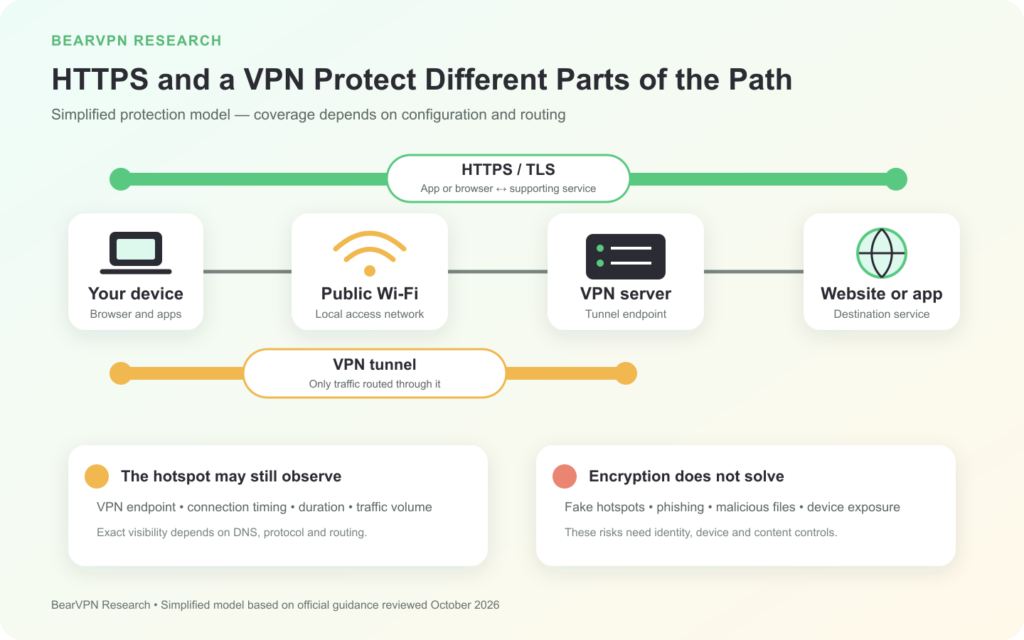
A VPN creates an encrypted tunnel between the device and a VPN server. For traffic that enters the tunnel, the hotspot usually sees a connection to the VPN server rather than the destination IPs, DNS traffic or other connection details that might otherwise be exposed by a direct route. Exact visibility depends on the DNS, protocol and routing configuration.
This is a different protection layer from HTTPS. HTTPS protects an application connection to a website or service that uses TLS. A full-device VPN can also carry traffic from apps or protocols whose own encryption is not apparent to the user. NIST’s travel tip describes a VPN as encrypting communications before they leave the device, while the UK National Cyber Security Centre stresses that only traffic routed through the tunnel receives that protection. (NIST/NCCoE, UK NCSC)
A VPN does not make the device invisible. The hotspot can still observe that the device is connected, that it is communicating with a VPN endpoint, when the connection began, how long it lasted and how much data moved. Exact visibility depends on the protocol and configuration.
The VPN also changes where part of the trust sits. Instead of allowing the local network to observe direct traffic paths, the user relies on the VPN service to handle tunneled traffic as promised. A VPN therefore reduces one trust problem without eliminating the need to assess the service itself.
The most important condition is worth repeating: VPN protection applies after the tunnel is established and to traffic routed through it. “VPN installed” and “this traffic is inside an active tunnel” are not the same statement.
Before, inside and outside the VPN tunnel
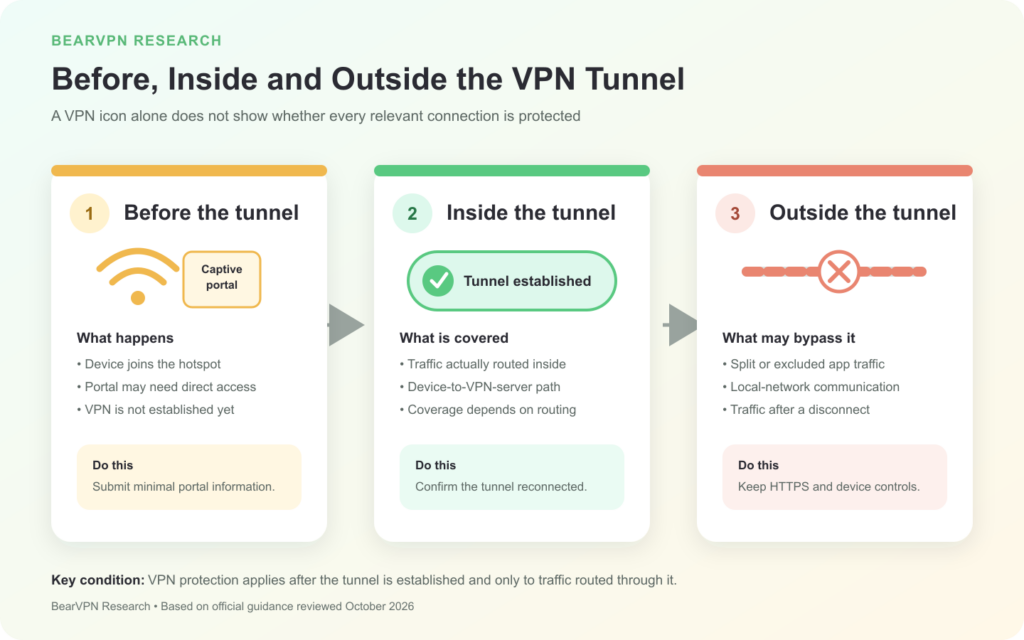
Thinking about three stages makes common public Wi-Fi gaps easier to understand.
Before the tunnel
Airports, hotels and cafés often use a captive portal that asks the user to accept terms, enter a room number or complete another step before normal internet access begins. The device may need to communicate with that portal before the VPN can connect.
The UK NCSC explains that this can require a direct connection before the protected tunnel is established. The portal itself may use HTTPS, but that does not prove it belongs to the venue or justify submitting unnecessary personal information. After completing the portal step, the user still needs to confirm that the VPN connected or reconnected. (UK NCSC)
Inside the tunnel
Once the tunnel is established, traffic routed through it receives the VPN layer between the device and VPN server. A full-device tunnel may cover more traffic than a per-app configuration, but actual coverage depends on the operating system, application, routing rules and VPN setup.
The useful question is not only “Does the app show a VPN icon?” It is “Is the relevant traffic routed through the established tunnel?”
Outside the tunnel
Split tunnelling, excluded apps, local-network communications and traffic sent after a disconnect may remain outside the VPN. HTTPS can still protect a relevant browser-to-website connection, but the VPN cannot protect traffic that does not enter it.
Automatic connection, full-device routing, reconnection behavior and disconnect protection can affect the result. This study did not test individual VPN products, so it does not assume that every service or platform handles these conditions in the same way.
The 10-scenario public Wi-Fi protection map
The table below separates the primary roles of HTTPS, a VPN and other safeguards. “Direct” means that the control’s core mechanism directly reduces the stated exposure; it does not mean that risk becomes zero. “Conditional” means that the result depends on the traffic path, configuration, application or connection state.
These 10 scenarios are an explanatory framework. They are not a random sample, a ranking of the most common attacks or a measurement of how often each risk occurs.
The pattern is straightforward. HTTPS most directly protects browser-to-site transport. A VPN most directly protects the path from the device to the VPN server for traffic carried inside the tunnel. Hotspot identity, local-device exposure, deception and malicious content belong to other security layers.
What a VPN does not solve
A VPN does not verify the hotspot
An attacker can create a network name that resembles one used by a hotel, airport or café. Canada’s Cyber Centre warns that a malicious actor may use a fraudulent hotspot with a familiar-looking name, while the NSA advises its audience to confirm that a device is connecting to the correct network. (Canada Cyber Centre, NSA)
If a VPN connects before sensitive traffic is sent, the false hotspot should not be able to read the contents carried inside the tunnel. But the VPN does not certify that the SSID belongs to the venue, and it cannot retroactively protect interactions that happened before connection.
A VPN does not automatically close local services
File sharing, device discovery, open ports and other local services can create a separate exposure on a shared network. A VPN tunnel is not a universal firewall rule and does not guarantee that local traffic is blocked. Use the device’s public-network profile or firewall, turn off unnecessary sharing and disable wireless features that are not needed.
A VPN does not identify every phishing site
Encryption protects data while it travels. It cannot determine whether the recipient deserves the information. HTTPS phishing sites can still request passwords or payment details, and a VPN can deliver that request securely to the wrong party.
Check the domain, enable multi-factor authentication where possible and follow anti-phishing warnings. Some VPN products offer separate malicious-site blocking, but that is an additional product feature rather than an automatic property of the VPN tunnel.
A VPN does not patch software or scan every download
Australia’s Cyber Security Centre explicitly states that VPNs do not protect against malware, phishing or vulnerabilities in software. Updates, trusted download sources, security software and application controls remain separate safeguards. (Australian Cyber Security Centre)
A VPN does not remove the need to trust a provider
The local hotspot sees less destination detail when traffic is carried inside a VPN tunnel, but the VPN service becomes part of the connection path. This study does not rank providers. Users assessing a service may want to examine its ownership, privacy policy, security documentation, audits and transparency information separately from its marketing claims.
A practical public Wi-Fi checklist
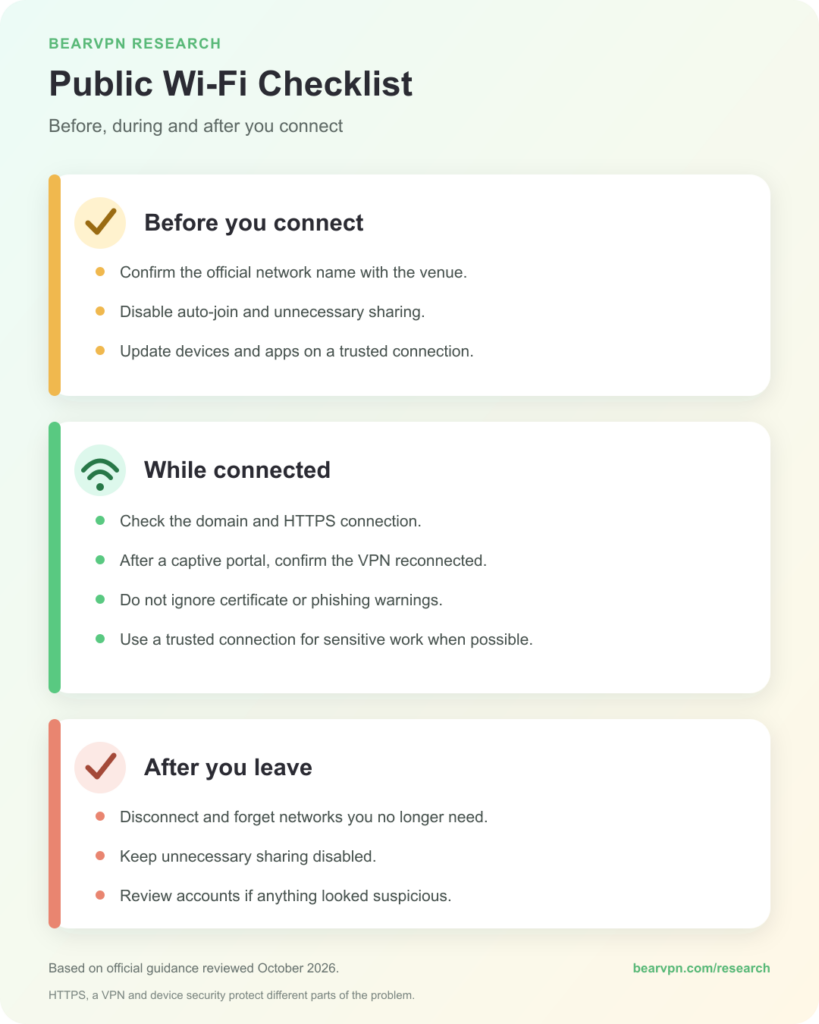
Before you connect
- Consider a connection you control. For sensitive or high-value work, mobile data or a personal hotspot can reduce exposure to an unknown local hotspot.
- Confirm the network name. Check the venue’s signage or ask staff rather than choosing a familiar-looking SSID from the list.
- Turn off automatic joining and unnecessary sharing. This reduces unintended connections and local-device exposure.
- Install updates before travelling or while using a connection you trust. Keep the operating system, browser, applications and VPN software current.
While connected
- Check the domain and HTTPS connection. Do not bypass certificate warnings.
- Complete captive-portal steps cautiously. Submit only what is necessary, then confirm that the VPN has connected if you intend to use one.
- Do not treat a padlock as proof of honesty. Stop if a page makes an unexpected request for credentials, payment or a download.
- Match the connection to the task. If sensitive work can wait for a more trusted connection, waiting may be the simpler control.
After you leave
- Disconnect and forget networks you do not need again. This reduces future automatic connections.
- Keep unnecessary sharing disabled. Re-enable local sharing or wireless features only when you need them.
- Respond to suspicious activity. If you entered credentials into a questionable page, change them from a trusted connection and review MFA and recent account activity.
Methodology
BearVPN reviewed the following 10 documents between October 17 and October 18, 2026. We selected government, national cybersecurity or official consumer-protection material that directly discussed public Wi-Fi, untrusted networks, HTTPS/TLS, VPN protection or alternative connections.
For each document, we coded a control as:
- Explicit: the document clearly recommended or explained the control;
- Partial: it mentioned a related risk or mechanism without a clear, actionable recommendation;
- Not found: we did not find explicit support in the document reviewed.
Published results table
Only Explicit results were included in the published counts. Each document had equal weight. The unit is a document reviewed—not a country, a government, an expert or a security outcome. “Not found” does not mean that the institution opposes the measure or never discusses it elsewhere.
We separately created the 10-scenario framework to compare HTTPS, VPN and other controls. The 10 documents are the sample used for counting official recommendations; the 10 scenarios are a mechanism-based explanatory framework. They cannot be converted into each other or combined into a score.
No wireless penetration testing, packet capture, VPN product comparison or attack-frequency measurement was performed.
Publisher disclosure: This study was produced by BearVPN, a VPN provider. BearVPN and competing VPN products were not tested or ranked in this analysis.
Limitations
This is a purposive review, not a systematic survey of every government or cybersecurity agency. The 10 documents cover seven jurisdictions, and four are from the United States, so the sample is not geographically balanced.
The documents also have different audiences, dates, purposes and risk tolerances. A consumer page, an enterprise configuration guide and advice for a high-profile individual should not be treated as three identical votes on one question.
The number of documents mentioning a control does not measure its technical effectiveness. The 10 scenarios are not a complete list of public Wi-Fi threats, and this study does not estimate the probability, severity or financial impact of any risk.
Actual protection varies with the operating system, browser, application, VPN protocol, DNS behavior, routing configuration and connection state. Some VPN products include additional security features, but this report discusses the general role of a VPN tunnel rather than evaluating those extras.
Official pages can also change. The dates above show the versions or page status available during our review, and important claims should be rechecked during future updates.
Frequently asked questions
Public Wi-Fi is not automatically unsafe or trustworthy. Correctly used HTTPS protects browser-to-website content from readable local interception, while hotspot identity, traffic outside that protection, device settings, phishing and malware require separate controls.
A hotspot should not be able to read properly encrypted HTTPS page content as plaintext. It may still observe connection details such as destination IPs, timing and traffic volume. A VPN can reduce destination detail for tunneled traffic but does not hide the VPN connection itself.
HTTPS protects the browser-to-website connection. It does not verify the hotspot, prove that the site operator is honest, cover every non-web protocol or secure an unpatched device.
A VPN can protect traffic after the tunnel is established and when that traffic is routed through it. It does not automatically cover pre-connection portal activity, excluded traffic, local sharing, phishing, malware or account security.
If the VPN connects first, an evil-twin hotspot should not be able to read content carried inside the tunnel. It still does not certify the SSID or protect information submitted before connection. Verify the network name and disable automatic joining.
The venue name alone does not determine safety. Confirm the SSID, use validated HTTPS connections, keep the device updated, and choose a VPN or personal hotspot according to the task’s sensitivity. Higher-risk users may reasonably follow more conservative guidance.
This study did not test banking apps or individual networks, so it cannot guarantee a specific setup. For sensitive actions, a cellular connection you control can reduce the extra risk of an unknown local hotspot, but it does not replace device security, account monitoring or MFA.
Your own cellular connection or personal hotspot can reduce exposure to an unknown local Wi-Fi operator or look-alike hotspot. It does not protect against phishing, malware, weak passwords or service-side breaches.
Yes. Disabling automatic joining and removing saved networks you no longer need can reduce unintended reconnections. The NSA and Canada’s Cyber Centre both include this precaution.
Disconnect and forget networks you do not need again. Keep unnecessary sharing disabled. If you entered credentials on a suspicious page, change them from a trusted connection and review MFA and recent account activity.
Conclusion
Public Wi-Fi is not one risk, and “use a VPN” is not one complete answer.
HTTPS protects the connection between a browser and a correctly authenticated website. A correctly established VPN adds another layer for traffic routed between the device and the VPN server. Device settings, hotspot verification, software updates, phishing awareness and account security protect other parts of the problem.
The most useful question is not whether one tool makes every public network safe. It is where a particular risk occurs, which control covers it, and whether the traffic you care about is actually inside that protection.
About BearVPN
If you choose to use a VPN on public Wi-Fi, confirm that it reconnects after any captive-portal step and understand which traffic the app routes through the tunnel. Learn more about BearVPN.



