


A VPN can replace the public IP address websites see, but it does not erase every way a person, browser, or device can be recognized. We reviewed recent IPv6 and WebRTC research and the public leak-protection guidance of 12 VPN providers.
Yes, you can still be tracked while using a VPN—but not necessarily through your original public IP address.
A properly working VPN usually replaces the public IP visible to websites and encrypts traffic between your device and the VPN server. It does not automatically sign you out of accounts, delete cookies, change your browser fingerprint, or remove location permission you have granted to a website or app.
The answer also depends on who is doing the tracking. A website, an internet provider, a VPN provider, an advertiser, and an administrator of a managed device have access to different signals.
To separate those questions, BearVPN reviewed recent published research on IPv6 and WebRTC leakage and examined the official public guidance of 12 VPN providers. The provider review measures documentation—not the real-world performance of the apps.
Key Findings at a Glance
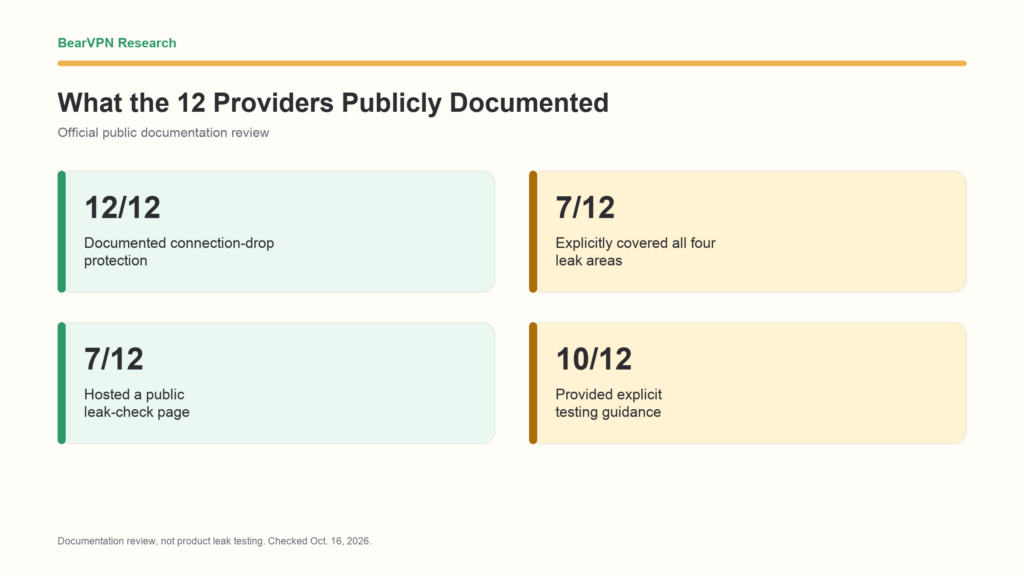
- 12 of 12 documented connection-drop protection. Every reviewed provider publicly described a kill switch, firewall, or equivalent safeguard intended to block traffic if the VPN connection fails.
- 7 of 12 explicitly covered all four areas. Seven providers had explicit public documentation for connection drops, DNS, IPv6, and WebRTC.
- 7 of 12 hosted a public leak-check page. The remaining five were coded Partial or Not found for provider-hosted tools; their official testing guidance varied in scope.
- 10 of 12 provided explicit testing instructions. The remaining two offered partial guidance; none were coded as having no guidance at all.
These figures measure public documentation, not whether a provider passed an independent leak test. The 12 providers were deliberately selected and do not represent the entire VPN market.
The Short Answer: What a VPN Hides—and What It Does Not
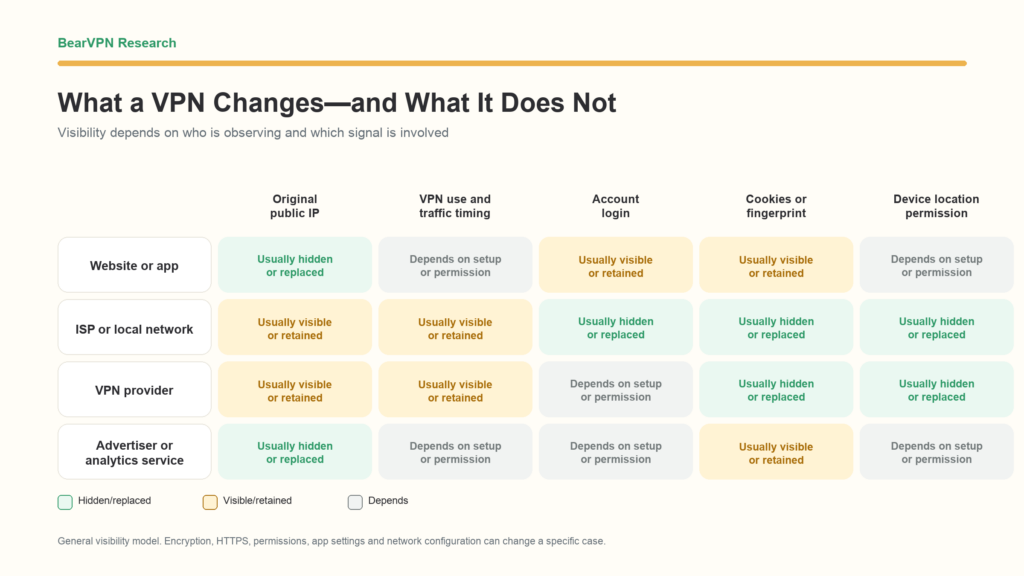
A VPN changes your network path. When the tunnel works correctly, a website generally receives the VPN server’s public IP instead of the public IP assigned by your internet provider. That can also change the approximate location inferred from the IP.
Other identifying signals remain separate.
What is visible can vary with the VPN app, operating system, browser, protocol, split-tunneling settings, and whether any traffic leaves the tunnel unexpectedly.
Who Can Still See What When You Use a VPN?
Websites and apps
Websites normally see the VPN exit IP when the connection is working. They can still receive information from your browser, including cookies, language, time zone, screen characteristics, and data you submit directly.
If you sign in, the service does not need your original IP to associate activity with your account. A shopping site can still recognize your account, a streaming service can retain viewing history, and a social platform can connect activity to your profile.
Websites and apps may also request device-derived location. The browser’s Geolocation API is controlled by a separate permission system. According to MDN’s Geolocation API documentation, a site can request location in a secure context and the user must grant permission. Connecting to a VPN does not automatically revoke a permission that has already been granted.
Your internet provider or local network
An internet provider or local network operator can generally see that your device is communicating with a VPN endpoint. It may also observe connection times, duration, and traffic volume.
When the tunnel is working correctly, the ISP or local network operator should not see the destinations and requests carried inside that tunnel in the same way it could without the VPN. That does not mean it sees nothing. DNS traffic sent outside the tunnel, deliberately excluded split-tunneled traffic, or other routing failures can reveal additional information.
The VPN provider
The VPN provider operates the server through which tunneled traffic exits. Its potential visibility depends on the protocol, DNS design, service infrastructure, and data-handling practices.
This study did not audit no-logs claims or provider infrastructure. A privacy policy, independent audit, technical architecture, and real-world implementation answer different questions. They should not be collapsed into a single “can or cannot track you” claim.
Independent app testing can answer a different question from provider documentation. BearVPN’s review of independent research on 281 free Android VPN apps summarizes reported traffic leaks, advertising-identifier transmission, and configuration issues.
Advertisers and analytics providers
Advertising and analytics systems do not rely only on IP addresses. Cookies, signed-in accounts, advertising identifiers, and browser characteristics can continue to associate activity after an IP change.
The Electronic Frontier Foundation’s Cover Your Tracks project explains how browser settings and device characteristics can be combined into a browser fingerprint. Its documented signals include the user agent, screen properties, time zone, language, fonts, and Canvas or WebGL output. A VPN does not automatically standardize those characteristics.
Employers, schools, and managed-device administrators
A VPN cannot remove monitoring software, device-management profiles, browser policies, certificates, account logs, or endpoint security tools installed on a managed device. Those controls may operate before traffic reaches the VPN tunnel or at a separate layer entirely.
Four Ways Your IP or Location Can Still Be Exposed
1. The VPN connection drops
If a VPN tunnel fails, the operating system may resume sending traffic through its normal network route. A kill switch or firewall is designed to block that traffic until protection returns.
The presence of a setting does not prove that it works identically in every condition. Sleep and wake cycles, switching from Wi-Fi to mobile data, changing network adapters, application crashes, manual VPN configurations, and split tunneling can all affect behavior.
That is why this study records whether providers explain connection-drop protection but does not treat documentation as a passed test.
2. DNS requests leave the tunnel
DNS translates a domain name into the address needed to reach a service. A DNS leak occurs when those requests use an unintended resolver outside the protected route, such as the user’s normal ISP resolver.
This can expose domain lookups to the resolver or network carrying those requests. A DNS leak is not identical to a public-IP leak, and the address of the DNS server shown by a test is not necessarily the user’s own address.
Browser Secure DNS settings, manually configured resolvers, antivirus products, routers, and operating-system behavior can all affect the result. For example, Proton VPN’s DNS guidance and Mullvad’s DNS leak guide both warn that browser or system DNS settings can change how queries are routed.
3. IPv6 takes a different path
Devices may have both an IPv4 and an IPv6 address. If a VPN handles IPv4 correctly but does not route or block IPv6 as intended, the original IPv6 address may remain visible.
A 2025 USC/Information Sciences Institute technical report, Smoothing Rough Edges of IPv6 in VPNs, analyzed a dataset of about 129,000 daily visitors identified as VPN users. The researchers reported that 12 VPNs classified as safe by earlier testing still leaked for at least 5% of users in their dataset. Among VPNs identified as IPv4-only, native IPv6 exposure ranged from 5% to 57% of visitors.
Those numbers should not be treated as an industry-wide failure rate. They apply to the services, users, detection method, and period studied. The paper is a technical report, and network configuration can affect the result.
The underlying concern is not new. The peer-reviewed 2015 PoPETs paper A Glance through the VPN Looking Glass documented IPv6 leakage and DNS-hijacking risks in commercial VPN clients. The comparison across years reinforces the need to check IPv6 separately rather than assuming an IPv4 result covers both protocols.
4. WebRTC exposes browser network information
WebRTC enables real-time browser communication. Its connection process uses technologies such as ICE and STUN to discover candidate network addresses. Depending on the browser, platform, and network, this process can expose public or internal network information.
Not every address shown by a WebRTC page is a meaningful public-IP leak. Private addresses and modern .local mDNS names are different from an original public IP visible to a remote website.
A 2025 preprint, WebRTC Metadata and IP Leakage in Modern Browsers, tested current builds of Chrome, Brave, Firefox, and Tor across desktop and mobile environments. It reported different results by browser and platform, including internal address or metadata exposure in some configurations. Because the paper is a preprint, its findings should be read as current evidence rather than a final peer-reviewed consensus.
Earlier WebRTC research established that browser behavior could expose client network information, but results from older browser versions should not be presented as the state of every browser in 2026.
Passing one check does not prove that the other three paths are protected.
Tracking That Does Not Depend on Your Original IP
Account logins
If you sign in to an account, the service can associate actions with that account regardless of whether the visible IP changes. A VPN is not a substitute for account privacy settings or careful separation of identities.
Cookies and local storage
Cookies can preserve login state, preferences, analytics identifiers, or advertising IDs across visits. Changing the public IP does not automatically delete them.
EFF’s Cover Your Tracks privacy explanation describes how a persistent cookie can link repeat visits and how browser data can be studied even when IP addresses change.
Browser fingerprinting
Fingerprinting uses a collection of browser and device characteristics rather than relying on one identifier. A tracker may combine signals such as the browser version, operating system, screen size, language, time zone, fonts, extensions, and rendering output.
These signals do not guarantee that every person is uniquely identified. They can, however, help distinguish or link browsers. A VPN changes the network address; it does not make browser configurations identical.
Device and browser location permission
IP-based location and device-derived location are different.
An IP lookup usually estimates a country, region, or city based on network-registration and routing data. A browser or mobile operating system may use Wi-Fi, cellular, GPS, or other signals to estimate location more precisely. If a user grants a website or app access to that information, a VPN does not automatically substitute the VPN server’s location.
Information you provide directly
A VPN does not hide a name, email address, phone number, payment record, delivery address, post, or form submission that you intentionally provide. Those details can be stronger identifiers than an IP address.
What 12 VPN Providers Publicly Explain
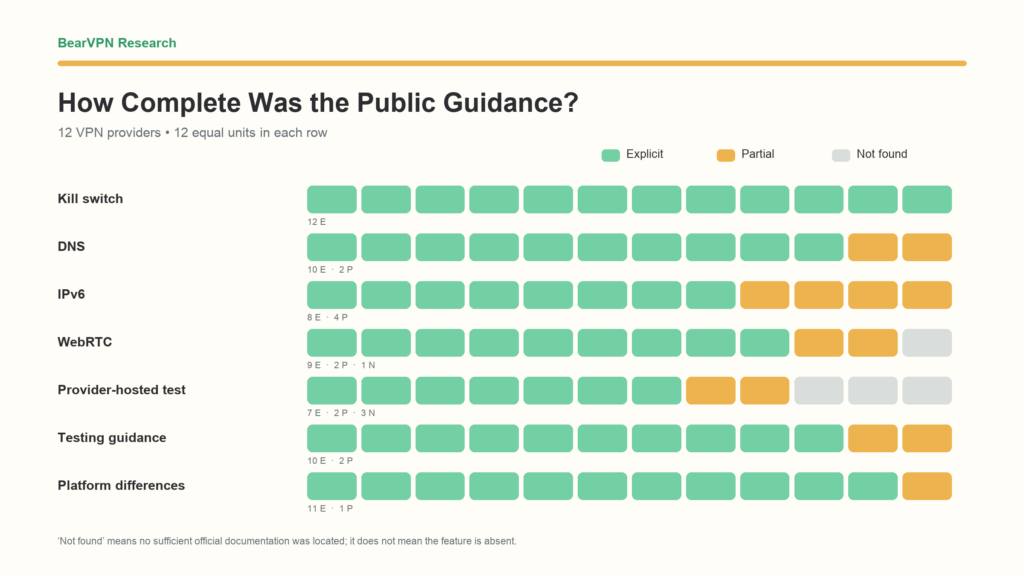
We reviewed the English-language websites, help centers, feature pages, and public checking tools of 12 consumer VPN providers. Each provider was coded as Explicit, Partial, or Not found for connection-drop protection, DNS, IPv6, WebRTC, provider-hosted testing, testing instructions, and platform differences.
The table below shows five of those fields.
“Not found” means we did not locate sufficient official documentation within the scope of this review. It does not mean the feature is absent or that the product leaks.
Connection-drop protection was universally documented
All 12 providers described a kill switch, firewall, VigilantBear, or equivalent safeguard. The terminology and implementation differed. Some pages described separate desktop and mobile behavior, while others presented a general feature statement.
This result shows that connection-drop protection is a mainstream documented feature in this sample. It does not show that all 12 implementations perform the same way.
Seven providers explicitly documented all four areas
Surfshark, ExpressVPN, Proton VPN, CyberGhost, PureVPN, Windscribe, and hide.me had explicit public documentation for connection drops, DNS, IPv6, and WebRTC.
The other five had at least one Partial or Not found entry. The reason varied: a broad feature claim without platform detail, documentation found for only one platform, an old page that could not confidently represent current apps, or no sufficient page found within our search scope.
IPv6 guidance was the most frequently partial technical field
Eight providers received an Explicit code for IPv6 and four received Partial. None were coded Not found.
The four Partial results did not mean the same thing. NordVPN had a broad IPv6 leak-protection claim without enough platform-level detail in the evidence reviewed. Mullvad’s evidence was clear for Android but incomplete across all platforms. TunnelBear’s most specific public materials were old. PrivadoVPN provided instructions for disabling IPv6 but not a single current explanation of how all supported apps handle it.
Public checking tools were less common than written instructions
Seven providers offered an explicit provider-hosted public checking page. Two had partial provider-hosted resources, and three were coded Not found. By comparison, 10 providers offered explicit step-by-step testing guidance and two offered partial guidance.
ExpressVPN, for example, publishes IP, DNS, and WebRTC checking tools. Mullvad provides a Connection Check, while Surfshark publishes separate DNS and WebRTC pages.
Written guidance can still be useful when it explains how to compare results. A provider-hosted test is convenient, but it is not independent verification of that provider’s product.
What Can Someone Do With Your IP Address?
A public IP address can reveal the internet provider or network organization and support an estimate of the country, region, or city from which a connection appears to originate. Services may use it for rate limits, regional availability, fraud checks, security alerts, or blocking.
An IP can also become more identifying when combined with a timestamp, account record, cookie, or another log. For example, a service may know that the same signed-in account appeared from a particular address at a particular time.
An IP address alone does not normally give an ordinary website your exact home address or automatically reveal your real name. Internet providers may be able to connect an address and time to a subscriber record, while a service can connect it to an account. Access to those records depends on the organization, its policies, and applicable legal processes.
An exposed address can also become a target for unwanted traffic or denial-of-service attempts. It does not, by itself, give someone control of a device. Device security still depends on exposed services, software vulnerabilities, credentials, and network configuration.
How to Check Whether Your VPN Is Exposing Your IP
Use the same browser and network for the before-and-after comparison, then repeat on other browsers you regularly use.
- Record the baseline. Disconnect the VPN and note the public IPv4 address, any public IPv6 address, the displayed ISP, and approximate location.
- Connect to the VPN. Wait until the app reports a complete connection. Confirm that the visible public IP changes to the VPN endpoint.
- Check DNS separately. Run a DNS test. Your regular ISP’s resolver should not appear unexpectedly. An unfamiliar resolver is not automatically a leak; browser Secure DNS and custom DNS settings can affect the name shown.
- Check IPv6 separately. If the baseline included a public IPv6 address, make sure that original address does not remain visible after connecting.
- Check WebRTC in each browser. Compare public addresses, not just private addresses or
.localnames. A public baseline address that remains visible through WebRTC needs investigation.
Repeat the checks after switching VPN servers, waking the device, or changing between Wi-Fi and another network. If split tunneling is enabled, verify which applications or websites are intentionally outside the tunnel.
Mobile browsers, in-app browsers, and desktop browsers may behave differently. A clean result at one moment is useful evidence about that setup; it is not a permanent guarantee across every version, network, or device.
Practical Takeaways
- A VPN hides one important identifier from websites when the tunnel works correctly: the original public IP. That is useful, but it is only one layer.
- Enable the kill switch or equivalent protection when available, and check how it behaves on the platform you use.
- Test the public IP, DNS, IPv6, and WebRTC separately. One clean result does not validate the others.
- Review location permissions, account logins, cookies, and browser tracking separately from VPN settings.
- Treat clear provider documentation as a transparency signal, not proof of real-world performance.
Research Methodology
We reviewed public material on October 16, 2026, from 12 deliberately selected consumer VPN providers: NordVPN, Surfshark, ExpressVPN, Proton VPN, Private Internet Access, Mullvad, CyberGhost, PureVPN, Windscribe, TunnelBear, hide.me, and PrivadoVPN.
The sample was selected to cover well-known services, different business models, and different styles of technical documentation. It was not random, was not weighted by market share, and does not represent every VPN provider.
We reviewed official English-language websites, help centers, feature pages, and provider-hosted public checking tools. Seven fields were recorded:
- Kill switch or equivalent connection-drop protection
- DNS handling or leak-protection guidance
- IPv6 handling or leak-protection guidance
- WebRTC risk or protection guidance
- Provider-hosted public checking tool
- Official user testing instructions
- Platform or browser differences
An item was coded Explicit when an official page directly explained the feature, risk, or check with enough scope to support the classification. It was coded Partial when the statement was broad, covered only part of the platform range, lacked operational detail, or was too old to confidently represent current apps. Not found means we did not locate sufficient official documentation within the review scope. It does not mean “No.”
Provider-hosted tests were counted separately from official instructions that recommended a third-party service. A general claim of “leak protection” was not automatically counted as explicit DNS, IPv6, and WebRTC documentation.
We did not purchase, install, or test the 12 VPN products. We did not capture traffic, simulate connection failures, switch networks, or verify implementation. The provider portion of this report is a documentation review.
External technical evidence was drawn from browser documentation, EFF materials, peer-reviewed research, a technical report, and a preprint. Each source type is identified in the text.
Publisher disclosure: This study was produced by BearVPN, a VPN provider. BearVPN was excluded from the 12-provider documentation review and from all reported totals.
Limitations
Official documentation changes. Search indexing and page availability can also affect a Not found result. A feature may exist even when its documentation is incomplete, and a documented feature may not behave as described in every condition.
VPN results can vary with the application version, operating system, browser, protocol, network, split-tunneling rules, custom DNS configuration, and other installed software.
The 2025 WebRTC study cited in this report is a preprint. The USC/ISI IPv6 study is a technical report with a specific dataset and detection method. The research published in 2015 provides historical evidence, not direct evidence about every 2026 product version.
This review did not evaluate no-logs policies, independent audits, jurisdiction, speed, streaming performance, or overall security. The documentation counts should not be used as an overall VPN ranking and cannot be generalized to the entire industry.
Frequently Asked Questions
Yes. When the VPN works correctly, websites normally see the VPN server’s public IP rather than your original public IP. They can still recognize a signed-in account, read permitted cookies, observe browser characteristics, and receive information you submit. A site with location permission may also receive device-derived location. A VPN reduces one tracking signal; it does not remove every other signal.
Your ISP can generally see that you are communicating with a VPN server, along with timing and traffic volume. In a properly working tunnel, it should not see the destinations and requests inside the tunnel in the same way it could without the VPN. DNS leaks, split-tunneled traffic, connection failures, or device-management tools can change that answer.
No. A VPN changes the network route and usually changes IP-based approximate location. It does not turn off GPS, Wi-Fi-based positioning, mobile location services, or a browser permission that allows a site to request location. Review location permissions separately in the device, browser, and app settings.
A VPN does not erase account records, payment information, device evidence, cookies, messages, or information held by other services. Whether a person can be identified depends on the available evidence, provider practices, jurisdiction, and legal process. A VPN should not be treated as a guarantee that activity cannot be attributed to a person.
Record your public IPv4 and IPv6 addresses before connecting. After connecting, check the visible public IP, DNS resolvers, IPv6, and WebRTC separately. Repeat the check in each browser you use and after a server or network change. If the original public IPv4 or IPv6 remains visible unexpectedly, review split tunneling and VPN settings, update the app, and contact the provider.
Conclusion
A VPN can hide the original public IP that websites would otherwise see, but that protection does not make a person untrackable. Accounts, cookies, browser fingerprints, device location permission, and information supplied directly can continue to connect activity to a user or device.
Our documentation review found that all 12 providers described connection-drop protection, while seven explicitly documented all four areas we reviewed: connection drops, DNS, IPv6, and WebRTC. Public guidance was common, but its completeness varied.
The practical approach is to treat a VPN as one privacy layer. Check IP, DNS, IPv6, and WebRTC separately, keep browser and location permissions under control, and distinguish provider documentation from independent technical evidence.
Sources Referenced in the Article
- MDN, Geolocation API
- Electronic Frontier Foundation, Cover Your Tracks
- EFF, Cover Your Tracks privacy explanation
- USC/ISI, Smoothing Rough Edges of IPv6 in VPNs
- PoPETs 2015, A Glance through the VPN Looking Glass
- WebRTC Metadata and IP Leakage in Modern Browsers
The official provider pages used for the documentation review are listed in the evidence appendix below.
Evidence Appendix: Official Provider Sources
These links support the documentation classifications in the comparison table. They are not independent product tests. Pages were reviewed on October 16, 2026.
- NordVPN:Kill Switch, feature and leak-protection overview, and VPN encryption and leak-protection page.
- Surfshark:Kill Switch, DNS leak test, IPv6 guidance, and WebRTC leak test.
- ExpressVPN:platform protection guidance, DNS leak test, IPv6 guidance, WebRTC leak test, and leak-testing tools.
- Proton VPN:Kill Switch, DNS leak guidance, IPv6 leak prevention, and VPN checking guidance.
- Private Internet Access:Windows app and Kill Switch guide, IPv6 handling, and IP and WebRTC leak guidance.
- Mullvad:security help pages, DNS leak guide, Android and IPv6 guidance, WebRTC guide, and Connection Check.
- CyberGhost:DNS leak test and Kill Switch explanation, connection-leak guidance, and VPN connection check.
- PureVPN:feature help, feature overview, IPv6 guidance, and WebRTC leak test.
- Windscribe:Firewall and leak-protection page, IPv6 handling, and WebRTC leak test.
- TunnelBear:VigilantBear, DNS leak guidance, IPv6 and DNS discussion, IP leak update, and WebRTC guidance.
- hide.me:Kill Switch, DNS leak guidance, IPv6 implementation, WebRTC leak test, and connection verification.
- PrivadoVPN:Windows Kill Switch, Android setup, DNS-over-HTTPS guidance, IPv6 help section, and leak-prevention guidance.



