


A VPN mainly changes two things: the network path your internet traffic follows and the public IP address visible at the other end of that path. Those changes can reduce real privacy and security exposures. They do not erase the many other ways a browser, account, device, or online service can identify or harm a user.
That distinction is not always clear. A 2023 USENIX Security study surveyed 1,252 VPN users in the United States and interviewed nine providers. The researchers reported flawed user mental models about both VPN protection and the data VPNs collect. The findings should not be generalized to every country or VPN user, but they show why precise boundaries matter.
BearVPN created an evidence-based map of 18 common privacy and security scenarios. Five user-facing scenarios involved exposures that a normally functioning VPN tunnel directly reduces. Four depended on settings, implementation, protocol, or an outside detection system. Nine were not directly addressed by the VPN tunnel.
These numbers organize the threat map; they are not a score for VPN effectiveness. The scenarios are not equally likely or equally severe, and they do not represent every online risk.
Key Findings at a Glance
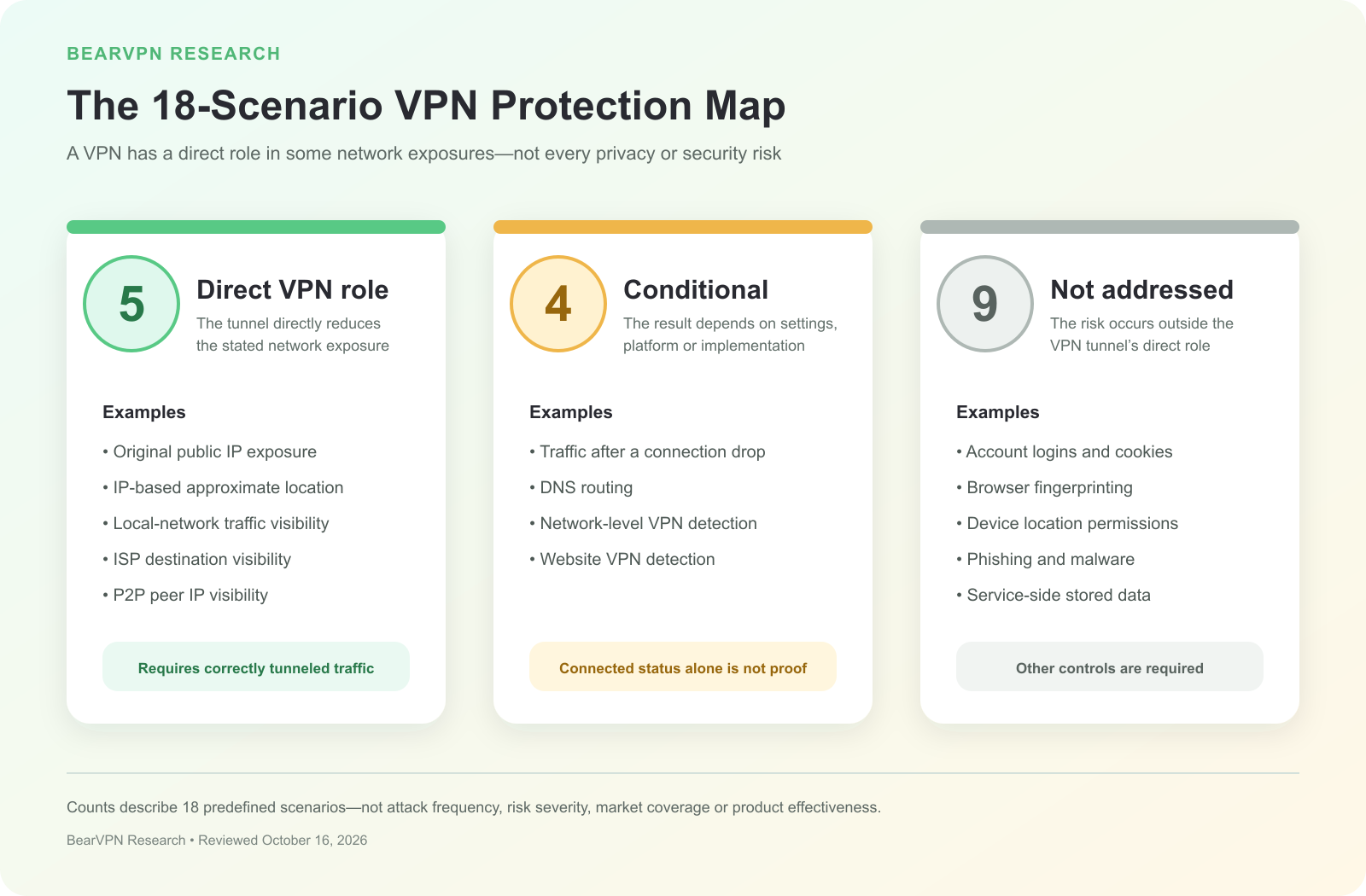
BearVPN classified 18 predefined privacy and security scenarios: five direct VPN scenarios, four conditional outcomes, and nine scenarios not addressed by the VPN tunnel. The counts are not percentages of all online risks or measures of product effectiveness.
- Five direct scenarios: These involved the original public IP, IP-based location, traffic carried inside the tunnel, local-network visibility, and the public IP visible to P2P peers.
- Four conditional outcomes: Connection-drop behavior, DNS routing, network-level VPN detection, and website VPN detection depended on factors beyond a simple “connected” status.
- Nine scenarios not addressed by the tunnel: These involved connection metadata, accounts, browser tracking, device location, phishing, malicious files, credentials, information submitted by the user, or data stored by other services.
- Changing an IP address is not the same as changing identity: Account logins, cookies, browser fingerprints, permission-based location, and information a user provides can persist after the public IP changes.
These counts describe the 18 predefined scenarios in this threat map. They do not measure attack frequency, risk severity, market-wide VPN performance, or the percentage of online threats a VPN can stop.
What a VPN Actually Hides
Original public IP and IP-based location
When traffic is routed through a VPN, a website or app normally receives the public IP address of the VPN exit server rather than the public IP assigned to the user’s connection. The U.S. Federal Trade Commission explains that traffic can appear to come from the VPN provider’s servers.
This also changes location estimates based on the public IP. A site may associate the exit IP with another city, region, or country. That is narrower than “hiding your location.” A VPN does not automatically change GPS-derived coordinates, remove a location stored in an account, or alter an address the user submits to a service.
Destinations and requests carried inside the tunnel
NIST describes IPsec as a network-layer security control used to protect communications over IP networks. Consumer VPNs use different protocols and implementations, but the broad network-layer purpose is similar: traffic is carried through a protected path to a VPN server.
For traffic inside a properly working tunnel, an internet provider or local network normally sees that the device is communicating with a VPN server. It should not see destinations and requests inside the tunnel in the same way it could without the VPN.
That is not total invisibility. The access network can still observe the VPN endpoint, connection timing, duration, and traffic volume. DNS that follows another path, split-tunneled traffic, connection failures, or device-management tools can also change what is visible.
A VPN therefore moves part of the trust relationship. The access network sees less of the tunneled activity, while the VPN provider occupies a privileged point in the route. The FTC advises users to investigate the provider, its permissions, its encryption claims, and its data practices rather than treating the app’s presence as proof of trustworthiness.
Public Wi-Fi and HTTPS
A VPN can add an encrypted path from the device to the VPN server, reducing what someone monitoring the local connection can read about traffic carried inside the tunnel.
Older public-Wi-Fi advice sometimes implies that all browsing without a VPN is exposed. The current picture is more nuanced. The FTC notes that widespread HTTPS adoption means most website connections are already encrypted and that public Wi-Fi is usually safer than it was in the early web.
HTTPS and a VPN protect different parts of the path. HTTPS protects the connection between a browser and the website. A VPN adds a protected path between the device and the VPN server. Neither proves that the website itself is trustworthy. A fraudulent site can use HTTPS and receive information the user voluntarily submits.
The public IP visible to P2P peers
Public IP visibility is part of peer-to-peer networking. The draft standards-track document BitTorrent BEP 24 explains that a tracker can see the publicly routable source IP in a request and that peers can see the public IP on the other side of a connection. BEP 5 also uses IP address and port information in DHT operations.
If P2P traffic is fully routed through a VPN, trackers and peers normally see the VPN exit IP instead of the user’s original public IP. The result can change if the client is excluded through split tunneling, uses another interface, follows an unexpected IPv6 path, or keeps communicating after a VPN disconnects.
This is an IP-routing effect, not a promise of anonymous or risk-free file sharing. Users remain responsible for applicable laws, copyright rules, account activity, downloaded files, and client security.
What Depends on Settings or Implementation
Four outcomes in the threat map were conditional. In each case, a VPN may help, but the “connected” indicator alone does not establish the result.
A Kill Switch or firewall-style control can reduce the chance that traffic falls back to the ordinary network after the tunnel fails. Behavior may differ across operating systems, application modes, sleep and wake events, or transitions between Wi-Fi and mobile networks. A provider documenting the feature is useful transparency, but it is not proof that every failure condition has been independently tested.
DNS is similarly affected by more than the VPN icon. The VPN client, operating system, browser DNS-over-HTTPS setting, custom resolver, and split-tunneling rules can all influence where a query goes. Public IP and DNS results should therefore be checked separately.
A VPN may also be detectable. In OpenVPN is Open to VPN Fingerprinting, researchers developed passive and active techniques for identifying OpenVPN traffic. Their evaluated framework identified more than 85% of OpenVPN flows with negligible false positives and recognized 34 of 41 tested “obfuscated” configurations. Those results concern OpenVPN, the study’s methods, sampled configurations, and evaluated network. They do not show that every protocol is detectable in every environment.
Detection by a destination is a separate issue. The FTC notes that a website may be able to determine that a visitor is using a VPN. Shared exit IPs, reputation data, commercial detection lists, and the site’s own rules can influence whether a connection is accepted, challenged, or blocked.
For a detailed explanation of IP, DNS, IPv6, WebRTC, and connection-drop checks, see BearVPN’s separate research report, Can You Be Tracked With a VPN? What IP and Location Leak Research Shows.
What a VPN Does Not Protect You From
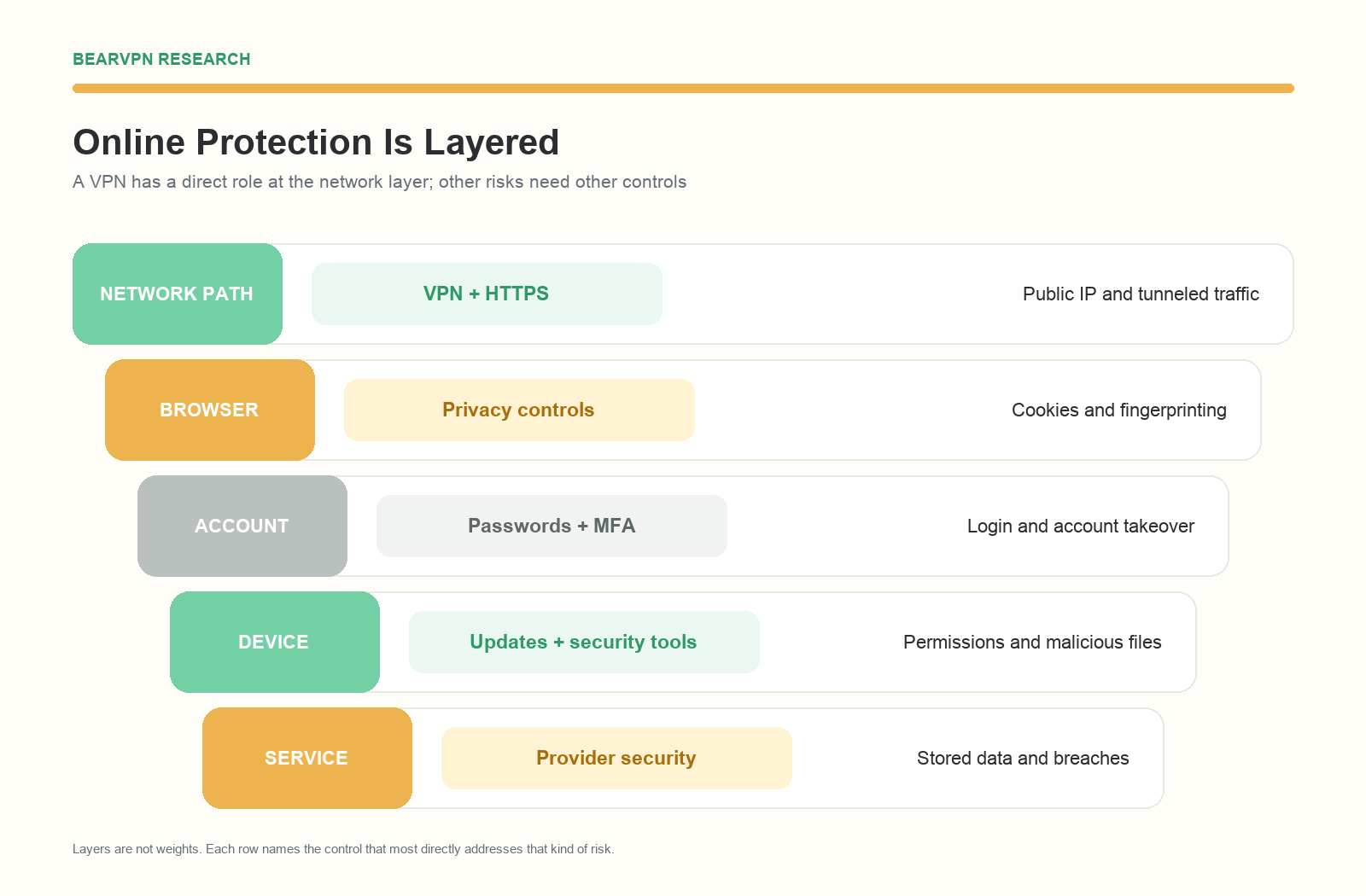
A VPN has a direct role at the network layer. Browser tracking, account security, device security, and service-side data require controls that address those separate layers.
Nine scenarios in the threat map were not directly addressed by the VPN tunnel. These include some of the most common ways people are recognized, deceived, or compromised online.
Browser and account identity
Changing the public IP does not sign a user out of an account. A search engine, retailer, streaming service, employer, or social network can continue associating activity with a logged-in profile.
Cookies and browser fingerprints can also persist across IP changes. EFF’s Cover Your Tracks project explains that cookies can link visits and that browser fingerprinting combines characteristics such as browser settings, hardware information, fonts, and screen properties. A VPN tunnel does not delete these identifiers or stop browser scripts from collecting them.
Account separation, cookie controls, and browser tracking protection address this layer more directly. Those measures are not perfect, but they target the mechanism involved rather than only changing the network address.
Device location
IP-derived location and device-derived location are different signals. According to MDN’s Geolocation API documentation, a web application can request permission to access location information, and the browser can use the best available capability on the device, such as GPS.
A VPN does not automatically revoke that permission or spoof GPS. If access is granted, a site may receive coordinates that do not match the VPN exit location. Users should review location permissions at both the operating-system and browser level.
Phishing and social engineering
A VPN encrypts a network path. It does not understand whether an email, message, caller, login page, or payment request is genuine. A scammer can operate an HTTPS website, and traffic to that site can travel through an encrypted VPN tunnel while the user is still being deceived.
CISA’s Secure Our World resources treat phishing awareness as a separate control alongside strong passwords, multifactor authentication, and software updates. Users should verify unexpected requests, inspect the real destination, avoid suspicious attachments, and report phishing.
Malware, ransomware, and dangerous downloads
A standard VPN tunnel does not scan a downloaded file or remove code that is already running on a device. The CISA StopRansomware Guide recommends controls such as patching, antivirus or anti-malware software, application controls, and protected backups.
Some VPN products bundle malicious-site filtering, download scanning, or a broader security suite. These may be useful product features, but they should be evaluated separately. They do not arise automatically from the VPN tunnel and cannot support a blanket claim that “a VPN prevents malware.”
Passwords and account takeover
A VPN cannot make a reused password unique, add another authentication factor, or stop an attacker from using credentials obtained in a breach or phishing attack. Strong unique passwords, a password manager, MFA, and prompt credential changes after a compromise address this layer.
The same distinction applies to account recovery. If an attacker controls a recovery email address or phone number, changing the public IP does not restore control of the account.
Information submitted to or stored by other services
The FTC points out that a site can still use information a person shares directly, such as an email address entered into a form. The same applies to a name, shipping address, payment method, support message, or account profile.
After a service receives information, it may store that data in its systems or share it with processors and other third parties. A VPN cannot control the service’s access policies, retention practices, software vulnerabilities, or response to a breach. Data minimization, careful provider selection, MFA, breach monitoring, and changing exposed credentials address this risk more directly.
The Complete 18-Scenario Evidence Map
“Direct” means a normally functioning VPN tunnel directly reduces the exposure when the relevant traffic is carried inside it. “Conditional” means the result depends on an additional feature, setting, implementation, protocol, or detection system. “Not addressed” means the VPN tunnel does not directly resolve the scenario, even though the risk may involve network metadata or another layer.
The pattern is consistent. Direct scenarios concentrate on the public IP and network path. Conditional outcomes concentrate on failure handling, DNS, and VPN detection. Scenarios not addressed by the tunnel concentrate on visible metadata, identity, content, device behavior, and data controlled by other services.
Match the Risk to the Right Control
The practical question is not whether a VPN is useful in the abstract. It is which control matches the layer where a risk occurs.
Research Methodology
BearVPN created a structured set of 18 common privacy and security scenarios. A scenario was included when it met five criteria:
- It represented a question ordinary consumers commonly encounter when judging VPN use.
- It could be located primarily at the network, browser, account, device or user, or destination or service layer.
- It represented a distinct user-facing scenario, observer, or security outcome, even when the underlying network mechanism overlapped with another scenario.
- It could be supported by official technical documentation, regulator guidance, protocol documentation, or peer-reviewed research.
- It allowed us to judge whether the base VPN tunnel directly changed the exposure without relying on one provider’s marketing definition.
Each scenario was assigned one of three classifications:
- Direct: A normally functioning VPN tunnel directly reduces the exposure when the relevant traffic is carried inside it.
- Conditional: A VPN may help, but the outcome depends on platform behavior, configuration, protocol, implementation, or external detection.
- Not addressed by the VPN tunnel: The tunnel does not directly resolve the scenario; another control or a more specific threat model is required.
We recorded the risk layer, VPN effect, conditions, additional control, primary source, allowed wording, and overclaim to avoid. Evidence included guidance from NIST, the FTC, and CISA; browser and tracking documentation from MDN and EFF; BitTorrent protocol documentation; peer-reviewed VPN research; and our earlier structured review of 12 providers’ public leak-protection documentation.
The initial list included ISP throttling and IP-targeted DDoS. We did not retain a general “VPN prevents throttling” conclusion because ISP policies, congestion, routing, and protocol detection vary. We also removed DDoS because hiding an original IP in some contexts is not equivalent to DDoS protection, and the available evidence did not support one general classification for consumer VPNs.
We did not install, penetration-test, or compare VPN products. We did not simulate attacks, connection failures, DNS leaks, censorship, malware, or account compromise. The counts describe the 18 predefined scenarios in this framework. They are not statistically representative of all online threats.
Publisher disclosure: This study was produced by BearVPN, a VPN provider. BearVPN was not treated as a sample or tested product in this analysis.
Limitations
- The 18 scenarios are a structured explanatory framework, not a complete inventory of online threats.
- The scenarios were not randomly selected, so the category counts cannot be generalized to the internet or VPN market.
- Classifications describe a generic, normally functioning consumer VPN tunnel. Products, protocols, platforms, and settings differ.
- “Direct” means the tunnel reduces a specific exposure; it does not mean the wider risk is eliminated.
- Conditional scenarios were not tested under one standardized experimental setup.
- The OpenVPN fingerprinting study does not represent every VPN protocol, provider, or network.
- Provider-bundled content filtering, antivirus, password management, and other add-ons were excluded from the definition of the VPN tunnel.
- The study did not weight scenarios by likelihood, severity, or real-world impact.
- Technical behavior and published guidance can change. The evidence was reviewed on October 16, 2026.
FAQ
A properly working VPN can hide the specific destinations, requests, and DNS activity carried inside its encrypted tunnel from the ISP’s direct view. The ISP can still see that the user is communicating with a VPN server, along with connection timing, duration, and traffic volume. DNS that follows another path, split tunneling, and connection failures can change the answer.
No. A VPN changes the public IP address a website sees, but the website can still record pages visited and activity performed on that service. If the user is signed in, the service can associate the activity with the account. Cookies and browser fingerprints may also link visits.
“Hackers” is too broad for a reliable yes-or-no answer. A VPN can reduce particular network-level exposures, especially the original public IP and local visibility into tunneled traffic. It does not prevent phishing, weak-password attacks, malicious files, vulnerable software, account compromise, or a breach at a service that stores user data.
The VPN tunnel itself does not scan files, remove malware, or decide whether a message or website is fraudulent. Some VPN products include separate malicious-site filtering or security tools, but these are additional features. Updates, reputable security software, backups, MFA, and phishing awareness remain necessary.
Sometimes. A site may use exit-IP lists, reputation data, shared-IP patterns, traffic signals, or its own policy rules to identify or challenge VPN connections. Results vary, and a VPN does not guarantee that its use will be undetectable.
Conclusion
A VPN’s clearest role is at the network layer. It can replace the public IP address visible to a destination and protect traffic carried between a device and the VPN server. This can materially reduce exposure to an access network, an internet provider, websites relying on the original IP, and P2P peers.
The boundary matters just as much as the benefit. Connection failures, DNS routing, and VPN detection depend on additional conditions. Accounts, browser identifiers, device location, phishing, malicious files, credentials, submitted information, and service-side breaches require other controls.
The useful question is therefore not “Can a VPN protect everything?” It is “At which layer does this particular risk occur?” Once that layer is clear, a VPN can be used for the job it actually performs—and paired with the controls it does not replace.
Sources
- NIST SP 800-77 Rev. 1: Guide to IPsec VPNs
- FTC: In the market for a VPN app?
- FTC: Are Public Wi-Fi Networks Safe?
- CISA: Secure Our World Resources
- CISA: StopRansomware Guide
- EFF: Cover Your Tracks
- MDN: Geolocation API
- USENIX Security 2023: Multi-perspective study of VPN users and providers
- OpenVPN is Open to VPN Fingerprinting
- BitTorrent BEP 24: Tracker Returns External IP
- BitTorrent BEP 5: DHT Protocol



