


If you’re in Doha or Al Rayyan and suddenly can’t log into Roblox, you’re not alone. Since August 13, 2025, multiple regional outlets and local pages have reported that Roblox is inaccessible/blocked in Qatar, with players seeing connection failures in both the app and on the web. While the precise policy basis hasn’t been fully detailed by authorities, early coverage attributes the move to child-safety and content concerns amplified on social media.
This guide explains what’s happening, the most common errors you’ll see, what the law says about VPN use in Qatar, and mobile-first steps—focused on iPhone and Android—to troubleshoot access responsibly.
Is Roblox Still Banned in Qatar?
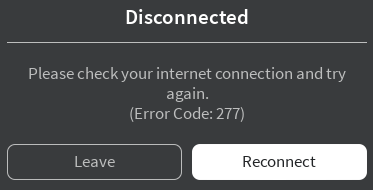
Yes, Roblox is still banned in Qatar. Reports from respected local and regional publishers indicate that Roblox became unreachable in Qatar on August 13, 2025, with users posting screenshots and confirming they couldn’t connect from major ISPs. Headlines vary (“blocked,” “inaccessible,” “banned”), but the real-world effect is the same for players: the platform doesn’t load. Many players describe opening the app and encountering messages like “Please check your internet connection and try again.”
Why Was Roblox Blocked? Child-Safety & Content Concerns
Early coverage ties the disruption to child-safety worries and moderation concerns, following visible public calls to act. This mirrors debates seen in other regions that previously restricted Roblox and similar platforms for youth-safety reasons. Even if you disagree with the approach, it’s helpful to understand that the stated rationale in the region centers on protecting minors from harmful or inappropriate content.
How to Play Roblox in Qatar With a VPN
If you want a straightforward option across devices, BearVPN offers a simple, one-tap interface on iOS, Android, Windows, and macOS. It provides global server options for quick IP switching, strong encryption, RAM-only servers, DNS-leak protection, and traffic obfuscation to keep your connection secure and stable.
A practical bonus is per-app VPN (split tunneling)—you can route only Roblox through the tunnel while keeping other apps (banking, local delivery) on your normal network. That can reduce overhead and latency during play. As with any VPN, there’s no 100% guarantee of access in every region or on every network, and you should always use it lawfully. Now let’s see how to access Roblox in Qatar with BearVPN.
Step 1: Download and Log In
Click the button above to download the BearVPN client for your device (Windows, Mac, iOS, or Android). Install the application and log in with your account credentials.
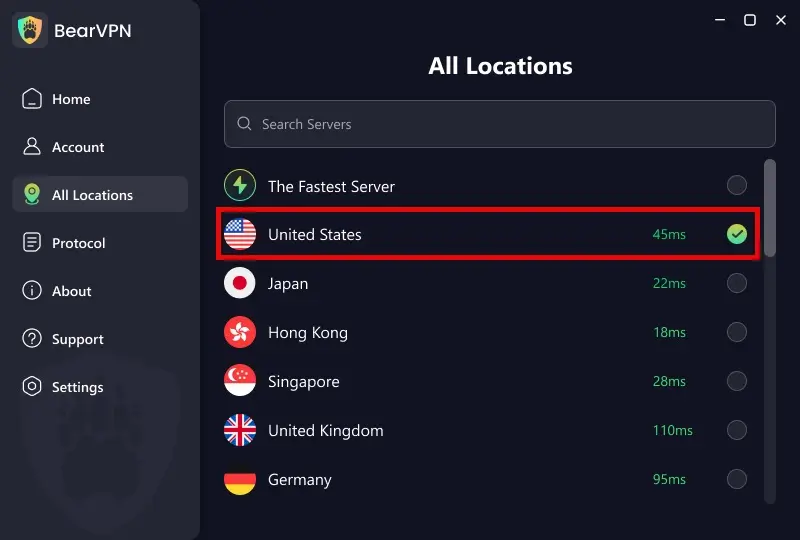
Step 2: Select a Specific Regional Server
Click the location pin on the main dashboard to open the Server List. Browse or search for the specific country you want.
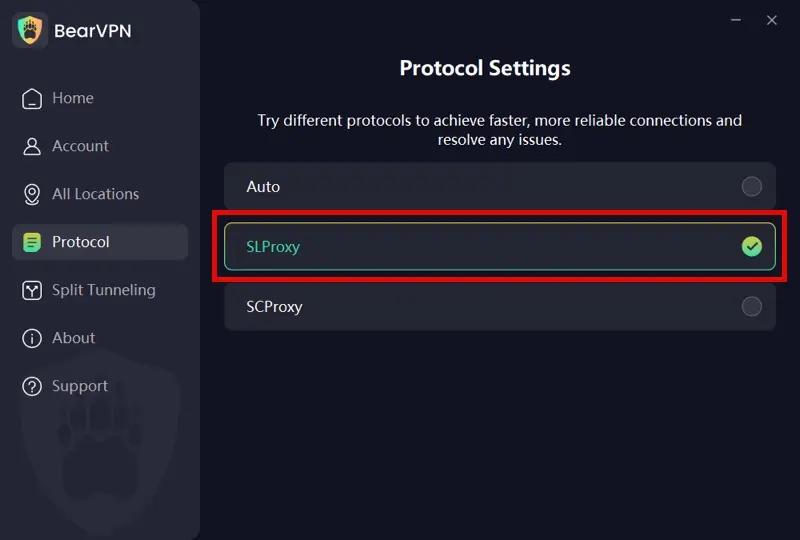
Step 3: Choose the Right Obfuscation Protocol
Choose from Auto, SLProxy, and SCProxy based on your needs.
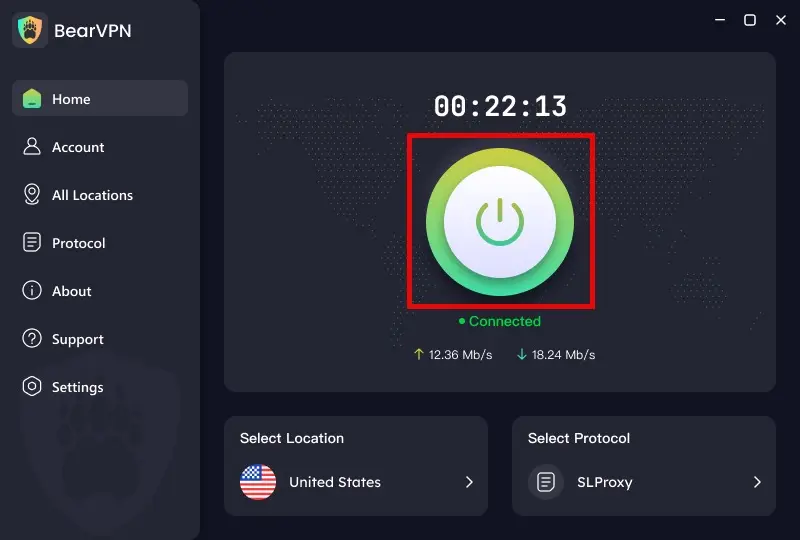
Step 4: Connect and Refresh
Head back to the main dashboard and hit the large ‘connection’ button. Once the connection is success, return to your browser and refresh the page. Then you can access Roblox.
How to Fix VPN Connected But Roblox Still Won’t Load?
Even when a VPN connects, Roblox might not launch due to routing, DNS caching, or protocol filtering. Start with small, reversible steps:
- Switch servers and wait a moment. Hop to a nearby alternative location; give the phone ~30 seconds to refresh routes before retrying Roblox.
- Change the VPN protocol. On phones, moving between protocols (for example, a standard option and an obfuscated one) can sidestep aggressive filtering.
- Clear app cache/reinstall Roblox. On Android, clear cache/data; on iOS, offload and reinstall the app. This helps if the app cached a failed endpoint.
- Test another network. Public Wi-Fi (campus, cafes, hotels) often restricts gaming traffic or UDP. If it fails on Wi-Fi, try cellular data; if it works on mobile data, your Wi-Fi likely enforces additional rules.
- Avoid stacking tools. Don’t combine a VPN with “gaming accelerators,” DNS-only apps, or proxy chains; extra layers introduce breakage and delay.
- Respect service limits. Some periods bring stricter filtering; if multiple nearby servers fail, don’t brute-force dozens of locations in minutes—pause and retry later.
If you’re using BearVPN, you can test:
- A second nearby location (e.g., Region A → Region B).
- Turn on traffic obfuscation for networks that flag tunnels by pattern.
- Enable per-app VPN to route only Roblox and reduce conflicts with other apps.
Is It Illegal to Play Roblox in Qatar With a VPN?
Well, it’s risky to use a VPN for illegitimate purposes in Qatar. Before you try anything technical, consider local rules. Sources differ on how to characterize VPN legality in Qatar. Some consumer-privacy resources say VPNs are legal when used for legitimate purposes and that misuse (e.g., to commit crimes) is unlawful.
Other overviews caution that the government does not consider VPN use legal, advising strong obfuscation and care. What’s consistent across sources is the principle of lawful, responsible use – and that enforcement focuses on what you do, not merely whether a Roblox VPN app exists on your phone. This article doesn’t provide legal advice; always follow local laws and your organization’s policies.
How to Play Roblox in Qatar Without VPN
In regions where Roblox is blocked and you decide to proceed within legal boundaries, focus on basic troubleshooting first. Because this situation is evolving, start with network hygiene, then—if appropriate—test a reputable VPN. The goal is to rule out false positives (local network glitches) before making any changes.
- Rule out a temporary outage. Toggle Airplane Mode for 10 seconds, then reconnect. If possible, try cellular data vs. Wi-Fi and see whether one path behaves differently.
- Update and relaunch. Update the Roblox app, then force-quit and relaunch. Reboots can clear stale DNS or routing issues.
- Try a clean path with a VPN. If Roblox remains unreachable and you’re acting lawfully, connect a reputable VPN and select a nearby, low-latency location (e.g., the closest available country). Shorter distances often mean lower ping in sessions that depend on fast round-trips.
- Reopen Roblox after the tunnel is up. Wait ~10–20 seconds before launching the app so the device completes DNS and route updates.
- If you get in, keep it minimal. Avoid chaining multiple accelerators or proxies, which can add latency and cause extra blocks.
- Disconnect when done. If Roblox is closed, disconnect the VPN to restore your usual local services.
Bonus. How to Download Roblox in Qatar
Qatar’s restriction on Roblox is enforced at the network level by local internet service providers (ISPs) rather than through store-level removal. Mobile users can install the software on their devices in a straightforward way. However, opening it on a standard Qatari internet connection will trigger a “No Network” or “Connection Error” screen. To bypass this block, your mobile device must run an active VPN before booting the application.
Desktop players can secure the setup files directly via the browser version. However, if you attempt to navigate directly to the official Roblox website, you will likely see a “This site can’t be reached” error page. Therefore, to download the installer client, you must first switch on a secure VPN. Then you can head to the official login page, sign in to your account, and do whatever you like as usual.
FAQs About “Roblox Banned in Qatar”
Yes. As of mid-August 2025, reputable local and regional outlets report Roblox is inaccessible/blocked in Qatar. Players across the country say they cannot connect in the app or on the web. Official, detailed statements remain limited, so coverage uses terms like “blocked” or “inaccessible,” but the effect for users is clear.
BearVPN helps users in Qatar to play Roblox quickly. You don’t have to worry about your safety as it safeguards your online privacy with hidden IP and encrypted data.
No. There is no specific punishment for VPN use in Qatar. The Cybercrime Prevention Law provides penalties for specific crimes, not for VPN usage. Regardless, misuse is risky, and you must follow local laws. If you proceed, do so responsibly and only for lawful purposes.
Conclusion
The phrase “Roblox banned in Qatar” captures how players experience the situation today: the platform simply doesn’t load. Credible outlets in the region highlight child-safety as the driving concern, but detailed official guidance is still limited. If you choose to troubleshoot on iPhone or Android, focus on clean networking first and, if appropriate and lawful, test a reputable VPN with nearby servers, light obfuscation, and per-app routing to minimize friction.
BearVPN works well on both phones and computers, but like any VPN, it cannot guarantee access everywhere—especially when network rules change quickly. Stay within the law, keep safety settings tight, and watch local news for updates before you invest time in lengthy workarounds.


![How to Change YouTube TV Location [Still Works in 2026]](/_next/image/?url=https%3A%2F%2Fcms.bearvpn.com%2Fwp-content%2Fuploads%2F2026%2F06%2Fhow-to-change-location-youtube-tv.webp&w=640&q=75)



