The “Unknown Status” or “Unknown Error” when joining a Roblox server is one of the most frustrating experiences for players in 2026. This error essentially means that the communication between your device and the Roblox game server has been interrupted, but the system cannot identify the specific cause. Whether you are trying to hop into a private server with friends or join a massive public experience like Blox Fruits, being met with a grayed-out “Joining Server” screen followed by an error message can ruin your gaming session.
This comprehensive guide will walk you through the technical reasons behind these connection failures and provide verified, step-by-step solutions to get you back into the game—including how a specialized gaming VPN like BearVPN can resolve 2026’s most common routing bottlenecks.
What Does “Unknown Status” Mean When Joining a Roblox Server?
When you see “Unknown Status” while trying to join a server on Roblox, it does not mean your account is banned or that the game is broken.
It means the Roblox client failed to complete the server handshake and could not determine why the connection failed.
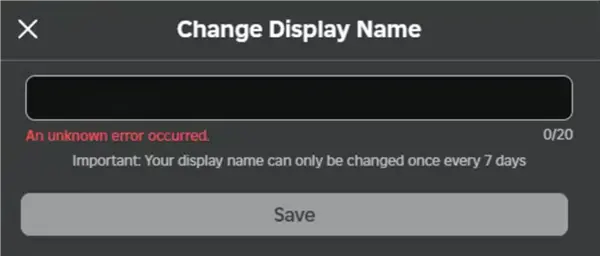
What’s Actually Happening Behind the Scenes
Normally, joining a Roblox server follows this process:
- Your device requests a server slot
- Roblox validates your session token
- Your ISP routes traffic to the game server
- The server confirms the connection
If any step times out or never responds, Roblox can’t generate a specific error code — so it defaults to “Unknown Status.”
What “Unknown Status” Is Not
To reduce panic (and rage-quitting), here’s what it usually isn’t:
- A permanent account ban
- A hardware failure
- A game you’re blocked from forever
- Proof Roblox is down (unless status.roblox.com confirms it)
Instead, it’s almost always caused by:
- Network routing failures
- Corrupted cache/session data
- Private or ghost server bugs
- ISP or regional filtering
That’s why fixing it often requires network-level solutions, not just restarting the app.
Why “Unknown Status” Happens in Roblox
In 2026, the complexity of global internet routing and the scale of Roblox’s infrastructure mean that “Unknown Status” is rarely caused by a single issue. Here are the primary technical culprits:
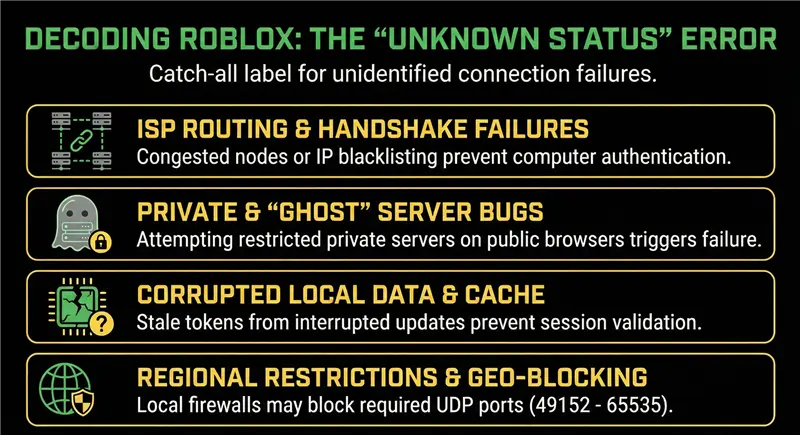
1. ISP Routing Issues and Handshake Failures
Sometimes, your Internet Service Provider (ISP) routes your data through congested nodes or unintentionally blacklists residential IP ranges used by Roblox data centers. This results in a “handshake failure,” where your computer’s attempt to authenticate with the server never receives a response. Because the connection never officially starts, Roblox labels the status as “Unknown”.
2. Private Server and “Ghost” Server Bugs
A recurring bug identified in late 2025 and 2026 involves servers hosted on private channels appearing on the public Server Browser. When players attempt to join these servers without the correct permissions, the client fails the join process without a specific error code, resulting in the “Unknown Status” message.
3. Corrupted Local Data and Cache Conflicts
Every time Roblox updates, it writes new temporary data to your drive. If an update is interrupted or if old cache files conflict with the current version, the client may fail to validate your session. These stale tokens are a leading cause of connection timeouts that the system cannot specifically categorize.
4. Regional Restrictions and Geo-Blocking
Depending on your location, certain servers or game features may be unavailable due to local regulations or regional ISP outages. In high-restriction areas, local firewalls may block specific ports (UDP 49152 – 65535) required for Roblox to communicate with game servers.
Step-by-Step Fixes for Roblox “Unknown Status”
Follow these troubleshooting steps in strict diagnostic order, moving from quick platform checks to advanced network optimizations.
Phase 1: Rule Out Platform & Server Issues
Step 1. Check Roblox Server Uptime
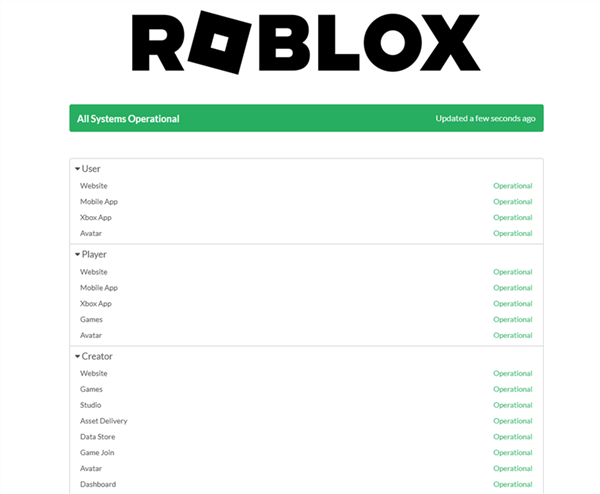
Before modifying your local settings, confirm whether the issue is platform-wide. Visit status.roblox.com and check the status of User Authentication and Game Join. If Roblox is experiencing partial outages, local fixes will not work.
Step 2. Join a Different Server or Game Instance
If the platform is fully operational, the specific server instance you are trying to join may have crashed or become a “ghost server” (a shut-down server still visible in the browser).
- Return to the main game page and scroll down to the Servers tab.
- Join a different public server with available slots, or attempt to join a friend directly.
- Disable third-party browser extensions (such as FPS boosters or ad blockers) that can interfere with joining private servers.
Phase 2: Repair Local App Data & Session Tokens
Step 3. Clear Roblox Cache and Local Data
Corrupted temporary files are the leading client-side cause of handshake errors.
- Windows: Press
Win + R, enter%localappdata%\Roblox, select all files, and delete them. Relaunch the client to force a clean data rebuild. - Mobile (Android/iOS): Go to Device Settings
Apps
Roblox, tap Storage, and select Clear Cache.
During our testing on Windows 11, clearing this temporary directory immediately resolved handshake freezes caused by interrupted client auto-updates.
Step 4. Log Out and Refresh Session Tokens
Stale authentication tokens often fail server-side validation without displaying a specific error.
- Open the Roblox app or web client, go to Settings, and click Log Out.
- Close the application completely, reopen it, and log back in to generate a fresh authentication token.
Phase 3: Reset Local Network & DNS
Step 5. Restart Your Router and Switch to Ethernet
Local network hardware can store corrupted routing states or suffer packet loss on Wi-Fi connections.
- Unplug your router and modem power cords for 60 seconds, then plug them back in.
- Switch from Wi-Fi to a wired Ethernet cable whenever possible. Minimizing packet loss and signal jitter drastically improves server handshake success rates.
Step 6. Flush Your DNS Cache
Outdated DNS records on your computer can direct traffic to outdated data center nodes.
- Open Command Prompt as Administrator on Windows.
- Type
ipconfig /flushdnsand press Enter to erase stale DNS resolution paths.
Phase 4: Diagnose & Bypass ISP Routing Bottlenecks
Step 7. Test via Mobile Hotspot
To confirm whether your Internet Service Provider (ISP) is causing connection drops:
- Disconnect from your home Wi-Fi and connect your PC or phone to a mobile cellular hotspot.
- Try joining the Roblox server again.
- If the game joins normally, your home ISP is dropping UDP packets or routing your connection through congested data nodes.
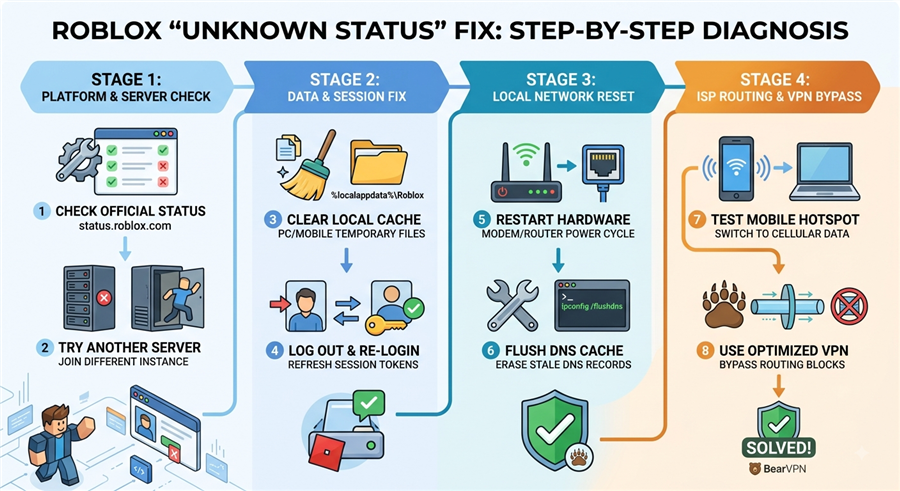
Step 8. Optimize Connection Routing with BearVPN
When local hardware resets fail and your primary network is responsible for packet loss or UDP port filtering (UDP 49152 – 65535), BearVPN creates a clean connection directly to Roblox servers.
Connect to BearVPN and launch Roblox to bypass ISP-level routing bottlenecks and residential IP restrictions.
How to Fix Roblox Errors with BearVPN (Step-by-Step)
When local hardware fixes fail, the issue is almost certainly at the network level. BearVPN is specifically designed for high-performance tasks like 4K streaming and low-latency gaming, making it the ideal tool to force a clean connection to Roblox.
Step 1: Download and Install BearVPN
Ensure you are using the official version of the software. You can download the latest client for PC, iOS, or Android.
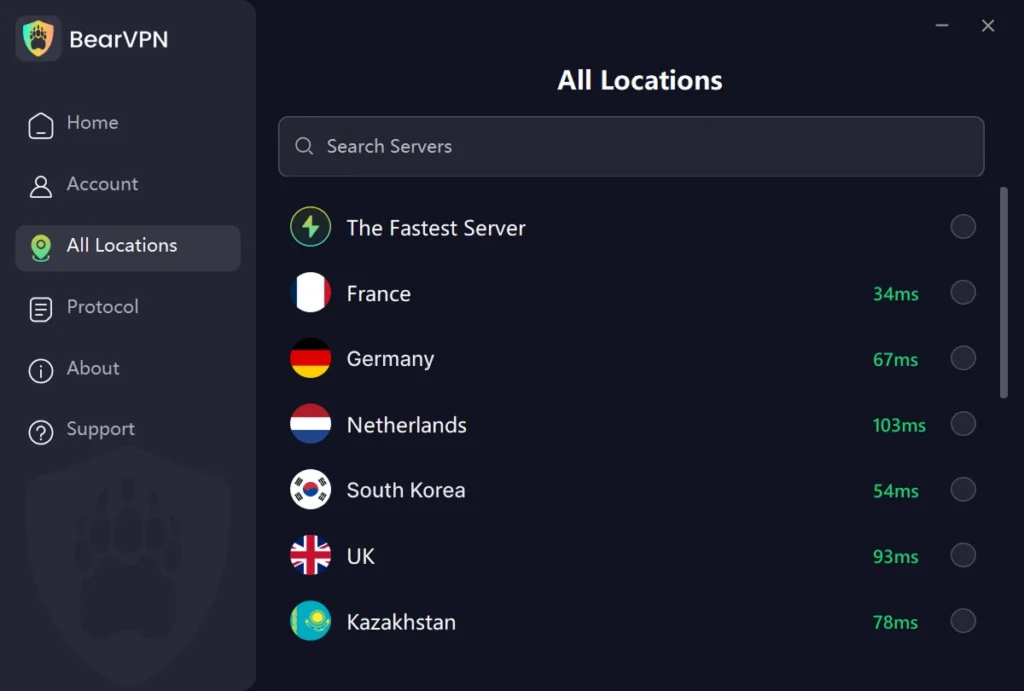
Step 2: Select a Low-Latency Server
To minimize “ping” and prevent the “Unknown Status” timeout, choose a server node closest to the Roblox data centers. For most players, selecting a node in the United States or Singapore provides the most stable path to Roblox’s core infrastructure.
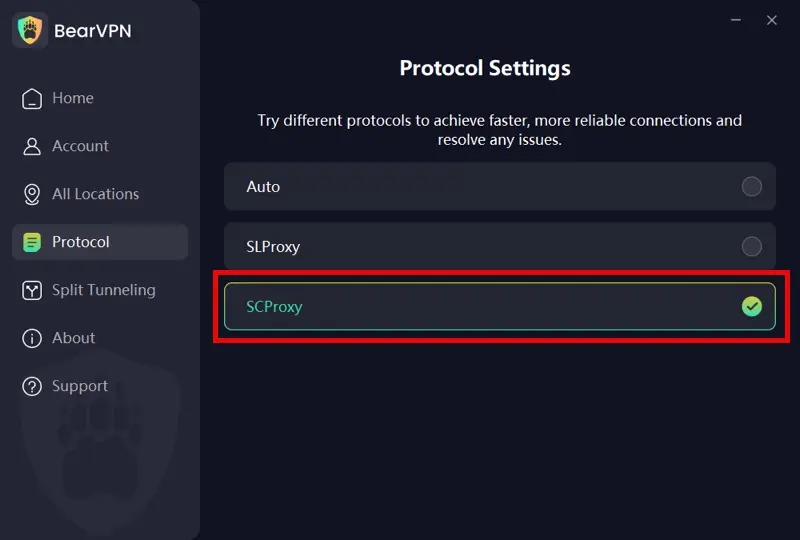
Step 3: Enable SCProxy Protocol
BearVPN features proprietary SCProxy and SLProxy protocols. These are engineered to mask VPN traffic as regular HTTPS traffic, preventing Roblox from flagging the connection and ensuring you aren’t blocked for “suspicious proxy use”.
Step 4: Launch Roblox and Join
With BearVPN connected and your IP address hidden, launch the Roblox app. The refreshed network path should bypass any ISP bottlenecks or residential IP blocks, allowing you to join the server instantly.
Why BearVPN is the Best Choice for Roblox Players
Not all VPNs are created equal for gaming; many free services actually cause errors by using overcrowded servers. BearVPN is optimized for the 2026 gaming landscape:
- Ultra-Low Latency: Optimized across 2000+ servers, your game won’t lag during intense combat or complex “obbies”.
- Bypass IP Bans: If your ISP’s residential IP is caught in a “blacklisting” wave, BearVPN provides a clean, dedicated path through its global network.
- Multi-Device Support: One BearVPN account covers up to 10 devices simultaneously, protecting your PC, phone, and tablet at once.
- Split Tunneling: Use it to secure only your Roblox traffic while letting other apps like Discord use your regular local internet connection for maximum performance.
Troubleshooting: Still Seeing the Unknown Error?
If the issue persists even with a VPN, try these advanced troubleshooting steps:
- Disable Browser Extensions: Ad-blockers or “Roblox enhancement” tools often interfere with the site’s authentication process.
- Flush Your DNS: Old network paths stored in your computer can lead to failures. Open Command Prompt as Admin and type ipconfig /flushdns to clear them.
- Check Privacy Settings: Ensure your account’s “Who can join me” setting is configured correctly; restricted accounts often trigger generic errors when attempting to join specific games.
Conclusion
Don’t let a generic “Unknown Status” error ruin your gaming session. Whether it’s an ISP bottleneck or a regional block, BearVPN provides the stable, high-speed connection you need to stay in the game.
Get BearVPN for as low as $1.67/month today!
FAQs on “Unknown Status” When Joining a Roblox Server
Is using a VPN legal on Roblox?
Yes. Using a VPN for privacy, security, or connection stability is allowed on Roblox, as long as you follow Roblox’s Terms of Service. A VPN must not be used to evade moderation actions, bypass bans, or exploit regional restrictions tied to account enforcement.
Will a VPN slow down my game or increase ping?
Not necessarily. Low-quality or free VPNs often increase latency due to overcrowded servers. However, gaming-optimized services like BearVPN use high-speed protocols (such as SCProxy and SLProxy) designed to reduce routing inefficiencies and prevent the timeouts that cause “Unknown Status” errors.
Why does “Unknown Status” only happen on one specific game?
This usually indicates a server-side issue, not a problem with your account. Common causes include a full server, a broken game instance, or a bug in the developer’s custom server browser—especially with private or reserved servers. Joining a different instance of the same game often resolves the issue.
Is “Unknown Status” the same as being banned?
No. “Unknown Status” is a connection failure, not an enforcement action. If your account were banned or restricted, Roblox would display a specific moderation message instead of a generic connection error.
How do I fix the “Authentication Failed” version of this error?
Log out and log back into your Roblox account to refresh your session token. If the issue persists, resetting your password forces a full token reset and often clears hidden authentication conflicts caused by corrupted local data.
Can clearing the cache really fix server connection errors?
Yes. Roblox relies heavily on local cache and session files. If these files become outdated or corrupted after an update, the client may fail validation during server handshake, resulting in “Unknown Status” or “Authentication Failed” errors.
Why does this error happen more often on Wi-Fi?
Wi-Fi connections are more prone to packet loss, jitter, and interference. Roblox server handshakes are sensitive to unstable connections, so even brief packet drops can cause the join process to fail without a clear error code.
Does changing DNS help with “Unknown Status”?
In some cases, yes. Flushing or changing DNS can resolve issues caused by outdated routing information. However, DNS fixes are less effective if the root problem is ISP-level congestion or IP blocking.
Why does switching to a mobile hotspot work?
A hotspot uses a completely different network route and IP range. If Roblox works on a hotspot but not on your home network, the issue is almost certainly related to your ISP’s routing or traffic handling.


![How to Change YouTube TV Location [Still Works in 2026]](/_next/image/?url=https%3A%2F%2Fcms.bearvpn.com%2Fwp-content%2Fuploads%2F2026%2F06%2Fhow-to-change-location-youtube-tv.webp&w=640&q=75)