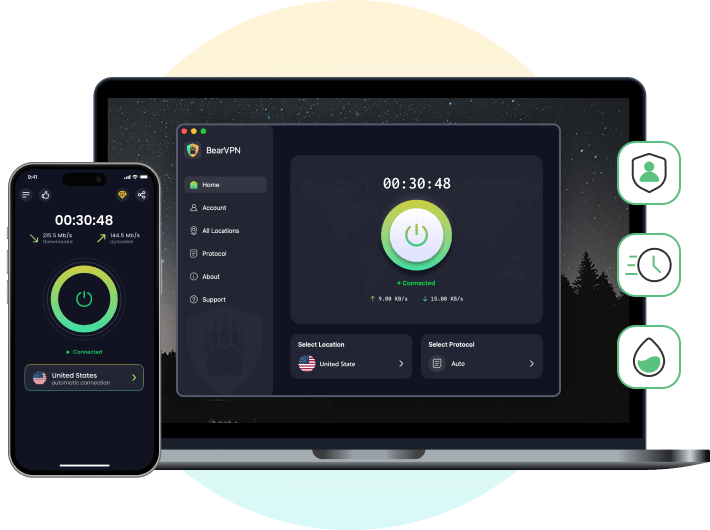
The simplest way to spend less on TikTok coins is to compare prices on TikTok’s official website instead of buying immediately in the mobile app. Web prices vary by location, so BearVPN can help you check the price shown through a different server location. A VPN changes your visible IP address, but TikTok may also consider your account and payment method, and a different price or successful checkout is not guaranteed.
- Connect BearVPN to one available region.
- Reopen TikTok’s official web recharge page.
- Compare the final price, currency, and payment options.
An Overview of TikTok Recharge Coins Price
Before diving into the tactics for getting cheaper coins, you should understand the baseline prices across different countries. Because TikTok operates globally, it adjusts its pricing structure to fit the economic realities of various countries. What costs a premium in the United Kingdom or parts of Europe might be surprisingly affordable in America or Southeast Asia.
Moreover, the price on the official desktop website is lower than that in the mobile apps because App Store and Google Play Store will charge an extra 30% commission for each purchase. Below is a comparative overview of TikTok coin prices on its official website in several popular countries as of 2026.
Prices are estimates based on web purchases and current currency exchange rates.
In this comparison, the US and Argentina show the lowest baseline web prices, while several other locations are higher. Treat the table as a snapshot: exchange rates, taxes, account details, and payment methods can change both the displayed price and the final charge. BearVPN can help you check the official recharge page from another available region, but TikTok still determines the offer and payment options available to your account.
While getting cheap coins is great for supporting your favorite creators, it’s useless if your region restricts live streaming features. If you are traveling or living in a country where live broadcasts are banned, check out our complete guide on how to unblock TikTok Live safely, so you can spend your coins and interact with creators without limits.
How to Buy the Cheapest TikTok Coins
To compare another location’s web price, connect BearVPN to one server, open TikTok’s official recharge page in a desktop browser, and check the price and payment options shown for your account.
Step-by-Step Guide to Recharging Cheap Coins on TikTok:
Step 1. Download and install BearVPN on the device you’ll use to open TikTok’s official recharge page. On desktop, choose the version for your current system; BearVPN is also available for Android and iOS.
Step 2. Sign up to BearVPN with your email address. Or log in to your account if you have one.
Step 3. Start a Fresh Browser Session. Clear TikTok cookies for the recharge page or open a new private-browsing window to reduce the effect of locally stored website data. This does not erase location, region, or payment information already associated with your TikTok account.
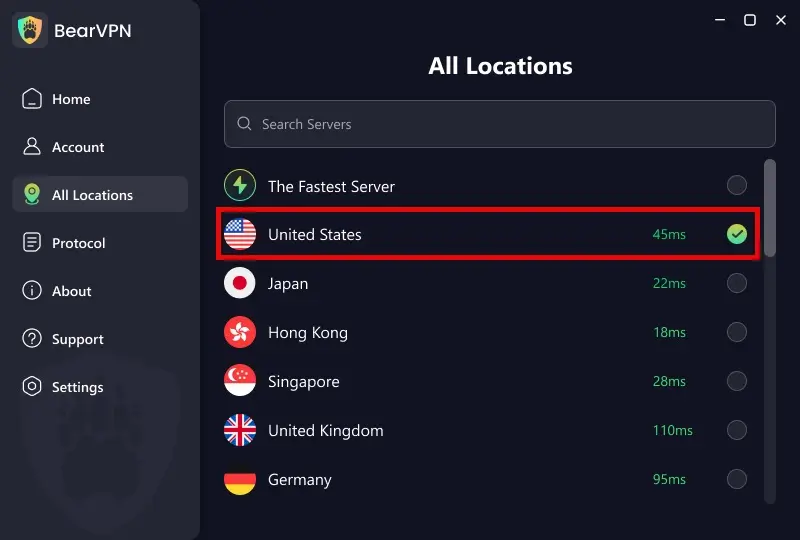
Step 4. Connect to One Available Region. Choose a BearVPN server in a region you want to compare, then keep that region during the session. Do not assume that inflation or a different currency automatically produces the lowest final price; confirm the amount and payment options on TikTok’s official checkout page.
Step 5. Navigate to the TikTok coins recharge page on your browser.
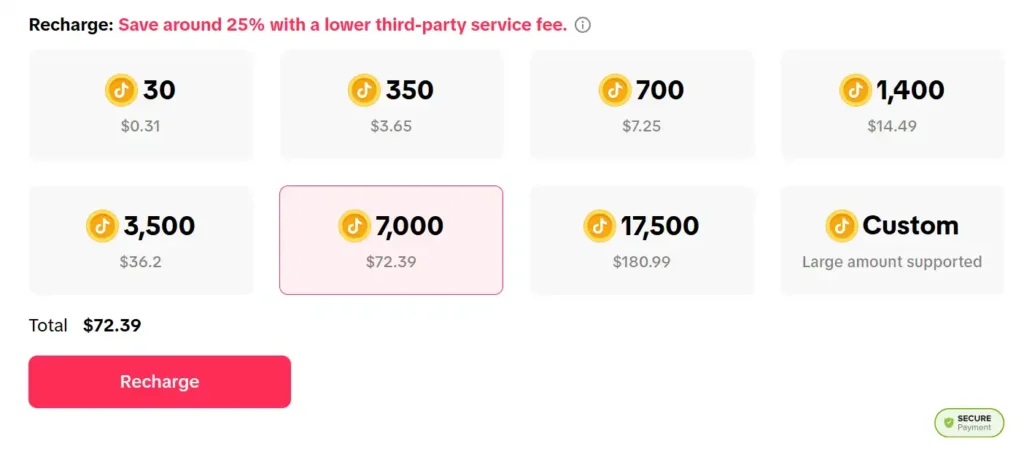
Step 6. Sign in to your TikTok account. You should now see the coin packages listed in the local currency of the VPN server you chose.
Step 7. Review and Complete the Purchase. Select the package, check the currency, taxes, fees, and final total, then use a payment method TikTok offers for your account. Processing and balance-update times can vary.
The Payment Region Still Matters. A card, wallet, billing address, account region, and VPN server can point to different countries. TikTok or its payment processor may reject that mismatch. Use accurate billing information and a payment method TikTok officially offers; a virtual or multi-currency card does not guarantee approval and should not be used to misrepresent your location.
Does BearVPN Really Work? – How We Test It for the Purchase
It is easy to claim that a VPN will save you money, but we wanted to prove it. Our test team ran live tests to see if BearVPN could actually deliver on the promise of cheaper TikTok coins.
The Setup:
We found volunteers in the United Kingdom and Mexico, where purchasing 7,000 coins costs $15+ than that in the US.
The Execution:
- First, our tester checked the price without connecting to BearVPN. You can see it below:
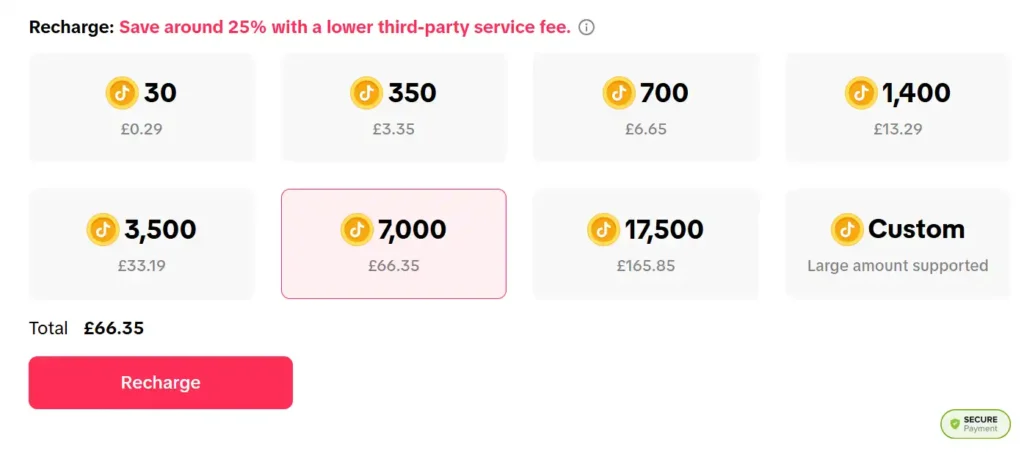
- Then we installed BearVPN and changed the location on TikTok to a USA server and an Argentina server accordingly.
- Last, we navigated to the TikTok coin recharge page.
The Result & Real-World Friction:
- The currency symbol immediately changed from GBP to USD, and the price dropped by nearly 25%.
- The Friction: When we first tried to check out on the Argentina server using a standard UK Visa card, TikTok threw a “Payment couldn’t be processed” error due to strict South American banking regulations.
- The Fix: We simply opened BearVPN, switched from Argentina to a USA server, and tried again. The US payment gateway accepted our international Visa card instantly via standard currency conversion. The 7,000 coins were credited to our account within seconds.
Follow-up: Our volunteers opened the TikTok app on their iPhones (without the VPN turned on). The coins purchased on the web had perfectly synced to their mobile accounts, ready to be gifted to creators.
This method of using a VPN to switch your digital location for better pricing is known as geo-arbitrage. It’s a completely legal and widely used strategy. In fact, many PC players use this exact same VPN routing technique to access different regional Epic Games stores to buy AAA games at massive discounts.
Will I Get Banned by Using a VPN for TikTok Cheap Coins?
If you use a VPN with caution, you are not likely to get banned from TikTok. But there are risks for VPN abuse.
Technically, using a VPN to bypass regional pricing contradicts the spirit of the Terms of Service for many digital storefronts. If TikTok detects that you are checking prices in several different countries in a short time, it may flag your account for suspicious activity. This usually results in a shadow ban, a blocked transaction, or a suspension of your coin-purchasing privileges.
Always keep connecting to a certain server and finish the coin purchase. If you want to check the price first, it’s better to use different devices.
How to Fix It if TikTok Detects Your VPN:
Some users reported that they were blocked and received an error message during the transaction. That’s because TikTok may have detected your VPN and stopped the process. Check the following tips to resolve it quickly.
- Stick to One Country: Choose one cheap location and stick to it. Do not bounce your IP address frequently.
- Clear Your Cache Again: Sometimes residual cache trips up the system. Log out, wipe your browser data entirely, reconnect your VPN, and log back in.
- Check Your Payment Method: Some regional TikTok portals require a payment method issued in that specific country. If your card is rejected, try using a PayPal account or an international credit card compatible with that region.
- Stop and Wait: If a transaction fails, do not spam the Buy button. Wait at least 24 hours before trying again to let the security flag cool down.
BearVPN can provide another available server route and encrypt the connection, but no VPN can guarantee that TikTok will accept a regional offer or avoid account and payment checks. If a transaction is rejected, stop retrying, verify the account and billing details, and use an option TikTok officially provides.
Can You Use Free VPNs to Recharge Cheap TikTok Coins?
Principally, free VPNs can help you change your current location to another. But the fact is, you have limited server options in free VPNs to complete the purchase process, and it’s risky for your TikTok account.
- Free VPNs provide a few server locations, which may not offer the one offering cheap coins.
- TikTok’s security system detects free VPNs with shared IPs, while a premium VPN is hardly exposed by using dedicated IP addresses.
- When using a free VPN, you may experience a connection drop during the purchase. This will cause a transaction failure or even an abnormality in your account.
A free VPN may be enough to test a location, but limited server choice, shared routes, data caps, or unstable sessions can make a price comparison less consistent. Check the provider’s ownership, privacy policy, official download source, and current limits. BearVPN is the stronger fit here when you need an available region and a continuous connection from price check to checkout.
- Keep one region throughout the price comparison.
- Encrypt your connection before opening TikTok checkout.
- TikTok still decides account and payment eligibility.
More Tips to Save Big on Recharging TikTok Coins
Using a VPN isn’t the only way to reduce your budget. If you are serious about getting a TikTok recharge coins cheap deal, you can also combine the VPN method with these supplementary tips.
1. Buy Coins on Sales Promotion
TikTok occasionally runs limited-time promotions, especially around major holidays like Black Friday, Christmas, or during massive platform events. During these promotional periods, you might get 10% to 30% extra coins for the same price. By following up on the TikTok official and enabling email notifications for TikTok, you can be notified when these sales drop.
2. Buy TikTok Coins with Bundles
Buying in bulk can always save you money, especially for virtual currency. The cost-per-coin is lower when you buy a package of 10000 coins compared to buying smaller 30 or 70-coin packages repeatedly. Buy the larger bundle upfront on the desktop web portal to lock in the lowest per-unit rate if you have large coin requirements.
Beware of Third-party Scams [Important]
As TikTok grows fast globally, a growing market of third-party platforms that act as authorised or secondary marketplaces for coins, including some so-called “free TikTok coin generators”. However, these websites are mostly phishing scams designed to steal your account credentials. By using such unauthorised charging platforms or generators, your TikTok account is exposed to malware. We always recommend using BearVPN and sticking to the TikTok official coin recharge page so that you can ensure your account security.
Why Does TikTok Recharge Coins Price Vary by Country?
TikTok coin price varies due to several global economic factors, mainly including:
- Purchasing Power Parity (PPP): Companies like TikTok adjust their prices based on the average income and cost of living in a specific region.
- Currency Exchange Rates: International currency values fluctuate daily against the US Dollar. TikTok must periodically adjust local pricing to ensure its profit margins remain stable.
- Local Digital Taxes: Many countries have implemented strict digital service taxes on virtual goods. TikTok passes the VAT cost directly onto the consumer, inflating the baseline price.
- App Store Fees vs. Web: Apple’s App Store and the Google Play Store notoriously take a 30% cut of all in-app purchases. If you buy coins inside the mobile app, TikTok raises the price to compensate. Web purchases bypass this fee entirely.
- Creator Fund Incentives: In countries where TikTok is heavily pushing its Creator Rewards Programs, they often lower the barrier to entry for virtual gifts to stimulate the local creator economy and encourage more tipping.
What Are TikTok Coins Used for?
You have successfully acquired your cheap coins, but what exactly do you do with them? TikTok coins are the lifeblood of the app’s internal economy.
- Virtual Gifting: The primary use for coins is purchasing virtual gifts like roses, galaxies, or sports cars during a creator’s live stream. When you send a gift, it appears as an animation on the screen, and the creator receives “Diamonds”, which they can later convert to real fiat money.
- Video Gifts: You can also send gifts in the comment section of regular, pre-recorded videos to show appreciation for high-quality content.
- TikTok Promote: If you are a creator yourself or a small business, you can use your coin balance to pay for TikTok’s built-in advertising tool that boosts your video to a wider audience to gain views, followers, and website clicks.
- Shoutouts & Premium Features: Some exclusive creator interactions or paid Q&A features require a coin balance to participate.
Navigating TikTok’s regional restrictions isn’t just about saving money on coins; it also affects content creation. Many popular editing tools associated with TikTok face similar geo-blocks. If you’re a creator, you might also need a reliable VPN to unblock CapCut to access the best trending templates and export videos directly to your feed.
What Payment Methods are Supported by TikTok?
TikTok supports a wide variety of payment methods to ensure global accessibility, mainly including international credit cards, PayPal, and some local payment methods. The exact options available to you will depend on your physical location or your VPN server location.
- Credit and Debit Cards: Visa, Mastercard, American Express, and Discover.
- Digital Wallets: PayPal, Apple Pay on iOS devices, and Google Pay on Android devices.
- Buy Now, Pay Later: Services like Klarna and Affirm are increasingly available in the US and other countries for larger coin purchases.
- Local Payment Solutions: Depending on the country, TikTok supports local processors such as Pix in Brazil, OXXO in Mexico, or local bank transfers in parts of Asia.
Pro Tip: If you are using a VPN to buy from another country, PayPal is recommended as the best payment method, as it bypasses strict billing address checks associated with direct credit card inputs.
Conclusion
Stop guessing which TikTok coin package costs less. Start with TikTok’s official web recharge page, compare the final checkout total, and choose the option that works for your account and payment method—not simply the lowest number in a regional price table.
BearVPN lets you check how TikTok’s official recharge page appears from another available server region while protecting the connection. Keep one region during the comparison, use accurate billing information, and avoid third-party coin generators. TikTok still decides which offers and payment methods your account can use.
Ready to check TikTok’s official web price from another available region?
FAQs About TikTok Recharge Coins Cheap
The value of 29,999 TikTok coins varies depending on where you buy them. If you buy them in the US, it costs about $311.99. But if you buy in Singapore, it costs about $345.58 (according to the latest exchange rate).
Based on the latest data of 2026, the cheapest countries to buy TikTok coins are the United States, Argentina, and Brazil. In these regions, you can get 30 coins for as low as $0.31 USD, or 7,000 coins for around $72.
There are some prerequisites to get more TikTok coins for cheap. Firstly, you should use a browser to buy rather than the mobile app. Secondly, use a VPN like BearVPN to change your IP address to the US or Argentina with lower prices. Finally, buy larger bulk bundles to lower the cost-per-coin based on your actual needs.
TikTok’s official referral programs allow you to get coins for free. You can participate in them to complete specific in-app tasks, or join in special TikTok live events where creators do treasure box drops that reward viewers with free coins. Never trust any third-party free coin generator websites.
You can buy TikTok coins directly within the TikTok mobile app via Apple Pay or Google Pay. You can also go to the official TikTok desktop website for the purchase, which saves around 25% with a lower third-party service fee. Alternatively, some verified third-party gift card resellers provide the service in different countries.
Don’t panic! TikTok coins are tied to your account, not your device. If you don’t see them immediately on your mobile app, simply force-close the TikTok app and reopen it. Once the app reconnects to the servers, your updated coin balance will sync automatically.



![How to Change YouTube TV Location [Still Works in 2026]](/_next/image/?url=https%3A%2F%2Fcms.bearvpn.com%2Fwp-content%2Fuploads%2F2026%2F06%2Fhow-to-change-location-youtube-tv.webp&w=640&q=75)