


Telegram remains blocked or unreliable on many Pakistani networks in 2026, although the result can vary by ISP, mobile network, and location. First compare Wi-Fi with mobile data and rule out a wider Telegram outage. If the app works on another network or only through a VPN, network-level filtering is likely. BearVPN can encrypt your connection, mask your public IP, and provide obfuscated routing options, but no VPN can guarantee access on every ISP or during a wider internet shutdown.
If Telegram works on another network but not your current one, connect BearVPN to encrypt the route and test obfuscation before reopening the app. A VPN cannot fix a Telegram outage or wider internet shutdown.

When Was Telegram Blocked in Pakistan?
Telegram access in Pakistan has not followed one uninterrupted timeline. Restrictions appeared in 2017, were later lifted, and returned in late 2023.
The distinction matters: the present restriction should not be described as one continuous ban dating from 2017. The strongest measurement-based evidence indicates that the current round of interference began in December 2023.
Why Is Telegram Blocked in Pakistan?
There is no single recent PTA notice that fully explains the current Telegram restriction. Available reporting and network evidence point to a broader conflict over platform regulation, content removal, national-security concerns, and access to user information.
Content and national-security concerns
Pakistani authorities have repeatedly raised concerns about militant propaganda, illegal content, and the use of social platforms by banned organizations. Telegram’s large public channels can distribute material quickly, making the platform part of the wider debate over online content enforcement.
Disagreement over platform compliance
Telegram has historically resisted politically motivated censorship requests, while Pakistan requires online platforms to respond to local legal and content-removal demands. However, the public evidence does not establish that Telegram was placed on a permanent blocklist or that it was specifically asked to create a technical “backdoor.”
Encryption and data-access concerns
Telegram encrypts its traffic, but it is important to describe that protection accurately. Regular Telegram Cloud Chats use client-server encryption and are stored in Telegram’s cloud. End-to-end encryption is used for Secret Chats and supported voice or video calls. Therefore, the block should not be explained simply by saying that every Telegram conversation is end-to-end encrypted.
In practical terms, Telegram may fail because an ISP interferes with the website domain, Telegram connection endpoints, or encrypted connections used by the app. OONI’s measurements pointed to TLS interference, but the exact implementation can differ between networks.
Telegram Not Working in Pakistan? Try These Fixes
If Telegram stays on “Connecting,” do not immediately assume the app has been banned on your specific connection. First switch between Wi-Fi and mobile data, restart Telegram, and check whether other users are reporting an outage. If Telegram works on one network but not another, ISP-level filtering is a likely explanation.
Changing DNS alone usually will not help when an ISP is interfering with Telegram’s connection endpoints or TLS traffic. In that situation, the two practical options are a VPN or Telegram’s built-in proxy support.
Method 1: Connect Through a VPN
A VPN encrypts the connection between your device and the VPN server and replaces your public IP address with the server’s IP. If your current ISP is interfering with Telegram, routing the connection through a different server may restore access.
BearVPN includes obfuscated connection modes designed for restrictive networks. Obfuscation can make VPN traffic harder for a network filter to identify, but no VPN can guarantee access on every Pakistani ISP or during a wider internet shutdown.
Why use BearVPN for Telegram:
- Strong obfuscation: Test an available obfuscated mode, including SCProxy where supported, if an ordinary VPN connection is disrupted.
- IP and DNS leak protection: Helps prevent services from seeing your normal public IP while BearVPN is connected.
- Kill Switch: Can stop traffic if the VPN connection drops unexpectedly.
- Split Tunneling: On supported platforms, route Telegram through BearVPN while selected apps use the regular connection.
How to Set Up BearVPN for Telegram:
Use the steps below to test whether a different encrypted route restores Telegram on your current network. Results depend on the ISP, server route, device, network congestion, and any new filtering measures.
Step 1: Install BearVPN
Download BearVPN from the official website and install the version for your device. The mobile apps are available without registration; Windows and macOS availability depends on the applicable plan. Use the download button below to open the correct option for your current system.
Step 2: Start with Smart Server Selection
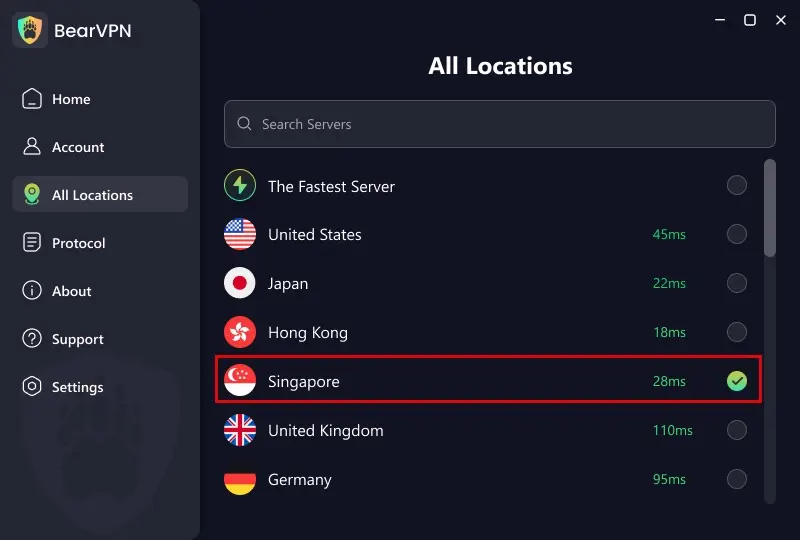
Open the server list and start with Smart Recommendations. The geographically closest server is not always the fastest because international routing differs between Pakistani networks. If Telegram still does not connect, test two or three nearby regional locations and keep the one that provides the most stable connection.
Step 3: Try SCProxy if the Connection Is Blocked
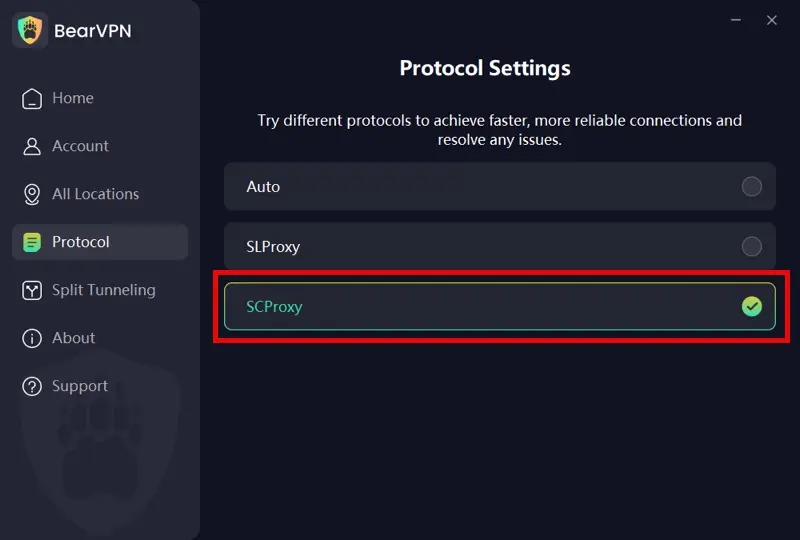
Open Settings > Protocols. Start with the recommended connection mode. If the VPN connects but Telegram still fails, or if the VPN itself cannot establish a stable connection, switch to SCProxy and reconnect.
SCProxy adds obfuscation intended for restrictive networks. It may help when a network interferes with recognizable VPN traffic, but it does not make a connection completely invisible and cannot guarantee that every ISP filter will be bypassed.
Step 4: Route Telegram Separately with Split Tunneling (Optional)
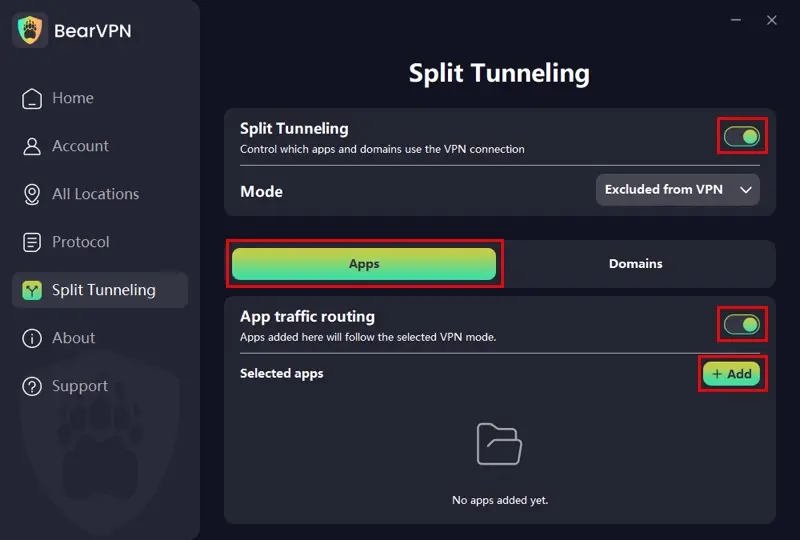
On supported platforms, open Settings > Split Tunneling, enable App Mode, and select Telegram. This lets Telegram use BearVPN while selected local apps can continue using the regular connection. Feature availability can vary by platform and app version.
Step 5: Connect and Test Telegram
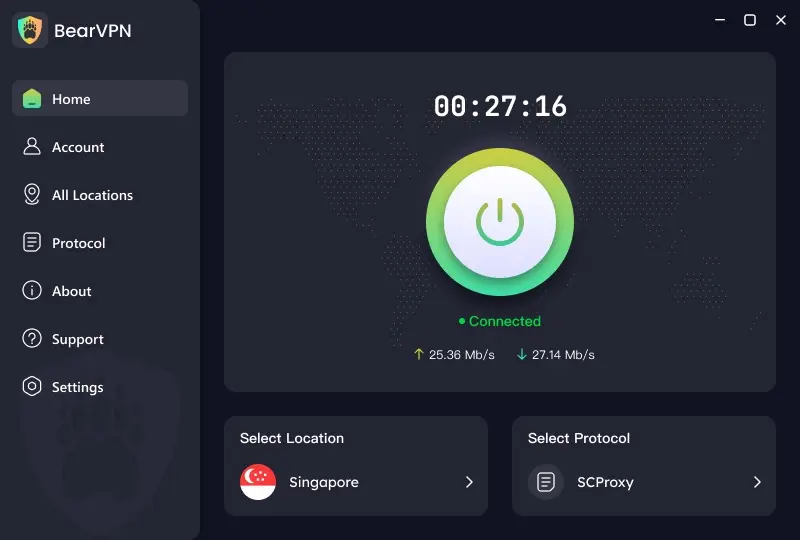
Connect to the selected server before reopening Telegram. Test a text message first, followed by media downloads and a voice call if needed. If Telegram still stays on “Connecting,” change the server or protocol, then restart the Telegram app.
A successful VPN connection does not guarantee that every Telegram feature will work. Results can vary with the ISP, server route, network congestion, and any new filtering measures.
- Switch between Wi-Fi and mobile data to see whether only one network is affected.
- Confirm that BearVPN itself shows “Connected.”
- Change the VPN server rather than repeatedly reconnecting to the same one.
- Test SCProxy if another protocol cannot establish a stable connection.
- Update Telegram and BearVPN, then restart both apps.
- Temporarily disable any proxy already configured inside Telegram so it does not conflict with the VPN test.
Method 2: Use Telegram’s Built-In Proxy Settings
Telegram supports SOCKS5 and MTProto proxy connections inside the app. A proxy can be useful if you only need to route Telegram rather than the rest of your device.
- Open Telegram > Settings.
- Select Data and Storage.
- Open Proxy Settings.
- Choose Add Proxy.
- Select the proxy type and enter the server, port, and credentials supplied by the proxy operator.
- Enable the proxy and check the connection indicator.
Only use a proxy provider you trust. A Telegram proxy does not encrypt or protect traffic from your other apps, and the proxy operator can see connection metadata such as your IP address and connection time. Public proxy addresses can also become overloaded or stop working without warning.
If you cannot open Telegram far enough to configure its proxy settings, or if you want to protect more than Telegram’s traffic, test BearVPN first. A VPN still cannot guarantee access during every restriction or outage.
- Encrypt supported traffic beyond Telegram.
- Mask the public IP seen by protected apps and sites.
- Test obfuscation when standard VPN traffic is disrupted.
Is It Legal to Use a VPN for Telegram in Pakistan?
Pakistan does not treat every use of VPN technology as automatically illegal. The PTA operates an IP and VPN registration system and has specifically promoted registration for organizations, IT companies, freelancers, banks, and other users that need uninterrupted business connectivity.
That does not mean every individual use case has a simple legal answer. Pakistan’s online-content rules and the Prevention of Electronic Crimes Act can apply to what a person accesses, publishes, or shares, regardless of whether a VPN is involved. Regulations and enforcement practices can also change.
As of September 2026:
- Do not assume that a VPN makes otherwise illegal activity lawful.
- Businesses and freelancers who depend on VPN access should review the PTA’s current registration requirements.
- Individual users should check the latest PTA guidance or seek local legal advice if their use involves regulated, sensitive, or restricted content.
- BearVPN improves connection privacy, but it does not make a user anonymous to Telegram, prevent account identification after login, or provide immunity from local law.
This section provides general information, not legal advice.
Diagnose Why Telegram Is Not Working in Pakistan
A network restriction is common, but it is not the only possible cause. Use these checks to identify the problem before changing settings.
Conclusion
Telegram remains blocked or unreliable on many Pakistani networks in 2026, but the exact behavior varies by ISP and location. If Telegram is not working, first compare Wi-Fi and mobile data and rule out an app-wide outage. If it works only after changing networks, ISP-level filtering is the likely cause.
A trusted Telegram proxy can route the app’s own connection. BearVPN is the more complete option when you want to encrypt the device’s internet connection, mask its public IP, and test obfuscated routing on a restrictive network. Neither method guarantees access, and users should follow Pakistan’s current laws and Telegram’s terms.
FAQs About Telegram in Pakistan
Telegram remains blocked or unreliable on many Pakistani networks. OONI’s latest detailed finding identified widespread interference beginning in December 2023, although the type of blocking varied between tested ISPs. We found no later official announcement confirming a nationwide unblock. Some users may therefore connect normally while others cannot use Telegram Web or the mobile app.
It may work on some connections, but access is inconsistent. Test both Wi-Fi and mobile data. If Telegram works on one connection but not the other, the problem is probably specific to that network. If it only works after connecting to a VPN or proxy, network-level filtering is the likely cause.
Possible causes include ISP filtering, a temporary Telegram outage, poor international routing, an outdated app, a failed proxy, or an account-specific problem. If both the website and app fail on one network but work on another, filtering is more likely than an ordinary Telegram outage.
Possibly, but free VPNs often limit servers, speed, data, or protocol choices. Some may also have unclear privacy practices. A paid VPN with obfuscation can provide more connection options on restrictive networks, but no provider can guarantee that Telegram will work on every ISP.
A VPN does not become part of your Telegram account or decrypt your Telegram message content during normal use. BearVPN carries encrypted network traffic between your device and its VPN server, while Telegram remains responsible for your chats and account data. A VPN cannot control what Telegram stores, hide activity linked to your logged-in account, or make you completely anonymous. Review BearVPN’s current privacy policy for details about how the VPN service handles connection data.
Open Settings > Data and Storage > Proxy Settings > Add Proxy, then enter the SOCKS5 or MTProto details supplied by a trusted proxy operator. A Telegram proxy affects Telegram only, not the rest of the device. Public proxies may log connection metadata, become overloaded, or disappear without notice.
VPN technology is not automatically illegal, and the PTA maintains a registration process for organizations and professional users. However, laws still apply to the content a person accesses or shares. Requirements can change, so check current PTA guidance and seek local legal advice for sensitive use cases.


![How to Change YouTube TV Location [Still Works in 2026]](/_next/image/?url=https%3A%2F%2Fcms.bearvpn.com%2Fwp-content%2Fuploads%2F2026%2F06%2Fhow-to-change-location-youtube-tv.webp&w=640&q=75)



