Unblocked games are browser-based games that may open without installation, but no domain works on every school network. Start with the established platforms below, use community-run hubs cautiously, and never install an unknown file just to launch a game. If a permitted site is blocked only by the current network, BearVPN may help on an authorized personal phone or tablet—not by removing management from a school device.
- Encrypt the connection on public or shared Wi-Fi.
- Mask your public IP before opening a browser game.
- Try the mobile app without an account or credit card.
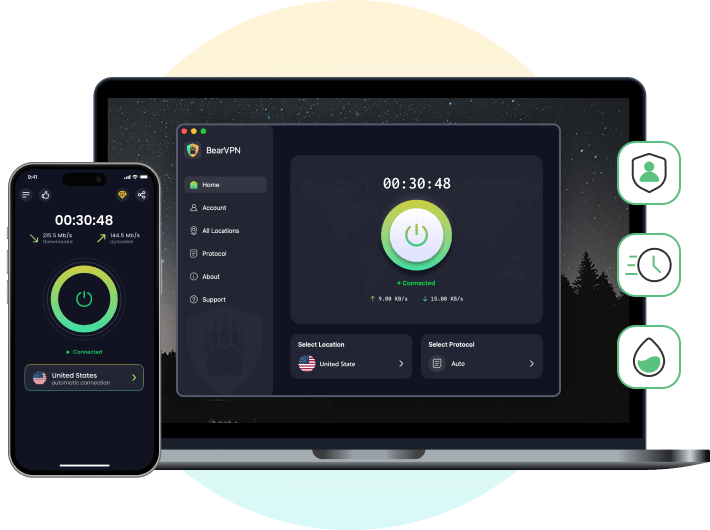
Use BearVPN only on an authorized personal device where VPN and game access are permitted. It cannot remove Chromebook management or override school policy.
Why Are Games Blocked at School?
Schools can block gaming websites at several levels: the Wi-Fi network, DNS resolver, web filter, browser policy, or the management settings installed on a school-issued device. Common reasons include:
- Reducing distractions during lessons
- Conserving bandwidth for schoolwork and video classes
- Limiting access to ads, chat features, violent content, or unknown downloads
- Complying with the school’s security and acceptable-use policies
A game may therefore work on a personal phone but remain blocked on a managed Chromebook, even when both devices use the same Wi-Fi. Schools can also block an entire domain, a specific game page, or a category such as “Games.”
This is why no honest list can guarantee that a website is unblocked everywhere. Treat the entries below as browser-game options to try—not permanent loopholes.
25+ Unblocked Games and Game Websites to Try in 2026
The following websites were publicly reachable when this guide was updated in September 2026, but that does not mean every game or domain will open on your school network. Start with established educational and browser-game platforms. Use extra caution with unofficial mirrors, Google Sites collections, and domains that frequently change ownership.
Before opening a site, check these four things:
- Browser play: Prefer games that run without an installer.
- Download requests: Leave if a site asks for an EXE, APK, browser extension, or “game launcher” that you did not expect.
- Advertising: Do not click fake Play, Update, Allow, or Download buttons.
- Account access: Never enter school, Google Workspace, payment, or personal credentials on an unfamiliar game hub.
1. Best Unblocked Puzzle, Math & Educational Games
If you want to play games without raising any red flags during study hall, start with established educational and puzzle platforms, although your school may still block individual domains.
2. Best Unblocked Action, Multiplayer & Sports Games
Looking for competitive, adrenaline-pumping gameplay? These browser games offer multiplayer, action, and sports options, but they may use more bandwidth and are more likely to be filtered directly in your browser.
3. Best Unblocked Arcade, Runner & Casual Games
These casual and endless-runner games can work directly in a modern browser, although browser-based does not mean filter-proof or automatically safe.
4. Community-Run Game Hubs and Google Sites: Use Extra Caution
If you are looking for massive collections, these community-run directories collect many browser games, but domains, owners, ads, and outbound links can change. A sites.google.com address does not mean Google has verified the games, advertisements, outbound links, or page owner.
What to Do If a Game Website Is Blocked
First, confirm that gaming is permitted and that the website is not simply offline. If you are using a school-issued Chromebook, do not try to remove management settings or install unapproved software. A VPN cannot remove controls applied directly by the school administrator.
On an authorized personal phone or tablet, BearVPN can encrypt the connection, mask the device’s public IP address, and route traffic through another server. This may help when a permitted website is unavailable because of the current network or region, but a school can still block VPN connections and results are not guaranteed.
On an authorized personal phone or tablet, install BearVPN from its official app-store listing and connect before opening a permitted browser-game site. The mobile app can be tried without creating an account; ads, available routes, features, and plan conditions may vary. This does not override school rules, network policy, or controls installed on a managed device.
Step 1: Download the BearVPN App (No Sign-up Required)
Use your personal phone instead of fighting controls on a managed Chromebook. Install BearVPN, open the app, and connect before launching the game site.
Step 2: Choose a Compatible Protocol
Start with Auto. If gaming performance is the priority, try Y2Proxy where available. If the current network interferes with recognizable VPN traffic and VPN use is permitted, SCProxy may help obfuscate the connection. No protocol guarantees lower latency, uninterrupted play, or access through a school firewall.
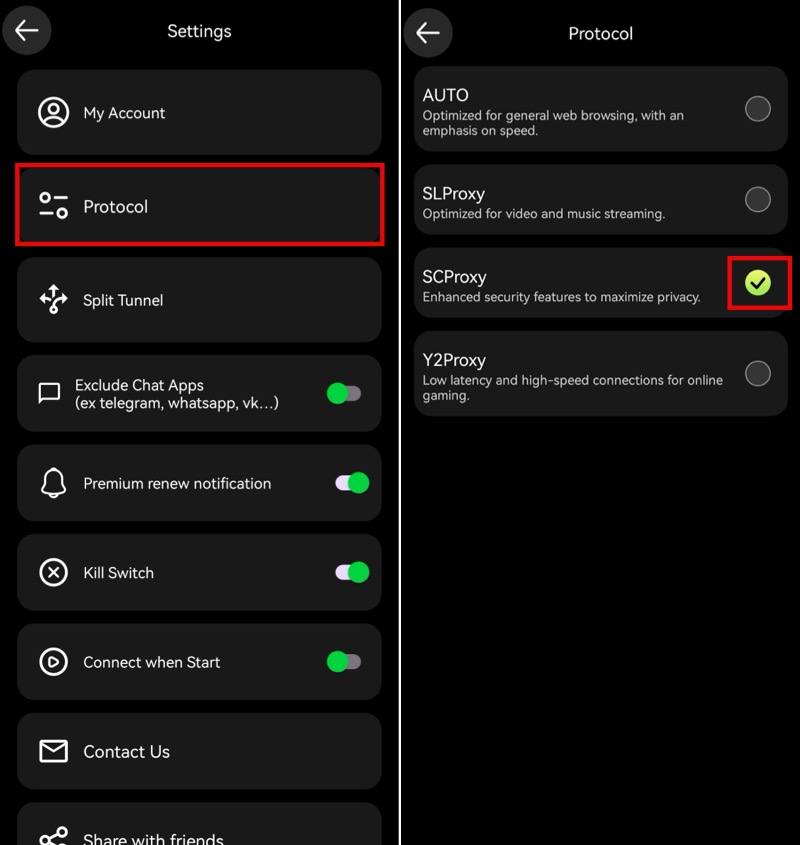
- Choose Y2Proxy (Best for Gaming): Designed specifically for “low latency and high-speed connections,” this protocol is your go-to for smooth, buffer-free gaming. It is heavily optimized for lightweight browser-based games (HTML5, WebGL, JS), making it ideal for playing Slope, Run 3, or 1v1.LOL without lag.
- Choose SCProxy (Best for Strict Firewalls): If your school’s network uses deep packet inspection (DPI) to block standard VPNs, switch to this stealth protocol. It deploys enhanced security features to maximize privacy, heavily obfuscating your traffic to instantly punch through aggressive firewalls.
Step 3: Connect Automatically & Start Playing
Return to the BearVPN dashboard, tap Connect, and wait until the app shows an active connection before opening the game. Automatic routing may select an available route, but it does not guarantee the fastest server or that the website will open.
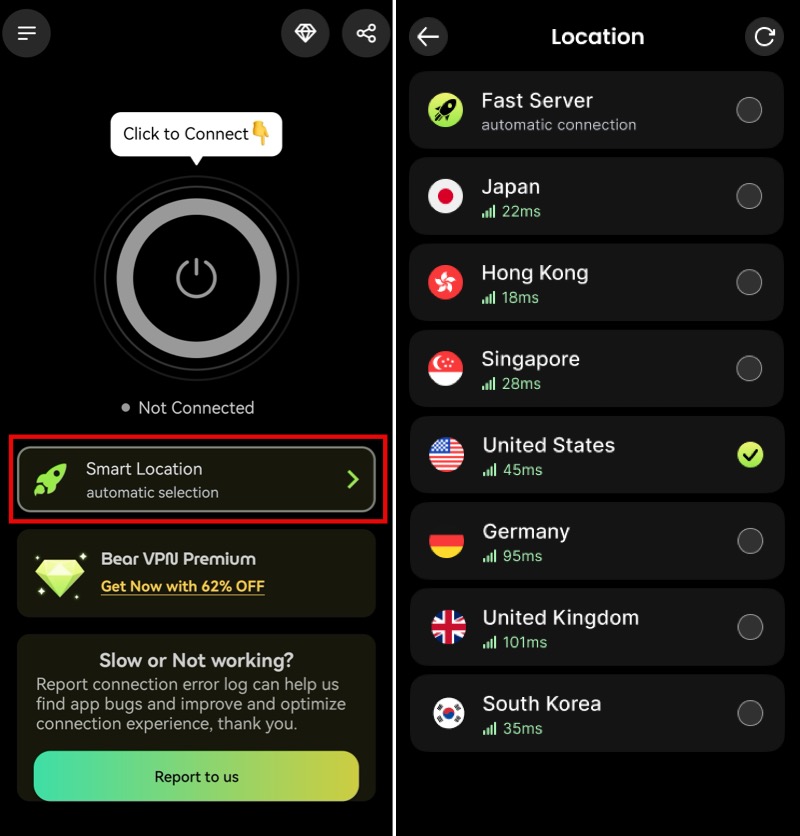
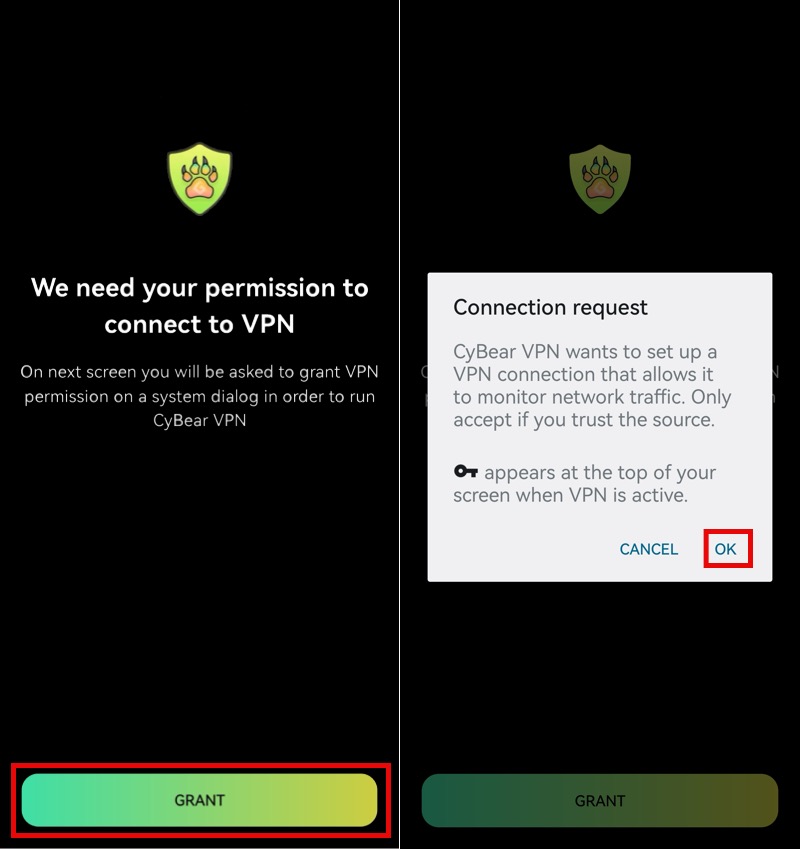
If prompted by your system with a “Connection request” dialog, tap OK to authorize the secure tunnel.)
Because BearVPN’s Smart Routing automatically picks the best and fastest server for you, there is no need to hunt for locations. Once your connection is protected and rerouted, you can:
- Play on your phone: Open Chrome or Safari and visit any unblocked game site listed above.
Step 4: Use Private Browsing for Local Privacy and Keep Kill Switch Active
A Private or Incognito window limits some history and session data retained on the device; it does not hide activity from the school network or bypass a filter. Avoid signing in to school-linked accounts during personal browsing. Kill Switch can block traffic if the VPN drops, helping prevent the normal public IP from appearing during the interruption, but it does not make activity invisible or override administrator monitoring.
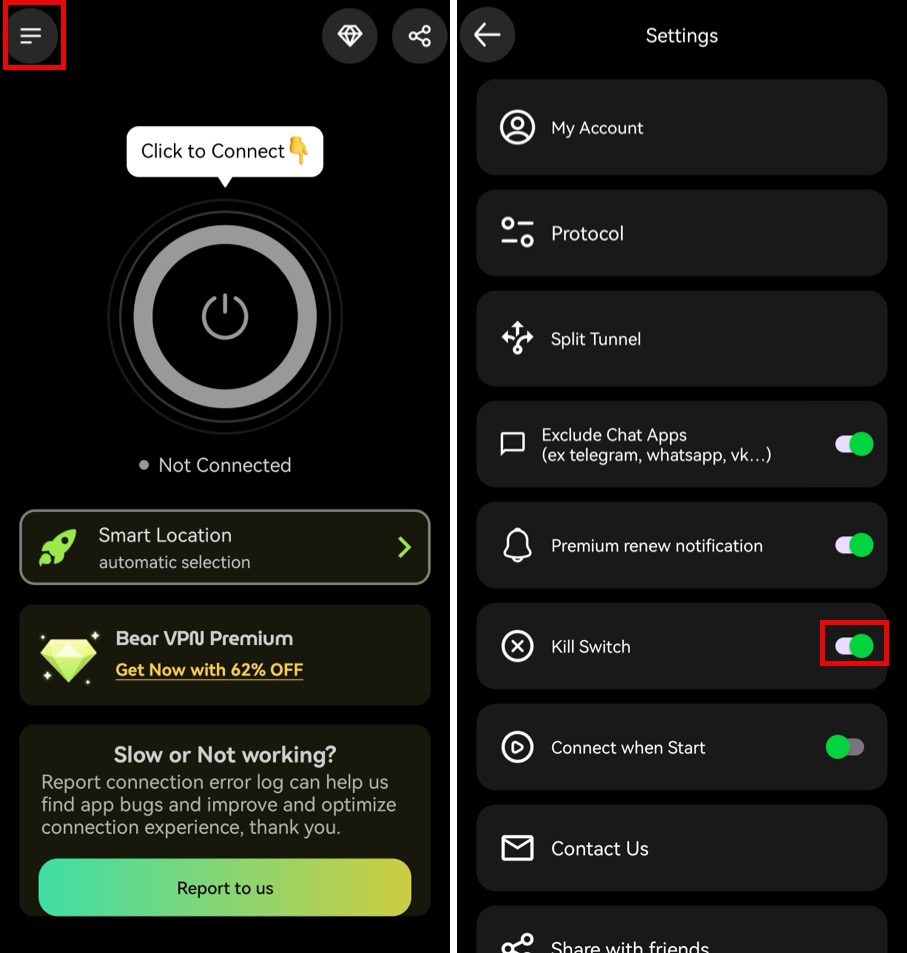
- Start with Auto or a nearby available route.
- Try SCProxy only if the network interferes with VPN traffic.
- Keep Kill Switch active if the connection drops.
BearVPN cannot remove device management, override school rules, guarantee access, or promise lower latency on every network.
Are Unblocked Game Websites Safe?
Some are safer than others. Established educational and browser-game platforms are generally easier to evaluate, while unofficial mirrors and community-run hubs can change domains, owners, ads, and outbound links without warning.
Before playing, check for these warning signs:
- A Play button downloads an EXE, APK, ZIP file, or browser extension
- The site asks you to allow notifications before the game loads
- Several fake Play or Download buttons appear around the game
- The page redirects repeatedly or opens unrelated tabs
- The site asks for school-account, payment, or unnecessary personal information
- The browser displays a certificate, deceptive-site, or dangerous-download warning
Closing an ad does not make an unfamiliar website trustworthy. Keep the browser updated, avoid unexpected downloads, and leave immediately if the domain changes or the game asks for permissions it does not need.
Is It Allowed at School?
Playing a browser game or using a VPN may violate a school’s acceptable-use policy even if it is legal in your location. Use personal devices only where permitted, play during authorized breaks, and do not attempt to disable Chromebook management, monitoring software, or network security controls.
FAQs on Unblocked Game Websites
Unblocked games are browser games that remain accessible on a network where other gaming sites are restricted. Most use HTML5, JavaScript, or WebGL and can run without an installation. “Unblocked” describes current availability, not guaranteed safety or permanent access. A school can block the same game later or apply different rules to its Wi-Fi and managed devices.
Established options to check include Coolmath Games, Hooda Math, Scratch, Google Doodles, ABCya, Funbrain, CrazyGames, and Poki. Availability varies by school, so none can be guaranteed to work. Educational platforms are a sensible starting point, while unofficial mirrors and community-run hubs require more caution.
Your school may block the domain, game category, embedded game server, ads, scripts, or multiplayer connection. A managed Chromebook can also apply device-level policies independently of the Wi-Fi network. That is why a site may load on a personal phone but remain unavailable on a school device.
Not automatically. Google Sites is a publishing platform, and pages can be created by individual users. A sites.google.com address does not mean Google has verified the games, ads, external links, or site owner. Avoid pages that request downloads, extensions, notification permissions, credentials, or unnecessary personal information.
No. Incognito mode mainly limits the browsing information retained on the device after the window closes. It does not change the network, bypass URL filtering, or hide traffic from an administrator. Schools can also disable Incognito mode on managed Chrome browsers and Chromebooks.
A VPN may help on an authorized personal device when a permitted site is restricted by the current network or region. However, schools can block VPN connections, and a VPN cannot remove management policies installed on a school-issued Chromebook. Check the school’s rules before connecting.
BearVPN’s Android and iOS apps can be tried without creating an account. The free mobile experience includes ads and one connection option. A paid plan unlocks additional server selection. Availability and performance still depend on the device, network, server, and website.
Final Thoughts
The best unblocked game websites are the ones that run in a browser, do not require suspicious downloads, and are permitted on the device and network you are using. Start with established educational or browser-game platforms, and treat changing Google Sites collections and unofficial mirrors with extra caution.
If you are playing on an authorized personal phone or tablet, BearVPN can encrypt your connection and mask your public IP address on shared Wi-Fi. It cannot remove school-device management or guarantee access to every game, but you can try the mobile app without creating an account and see whether it works on your current network.
Using your own phone or tablet on an authorized network? Connect BearVPN before opening the game and see whether the current network restriction disappears.


![How to Change YouTube TV Location [Still Works in 2026]](/_next/image/?url=https%3A%2F%2Fcms.bearvpn.com%2Fwp-content%2Fuploads%2F2026%2F06%2Fhow-to-change-location-youtube-tv.webp&w=640&q=75)