


Monkey makes random video chat fast and easy, but it also puts you face-to-face with strangers you know almost nothing about. The platform now says it is strictly for adults and uses AI moderation, reporting, and blocking tools to reduce harmful behavior.
Those protections improve the experience, but they cannot guarantee that every live chat is safe or stop another user from recording, lying, scamming, or showing inappropriate content.
This guide examines whether Monkey is safe for kids and adults, what data the Android app may collect, and how BearVPN can protect the network side of your chats.
Related article: Is OmeTV safe?
Quick Answer: Is Monkey App Safe?
Monkey is not safe for children or teenagers. The platform currently says it is strictly for users aged 18 and older, and child-safety organizations warn that random matching can still expose users to adult content and unpredictable strangers.
Adults can reduce the risks, but Monkey should not be treated as completely safe. AI moderation and reporting tools cannot prevent every explicit video, scam, fake identity, threatening message, or unauthorized recording before it happens.
BearVPN masks your IP address and encrypts your connection, especially on public Wi-Fi. However, it cannot control what another person shows, says, saves, or records during a chat.
What Is Monkey App and Is It Still Available?
Monkey is a social discovery platform that connects users through random video chat, text messages, group video conversations, and profile-based matching.
The service originally became popular for short, fast video matches with strangers. Its current Android listing highlights several broader features:
- Video Chat for face-to-face conversations.
- Squad Chat for group video calls.
- Text Chat and direct messages.
- Cards for discovering and adding users.
- Personalized profiles with moods and profile music.
Monkey is still active in 2026. The official Android app is available through Google Play, where it has more than 10 million downloads and continues to receive updates.
The official Monkey website also says that Android users can use the app, while iPhone, iPad, and desktop users can access Monkey through its web version.
Do not download Monkey from an unknown APK website. The official Android app is already available through Google Play, so there is no reason to trust a modified or repackaged installer.
One detail can be confusing: Google Play currently gives the Android app a Mature 17+ content rating, while Monkey’s own Safety Center says the platform is strictly for users aged 18 and older. The store rating describes the app’s content classification; it does not replace Monkey’s own minimum-age policy.
How Does Monkey App Work?
Monkey is built around fast social discovery. Users create a profile and then meet or message other people through several features:
- Video Chat: Start face-to-face conversations with randomly matched users.
- Squad Chat: Join group video conversations with friends or other users.
- Text Chat: Send direct messages without starting a video call.
- Cards: Browse profiles and add people you want to connect with.
- Personalized Profiles: Add a mood, profile music, and other details.
The Android app is free to install but includes in-app purchases. Some matching or profile features may therefore require coins or a paid upgrade.
Keep in mind that a profile does not prove someone’s real age, identity, location, or intentions. Treat every new match as a stranger, even when their photos and profile details appear convincing.
Is Monkey App Safe for Kids, Teens, and Adults?
Monkey has added moderation and reporting tools, but random live video chat still carries risks that cannot be removed completely.
Is Monkey Safe for Kids and Teens?
No. Monkey currently says it is strictly for users aged 18 and older.
The company says its AI systems look for suspected underage accounts and policy violations. However, an age rule and automated monitoring cannot guarantee that every participant is an adult or that harmful content will be blocked before it appears.
Children and teenagers may be exposed to:
- Sexual or otherwise inappropriate live content.
- Adults pretending to be younger.
- Requests for personal photos or private video calls.
- Grooming, manipulation, or financial exploitation.
- Pressure to move the conversation to Snapchat, Instagram, or another app.
- Secret screenshots or screen recordings.
For parents, the safest approach is not simply to supervise Monkey use. Children and teenagers should avoid the platform until they meet its minimum age requirement.
Is Monkey Safe for Adults?
Adults can use Monkey more safely, but they should still treat every match as an unknown person.
Monkey says it uses real-time AI video monitoring, text analysis, account restrictions, reporting, and blocking. These tools may reduce harmful behavior, but they cannot prevent the first exposure to every explicit video, scam, threat, or deceptive profile.
Adult users should assume that:
- Profile information may be false.
- Another user can screenshot or record the conversation.
- Links sent through chat may lead to phishing or malware.
- A stranger may try to move the conversation to another platform.
- Personal details visible in your face, room, school, workplace, or background may reveal your identity.
Do not show documents, payment information, private messages, your home address, or anything you would not want saved and shared.
Monkey Safety Features vs. Remaining Risks
Monkey’s safety tools are useful, especially when users report violations quickly. But no moderation system can make random stranger video chat completely predictable.
What Data Does Monkey App Collect?
Monkey’s Google Play Data safety section says the Android app may collect location, personal information, and six other categories of data. It also says the app may share app information, performance data, and device or other identifiers with third parties.
Google Play states that this information is supplied by the developer and may vary according to how you use the app, your region, and your age. It should not be treated as an independent privacy audit.
These disclosures do not prove that another Monkey user can directly see your IP address or exact location. However, they are valid reasons to limit app permissions, avoid sharing personal information, and protect your network connection.
How to Stay Safer on Monkey
No tool can make random video chat completely risk-free. Use the following steps together to protect your network, account, identity, and personal information.
1. Protect Your Monkey Connection with BearVPN
BearVPN protects the network side of your Monkey chats. It replaces the IP address visible to online services and encrypts your traffic, which is especially useful when you use Monkey on shared Wi-Fi at a hotel, airport, café, dorm, or school.
The Kill Switch can also block unprotected internet traffic if the VPN connection drops unexpectedly.
However, BearVPN cannot hide information you reveal through your camera, microphone, profile, or messages. It also cannot prevent another user from taking screenshots or recording the conversation.
How to Use BearVPN with Monkey
- Download BearVPN from the official website, Google Play, or the Apple App Store.
- Open BearVPN and connect to a nearby server for better video speed.
- Enable the Kill Switch when it is available on your device.
- Open the official Monkey Android app or the official Monkey website.
- Keep BearVPN connected throughout the video chat.
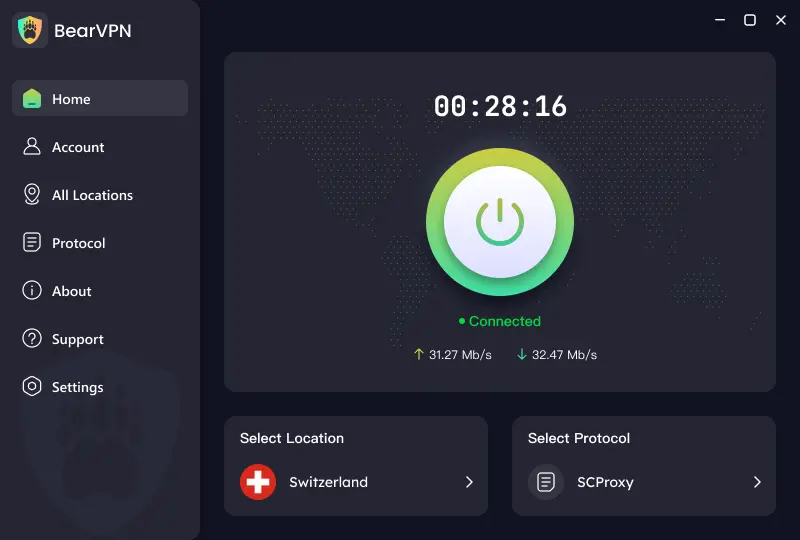
Why BearVPN Is a Strong Choice for Monkey:
- Masks your IP: Replaces your real IP address and reduces IP-based location exposure to Monkey and other online services.
- Privacy-first infrastructure: Bare-metal and RAM-only servers, backed by a no-logs policy, reduce stored connection data.
- Leak protection: AES-256 encryption, DNS leak protection, and the Kill Switch keep your traffic protected if the VPN connection drops.
- Smoother video chats: Smart recommendations select a suitable server from 2,000+ servers across 50+ locations.
- Reliable on shared networks: Strong obfuscation can improve VPN connectivity on restrictive school, workplace, hotel, or public Wi-Fi.
- Flexible routing: Split tunneling lets you protect Monkey without routing every other app through the VPN.
For most Monkey video chats, use BearVPN’s Smart server recommendation or connect to a nearby location, then enable the Kill Switch and keep the same server throughout the conversation.
Connect BearVPN before opening Monkey to mask your IP, encrypt your video-chat traffic, and protect your connection on shared Wi-Fi.

Steps to protect your privacy with BearVPN:
Step 1. Download and install BearVPN on your Windows, Mac, Android, or iOS device.
Step 2. Launch BearVPN and choose a server to connect to.
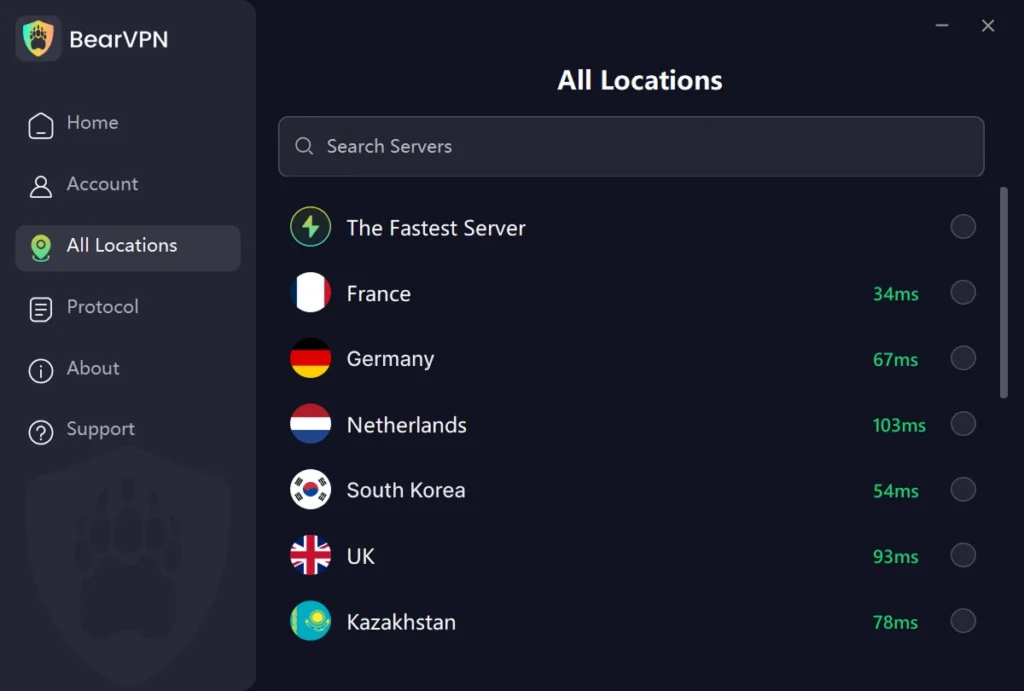
Step 3. Once connected, go to your browser and clear the browsing history. Then open the Monkey web version for new chats.
If you use Monkey APK on Android phones, it’s better to clear the app cache before starting new matches.
2. Do Not Open Links from Random Matches
Treat every link sent by a new Monkey match as untrusted.
Scammers may promise private photos, gifts, account upgrades, or a “better” place to continue chatting. The link may instead lead to:
- A fake Snapchat, Instagram, or Monkey login page.
- Malware or spyware downloads.
- Payment or cryptocurrency scams.
- Pages that request camera, notification, or location permissions.
Do not sign in, download a file, or enter payment information through a link sent during a random chat.
If someone pressures you to open a link or move the conversation immediately, leave the chat and use Monkey’s Report and Block tools.
3. Use Only the Official Monkey App or Website
Do not download a Monkey APK from a third-party website.
The official Android app is currently available through Google Play, so Android users do not need a repackaged installer. The Google Play listing also provides the verified developer name, update history, permissions, and Data safety disclosures.
For iPhone, iPad, Windows, or macOS, use Monkey only through its official website when the web version is available.
Avoid downloads described as:
- Monkey MOD APK.
- Premium unlocked.
- No-ban version.
- Age verification bypass.
- Pre-activated Monkey.
- Modified or older Monkey builds.
These files may contain additional tracking, steal login details, alter ads, or prevent official security updates.
Official access:
4. Reveal as Little Personal Information as Possible
Do not give a random match an easy path to your real identity.
Avoid sharing or showing:
- Your full name, birthday, phone number, or address.
- Your school, workplace, daily schedule, or usual locations.
- Social-media usernames linked to your real identity.
- ID documents, payment details, or account recovery codes.
- Private photos or anything that could be used for blackmail.
Check what is visible behind you before turning on the camera. School logos, mail, street signs, photographs, uniforms, and computer screens can reveal more than you intended.
Assume that every video or text chat can be screenshotted or recorded without your knowledge.
If a user becomes sexual, threatening, manipulative, or repeatedly asks for personal information:
- End the chat immediately.
- Do not argue or negotiate.
- Save evidence only when it is safe and necessary.
- Report the account.
- Block the user.
How Parents Can Block Monkey
Monkey currently says it is an 18+ platform. If a child or teenager is accessing it, parents can block both the Android app and the website.
On iPhone or iPad
Use Apple Screen Time to:
- Prevent new app installations.
- Apply age-appropriate content restrictions.
- Block monkey.app under restricted websites.
- Review App & Website Activity.
Protect the Screen Time settings with a passcode the child does not know.
On Android or Chromebook
Use Google Family Link to:
- Block or prevent approval of the Monkey Android app.
- Restrict access to monkey.app in Chrome.
- Review installed apps and permissions.
- Control third-party app access.
On Your Home Wi-Fi
You can also block the monkey.app domain through your router, DNS filter, or parental-control service. Remember that a Wi-Fi-level block will not stop access through mobile data or another network.
Technical controls work best alongside a direct conversation. Explain that strangers may lie about their age, record chats, request explicit content, or move conversations to less moderated platforms.
Conclusion
Monkey is not suitable for children or teenagers, and adults should not treat random video chat as completely safe. The platform’s AI moderation, reporting, and blocking tools may reduce harmful behavior, but they cannot stop every explicit video, scam, fake identity, or secret recording.
Use only the official Monkey app or website, reveal as little personal information as possible, and leave immediately when a match becomes suspicious.
Before opening Monkey, connect BearVPN to mask your IP address and encrypt the network connection—especially on public or shared Wi-Fi.
FAQs About the Monkey App
Yes. Monkey currently describes itself as a platform for users aged 18 and older.
The Android app’s Mature 17+ label on Google Play is a content rating, not Monkey’s minimum-age rule. Children and teenagers should not use the platform simply because the app store displays 17+.
No. Monkey’s own rules say the platform is for adults.
Random video matching can expose children and teenagers to explicit content, adults using false identities, grooming, scams, personal-information requests, and secret recordings. AI moderation and an age rule cannot guarantee that every user is genuinely an adult.
Parents should block both the Monkey app and monkey.app and talk openly with children about random-chat risks.
Monkey should not automatically be described as hacked or as directly exposing your IP address to every match. However, users can still face phishing links, fake login pages, malicious downloads, account theft, and scams.
Install Monkey only through Google Play or use its official website. Never download a Monkey MOD APK or enter your password through a link sent by a stranger.
BearVPN encrypts your network connection and masks your IP address from online services. It is especially useful on public Wi-Fi, but it cannot make a malicious link safe or prevent another user from recording a chat.
Google Play’s Data safety section says the Android app may collect location information. However, this does not prove that your precise GPS location is automatically displayed to random matches.
To reduce location exposure:
Deny location permission when it is not required.
Avoid showing street signs, uniforms, mail, or landmarks on camera.
Do not share your city, school, workplace, or daily routine.
Connect BearVPN to mask the approximate location associated with your IP address.
BearVPN cannot hide a location you reveal through your profile, messages, camera background, or device GPS permissions.
Open Monkey and check the account or settings area for a Delete Account or account-management option.
Google Play’s current Data safety section says users can request data deletion. If the deletion option is not available inside your account, use the privacy or data-deletion contact linked from Monkey’s official Google Play listing, or contact its listed support address at hello@monkey.app.
After requesting deletion, revoke Monkey’s camera, microphone, location, and social-login permissions. Uninstalling the app alone does not necessarily delete account information already stored by the service.



