You notice it when a site won’t load, a social app suddenly “disconnects,” or a page works on one network but fails on another. In Pakistan, those glitches can sometimes be normal outages—but they can also reflect internet restrictions that change with time, policy, and events.
This guide walks you through the main categories of banned websites in Pakistan, the most commonly affected platforms, and the reasons restrictions occur. You’ll also learn how to think about legality and personal risk, and what “safe and legal” options look like when you need reliable access and stronger privacy online.
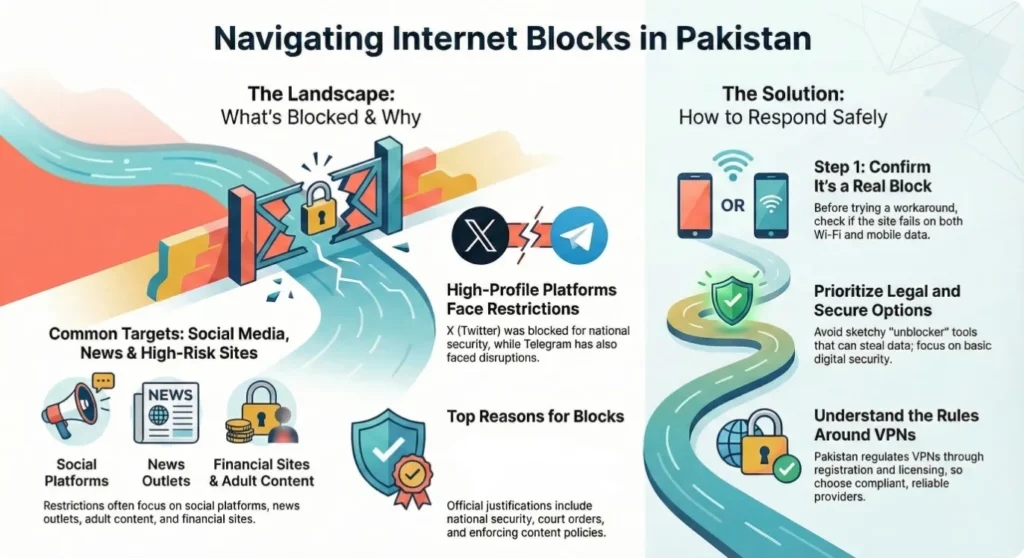
Overview of Internet Restrictions in Pakistan
Internet controls in Pakistan aren’t always a simple yes/no block. You may see full blocking, partial access, throttling, or intermittent availability—sometimes varying by ISP or region. Understanding who regulates access and how restrictions are applied helps you interpret what you’re seeing on your devices.
Pakistan’s internet governance involves regulatory decisions, court orders, platform requests, and network-level controls. The nationwide X block began in February 2024, but OONI measurements and the PTA chairman’s public confirmation show that access was restored on May 7, 2025. Keep the 2024 block as an important historical example—not X’s present national status.
At the same time, not every “blocked” experience is censorship. Network congestion, DNS issues, server outages, and app-specific disruptions can look identical from your perspective. That’s why it’s useful to confirm whether a problem appears across multiple networks and whether independent measurement sources report similar patterns.
What Categories of Websites Are Blocked in Pakistan?
When you look across PTA actions, news coverage, and measurement reports, restrictions tend to cluster into a few repeat categories. Thinking in categories helps you avoid overgeneralizing from one blocked app to the whole internet, and it makes it easier to interpret why certain sites are targeted more often than others.
Below is a practical way to group restricted websites in Pakistan. These categories are broad on purpose: a single site can fall into more than one bucket, and the underlying reason can shift over time.
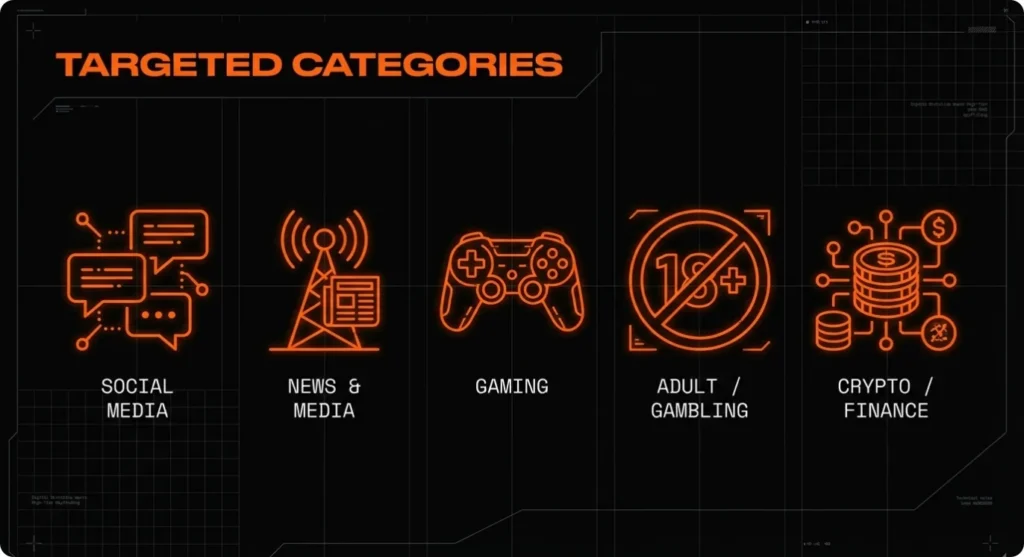
If your goal is to find a list of blocked websites in Pakistan, category thinking also helps you scan more intelligently: social platforms may change status quickly, while adult/gambling domains are more often subject to long-running restrictions.
Popular Websites Blocked in Pakistan: Current Examples and Status
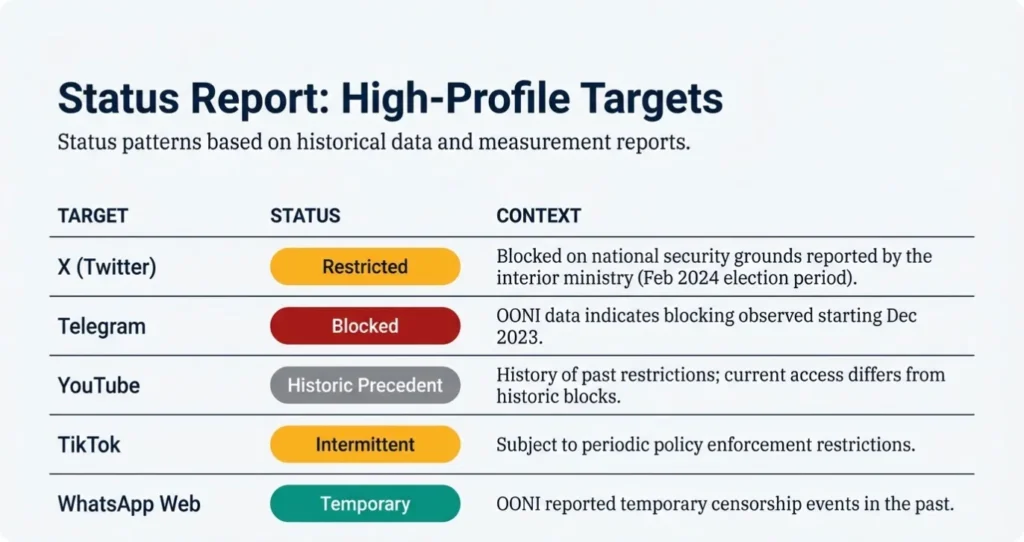
A useful blocked-sites list needs dates and evidence. A platform can move from blocked to restored, fail on one ISP, or disappear worldwide for reasons unrelated to Pakistan. A copied list of dozens of domains is therefore less useful than a shorter, sourced status check.
The table separates current findings, dated historical restrictions, and services for which no nationwide Pakistani ban was confirmed during this review.
Is Wattpad Banned in Pakistan?
No current authoritative source reviewed for this update confirms a nationwide PTA ban on Wattpad. That does not mean every user can reach it. Wattpad’s own service, one ISP, a DNS resolver, a school network, the app build, account session, or an individual media hostname can fail independently.
Open the official site and app, check for a platform incident, and compare the same story page on mobile data and Wi-Fi. If Wattpad works on one network but not another, the route is involved. If the official service is down everywhere or the account is suspended, changing VPN servers will not fix that layer.
Is Discord Banned in Pakistan?
No current authoritative source reviewed confirms a nationwide Discord ban. Test the failing feature: login, text chat, voice, and Discord media/CDN delivery are different paths. When text works but voice fails only on school, office, or hotel Wi-Fi, local firewall or routing rules are the stronger first explanation.
Use these statuses as dated evidence, not a permanent promise. Verify the official service status and compare two networks before calling a platform banned.
Why Are Websites Blocked in Pakistan?
If you want to figure out the reason why websites are blocked in Pakistan, you’re usually looking for more than a vague answer like “censorship.” In practice, restrictions are justified through a mix of security claims, legal enforcement, and policy choices—sometimes triggered by major events and sometimes by longer-term regulation.
Here are the most common explanation buckets you’ll see, with real-world examples of how they show up:
1) National security and public order concerns
During politically sensitive periods, access to social platforms can become a flashpoint. Pakistan’s interior ministry cited national security when defending the February 2024 X block. The nationwide restriction ended in May 2025, so use it as a documented historical example rather than X’s current status.
2) Court orders and legal compliance
Some restrictions are tied to judicial processes or complaints that lead to takedown or blocking decisions. Even when the public doesn’t see every detail, the operational reality is that ISPs can be instructed to restrict access based on legal demands.
3) Content policy enforcement (adult, gambling, or harmful content)
Adult and gambling sites are common targets in many countries, including Pakistan, where policy and legal standards may restrict these categories. These blocks are often less “newsworthy,” but they can be more stable over time.
4) Fraud, consumer protection, and high-risk finance
Financial scams, fake investment schemes, and risky online services can drive enforcement actions. Even if you personally view a site as harmless, regulators may treat whole categories as high-risk.
5) Technical and regulatory measures around VPN use
A failed VPN connection is not proof that the destination website is banned. Pakistan has used business IP whitelisting and VPN-registration processes, then introduced licensing for VPN service providers under its data-services regime. Access can still differ by provider, protocol, IP range, and ISP, and some international VPN apps reported disruption in late 2025 and 2026. Do not reduce this changing environment to either “all personal VPNs are illegal” or “every VPN will always work.”
The key point: the same user experience (a site not loading) can come from very different policy motivations. That’s why confirming the type of restriction is often the fastest path to a safe response.
Is Visiting Banned Sites Illegal in Pakistan?
A blocked page does not answer the legal question by itself. Risk can depend on the content, the user’s conduct, the applicable order or law, whether material is downloaded or distributed, and whether the connection is personal, organizational, or part of a regulated activity. VPN-provider licensing and business IP registration are also different questions from whether a particular webpage is lawful to view.
Use four separate checks:
- Content and connection rules are different: A VPN can bypass a network restriction, but it does not legalize fraud, exploitation, prohibited material, or another unlawful act.
- Business access may involve registration or whitelisting: Organizations should follow the current PTA process and their compliance team’s requirements.
- Provider licensing does not settle every individual case: Check the provider, purpose, present PTA guidance, and any sector-specific rule.
- A technical failure is not a legal finding: Record the exact error and status before describing a website as officially banned.
For regulated work, journalism, sensitive communications, or disputed content, obtain current advice from qualified Pakistani counsel or the organization’s compliance team.
Not legal advice: For anything high-stakes (work compliance, regulated industries, or travel situations), consult qualified counsel or your organization’s compliance team.
How to Access Blocked Websites in Pakistan Safely and Legally
You don’t need a hacky mindset to handle restricted websites—you need a risk-aware one. The safest strategy is to first confirm whether you’re dealing with an actual block, then choose options that minimize legal exposure and protect your privacy, especially if you’re on shared or public networks.
1) Confirm what’s actually happening before you change anything
Record the exact URL, full error, time, network, and ISP. Check the platform’s official status page, then compare the same official page on mobile data and one permitted Wi-Fi network. Separate website from app, login from public page, Discord text from voice, and Wattpad home pages from story/media content.
Success signal: the same official service works on one network and fails consistently on another. That points to the route, DNS, firewall, or ISP. If it fails everywhere with the same platform error, stop switching routes and investigate the service or account.
2) Prioritize legal, low-risk alternatives first
Use the official app, verified status page, newsletter, RSS feed, support channel, or another licensed source for the same information. Use an alternate domain only when the service itself links to it. Never give a password, verification code, draft, payment detail, or recovery phrase to a “working mirror” found in a comment or messaging group.
3) Treat privacy and security as part of access—not a separate topic
Update the device, browser, and official app; enable multi-factor authentication; and remove unknown proxy profiles, root certificates, browser extensions, or sideloaded APKs. Back up unsynced Wattpad drafts before clearing app storage. On a school or employer-managed device, contact the administrator instead of changing its policy.
4) Use BearVPN to bypass a proven network restriction
When Wattpad, Discord, Telegram, or another lawful service works on one connection but fails on the current ISP or Wi-Fi, BearVPN can change the visible IP and move traffic through another encrypted route. That can bypass an IP-range block, DNS interference, protocol filtering, ISP restriction, or local firewall path.
BearVPN is built for this environment:
- Strong Obfuscation: Makes supported VPN traffic harder for restrictive networks to identify and block as VPN traffic.
- Smart Server Selection: Quickly finds a suitable route instead of forcing the user to guess through a long list.
- 2,000+ servers across 50+ locations: Provides alternative IP ranges and routes when one path is filtered or congested.
- Kill Switch and DNS leak protection: Help prevent fallback to the original route if the tunnel drops.
- Split Tunneling: On supported platforms, route the blocked app through BearVPN while selected local apps retain the normal connection.
- AES-256 encryption and no-logs policy: Protect supported traffic without handing it to a random proxy or cracked APK.
How to test the blocked service with BearVPN:
- Confirm the official service works on another network or that independent measurements show a network-level restriction.
- Install BearVPN from the official website or verified app-store listing on your personal device.
- Open BearVPN and use Smart Server Selection or choose a nearby server first.
- Connect and verify that the public IP changed; enable Kill Switch and DNS leak protection where supported.
- Reopen the official app or website and retry the same feature—not a different mirror.
- If needed, try one other suitable server. Stop server-hopping when every route returns the same account, platform, or global-outage message.
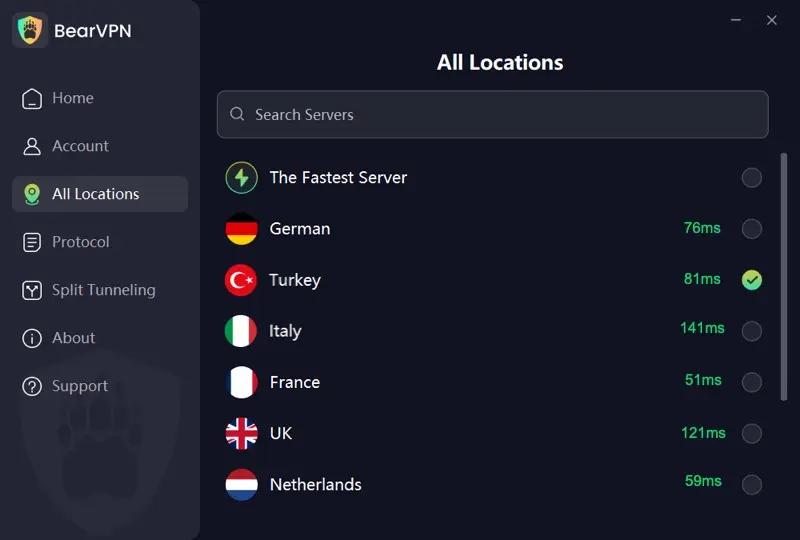
BearVPN’s free Android and iOS option requires no signup and uses an automatically selected free route. Manual location selection, supported desktop apps, the wider server network, multiple devices, and advanced controls may require Premium.
5) Know what not to do
Avoid “one-click unblocker” browser extensions from unknown publishers, pirated VPN APKs, and random proxy lists shared on social media. They often trade your access problem for a bigger one: data theft, account takeovers, or device compromise.
If your connection is critical for work, you can also check other available servers for Pakistan based on distance and network load—nearby locations often provide more stable latency than far-away routes, even when bandwidth is similar.
Use BearVPN to change the route to Wattpad, Discord, Telegram, and other lawful services without trusting a mirror, cracked APK, or unknown proxy.

Conclusion
Blocked websites in Pakistan do not stay in one permanent category. X’s nationwide block ended in May 2025, Omegle closed worldwide, Wikipedia was restored after a short restriction, and no current authoritative nationwide Wattpad or Discord ban was confirmed in this review. The exact domain, feature, ISP, date, and error matter.
When a lawful service fails only on one ISP, DNS route, or local network, BearVPN can mask the public IP and route around the restriction. It cannot restore a closed platform, repair a global outage, or change the legality of the underlying activity—so diagnose the layer first, then act aggressively on the problem BearVPN can actually solve.
FAQs about Blocked Sites in Pakistan
VPN technology is used in Pakistan for lawful privacy, security, remote work, and business connectivity, but the regulatory environment includes provider licensing and organizational registration/whitelisting processes. Personal use should not be reduced to one permanent yes/no rule. The content and conduct remain subject to Pakistani law, and regulated work may require current compliance advice.
No current authoritative source reviewed for this update confirms a nationwide PTA ban on Wattpad. If the official site or app fails, check Wattpad’s service status, account, app version, DNS, ISP, and another network. BearVPN can help when the failure follows one network route rather than the platform itself.
Omegle wasn’t officially banned by Pakistan, but the platform itself shut down permanently worldwide in late 2023, so it is no longer available anywhere.
Wikipedia isn’t currently banned. It was briefly blocked in February 2023 because it failed to remove content that the government deemed blasphemous, but the ban was lifted just a few days later by order of the Prime Minister.
Not as one simple universal rule. Pakistan has used registration and IP-whitelisting processes for organizational users and introduced licensing for VPN service providers. At the same time, particular VPN apps, protocols, domains, or IP ranges may be disrupted unevenly. Check the current PTA framework and the exact provider rather than assuming every unregistered connection has identical status.
Pakistan’s nationwide X block was lifted on May 7, 2025. If X still fails, first check its official status, update the app, clear stale cache, and compare mobile data with Wi-Fi. Then connect BearVPN, use a nearby server or Smart Server Selection, enable DNS leak protection, and reopen X. If the same failure appears across multiple routes, it may be an app, account, or service issue rather than a national block.
Use the current PTA IP-whitelisting and VPN-registration portal as the source of truth. A business will generally need its registered entity information, a documented connectivity purpose, the static VPN endpoint IPs supplied by its provider or IT team, and a responsible contact. Because requirements and the provider-licensing route can change, the company’s network administrator or compliance team should verify the current form before submission.
References
- Pakistan Telecommunication Authority (PTA): IP Whitelisting & VPN Registration portal
- OONI Explorer (Pakistan): Measurements and reports on internet censorship
- Dawn (Nov 13, 2025): PTA licensing of VPN service providers
- OONI — X block lifted May 7, 2025: https://explorer.ooni.org/findings/2025-pakistan-blocked-twitterx-
- OONI — Pakistan Telegram findings: https://explorer.ooni.org/findings
- Associated Press of Pakistan — PTA VPN provider licensing: https://www.app.com.pk/national/pta-grants-license-to-vpn-service-providers/
- Associated Press of Pakistan — CVAS-Data licensing route: https://www.app.com.pk/national/pta-commences-licensing-of-vpn-service-providers-under-cvas-data-regime/
- Dawn — X access restored: https://www.dawn.com/news/1909092