


If you’ve searched for blocked websites in India, you’re probably trying to figure out why a site won’t load, whether it’s truly banned, and what your options are. In practice, India’s online restrictions don’t look like one simple, permanent “blacklist.” Access can vary depending on your ISP, your state, the type of content involved, and whether a block is temporary or tied to a specific legal or security order.
This guide breaks down the most common restriction categories, gives well-reported examples, explains the legal context in plain language, and walks you through safer, law-aware ways to respond when a website is blocked.
Overview of Internet Restrictions in India
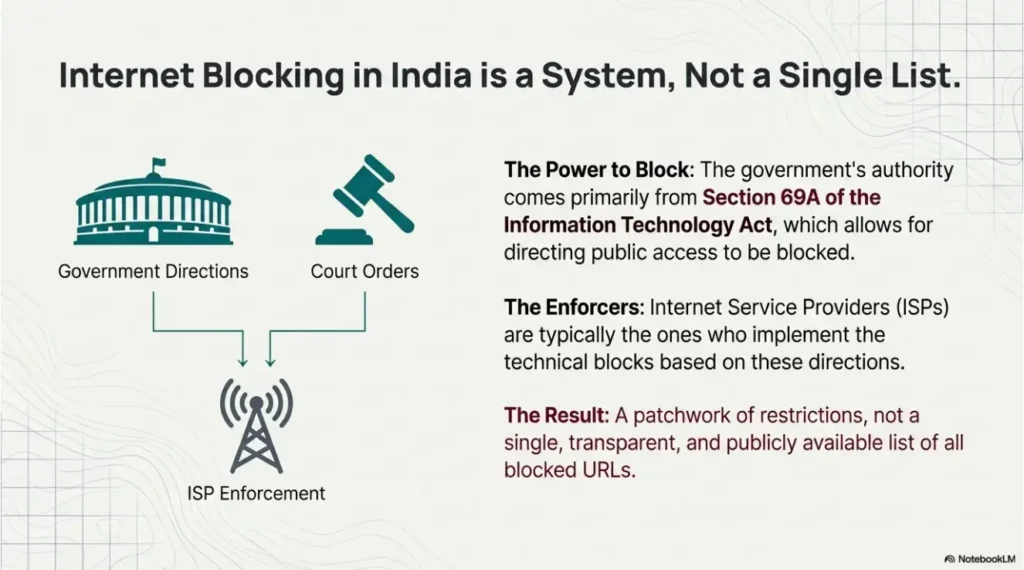
India’s approach to online restrictions is shaped by a mix of legal powers, administrative directions, and court orders, with ISPs typically implementing the technical blocks. That means two people in different cities—or even on different networks in the same city—can sometimes see different results for the same URL.
At a high level, the government has authority under Section 69A of the Information Technology Act to direct the blocking of public access to information through computer resources, and the process is linked to the 2009 blocking rules that outline procedures and intermediary obligations.
In reality, you’ll encounter everything from full bans (where an app is removed and connectivity is blocked nationwide) to partial or time-limited restrictions (such as specific accounts or content being withheld). Transparency varies, and a complete public list of all blocked URLs is not consistently available.
What Kind of Websites Are Blocked in India
Instead of thinking only in terms of “banned websites in India,” it’s more useful to think in categories. Different categories tend to trigger different legal justifications, enforcement patterns, and levels of consistency across networks—so you can diagnose what’s happening faster. The categories below reflect what shows up most often in reporting and policy discussions.
Blocked Website Categories (India)
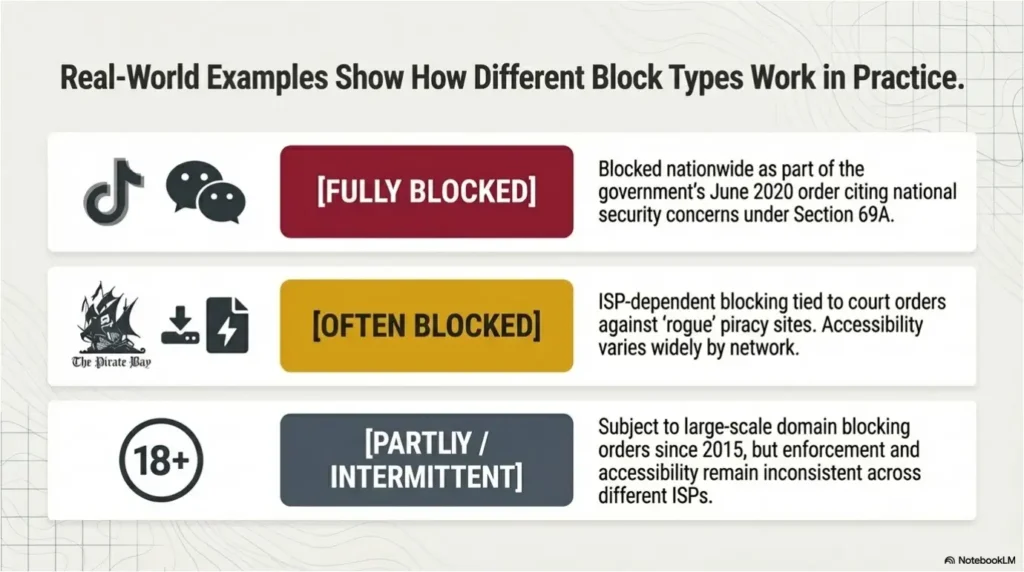
Popular Websites Blocked in India
Lists can be tricky: India does not consistently provide a single, complete, publicly searchable catalogue of everything that’s blocked, and restrictions can shift over time. The most helpful approach is to use representative examples that are well-reported, then label them clearly by status and restriction type.
Last checked: September 2026
A block can target an app, a domain, one URL, one account, or an entire service. Calling all five outcomes “a banned website” creates a dramatic list—but a useless one. The status column below tells you what was actually restricted.
List of Websites Not Banned in India
There is no official government “not banned” whitelist or authoritative PDF. A service not appearing in a public blocking announcement also does not guarantee that every page, feature, or domain will work on every ISP. However, the following mainstream services are generally accessible in India and are not subject to a known nationwide platform ban as of September 2026.
If one of these services fails, do not instantly assume India banned it. Test another network, check the official status page, inspect the exact error, and only then investigate ISP filtering.
Why Are Websites Blocked in India?
If you’re asking “why are websites blocked in India,” you’re usually trying to separate three possibilities: policy enforcement, court-driven blocks, or cybersecurity cleanup. Those drivers matter because they affect how stable the restriction is—and what a realistic, lawful response looks like.
Below are the most common reasons you’ll see in credible reporting and policy frameworks. Think of these as categories for interpreting the “Notes” column in lists of restricted websites in India.
- Legal and administrative directions under the IT framework
Section 69A provides legal authority to issue blocking directions, and the 2009 rules describe procedures and intermediary handling—this is often the backbone cited in official contexts. - National security / public order concerns
This is frequently cited in app blocking and in some content withholding disputes, including high-profile platform compliance situations. - Copyright and anti-piracy enforcement
Indian courts have ordered ISPs to block certain torrent/piracy domains, often described as “rogue websites,” as part of broader copyright protection actions. - Adult content restrictions
Large-scale adult-site blocking orders have been reported in India, with implementation and scope evolving over time (including partial reversals reported after public controversy). - Fraud, malware, and incident-response measures
Some restrictions are part of cybersecurity incident handling—blocking scam domains, disrupting malicious infrastructure, or responding to major cyber incidents. CERT-In’s role and directions sit in this broader cybersecurity context.
Is Visiting Banned Sites Illegal in India?
People often ask this because they want a straight yes/no, but legality tends to depend on what the site is, why it’s restricted, and what you do on it. A site being inaccessible on your ISP isn’t automatically proof that “visiting it is a crime,” and different restrictions can come from different legal routes.
What you can take away confidently is this: India has formal mechanisms to direct blocking (including under Section 69A), and some categories—like piracy distribution or illegal content—carry their own legal risks regardless of how you accessed the page.
If your goal is compliance, the safest approach is to treat blocks as a signal to slow down: confirm what you’re trying to access, avoid suspicious mirrors, and don’t assume a tool makes prohibited behavior permitted. When in doubt, rely on official sources and qualified legal advice for your situation.
How to Access Blocked Websites in India Safely and Legally
When you can’t open a site in India, the first step is figuring out what kind of restriction you’re dealing with. Many “blocked website” cases are actually outages, DNS failures, or ISP-level filtering that varies by region. A careful check upfront helps you stay safer and avoid unnecessary risk.
1) Confirm whether it’s a block or a normal outage
- Try a different connection (for example, mobile data vs home Wi-Fi). If it works on one network but not the other, it often points to ISP filtering rather than a universal block.
- Check the website’s official status page (if available) or a reputable uptime monitor.
- Note the error type: DNS errors, connection resets, or explicit block pages can hint at what’s happening.
2) Be cautious with “mirror” links and look-alike domains
- For example, if you’re trying to unblock TikTok, you’ll often run into unofficial mirrors, fake APK files, or copycat pages that mimic login screens. These are common sources of malware and credential theft.
- Stick to official domains, verified app stores, and trusted sources, and avoid downloads from unknown links.
3) Understand the tool landscape at a high level (without assuming it changes legality)
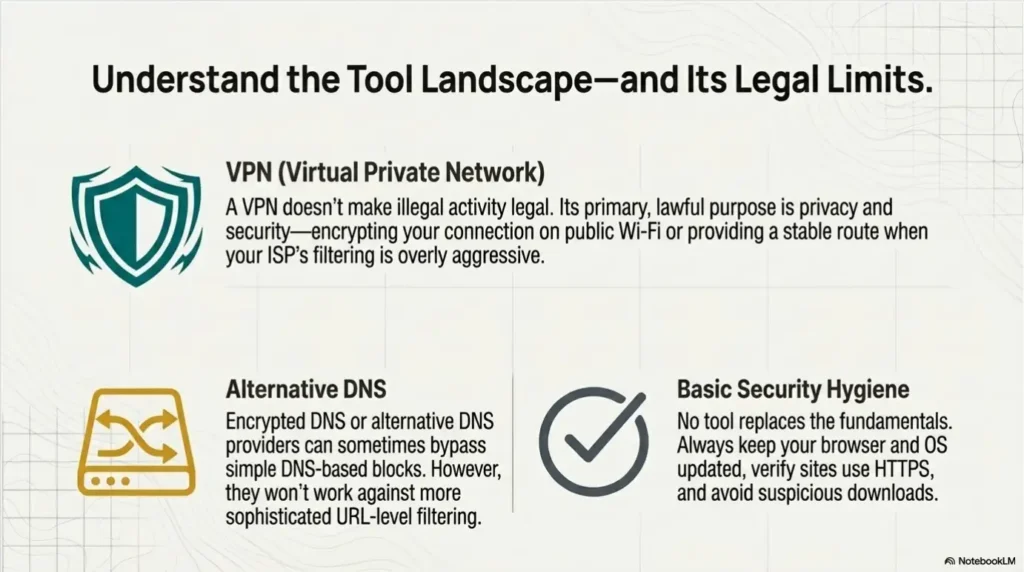
- India does not impose a general ban on ordinary consumer VPN use, and people use VPNs for privacy, remote work, travel, and public Wi-Fi protection. But the activity performed through a VPN remains subject to Indian law, court orders, and platform terms. CERT-In’s 2022 directions also created customer-information retention obligations for VPN service providers operating within their scope. A VPN is a powerful privacy and routing tool—not a legal force field. This is general information, not legal advice.
- DNS alternatives or encrypted DNS may help in some DNS-based blocks, but they won’t reliably address every restriction type (for example, URL-level filtering).
- Basic security hygiene still matters: keep your device updated, verify HTTPS, and avoid unknown downloads.
4) Choose settings and references that match your legitimate needs
- If your goal is privacy while browsing or stable access to services you’re entitled to use, follow reputable, India-specific guidance that explains restriction types and emphasizes compliance.
- When people use a VPN for lawful purposes, they may select a location based on performance or where the service is intended to operate. In some cases, trying a US server can provide a more stable route—while you still follow local law and the platform’s terms.
VPN for Blocked Websites in India: What to Look For (and Where BearVPN Fits)
Choosing a VPN for India isn’t just about “unblocking.” You’re deciding whether a service can reliably protect you on public networks, minimize data exposure, and stay stable when your ISP is inconsistent. That’s why it’s smarter to evaluate features and policies than to chase a “magic fix” promise.
Use the checklist below to keep your decision practical—and aligned with the way restrictions and compliance pressures actually work in India.
A practical VPN checklist
- Modern protocols and strong encryption (for example, WireGuard + AES-256 where applicable)
- Kill switch to reduce accidental exposure if the connection drops
- Leak protection (DNS/IP leak safeguards)
- Clear logging stance you can understand without guesswork
- Good performance on your devices (especially mobile, where most browsing happens)
Where BearVPN comes in
When one Indian ISP turns the open web into a wall of timeouts and block pages, BearVPN gives you another network path. It encrypts traffic with AES-256, masks your public IP, and adds Kill Switch, DNS/IP leak protection, obfuscation, and RAM-only infrastructure. These features can protect everyday browsing and may help with network- or region-level restrictions, but no VPN can guarantee access to every domain or turn prohibited conduct into permitted conduct.
- Change the public IP and network path in one tap.
- Protect the connection with AES-256 encryption.
- Reload the official domain—not a poisoned APK, clone, or fake mirror.

FAQs about Banned Sites in India
Depending on how your Internet Service Provider (ISP) enforces the restriction, you will usually see one of three things:
a. A custom ISP block page explicitly stating that the URL has been restricted due to government directives, DOT regulations, or a court order.
b. A generic browser network error, such as “ERR_CONNECTION_REFUSED” or “This site can’t be reached.”
c. A endless loading screen that eventually times out, which happens when the ISP uses silent packet-dropping or URL-level filtering to block the connection.
While India has banned hundreds of apps in total since 2020, people often look for specific lists of prominent apps caught in major blocking waves. Some of the most notable apps banned under Section 69A include: TikTok, PUBG Mobile (and its variants), WeChat, ShareIt, CamScanner, UC Browser, Kwai, Baidu Map, Clash of Kings, Club Factory, Xender, Bigo Live, Weibo, Beauty Plus, VivaVideo, Mobile Legends: Bang Bang, Shein, Helo, Likee, VMate, Mi Community, DU Recorder, Garena Free Fire, and AliSuppliers.
Most major Chinese consumer-facing platforms, e-commerce web portals, and utility sites are blocked. This includes the web versions and associated servers of platforms like Weibo (social media), Baidu (search engine), Alibaba/AliExpress and Shein (shopping), Tencent domains, and gaming portals related to companies like NetEase.
The most famous one is UC Browser (developed by Alibaba), which used to be incredibly popular in India before the 2020 bans. Other Chinese-backed browsers like DU Browser and APUS Browser are also restricted.
No authoritative, continuously updated government PDF lists every website that is not banned in India. The internet is too large, and blocking actions can target apps, domains, individual URLs, accounts, or temporary events. Treat third-party “complete PDFs” as snapshots, verify important claims against official orders, and test the exact domain on more than one network.
Do not assume a nationwide ban from one failed connection. Availability may vary by URL, ISP, DNS resolver, and time. Test the exact page on another permitted network, check whether the service itself is down, and look for an explicit ISP block notice or reliable official order.
Ordinary VPN use is not subject to a general nationwide ban, but what you do through the connection must still comply with applicable law. VPN providers can also face regulatory obligations. Do not treat a VPN as legal permission to access or distribute prohibited material.
Government actions beginning in 2020 named specific apps, including TikTok, WeChat, UC Browser, ShareIt, CamScanner, and others. Publish the official announcement link rather than claiming that every Chinese website, company, or related domain is blocked.
Conclusion
Blocked websites in India aren’t a single, static phenomenon—you’re usually seeing a mix of legal orders, ISP enforcement, and category-based restrictions that can change over time. If a site won’t load, start by identifying whether it’s an outage or a network-level block, then choose a response that’s safe and law-aware. For many everyday situations—especially public Wi-Fi or inconsistent ISP filtering—a VPN can be a practical privacy tool, not a shortcut around responsibility.
Sources and Further Reading
If you want to go deeper than a “banned websites in India list,” these references are where the core claims in this guide come from. They’re also useful if you’re comparing different explanations in the SERP and trying to spot low-quality, recycled lists.
- India Code: Information Technology Act, Section 69A
- CIS resource: Blocking Rules (2009) reference text and context
- Government press release: PIB announcement on blocking 59 apps (June 29, 2020)
- Freedom House: Freedom on the Net 2026 – India


![How to Change YouTube TV Location [Still Works in 2026]](/_next/image/?url=https%3A%2F%2Fcms.bearvpn.com%2Fwp-content%2Fuploads%2F2026%2F06%2Fhow-to-change-location-youtube-tv.webp&w=640&q=75)



