A VPN kill switch is a traffic-control feature that blocks all or selected internet access when the protected VPN path becomes unavailable. Depending on the implementation, the rule may be managed by the VPN app, a firewall, routing controls, or the operating system. Its purpose is to keep a device from silently returning to an ordinary, unprotected connection.
The name alone does not tell you when the feature activates, what it blocks, or whether it behaves the same way on every platform.
Publisher disclosure: This report was produced by BearVPN, a VPN provider. BearVPN was not included in the 20-provider sample or any reported percentage. The study reviews public documentation and does not independently test traffic blocking or rank product security.
Key Findings
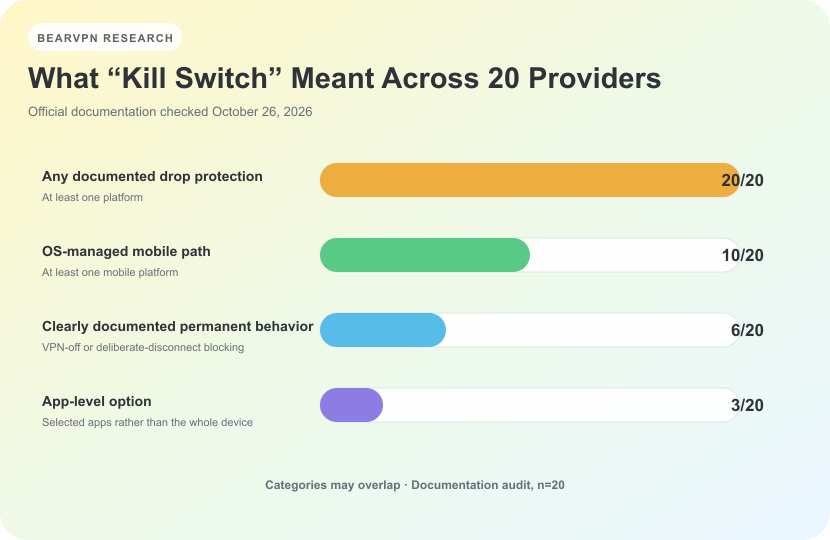
The categories overlap: one provider can document more than one kill-switch implementation. Results describe official documentation, not independent performance tests.
- All 20 providers had at least one official source describing some form of connection-drop protection on at least one platform.
- 6 of 20 clearly documented an always-blocking or permanent mode that could continue blocking network access while the VPN was deliberately disconnected or otherwise not connected.
- 10 of 20 documented an operating-system-managed protection path on at least one mobile platform.
- Only 4 of 20 clearly stated a current default state for at least one implementation under our strict definition.
- 8 of 20 explained what happens after a deliberate disconnect, while only 1 of 20 explicitly described behavior after a normal app quit.
These results measure what official documentation disclosed. They are not independent leak-test results, and they do not show that every documented feature performs exactly as described under every network condition.
What Is a VPN Kill Switch?
A VPN creates an encrypted tunnel between a device and a VPN server. While that tunnel is working, internet traffic assigned to it follows the protected route. If the tunnel fails, the operating system may otherwise return traffic to the device’s normal Wi-Fi or mobile connection.
A kill switch is intended to interrupt that fallback. Depending on its design, it may block the entire device, stop selected apps, prevent non-VPN routes, or use a mobile operating system’s “Always-on VPN” and “Block connections without VPN” controls.
The concern is not that previously encrypted data suddenly becomes decrypted. The concern is that new traffic may leave through the ordinary network after the VPN path disappears. A website, app, or network observer could then see the device’s normal public IP address or traffic that is no longer routed through the VPN.
A kill switch addresses this connection-failure scenario. It does not prevent tracking through accounts, cookies, browser fingerprinting, advertising identifiers, or information a user chooses to share. Our separate study explains other ways a user can still be tracked while using a VPN.
How Does a VPN Kill Switch Work?
A simplified sequence looks like this:
- The device establishes a VPN connection.
- The tunnel becomes unavailable because of a server problem, a network change, sleep and wake, an app failure, or another interruption.
- A traffic rule prevents all or selected connections from using an unprotected route.
- The VPN reconnects, or the user changes the setting.
- Network access resumes according to the selected mode.
Not every implementation waits for a disconnection and then reacts. A firewall- or routing-based design may preconfigure the device so that ordinary traffic is never allowed outside the VPN path while the relevant rule is active. Mobile implementations may instead rely on controls supplied by Android or iOS.
The traffic scope also differs. A device-level mode can affect every app. An app-level option may close or restrict only selected applications. A system-managed mode can apply across the device, but its settings, labels, and behavior are controlled partly by the operating system rather than solely by the VPN app.
Standard, Permanent, App-Level, and OS-Managed Protection
Product names are not standardized. ExpressVPN calls its desktop feature Network Lock, Mullvad offers Lockdown mode, Windscribe uses a Firewall, TunnelBear uses VigilantBear, and IVPN describes a Firewall. Different names can serve similar goals, while two products using the words “kill switch” may behave differently.
Is a VPN Kill Switch Always On by Default?
No universal rule exists. Some implementations are enabled by default, some are disabled until the user turns them on, and some cannot be disabled. A fourth possibility is that the official documentation explains how to enable the feature but never states its initial setting.
Those situations should not be merged. “Standard is selected when the user enables Kill Switch” describes a mode default, not whether the feature itself is enabled on a new installation. Similarly, a help page that tells users to toggle a switch does not establish whether the switch starts on or off.
Under our strict rule, only 4 of the 20 providers clearly stated a current default state for at least one implementation: NordVPN, ExpressVPN, Mullvad, and Mozilla VPN. This does not mean the other 16 default to off. It means the current sources we reviewed did not meet the same evidence threshold.
How We Audited 20 VPN Providers
We reviewed NordVPN, Surfshark, ExpressVPN, Proton VPN, Private Internet Access, Mullvad, CyberGhost, PureVPN, Windscribe, TunnelBear, hide.me, PrivadoVPN, IPVanish, Hotspot Shield, VyprVPN, PrivateVPN, IVPN, Mozilla VPN, Norton VPN, and McAfee Secure VPN.
The sample was selected to compare widely known VPN services and a range of documented implementations. It is not a random sample of the global VPN market. BearVPN was excluded from the sample and all reported percentages.
Sources and Evidence Priority
We prioritized, in order:
- official help-center and support pages;
- official product and feature pages;
- official release notes;
- official App Store or Google Play listings;
- official educational material only when more specific product documentation was unavailable.
The coding unit was Provider + Platform + App distribution/version + Mode. This was necessary because one provider can document a standard desktop mode, a stricter advanced mode, an app-level option, and an Android system setting as separate implementations.
We coded claims as explicit, not found, conflicting, insufficient, or OS-managed. Not found does not mean no. It means the reviewed official material did not state the field clearly enough to publish a yes-or-no conclusion.
Brand-level percentages use 20 providers as the denominator, with each provider counted no more than once per measure. Platform-and-mode rows were used to determine whether a provider met each criterion, but providers with more documented platforms did not receive additional weight. “Not found,” conflicting, and insufficient evidence were not counted as “no.”
In total, the audit produced 64 platform-and-mode rows: 29 standard connection-drop rows, 13 OS-managed rows, seven permanent or advanced rows, four firewall rows, four unknown or insufficient rows, three app-level rows, two routing-level rows, and two protocol-dependent rows. One named “Always” mode did not contain enough behavioral detail to enter the six-provider permanent-mode finding.
Documentation checked: October 26, 2026.
Finding 1: Official Documentation Existed for All 20—but the Implementations Differed
All 20 providers had at least one official source describing some form of connection-drop protection on at least one platform. That result should not be read as “all 20 passed a leak test,” “all platforms are covered,” or “all implementations are equivalent.”
The categories overlapped:
- 20 providers documented some form of protection against an unexpected connection drop on at least one platform;
- 10 documented an OS-managed mobile path;
- six clearly documented permanent or always-blocking behavior;
- three documented an app-level option.
NordVPN, for example, documents a device-level Internet Kill Switch and a separate App Kill Switch on Windows, while Android uses operating-system controls. Windscribe describes a desktop Firewall rather than a conventional reactive kill switch and points mobile users toward OS-level Always-on behavior. PrivateVPN documents a Windows Application Guard in addition to broader connection protection.
These are not four mutually exclusive product types. One provider can appear in more than one category, so the percentages should not add to 100%.
Finding 2: Only 6 of 20 Clearly Documented an Always-Blocking Mode
Six providers clearly documented a mode that could continue blocking network access when the VPN was deliberately disconnected or otherwise not connected:
- ExpressVPN: Advanced Internet Kill Switch on desktop;
- Proton VPN: Advanced Kill Switch on supported platforms;
- Private Internet Access: Advanced Kill Switch on desktop;
- Mullvad: Lockdown mode;
- VyprVPN: Kill Switch behavior described as blocking whenever VyprVPN is disconnected;
- IVPN: Always-on or Persistent Firewall behavior.
This finding uses a behavioral definition, not a product-name test. A standard kill switch can still be a legitimate connection-drop feature even if it stops blocking after the user deliberately disconnects. The other 14 providers should therefore be described as not clearly meeting this audit’s permanent-behavior definition in the reviewed sources—not as having “no real kill switch.”
Platform boundaries also matter. ExpressVPN’s iOS “Advanced” setting expands what is blocked during an unexpected interruption, but the official documentation says deliberate disconnect behavior differs from the permanent desktop mode. We therefore did not count that iOS setting as a separate permanent implementation.
PrivateVPN’s macOS app offers modes named Auto and Always. However, the reviewed page did not separately explain deliberate disconnect, normal quit, and startup behavior. We kept that row in the underlying matrix but did not use the mode name alone to add PrivateVPN to the six-provider result.
Finding 3: Half of the Providers Documented an OS-Managed Mobile Path
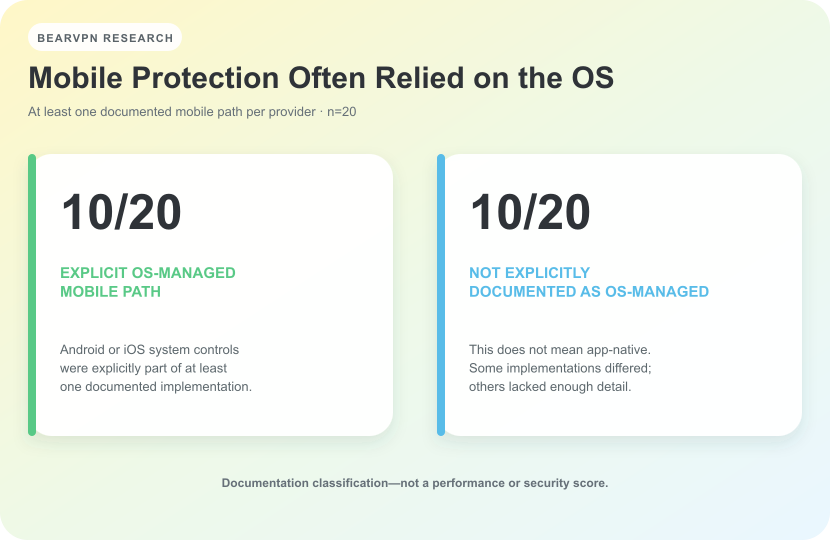
Ten providers explicitly documented an OS-managed path on at least one mobile platform. The other ten were not necessarily app-native; some sources did not provide enough detail to classify the implementation.
Ten of the 20 providers documented at least one mobile protection path that relied on operating-system controls: NordVPN, ExpressVPN, Proton VPN, Private Internet Access, Windscribe, PrivadoVPN, IPVanish, Hotspot Shield, PrivateVPN, and IVPN.
On Android, “Always-on VPN” can keep a selected VPN active, while “Block connections without VPN” can prevent the device from using an ordinary connection when the VPN is unavailable. A provider may guide users to those settings, but the enforcement path belongs partly to Android. It should not be described as identical to the provider’s desktop app implementation.
Version changes can alter that relationship. Private Internet Access’s older release notes document the removal of its in-app Android kill switch; its current help page directs users to Android’s system controls. IVPN similarly removed its custom Android kill switch and now recommends the native Android option.
iOS can have different constraints. IVPN’s current known-issues page says its native iOS Kill Switch is unavailable on iOS 16 and later. Norton documents its iOS Kill Switch only when the Mimic protocol is used. These boundaries are exactly why a brand-level “yes” is not enough for someone choosing a setting on a specific phone.
The other ten providers were not explicitly documented as OS-managed in the sources reviewed. That second group should not be labeled app-native: some had different implementations, while others simply lacked enough detail for that classification.
Finding 4: Documentation Rarely Explained Every Trigger
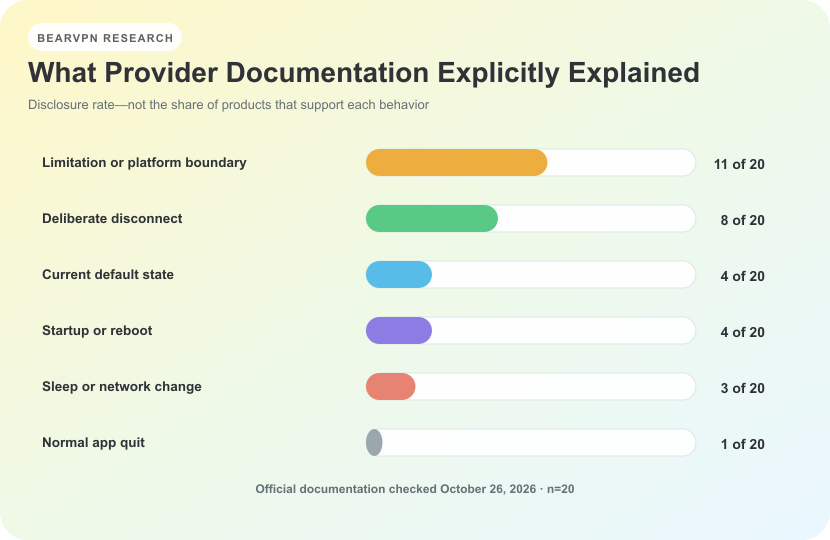
These figures measure documentation disclosure. They do not show how many products support each behavior.
Official pages commonly explained the central promise—blocking traffic after a VPN interruption—but less often described what happens around deliberate user actions or device-state changes.
Across the 20 providers:
- 11 documented at least one limitation or platform boundary;
- eight explained what happens after a deliberate disconnect;
- four clearly stated a current default state;
- four discussed startup or reboot behavior;
- three discussed sleep, wake, or network changes;
- one explicitly described behavior after a normal app quit.
These are disclosure rates, not support rates. If a page did not mention app quit, we did not assume that protection stops—or that it continues.
Some of the clearest documentation came from providers that openly described limits. Mullvad documents an early-boot limitation on macOS and explains that apps excluded through split tunneling can still access the internet during Lockdown mode. IVPN distinguishes stronger Windows startup protection from limits on macOS and Linux. Norton states that its iOS Kill Switch is tied to the Mimic protocol and that an Android local-device setting can conflict with Kill Switch behavior.
Publishing a limitation does not make a product less safe. It gives users a more accurate basis for deciding whether the feature matches their device and use case.
VPN Kill Switch Comparison: 20 Providers
This table summarizes brand-level findings. A provider can use multiple implementations across platforms, so each row should be read with its evidence note. “Not clearly documented” does not mean the feature or behavior is absent.
The table is a brand summary, not a substitute for checking a specific operating system, app distribution, version, protocol, and mode. Product documentation can also change after an app update.
How to Check Your VPN’s Kill Switch Settings
Use the following checklist rather than assuming that the presence of a feature name answers every question:
- Find the exact setting. Look under Security, Privacy, Connection, Network, or Advanced settings.
- Identify the mode. Determine whether it is standard drop protection, a permanent or lockdown mode, an app-level option, or an operating-system setting.
- Confirm the platform. Read the page for your operating system and app distribution. A macOS App Store build may not match a website download, and mobile behavior may not match desktop behavior.
- Check the initial state. Do not confuse “available,” “recommended,” or “how to enable” with “enabled by default.”
- Read the trigger conditions. Look for deliberate disconnect, app quit, startup, reboot, sleep, wake, Wi-Fi changes, and server switching.
- Check exclusions. Split tunneling, LAN access, selected protocols, and excluded apps can change what remains connected.
- Recheck after updates. A provider may remove an in-app feature, replace it with an OS-managed path, or change platform support.
If you choose to test a setting yourself, do it during a non-critical session and expect that network access, local devices, downloads, or unsaved work may be interrupted. This report did not perform those tests.
What a Kill Switch Cannot Protect Against
A kill switch controls a network path. It does not provide complete anonymity or solve every security problem.
It cannot, by itself, prevent:
- a website from recognizing a signed-in account;
- cookies or browser fingerprinting;
- advertising or device identifiers;
- malware on the device;
- information the user deliberately submits;
- application-layer tracking while the VPN tunnel is working normally;
- traffic outside the feature’s documented scope, including unsupported platforms, protocols, app versions, or excluded split-tunneling routes.
It also cannot be assumed to prevent every possible IP, DNS, IPv6, WebRTC, or transition leak merely because the setting exists. That requires platform-specific technical testing under defined conditions. For the broader protection boundary, see what a VPN hides—and what it does not.
Limitations
This is a documentation audit, not a network experiment. We did not interrupt tunnels, crash processes, reboot devices, capture packets, or independently verify whether each implementation blocked traffic exactly as described.
Official documentation varied in depth. Some providers maintained detailed platform pages, while others used one general feature page, an app-store listing, an older help article, or educational material. IPVanish’s platform evidence was spread across current listings and migrated support content. Hotspot Shield’s iOS page included a product-name mix-up. McAfee had clear Mac product guidance, but the current evidence reviewed was insufficient to map the same feature reliably to Windows, Android, and iOS.
Some fields therefore remain Not found, conflicting, or insufficient. We did not turn those statuses into negative product claims or fill the gaps with third-party reviews.
App behavior, operating-system controls, and help pages can change. The findings describe public material available through October 26, 2026, not every past or future version. The sample is also purposive and should not be used to estimate the share of all VPN services with a particular feature.
Frequently Asked Questions
Turn it on if you want internet traffic to stop rather than fall back to an ordinary connection when the protected VPN path fails. Before enabling it, check whether the mode affects the whole device, selected apps, local-network access, or split-tunneled traffic. A stricter permanent mode may also keep the device offline after a deliberate disconnect until the VPN reconnects or the setting is changed.
It depends on the mode. Many standard modes are documented for unexpected interruptions and may allow internet access after a deliberate disconnect. Permanent, Advanced, Lockdown, or Always-on modes may continue blocking, but the name alone is not enough evidence. Check the current documentation for the exact platform and mode.
Not exactly. Always-on VPN commonly tells a mobile operating system to keep a selected VPN active or reconnect it. On Android, pairing it with Block connections without VPN creates the stricter no-VPN-no-network behavior. A provider’s in-app kill switch may use a different implementation and offer different controls.
Some providers document support on both platforms, but mobile implementations often differ from desktop ones. Android may use native Always-on and block-without-VPN settings. iOS behavior may depend on the app, operating-system version, or protocol. Read the provider’s platform-specific instructions rather than applying a desktop claim to a phone.
No such conclusion can be drawn from the feature name alone. Results depend on implementation, operating system, protocol, app version, DNS handling, IPv6 behavior, split tunneling, and the event being tested. This audit compared documentation and did not conduct independent leak tests.
Sources and Reproducibility
The comparison table links each provider to a primary official source. Where one page could not support the whole row, the audit also reviewed the following platform or mode-specific sources:
- NordVPN: Kill Switch and Split Tunneling
- Surfshark features
- ExpressVPN: Android block connections without VPN
- ExpressVPN: iOS network protection
- Proton VPN: Advanced Kill Switch
- Proton VPN: Always-on VPN on Android
- PIA: iOS settings and protocols
- PIA: Android Kill Switch
- PIA: Android in-app Kill Switch removal note
- PureVPN: Windows Kill Switch settings
- PureVPN: macOS Kill Switch settings
- hide.me: iOS release notes
- PrivadoVPN: Android setup
- PrivadoVPN: iOS setup
- IPVanish: Android TV Kill Switch app
- Hotspot Shield: Android settings
- Hotspot Shield: iOS settings
- VyprVPN: TV overview and default states
- PrivateVPN: FAQ
- PrivateVPN: Android system Kill Switch repair guide
- IVPN: Firewall exceptions
- IVPN: Known issues with native iOS Kill Switch
- Mozilla VPN: Device compatibility
- Norton VPN: Access Local Devices
- Norton VPN: Configure VPN settings
- McAfee: What Is a VPN Kill Switch?
For reproducibility, a future update should preserve the provider, platform, app distribution or version, mode, default state, accidental-drop behavior, deliberate-disconnect behavior, app-quit behavior, startup behavior, sleep or network-change behavior, traffic scope, known limitation, source URL, evidence status, and last-checked date. Any changed source should be recoded before percentages are recalculated.
Providers or readers who identify a current first-party source that changes a coded field may submit a correction. A correction should include the platform, app version or distribution, mode, official URL, and the exact statement that supports the change.
Conclusion
A VPN kill switch is best understood as a family of traffic-control designs, not one uniform feature. Across the 20 providers reviewed, the largest differences appeared in permanent behavior, mobile operating-system dependencies, default-state disclosure, and the treatment of deliberate disconnects, app exits, startup, and network changes.
For users, the practical question is not simply whether a provider advertises a kill switch. It is whether the documented mode covers the correct device, blocks the intended traffic, starts at the expected time, and remains active during the events that matter to that user.
Official documentation can explain those boundaries, but it cannot replace controlled technical testing. The findings should be revisited when material first-party documentation or platform behavior changes.