


We screened 30 U.S. iOS VPN search results and analyzed the privacy disclosures of 18 apps with an ongoing free tier. Here is what they said about tracking, analytics, advertising, identifiers, and location.
Free VPN apps raise an obvious question: if users are not required to pay, what data do these apps say they collect, and how do they say they use it?
Apple’s App Privacy labels offer a structured place to start. Before downloading an app, users can see whether the developer says data may be used to track them, linked to their identity, or collected without being linked to them. The labels can also show purposes such as analytics, advertising, and app functionality.
For this study, BearVPN saved the first 30 software results returned by Apple’s U.S. Search API for the query “free vpn” on October 12, 2026. We obtained usable App Privacy disclosures for 29 of those results. After reviewing the store descriptions, we confirmed that 18 offered an ongoing free tier rather than only a time-limited trial or paid subscription. Those 18 apps are the main sample used in the percentages below.
This is a study of public disclosures, not a test of actual app behavior. We did not install the apps, inspect their code or SDKs, or intercept network traffic. Apple describes Privacy Nutrition Labels as self-reported, and individual App Store pages state that the information has not been verified by Apple. Our findings therefore describe what developers disclosed; they do not independently verify the apps’ actual data practices.
Sample flow: 30 U.S. search results screened → 29 privacy labels available → 18 ongoing free-tier apps analyzed
Key Findings at a Glance
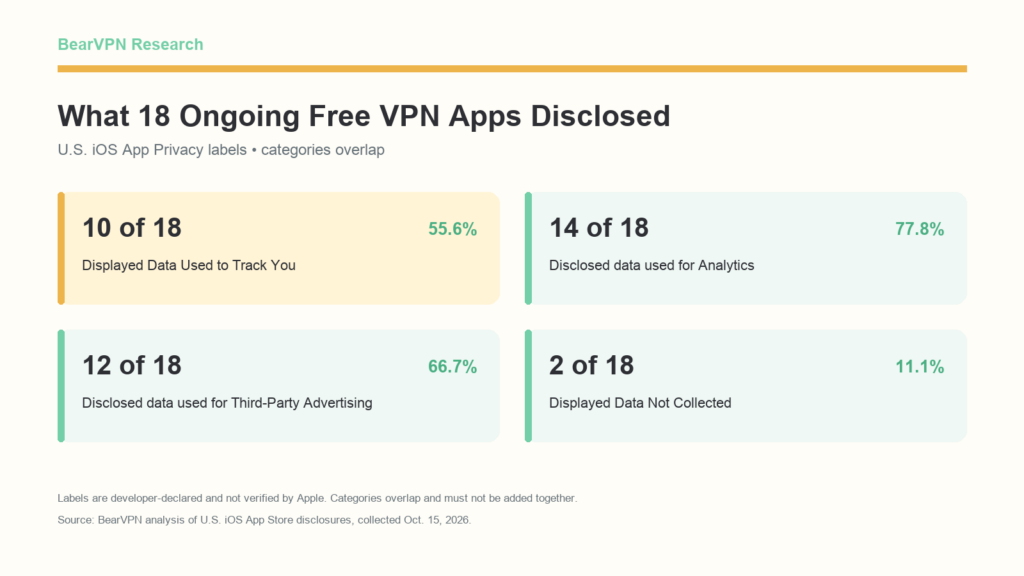
- 10 of 18 apps (55.6%) displayed Apple’s “Data Used to Track You” label.
- 14 of 18 (77.8%) disclosed at least one data type used for Analytics.
- 12 of 18 (66.7%) disclosed at least one data type used for Third-Party Advertising.
- 12 of 18 (66.7%) disclosed data used for App Functionality.
- 12 of 18 (66.7%) disclosed Device ID, making it the most common specific data type in our sample.
- 2 of 18 (11.1%) displayed “Data Not Collected.”
These categories overlap. An app can disclose the same or different data types for analytics, advertising, and app functionality, and it can display more than one top-level privacy label.
How to Read Apple’s Privacy Labels
Apple uses “collect” in a narrower way than the word is often used in everyday conversation. Under Apple’s App Privacy guidance, collection means transmitting data off the device in a way that allows the developer or a third-party partner to access it for longer than needed to service a request in real time. Data processed only on the device does not need to appear as collected. An authentication token or IP address that is transmitted and immediately discarded after servicing a request may also fall outside the disclosure requirement.
Apple asks developers to account for their own practices and those of third-party partners whose code they integrate, including analytics tools, advertising networks, and SDK vendors. Apple also permits certain data to be omitted when all of its optional-disclosure conditions are met—for example, some data submitted infrequently and voluntarily in a support or feedback request.
The four top-level labels in this report mean different things:
- Data Used to Track You refers to data linked with information from other companies’ apps, websites, or offline properties for targeted advertising or advertising measurement, or data shared with a data broker. It does not mean every form of analytics or every advertisement.
- Data Linked to You means the developer says the data may be connected to an identity through an account, device, or other details.
- Data Not Linked to You means the developer says the data is not connected to an identity. Apple’s rules require protections against linking or re-linking it. It still means data may be collected.
- Data Not Collected means the developer reports that the app does not collect data that must be disclosed under Apple’s framework. It is not an independent technical certification from Apple or BearVPN.
The labels may also describe different practices depending on a user’s age, region, account status, paid or free tier, permissions, and app features. That is one reason a label is useful as a summary but cannot answer every privacy question on its own.
What the 18 Ongoing Free VPN Apps Disclosed
Ten of the 18 apps displayed “Data Used to Track You,” while four displayed at least one category under “Data Linked to You.” Sixteen displayed at least one category under “Data Not Linked to You.” Separately, two apps displayed “Data Not Collected”; those two did not display the other collection labels.
The rows cannot be added together. Tracking, linked data, and non-linked data describe different dimensions of a disclosure and can appear on the same product page. For example, an app may disclose a device identifier for tracking while separately reporting crash information as not linked to identity.
These numbers should not be treated as a privacy score. A longer label may reflect broader collection, more applicable features, or more detailed disclosure. The number of listed categories does not show sensitivity, retention, safeguards, or actual data flows, so it cannot establish which app is safer.
The clearest top-level result is narrower: in this snapshot, more than half of the confirmed free-tier apps told prospective users that at least one type of data may be used for tracking as Apple defines it.
Analytics Was the Most Commonly Disclosed Purpose
Analytics appeared more often than any other stated purpose. Fourteen of the 18 apps disclosed at least one data type used for Analytics. Third-Party Advertising and App Functionality each appeared in 12 apps.
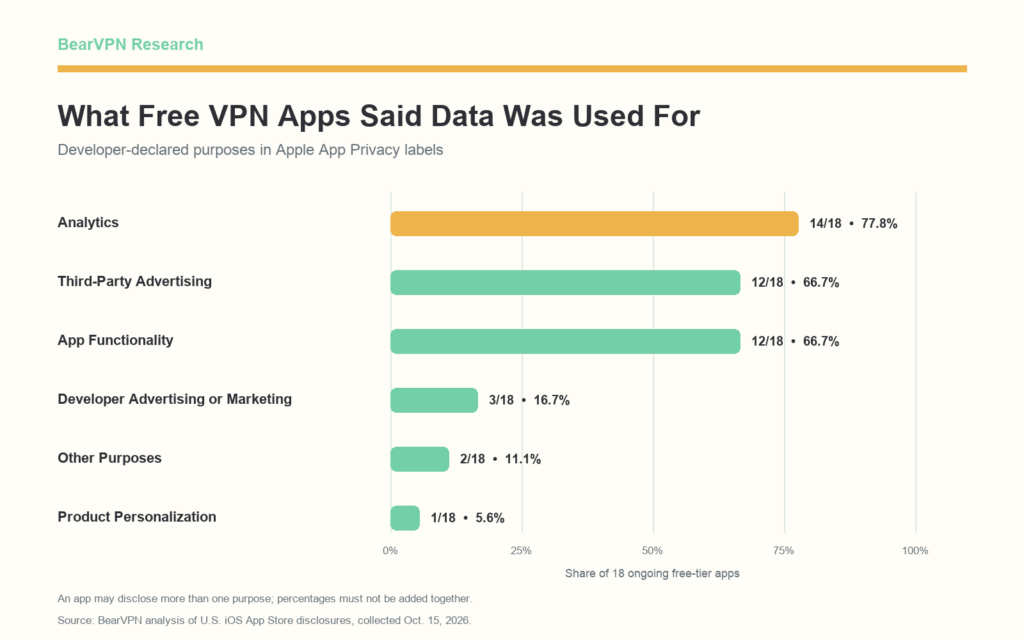
This breakdown shows why “analytics” and “tracking” should not be used interchangeably. Apple defines Analytics as using data to evaluate behavior, understand feature effectiveness, plan features, or measure an audience. Tracking has the more specific cross-company advertising, measurement, or data-broker meaning described above. An app can therefore disclose analytics without displaying a Tracking label.
Third-Party Advertising is also a purpose rather than a verdict about the app’s entire business model. Apple defines it to include displaying third-party ads in an app or sharing data with entities that display those ads. Whether the associated processing also meets Apple’s tracking definition depends on how the data is used and combined.
App Functionality was just as common as Third-Party Advertising. Apple’s examples include authentication, enabling features, preventing fraud, implementing security measures, maintaining server availability, reducing crashes, improving performance, and providing customer support. A privacy label does not reveal which of those examples applies unless the developer provides more detail elsewhere.
Device IDs and Coarse Location Were Common
Device ID was the most frequently disclosed specific data type, appearing in 12 of the 18 apps. Coarse Location and Crash Data each appeared in 11, followed by Performance Data in 10 and Product Interaction in nine.
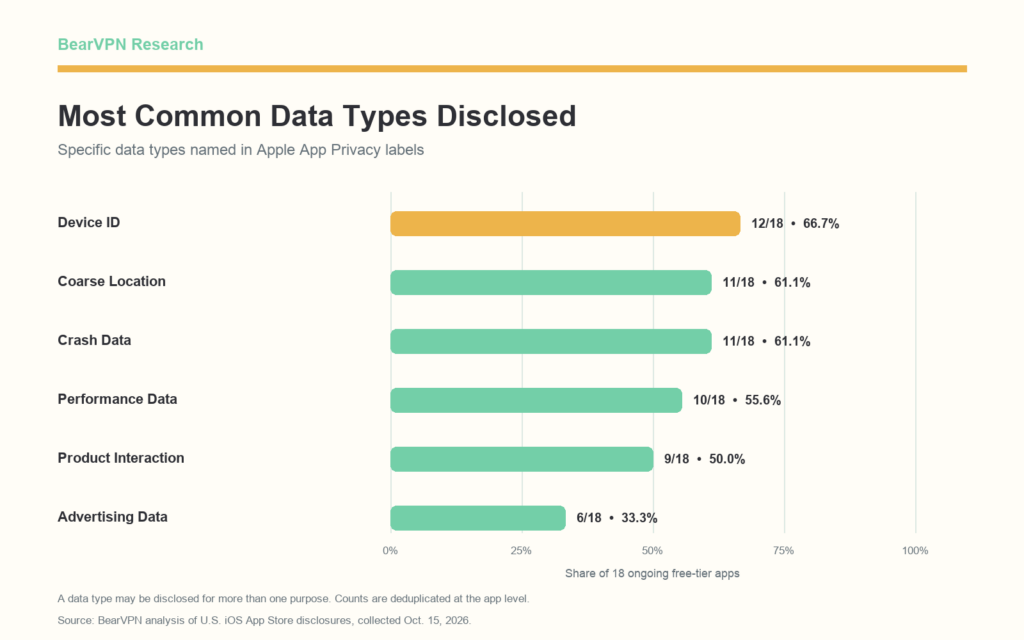
Under Apple’s definitions, Device ID can include an advertising identifier or another device-level identifier. Its significance depends on the stated purpose and whether it is linked to identity or used for tracking. The label does not justify assuming that every disclosed Device ID serves the same function.
Coarse Location is less precise than latitude and longitude recorded to three or more decimal places. It may represent an approximate location, but it should not be rewritten as continuous GPS tracking. For a VPN app, approximate location may also be derived from an IP address, used for an advertising purpose, or used as part of an app function. The label alone does not show which technical method generated it.
Crash Data and Performance Data can support reliability work, while Product Interaction can describe how users engage with app features. Their presence does not by itself prove excessive collection. Conversely, the label does not establish whether the app minimizes or retains the data appropriately. It identifies the developer’s declared categories and purposes, not the full implementation.
Why Advertising and Tracking Were Not the Same Disclosure
We compared our earlier App Store advertising-disclosure coding with the Tracking labels in this study. The comparison is descriptive, not causal.
Among the 10 apps whose store descriptions directly or indirectly disclosed an ad-supported free tier, five displayed Tracking. Among six whose descriptions did not explain their advertising status, four displayed Tracking.
These figures do not show that one group is safer. The sample is not random, and the ad-free and ambiguous groups contain only one app each. More importantly, the two disclosures answer different questions. A product description can tell users whether ads support the free service, while the App Privacy label reports data categories and uses under Apple’s framework. An app may display ads without using data in a way that meets Apple’s tracking definition; tracking can involve targeted advertising, advertising measurement, or sharing app data with a data broker. Users need to read both sections rather than treating either one as a substitute for the other.
What the Privacy Policies Added
We also reviewed eight deliberately selected privacy policies to see what details they added about IP addresses, identifiers, third parties, and retention. These were representative case studies, not a random sample, so we do not use them to calculate market-wide percentages.
Four examples show why the store label and privacy policy should be read together:
Sources: Free VPN privacy policy, X-VPN privacy policy, VPN 360 product privacy notice, and Psiphon privacy policy.
The most common difference was not an obvious contradiction but a difference in scope and level of detail. App Privacy labels use Apple’s fixed categories. A privacy policy may cover websites, accounts, customer support, payments, several operating systems, optional diagnostics, and multiple third-party services in the same document.
That difference can create two reading errors. Looking only at the label can miss operational detail available in the policy. Looking only at the policy can cause a reader to assign website, Android, paid-account, or third-party practices to the iOS free tier without enough evidence. A careful comparison first asks whether the two documents describe the same product, platform, user state, and type of processing.
A Five-Step Check Before Installing a Free VPN
Privacy labels are most useful when they become part of a short, repeatable check:
- Confirm that the free tier is ongoing. “Free” in a search result can mean a limited trial, a free download followed by a required subscription, or continuing use without payment.
- Read all top-level App Privacy sections. Check whether the page displays Data Used to Track You, Data Linked to You, Data Not Linked to You, or Data Not Collected. Remember that more than one can appear.
- Expand the categories. Look for Device ID, Location, Advertising Data, Product Interaction, and Diagnostics, then check the purpose listed beside each item.
- Search the privacy policy. Useful terms include “IP address,” “advertising ID,” “analytics,” “retention,” “third parties,” and “free version.” Check whether the policy clearly distinguishes the app from the website and free users from subscribers.
- Compare the documents, but do not force a verdict. A difference in scope is not automatically a contradiction. If an important practice remains unclear, record it as unresolved rather than guessing how the app behaves.
A Tracking label is not, by itself, proof that an app is unsafe. Likewise, a Data Not Collected label is not proof that a VPN has passed a technical privacy audit. The practical goal is to understand what has been declared and what remains unanswered before deciding whether the service fits your needs.
Research Methodology
Sample selection
On October 12, 2026, we queried the Apple iTunes Search API using:
https://itunes.apple.com/search?term=free%20vpn&country=us&entity=software&limit=50
We preserved the first 30 results in the returned order. This created a reproducible search-results snapshot, not a ranking of the most downloaded, most popular, safest, or best free VPNs. API results can change over time and may not match every user’s personalized App Store interface.
The unit of analysis was the individual App Store listing. Different apps from the same developer could therefore appear separately.
Eligibility and denominators
We reviewed the saved U.S. English store descriptions to determine whether each result disclosed an ongoing free tier. Apps offering only a free trial, requiring a subscription, or not providing enough evidence of continuing free use were excluded from the primary free-tier analysis.
- 30 search results were screened.
- 29 had an App Privacy disclosure we could retrieve.
- 18 had both an available disclosure and a confirmed ongoing free tier.
- Those 18 form the denominator for the main percentages in this report.
We kept Missing, No, Not Applicable, and Unclear as separate values. We did not convert missing or uncertain information to zero.
Privacy-label coding
App Privacy information was collected on October 15, 2026. For each eligible app, we recorded the presence of Tracking, Linked, Not Linked, or Data Not Collected, as well as disclosed data types and purposes. Counts were deduplicated at the app level, so the same data type appearing under several purposes counted once in the data-type prevalence table.
We used Apple’s definitions for collection, tracking, linkage, data types, and purposes. The full framework is available in Apple’s App privacy details on the App Store documentation. Apple also describes its Privacy Nutrition Labels as a self-reported summary provided by developers.
Policy case studies
Eight policies were deliberately selected to cover different label patterns and levels of detail. Four appear in the article as concise examples. Because the selection was purposive rather than random, policy findings are qualitative and are not presented as percentages for the 18- or 30-app samples.
Limitations
- We studied developer disclosures, not actual data flows. We did not install apps, inspect code or SDK packages, observe App Tracking Transparency prompts, or intercept traffic.
- Apple allows optional non-disclosure in limited circumstances when all of its conditions are met. A label is not necessarily an inventory of every transient or locally processed data item.
- The results represent U.S. iOS disclosures at a specific time. They should not be generalized to Android, Windows, macOS, other countries, or later app versions.
- Features and data practices may differ by region, permission, age, free or paid status, account status, and product version.
- The search-result sample is not a random sample of the VPN market, and its order does not measure popularity or market share.
- Privacy policies can cover several services and platforms. Differences between a policy and an iOS label do not automatically establish an error or deception.
- BearVPN produced this report. BearVPN is a VPN provider and may benefit from brand visibility or search traffic generated by the research. BearVPN was not part of the fixed sample and was not included in any calculation or ranking.
Frequently Asked Questions
Some free VPN apps say they collect data that may be linked to identity, while others disclose only data described as not linked. In our primary sample, four of 18 displayed at least one Data Linked to You category, 16 displayed Data Not Linked to You, and two displayed Data Not Collected. These categories overlap except for Data Not Collected. The labels are developer disclosures rather than independent measurements, so they show what the apps say under Apple’s framework, not a complete technical audit of actual data flows.
Apple defines tracking as linking data from an app about a user or device with third-party data for targeted advertising or advertising measurement, or sharing that app data with a data broker. It is narrower than the everyday meaning of “tracking.” Ordinary product analytics does not automatically qualify, and showing an advertisement does not always mean the app uses data for tracking. Ten of the 18 ongoing free-tier apps in our sample displayed this label.
It means the developer reports that the collected data is not linked to identity. Apple says developers should remove direct identifiers before collection and avoid later actions that would reconnect the data to a person. However, a store label does not let an outside reader verify the implementation. It is safer to describe the data as “declared not linked” rather than treating the label as proof of complete anonymity or zero privacy risk.
Those data types can serve several purposes. A Device ID may be used for advertising, measurement, fraud prevention, or another app function. Coarse Location may support approximate regional information, server selection, analytics, or advertising. Apple’s label pairs data types with purposes, so both parts need to be read together. The presence of either type does not reveal the full technical method, retention period, or whether every user generates that data.
No. Labels help users compare declared data practices before downloading, but they do not test encryption, logging, leaks, SDK behavior, security controls, or whether a developer’s answers match the app’s network traffic. Those questions require other evidence, such as reproducible technical testing, code or SDK analysis, and credible independent audits. A privacy label is one useful source, not a complete safety assessment.
Conclusion
The disclosures in this snapshot varied substantially. More than half of the 18 confirmed free-tier VPN apps displayed Apple’s Tracking label, while analytics was the most common stated purpose. Device ID, Coarse Location, Crash Data, and Performance Data were among the most frequently disclosed specific types.
The results also show why a single label rarely tells the whole story. Advertising and tracking were not interchangeable, data used for app functionality was as common as data used for third-party advertising, and representative privacy policies added details that the structured labels could not show.
For users, the most useful approach is to read three things together: how the free tier is funded, what the App Privacy label declares, and what the privacy policy says about identifiers, IP addresses, third parties, and retention. Those sources cannot replace independent testing, but they can make the questions clearer—and reveal where important answers are still missing.



