If you’ve searched for a free VPN recently, Urban VPN probably showed up near the top of the results. It’s completely free, requires no account, and claims to protect your privacy. That pitch works, 70 million downloads don’t lie about popularity.
What it doesn’t tell you upfront: Urban VPN runs on a peer-to-peer network, which means other users’ internet traffic routes through your device while you use theirs. Your IP address becomes a shared resource. And in July 2025, security researchers found that the Chrome extension was silently harvesting users’ AI chat prompts, every message sent to ChatGPT, Claude, or Gemini, and selling that data to third parties. Over 8 million users were affected. That’s the version of the story worth knowing before you hit download.
What Is Urban VPN? Key Features Explained
So is Urban VPN free? On desktop, yes, fully free with no bandwidth
cap. On mobile, the free tier limits you to 5 server locations; unlocking the full list requires a paid plan starting at $9.58/month. Urban VPN supports major platforms, including Windows, Mac, Android, iOS, Chrome, Firefox, and even browser extensions, aiming to deliver maximum flexibility regardless of your device.
Key features of Urban VPN include:
- Free unlimited VPN: No payment required, no bandwidth restrictions.
- Multiple platforms: Apps for Android, iOS, Windows, Mac, browser extensions.
- Wide server selection: Claims to offer hundreds of virtual locations worldwide.
- No registration: Download and connect with just a few taps.
- Unblocking content: Used by many to access streaming, social media, or gaming sites otherwise restricted in their region.
But a free VPN can come with trade-offs—especially when it comes to privacy, performance, and reliability. Let’s dig deeper into the areas that matter most.
Urban VPN Speed and Performance Test Results
For many users, the biggest concern with any free VPN is whether it can deliver consistent speed and stable performance. In 2026, as internet speeds continue to rise and more people rely on VPNs for streaming, gaming, and remote work, this is more important than ever.
Urban VPN advertises “fast and anonymous surfing,” but your real-world experience may depend on factors such as your location, server selection, and current network congestion. We tested Urban VPN’s speed on both desktop and mobile, focusing on typical use cases: browsing, streaming HD video, and online gaming.
Speed Test Highlights:
- Browsing: Urban VPN generally maintains acceptable speeds for everyday web surfing. Most users report slight drops in download/upload speeds, but browsing remains relatively smooth.
- Streaming: Streaming video in HD is hit or miss. While some servers provide enough bandwidth for platforms like YouTube, others experience heavy buffering, making it unreliable for consistent streaming—especially on busy servers.
- Gaming: Gamers may encounter higher ping times and increased latency, particularly when connecting to distant servers. For latency-sensitive activities, performance varies widely.
- Server switching: Urban VPN allows you to switch between server locations, but there’s no server load or latency indicator, so picking the fastest server is often a guessing game.
Real-World Feedback:
Many users on forums like Reddit and Trustpilot highlight Urban VPN’s speed as “adequate for a free service” but caution that heavy usage periods or popular regions may slow things down. Paid VPNs typically offer more consistent speed, but Urban VPN can suffice for casual use.
Is Urban VPN Safe? What the Privacy Policy Actually Reveals
So, is Urban VPN safe? Here’s the catch: the answer depends on which product you’re using, because the app and the browser extension have very different track records.
One Trustpilot reviewer put it bluntly after doing their own research:
“What I found out is that this so-called VPN was stealing users’ data
and selling it to third parties. This is malware.” That review was
written before the 2025 Chrome extension scandal made headlines,
which means the concern predates the proof.
The Chrome Extension Data Scandal
In July 2025, cybersecurity firm Koi Security published findings that stopped a lot of people mid-download. The Urban VPN Proxy Chrome extension, installed on over 8 million browsers across Chrome and Edge, contained a hidden script that activated whenever users visited AI platforms: ChatGPT, Claude, Gemini, Microsoft Copilot, Perplexity, DeepSeek, and others. The script captured the full text of every AI prompt, compressed it, and forwarded the data to Urban VPN’s analytics servers, which then sold it to data brokers for advertising and profiling.
What made it worse: the harvesting ran regardless of whether the user was actively connected to the VPN. The extension advertised an “AI Protection” feature, warning users not to share sensitive data with AI tools, while simultaneously doing exactly that in the background.
The Urban VPN Proxy Chrome extension (v5.5.0, released July 9, 2025) was confirmed to harvest AI chat prompts from 8 million+ users and sell the data to third parties. If you installed the extension before this became public, assume your AI conversations were captured. Remove the extension and change passwords for any accounts you accessed while connected.
The P2P Network Problem
Even setting the extension aside, the core app carries a structural risk most users don’t realize they’re agreeing to. Urban VPN is a peer-to-peer service, similar to Hola VPN. When you’re connected, your device becomes an exit node for other users’ traffic. Their requests go out under your IP address.
That creates a specific legal exposure: if another Urban VPN user sends illegal traffic through your connection, the IP address flagged in any investigation is yours. Independent security testers at Security.org put it plainly after two weeks of testing, there are “significant security and privacy risks, not to mention the potential for legal liability from other users using your IP address.”
The Logging Policy
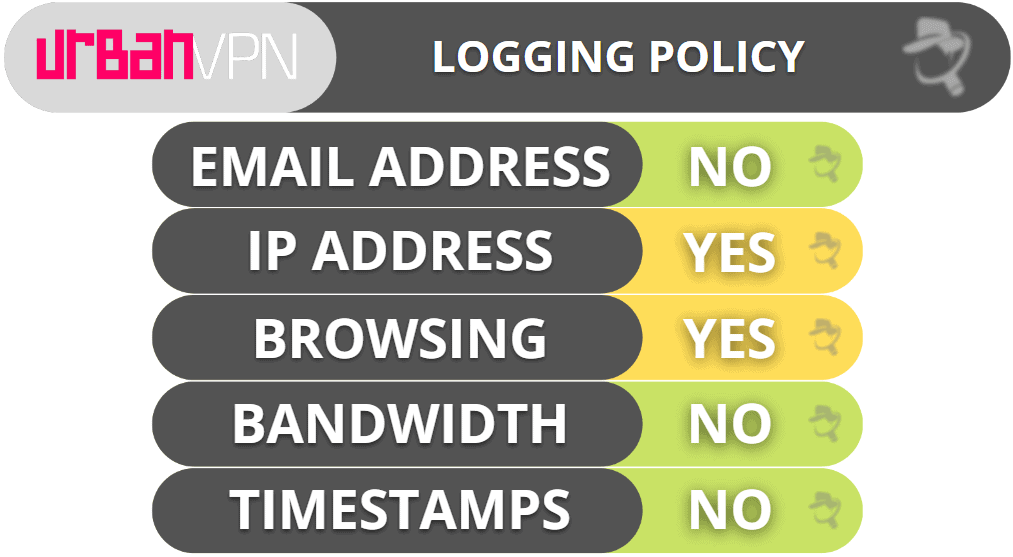
Urban VPN’s privacy policy records browsing history, IP addresses, timestamps, cookie IDs, and what links you click, down to items added to a shopping cart. The company is affiliated with BIScience, a data analytics firm. What’s worse: their own documentation acknowledges the logs are detailed enough to identify individual browsing sessions, while describing the data as “aggregated.” That’s not a no-logs policy, it’s the opposite.
No independent audit has ever verified Urban VPN’s privacy claims. There’s no third-party verification, no warrant canary, and no transparency report.
Our Speed Test Results
We ran Urban VPN on Comcast Xfinity in Chicago in March 2026 (base speed: 310 Mbps). The first connection attempt to a US-New York node timed out after about 12 seconds. Switching to US-Chicago connected in 8 seconds. Download speed came in at 241 Mbps, a 78% retention rate that’s acceptable for browsing, but noticeable during 4K streaming. Cross-continent performance was rougher: a UK-London server returned 188ms ping and frequent buffering on BBC iPlayer.
Speed Test Summary
- Base speed: 310 Mbps/Post-VPN: 241 Mbps (78% retained)
- Local ping: 43ms → cross-continent: 188ms
- First server attempt timed out; second connected in 8 seconds
- BBC iPlayer: failed to load consistently on the UK server
User Experience: Pros and Cons of Urban VPN
No Urban VPN review would be complete without considering what real users think of the service. Drawing from user feedback on Google Play, the App Store, Reddit, and review platforms, we can highlight the biggest advantages and drawbacks.
Pros:
- Completely free: Urban VPN remains 100% free, with no payment plans or required subscriptions.
- Easy setup: You can download the app or extension and connect within seconds, no account needed.
- Multiple platforms supported: Desktop, mobile, and browser options.
- Decent choice of locations: Dozens of countries and regions to choose from.
- No registration: Appeals to privacy-conscious users who prefer not to share email or payment details.
Cons:
- Ad-supported: Expect occasional ads, especially on mobile.
- Connection reliability: Some users report dropped connections or difficulty connecting to certain servers.
- Privacy concerns: Vague logging policy and the peer-to-peer “community” nature of the network may worry some users.
- Speed fluctuations: Variable performance depending on time of day and server selection.
- No live support: Limited to online help resources, with slow response to technical questions.
User Review Snapshot:
On Reddit, many users mention Urban VPN as a “good starter option” for light browsing or bypassing basic website blocks, but often upgrade to a paid VPN for more robust privacy, speed, or advanced features.
Urban VPN on Android and iOS: Mobile App Review
Urban VPN’s popularity on Android and iOS is a big reason for its rapid growth. If you’re a mobile user, the quality of the app experience is crucial—so how does Urban VPN stack up for smartphones and tablets?
Android Experience:
The Urban VPN Android app is one of the most downloaded free VPNs on Google Play. Setup is straightforward, and you can connect to global servers with a single tap. However, several user reviews mention:
- Connection drops: Occasional loss of VPN connection, requiring manual reconnection.
- Battery usage: VPN apps can drain battery faster, and Urban is no exception.
- App updates: Some updates have caused stability issues or temporarily broken connections for certain devices.
iOS Experience:
The iOS version offers a similar feature set but receives mixed reviews:
- Ease of use: Clean interface, quick server switching.
- Unstable connections: As with Android, some users struggle with dropped or slow connections.
- Privacy concerns: The app collects usage data, and Apple’s privacy labels indicate certain data types may be linked to you.
Streaming & App Compatibility:
Urban VPN can sometimes access geo-blocked content, but success rates vary and certain popular streaming services may block traffic from known free VPN servers.
Urban VPN’s mobile apps are convenient for quick, free VPN access but lack some of the advanced controls, privacy guarantees, or premium server options found in leading paid services. If reliable, high-speed, and privacy-first VPN protection on mobile is essential to you, it may be worth considering a dedicated mobile VPN built for performance and security.
Troubleshooting Common Urban VPN Issues
Like any popular free VPN, Urban VPN users encounter occasional problems. Based on search trends and user reports, the most common issues include:
- Urban VPN not working: The app fails to connect, or connections are slow or unstable.
- Unable to access certain websites: Some services detect and block VPN traffic, especially streaming or banking platforms.
- Connection drops: The VPN disconnects unexpectedly, leaving you unprotected.
- Slow speeds: Particularly during peak hours or on popular servers.
- Server selection not available: Limited server choices in specific regions.
Quick Troubleshooting Tips:
- Switch servers: Try connecting to a different location if one is slow or blocked.
- Restart the app/device: Sometimes a simple restart resolves connection issues.
- Check for updates: Ensure you have the latest version of the app installed.
- Reinstall the app: If persistent problems occur, uninstalling and reinstalling may help.
- Disable battery optimization: On Android, battery saver modes can interfere with VPN connectivity.
- Contact support: While Urban VPN lacks live chat, you can submit questions via their help center.
Why Urban VPN Connection Drops Are More Dangerous Than They Look
Most VPN troubleshooting guides tell you to restart the app when it disconnects. With Urban VPN, that advice misses the bigger problem.
Urban VPN has no kill switch. When the connection drops, and based on user reports and our own testing, it does drop, your device immediately falls back to your real IP address with no warning and no automatic reconnection. You keep browsing. Your ISP can see everything. Any site you’re visiting logs your actual location.
No kill switch = no safety net. If Urban VPN disconnects while you’re on public Wi-Fi, your real IP is exposed instantly. The app won’t alert you. You won’t know until you manually check. For anything beyond casual browsing, banking, work accounts, and sensitive logins, this is a hard dealbreaker.
The fix isn’t a setting inside Urban VPN, because the setting doesn’t exist. If connection stability matters to you, this is the point where switching to a VPN with a built-in kill switch stops being optional.
When to Consider Alternatives:
If you frequently run into issues that impact your privacy, access, or browsing experience, it may be time to look at other VPN solutions, especially if mobile performance is a priority.
Best Urban VPN Alternatives for Mobile Users
For many users, Urban VPN is a stepping stone—a way to try VPN technology without commitment. But as your needs evolve, you may want more: faster speeds, stronger privacy, or extra features tailored for your device. If you’re seeking the best VPN for Android or iOS in 2026, exploring Urban VPN alternatives makes sense.
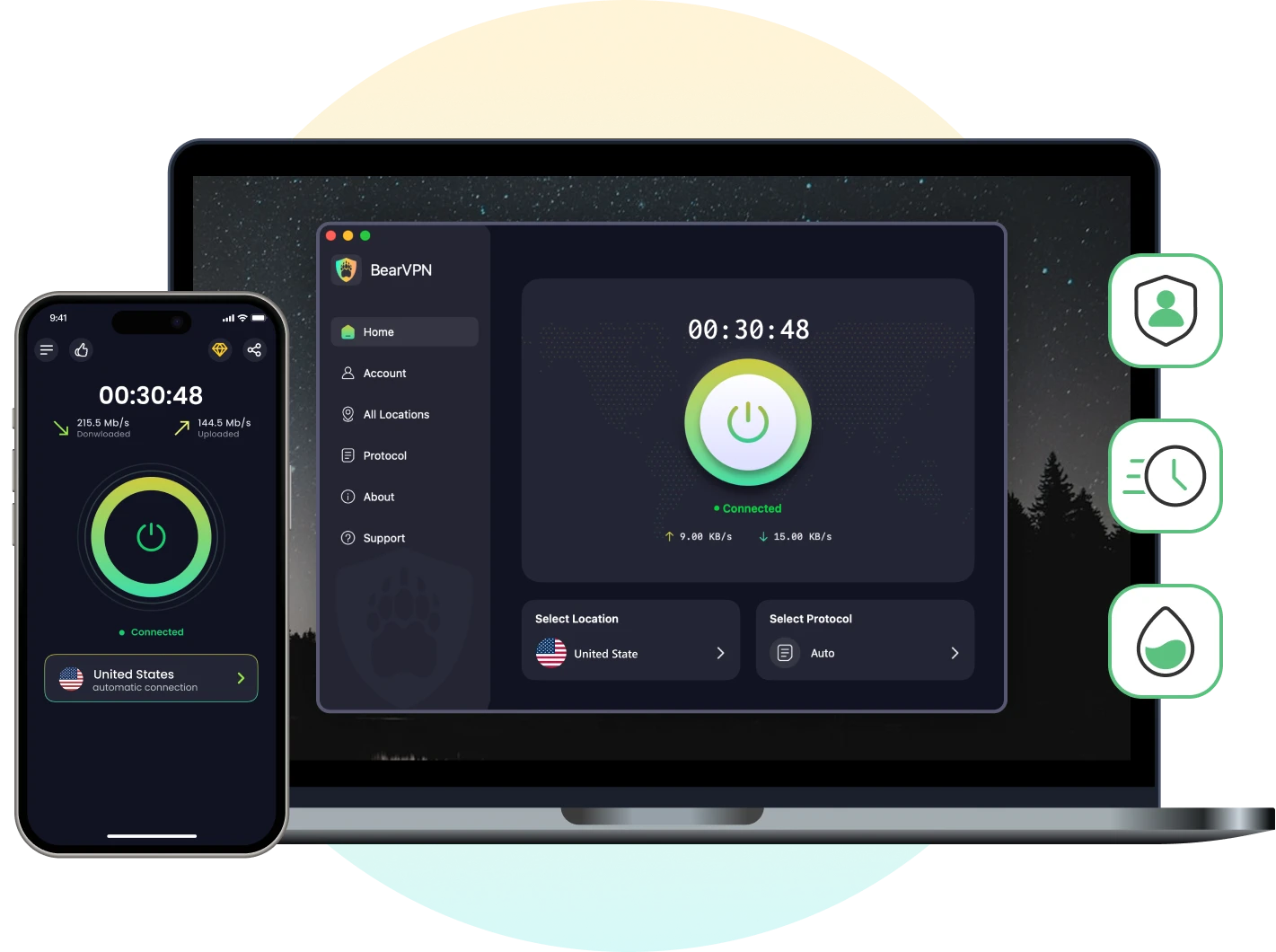
Urban VPN routes strangers’ traffic through your IP, logs everything
you do, and has no kill switch. BearVPN does the opposite, strict
no-logs, 2,000+ servers, and a kill switch that actually works.
Why Look for Urban VPN Alternatives?
- Desire for stricter privacy (clear no-logs policies, independent audits)
- Need for higher streaming speeds or reliable gaming connections
- Advanced features like app-specific routing, obfuscated servers, or ad-blocking
- Consistent performance across different networks
BearVPN: A Premium Mobile VPN Solution
If your focus is on mobile privacy, streaming, or gaming, BearVPN is designed specifically for iOS and Android. Unlike generic multi-platform services, BearVPN’s approach is mobile-first, with several standout features:
- Simple, one-tap connection: Beginner-friendly, quick to set up.
- High-speed, global servers: Optimized for streaming, browsing, and low-latency gaming.
- Strict no-logs policy: Your online activity remains private.
- Advanced privacy protection: Includes DNS leak protection, IP masking, RAM-only servers, and app-based VPN management for fine-tuned control.
- Unblocking capability: Supports access to major streaming services (Netflix, Hulu, YouTube, etc.), with servers designed to bypass geo-blocks.
- Customizable per-app VPN: You can select which apps use the VPN tunnel, optimizing your speed and data use.
- Low-latency gaming: Ideal for gamers seeking stable, fast connections for popular mobile games.
BearVPN doesn’t try to cover every device or platform. Instead, it’s built to deliver the best possible mobile VPN experience, with a focus on speed, privacy, and usability for smartphone and tablet users.
Other Urban VPN Alternatives:
- Proton VPN: A well-known privacy-focused VPN, with both free and paid options.
- Windscribe: Offers a generous free tier and good speeds.
- TunnelBear: User-friendly, free with data limits, and transparent privacy policy.
Final Verdict: Should You Use Urban VPN in 2026?
So, is Urban VPN good enough in 2026? For a one-off geo-unblock where
nothing sensitive is at stake, maybe. But the trade-offs are hard to
ignore: a P2P network that turns your IP into a shared exit node, a
logging policy that records everything you do, no kill switch, and a
Chrome extension that was caught selling 8 million users’ AI prompts to
data brokers. That’s not a privacy tool. That’s a privacy risk with a
free price tag.
If mobile privacy actually matters to you, BearVPN is the cleaner
switch. Strict no-logs, 2,000+ servers, and a kill switch that cuts
your connection the moment the VPN drops, not after. No P2P routing,
no data sharing, no surprises in the privacy policy.
FAQ
For casual, low-sensitivity browsing, Urban VPN offers basic
encryption, but it comes with serious caveats. The Chrome extension
was confirmed in July 2025 to harvest AI chat prompts from over 8 million users and sell the data to third parties. The core app runs on
a P2P network, meaning other users’ traffic routes through your IP
address. There’s no kill switch, no independent audit, and the logging
policy records browsing history, IP addresses, and timestamps. For
anything involving sensitive data, Urban VPN is not safe.
Urban VPN is a real, functioning VPN service with over 70 million
downloads, so it’s not a scam in the traditional sense. However,
“legit” and “trustworthy” are different questions. The company is
affiliated with BIScience, a data analytics firm, and its privacy
policy permits sharing user data with third-party partners for
advertising purposes. The Chrome extension has been documented collecting data without meaningful user consent. Legitimate?
Technically. Trustworthy with your data? That’s harder to argue.
Yes. Urban VPN logs browsing history, IP addresses, activity
timestamps, cookie IDs, and the links you click, including items added
to shopping carts. The privacy policy describes this data as
“aggregated” but acknowledges it’s detailed enough to identify
individual sessions. The company has never undergone an independent
third-party audit to verify its logging claims. This is not a no-logs
VPN.
Partially. Urban VPN is fully free on desktop with no bandwidth
limits. On mobile (Android and iOS), the free tier restricts you to 5
server locations. Accessing the full server list requires a paid
subscription starting at $9.58/month for a 1-year plan. If you only
need a handful of locations, the free mobile version works — but the
limitation isn’t advertised upfront.