


Many people use “safe” to mean different things when they talk about SHEIN. Some are asking whether the site is legitimate, while others worry about payment details, app permissions, product materials, fake discount links, or past data security issues. To judge SHEIN fairly, it helps to separate these risks instead of giving one simple yes-or-no answer.
Is SHEIN Safe to Use?
SHEIN is not a random scam site, but “safe” is not a yes-or-no question. A shopping platform can be legitimate while still carrying privacy, payment, product, delivery, and phishing risks. The smarter question is not only whether SHEIN is real, but how to use it more safely.
In general, SHEIN is safe enough to browse and order from when you use the official website or app and follow basic online shopping precautions. The bigger risks usually come from fake SHEIN links, weak passwords, saved payment details, public Wi-Fi, unrealistic product expectations, and privacy settings that users never review.
So the practical answer is: SHEIN is generally safe to use, but you should not treat it as risk-free.
Is SHEIN Legit or a Scam?
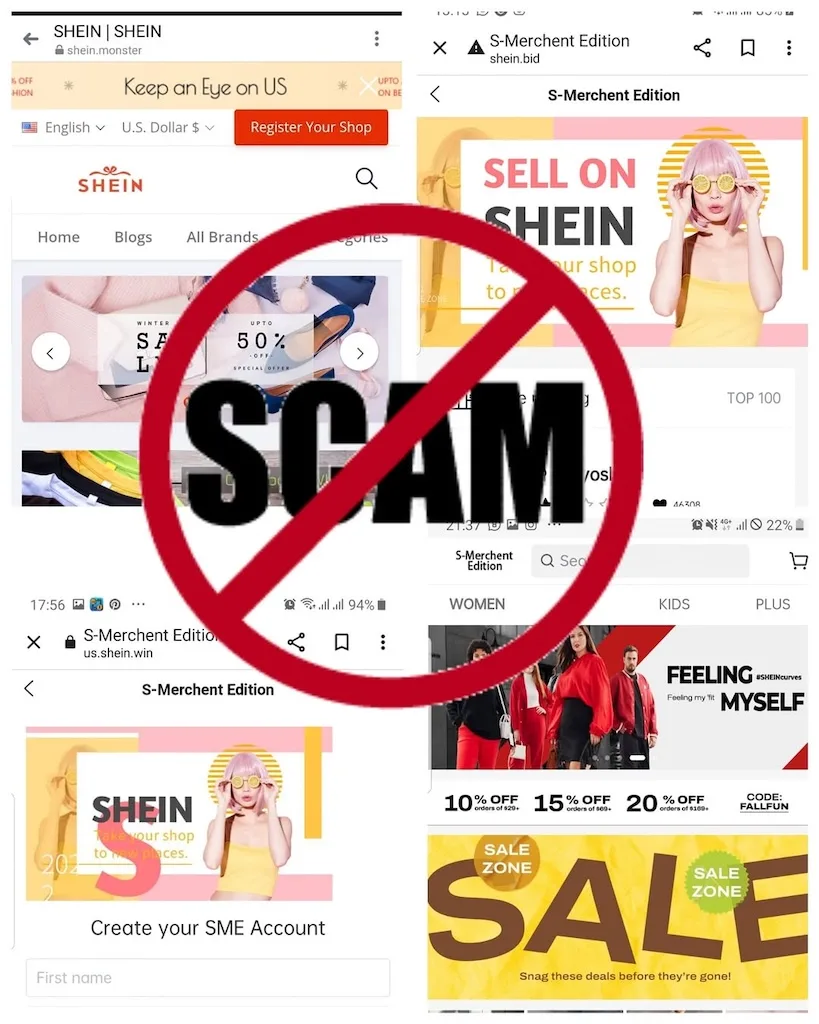
SHEIN is a real global online fashion and lifestyle retailer, not a fake store pretending to sell products. However, many scams use well-known shopping brands to trick users, and that is where the confusion often starts. A fake website can look like SHEIN, use similar branding, and promote discounts that seem believable.
To avoid fake SHEIN scams:
- Type the official SHEIN website address directly into your browser.
- Download the app only from the Apple App Store or Google Play.
- Do not log in through links from random texts, emails, or social media ads.
- Be careful with “too good to be true” coupons.
- Avoid pages that ask you to pay outside SHEIN’s normal checkout process.
- Do not share verification codes with anyone claiming to be customer support.
This distinction matters: SHEIN itself may be legitimate, but fake SHEIN pages and phishing messages can still be dangerous.
Is It Safe to Pay on SHEIN?
SHEIN supports common online payment options, and its payment help page says shoppers may be redirected to PayPal’s payment page or to a secure page to enter credit card details, depending on the payment method selected. That makes SHEIN similar to many large e-commerce platforms: the checkout process can be secure, but your risk still depends on whether you are using the official site or app, how you pay, and whether your account and network connection are protected.
For most shoppers, a credit card, PayPal, Apple Pay, Google Pay, or another trusted payment option is safer than direct or unusual payment methods because these options may give you more dispute or chargeback support if something goes wrong. The exact options vary by region, so check what SHEIN offers at checkout in your country.
To reduce payment risk on SHEIN:
- Use the official SHEIN website or app before entering payment details.
- Avoid checkout pages opened from random ads, texts, emails, or social media links.
- Use a payment method with buyer protection, such as a credit card or trusted third-party payment service.
- Consider using PayPal, Apple Pay, Google Pay, or a virtual card if available, so you do not always need to enter your card number directly.
- Avoid saving card details unless you shop frequently and are comfortable with the risk.
- Check whether the charged amount, merchant name, and currency match your order confirmation.
- Do not complete checkout on $1 unless your connection is protected.
A secure checkout page can protect the payment process, but it cannot protect you if you enter your details on a fake SHEIN website. That is why the safest payment habit is simple: start from the official SHEIN site or app, use a protected payment method, and avoid rushing through checkout from suspicious links.
Is the SHEIN App Safe for Privacy?
The SHEIN app can be convenient, but convenience often comes with data collection. That does not automatically mean the app is unsafe, but it does mean users should understand what information they are sharing and which permissions they allow on their device.
SHEIN’s privacy notice states that its policy explains how personal information is collected, used, shared, processed, and protected when users access its website, app, communications, purchases, and other services. SHEIN’s Privacy Center also says its privacy notices describe the types of data collected, how it is used or processed, who it is shared with, and what rights may apply by jurisdiction.
That means users should treat SHEIN like any major shopping app: useful, but worth checking.
Before using the app heavily, review:
- Location access
- Photo or camera access
- Notification permissions
- App tracking settings
- Saved payment details
- Email and SMS marketing preferences
- Account login security
You can also choose to shop through the website instead of the app if you want fewer app-level permissions. That will not remove all tracking, because websites can still use cookies and analytics, but it may reduce the number of device permissions involved.
Has SHEIN Had a Data Breach Before?
Yes. SHEIN has had a data security incident in the past. In 2022, the New York Attorney General announced a $1.9 million settlement with Zoetop, the then-owner of SHEIN and ROMWE, over its handling of a 2018 data breach. According to the announcement, the breach involved login credentials for tens of millions of SHEIN and ROMWE accounts.
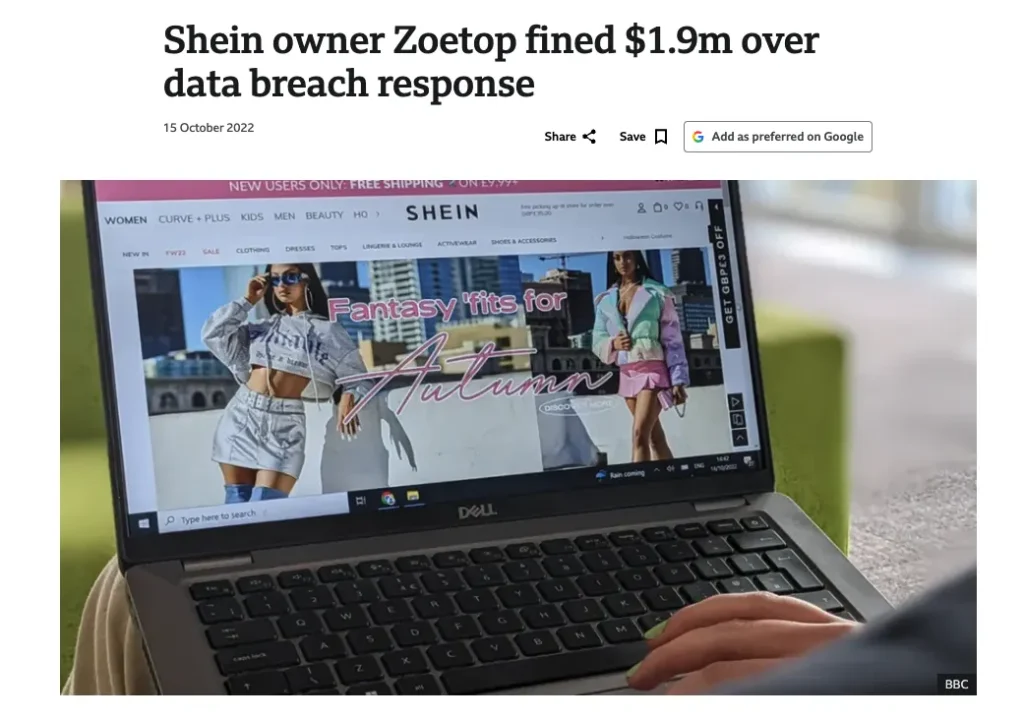
This does not mean your SHEIN account is unsafe today, and it does not mean every shopper will have a security problem. But it is a useful reminder that large shopping platforms are attractive targets for attackers, especially because they store account, order, email, and payment-related information.
To protect your SHEIN account:
- Use a password you do not use anywhere else.
- Change your password if you reused it on older shopping accounts.
- Watch for login alerts, password reset emails, or unfamiliar order activity.
- Avoid logging in from links in emails, texts, or social media messages.
- Use two-factor authentication if it is available in your region.
- Consider using a separate email address for shopping accounts.
Past data breaches are not a reason to panic, but they are a strong reason to take account security seriously.
What Are the Main Risks of Shopping on SHEIN?
SHEIN safety is not just about whether the website works. The real risks are spread across account protection, privacy, product quality, fake links, and post-purchase expectations. Understanding each risk helps you avoid the most common mistakes.
If you compare SHEIN with other low-cost shopping apps, you may have similar questions about whether Temu is safe to use, especially around fake links, payment protection, product quality, and app privacy.
1. Fake SHEIN Websites and Phishing Links
Scammers often copy familiar brands because users already trust them. A fake SHEIN website may use similar colors, logos, product photos, and discount language to make you log in or enter payment details.
Be extra careful with:
- Huge discount links from unknown senders
- Fake refund messages
- “Your package is delayed” texts
- Login pages opened from social media ads
- Customer support accounts asking for codes or payment information
The safest move is to go directly to the official SHEIN site or app instead of clicking through random links.
2. Product Quality and Sizing Issues
A low price does not automatically mean a product is fake or unsafe, but it does mean expectations should be realistic. SHEIN items can vary in fabric, fit, stitching, color, and sizing. This is one of the most common reasons shoppers feel disappointed.
Before ordering, check:
- Real customer photos
- Size charts
- Fabric composition
- Product reviews
- Return rules
- Shipping times
- Whether the item is final sale
For clothing, sizing and material quality are often bigger concerns than platform legitimacy.
3. Product Safety Concerns
Product safety on SHEIN depends heavily on what you buy. A basic T-shirt, a phone case, a necklace, a children’s pajama set, and a cosmetic product do not carry the same level of risk. That is why shoppers should judge SHEIN items by category instead of assuming every product is equally safe or unsafe.
For lower-risk fashion items, such as basic tops, casual accessories, or seasonal pieces, the main concerns are usually fit, fabric quality, color accuracy, stitching, and whether the item looks like the product photos. These are quality and expectation issues more than serious safety issues.
Be more careful with products that involve skin contact, children, cosmetics, unknown materials, or long-term use. This includes:
- Kids’ clothing and sleepwear
- Cosmetics and beauty products
- Jewelry and metal accessories
- Shoes
- Underwear and swimwear
- Items with strong smells, dyes, glue, or unclear material labels
- Electronics, chargers, or products with heating components
Before buying higher-risk items, check the material details, product photos, buyer reviews, seller information, return policy, and whether the listing provides enough safety or compliance information. If the product has no real reviews, unclear materials, or suspicious claims, it may be better to skip it.
SHEIN has also faced product safety scrutiny in some markets, so shoppers should be especially selective with items where materials, safety standards, or age suitability matter. This does not mean every SHEIN product is unsafe. It means the safer approach is to treat SHEIN as a low-cost marketplace where product quality and safety can vary by category, listing, and seller.
4. Data and Tracking Concerns
Like many online shopping platforms, SHEIN may collect account, order, device, browsing, and service-related data depending on how you use the site or app. SHEIN’s own privacy materials describe data collection, use, processing, and sharing practices.
To reduce privacy exposure:
- Limit unnecessary app permissions.
- Use a separate shopping email if you prefer.
- Turn off unnecessary marketing notifications.
- Avoid logging in through unknown links.
- Review privacy settings where available.
- Use a VPN when shopping on shared or public networks.
A VPN does not stop all app tracking, but it can help protect your network connection and reduce IP-based exposure.
5. Refund and Delivery Expectations
SHEIN orders can involve longer shipping times, changing delivery estimates, return conditions, and product-level restrictions. Some dissatisfaction comes from expecting the experience to feel like a premium local retailer when the business model is different.
Before buying, check the return policy, delivery estimate, product reviews, and whether the product can be returned. This matters more for larger orders or items where sizing and fabric quality are uncertain.
6. Misleading Discounts and Urgency Tactics
Another risk is not technical security, but shopping pressure. SHEIN often uses discounts, countdowns, flash sales, limited-time offers, coupons, and app-only promotions to encourage quick decisions. These tactics are common in e-commerce, but shoppers should not assume every discount is as urgent or valuable as it looks.
In 2025, the European Commission and national consumer authorities said SHEIN needed to address several consumer protection concerns, including fake discounts, pressure-selling with false deadlines, misleading product labels, unclear sustainability claims, and incomplete or incorrect information about return and refund rights.
For shoppers, the practical lesson is simple: do not let countdowns or dramatic discounts rush your decision. Before checking out, compare the final price, shipping cost, return terms, product reviews, and whether the item is actually worth buying without the “limited-time” pressure.
Be especially careful when:
- A countdown timer makes the deal feel urgent.
- The original price looks inflated.
- A coupon only works if you add more items than planned.
- Return or refund details are hard to find.
- The product label sounds impressive but does not explain what it means.
- You are buying quickly because the app says the deal is about to disappear.
A discount is only useful if the product, price, and return terms still make sense after you slow down and check the details.
How to Shop on SHEIN More Safely
The safest way to use SHEIN is to combine common-sense shopping habits with basic digital security. No single tool can remove every risk, but the right habits can reduce the chances of payment problems, account issues, phishing, and privacy exposure.
Use this checklist before you shop:
- Use the official SHEIN website or app.
Avoid logging in through links from random ads, emails, or messages. - Download the app only from official app stores.
Do not install APK files or apps from unknown websites. - Use a strong, unique password.
Do not reuse the same password from email, banking, or other shopping accounts. - Enable extra account protection if available.
Use two-factor authentication or verification features when supported. - Choose a safer payment method.
Credit cards and trusted payment services may give you more dispute options than direct payment methods. - Do not save payment details unnecessarily.
Entering your card each time can be slightly less convenient, but it reduces stored payment exposure. - Check app permissions.
Disable access that is not needed for shopping, such as precise location, contacts, camera, or photos. - Avoid public Wi-Fi for checkout.
Open networks in airports, cafes, hotels, and malls are not ideal for entering payment information. - Use a VPN on shared or public networks.
A VPN helps encrypt your connection and protect your browsing from local network snooping. - Monitor your account and bank activity.
Check order history, login notices, and bank statements after purchases.
Can a VPN Make SHEIN Safer?
A VPN can make one part of SHEIN shopping safer: your internet connection. It is especially useful when you shop on public Wi-Fi, travel networks, hotel Wi-Fi, campus networks, or any connection you do not fully trust.
A VPN can help by:
- Encrypting your internet traffic
- Hiding your IP address from websites and network observers
- Reducing exposure on public Wi-Fi
- Making mobile shopping safer on shared networks
- Helping protect browsing activity from local network snooping
But a VPN cannot do everything. It cannot guarantee product quality, force a refund, remove all app tracking, stop you from entering information on a fake website, or protect an account with a reused password.
That is where BearVPN fits naturally. BearVPN offers a free mobile VPN for iOS and Android with no signup, while Windows and macOS are positioned as Premium desktop options. This makes it useful for people who often shop from their phones and want a simple way to protect their connection before browsing or checking out. For iOS shoppers, a free VPN for iPhone can be useful when browsing shopping apps or checking out on public networks.
BearVPN also highlights privacy and security features such as a strict no-log policy and secure encryption across its free VPN page. For SHEIN users, the practical use case is clear: turn on BearVPN before shopping on public Wi-Fi, then combine it with official links, safe payment methods, and careful app permissions.
Protect your connection before browsing SHEIN or entering payment details on shared networks.
When Should You Avoid Buying from SHEIN?
Sometimes the safer choice is not to buy. Even if SHEIN is a legitimate platform, certain situations should make you pause before entering personal or payment information.
Avoid buying when:
- The link does not come from the official SHEIN website or app.
- The discount looks unrealistic, even for SHEIN.
- The page asks for unusual payment methods.
- The product has no reviews, unclear materials, or suspicious images.
- The item is safety-sensitive and you cannot verify enough details.
- You are using public Wi-Fi and cannot secure your connection.
- The return policy does not work for your situation.
- You feel pressured by fake countdowns, fake support messages, or urgent payment requests.
A few minutes of checking can prevent a much bigger problem later.
Final Verdict: Is SHEIN Safe?
SHEIN is generally safe in the sense that it is a legitimate online shopping platform. But that does not mean every purchase, product, link, or app setting is automatically safe.
The real answer is more balanced: SHEIN can be safe to use if you shop through official channels, protect your account, use secure payment methods, review app permissions, avoid suspicious links, and secure your connection when needed.
For privacy-conscious shoppers, a VPN is a useful part of that safety setup. BearVPN can help protect your connection while shopping, especially on mobile devices and public Wi-Fi. Just remember that a VPN is not a replacement for smart shopping habits. It protects your network connection, not the quality of the item in your cart.
FAQs
Yes, SHEIN is generally safe to order from if you use the official website or app and follow basic online shopping precautions. The biggest risks usually come from fake links, weak account security, payment mistakes, privacy settings, and product quality expectations.
SHEIN can be used with credit cards, but you should still protect your payment information. Use the official checkout page, avoid public Wi-Fi when entering card details, monitor your statement, and consider not saving your card unless necessary.
The SHEIN app should only be downloaded from official app stores. After installing it, review app permissions and disable anything you do not need, such as unnecessary location, photo, camera, or notification access.
Yes. SHEIN’s privacy notice says it explains how personal information is collected, used, shared, processed, and protected when users access the website, app, purchases, communications, and related services.
A VPN can protect your internet connection, especially on public Wi-Fi or shared networks. It can help encrypt your traffic and hide your IP address. However, it cannot control product quality, refund outcomes, app permissions, or what information you choose to share.
Be more careful with safety-sensitive products such as kids’ clothing, cosmetics, jewelry, and skin-contact items. Check materials, reviews, photos, return rules, and any safety information before buying.



