


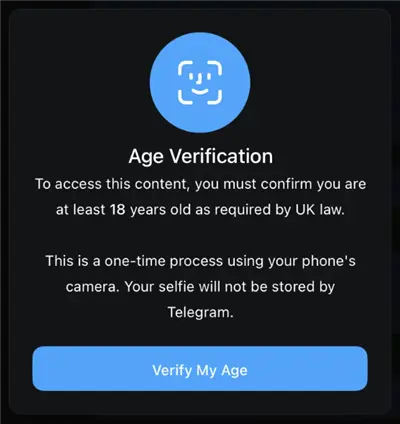
A startling new message asking you to scan your face to confirm your age may have shown if you recently attempted to visit a blocked Telegram channel.
For many years, all it took to access sensitive content on Telegram was to toggle a switch in the settings. However, Telegram launched an “Age Verification Bot” in 2025 as a result of stringent new rules like the UK Online Safety Act and more stringent EU restrictions. This bot prevents you from accessing channels until you use a biometric facial scan to demonstrate that you are older than eighteen.
You’re not alone if you respect your privacy and don’t want to provide a chat app with your biometric information.
In this guide, we will show you exactly how to bypass the Telegram age verification bot, bring back the missing “Disable Filtering” switch, and unlock your channels safely—without scanning your face.
The information and instructions provided in this article are for educational and informational purposes only. The full risks and consequences of using the BearVPN service to bypass Telegram’s age verification or content restrictions rest solely with the user. Users are responsible for complying with all applicable local, state, national, and international laws when accessing Telegram or any other online content using BearVPN.
Why is Telegram Asking for a Face Scan?
Before we fix the problem, it helps to understand why it’s happening. You aren’t seeing this error because of your account settings; you are seeing it because of your location.
Telegram detects your IP address. If you are connecting from a country with strict age-verification laws (such as the United Kingdom, parts of the European Union, or South Korea), the app is legally required to gate “sensitive content” behind a hard verification wall.
The “Missing Switch” Phenomenon
Many users follow old guides that say: “Go to Settings > Privacy > Sensitive Content > Disable Filtering.”
However, when they look for this option, it’s gone.
If Telegram detects you are in a strict region, it completely hides the “Disable Filtering” toggle from your menu. No amount of restarting the app will bring it back. The only way to restore this button—and bypass the facial scan—is to convince Telegram you are in a country where these laws don’t exist.
Bypass Telegram Age Verification via The “IP Switch”
This is the most effective method in 2026. Since the facial scan requirement is triggered by your geographic location (IP address), changing your digital location removes the requirement entirely.
Scenario 1: You Are Inside a Strictly Regulated Region (UK/EU)
If you are located in the UK, Germany, or other regions with stricter online regulations, Telegram may apply location-based restrictions based on your IP address.
In this case, try connecting to a VPN server outside your current region. A different IP location may help you access Telegram features that are limited in your area.
Recommended server locations:
- United States
- Switzerland
- Netherlands
Avoid:
- United Kingdom
- Germany
- South Korea
Simply open BearVPN, select a preferred server location, and reconnect to Telegram with the new IP address.
Scenario 2: You Are Outside Europe and Need Access to UK/EU Telegram Content
If you are located outside Europe but want to access UK or EU-based Telegram channels, communities, or regional content, you may need a European IP address.
Connect to a VPN server in the target region to make your connection appear as if it is coming from that location.
Recommended server locations:
- Netherlands
- Switzerland
- Germany
With BearVPN’s global network of 2,000+ servers, you can switch between different locations and choose an IP address that matches your access needs.
How to Bypass Telegram Restrictions Inside Strict Regulated Zones
Step 1: Connect via BearVPN (One-Click IP Switch)
BearVPN is a free and reliable VPN tool, specifically optimized for high-bandwidth social media and streaming access:
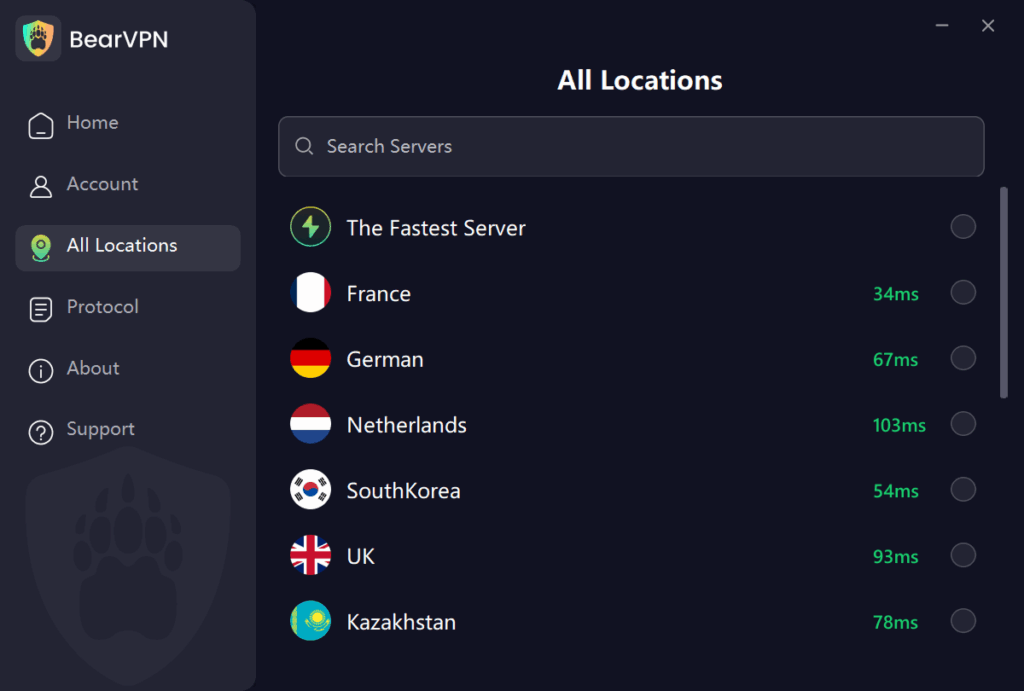
- 2000+ Server Lines: BearVPN is equipped with over 2000+ servers, covering 50+ regional locations, ensuring you can easily find a “Safe Zone” IP address.
- Residential-Style IPs: We use advanced IP masking that makes your connection look like a standard home user, not a VPN, effectively preventing Telegram from blocking your connection.
- High-Speed Connection and Unlimited Bandwidth: Utilizing smart routing technology, we ensure smooth and lag-free performance when watching videos or loading Telegram media. We offer unlimited bandwidth, allowing you to surf the internet freely without traffic limitations.
Establish your connection quickly and securely with BearVPN:
- Open BearVPN on your mobile device or desktop (supported on Windows, iOS, Android, macOS).
- Search for a US or Switzerland server from our global network.
- Tap Connect (One-Click Connection).
- Wait for the connection to stabilize (usually 2-3 seconds).
Privacy Protection: BearVPN uses industry-leading encryption protocols to ensure secure data transmission, and we maintain a No-Log Policy. Your Telegram activity remains your business and fully protected.
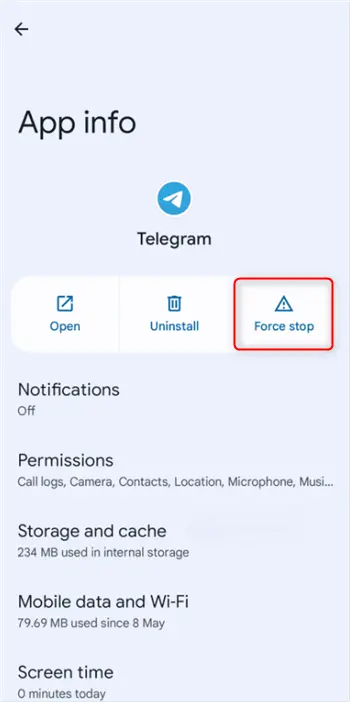
Step 2: Force Restart Telegram
This is crucial. Telegram caches your location data.
- On iPhone: Swipe up from the bottom of the screen and pause to view open apps. Swipe the Telegram app up to close it completely.
- On Android: Go to Settings > Apps > Telegram > Force Stop.
Step 3: Enable the “Disable Filtering” Toggle
Now that your IP is in a safe zone, the facial scan prompt should be gone, but the content might still be hidden until you flip the switch.
- Open Telegram.
- (Note: If the option is still hidden on the mobile app, use the Desktop/Web version instructions below—it syncs to your phone instantly).
- Go to Settings.
- Tap Privacy and Security.
- Look for the Sensitive Content section (it should now be visible).
- Toggle On the option that says “Disable Filtering.”
Congratulations. You can now open the blocked channels, and you will not be asked to scan your face.
Bypass Telegram Age Verification Using Telegram Web (The “Sync” Trick)
Sometimes, the Telegram mobile app (especially on iOS/iPhone) has Apple-imposed restrictions that are even stricter than Telegram’s own rules. Apple often blocks “NSFW” toggles entirely within apps downloaded from the App Store.
The workaround is to change the setting on the Web Version, which will then sync to your iPhone/Android app.
Prerequisite: You must still have BearVPN connected to a safe region (like the US) for this to work effectively if you are in the UK/EU.
- Connect BearVPN to a US server.
- Open your browser (Chrome/Safari) and go to web.telegram.org.
- Log in with your phone number.
- Click the Menu (three lines) in the top left corner.
- Go to Settings > Privacy and Security.
- Scroll down to the bottom. You should see a checkbox: “Disable Filtering.”
- Check the box.
- Close the browser and open the Telegram app on your phone. The blocked channels should now be accessible.
Pro Tip: If you toggle this on the Web version but the channels remain blocked on your iPhone, you may need to leave the channel and rejoin it while the VPN is active.
Bypass Telegram Age Verification via Third-Party Clients
If the native Telegram app is giving you trouble even with a VPN, many users turn to third-party Telegram clients. These are apps built on Telegram’s open API but with different features.
Popular Option: Nicegram
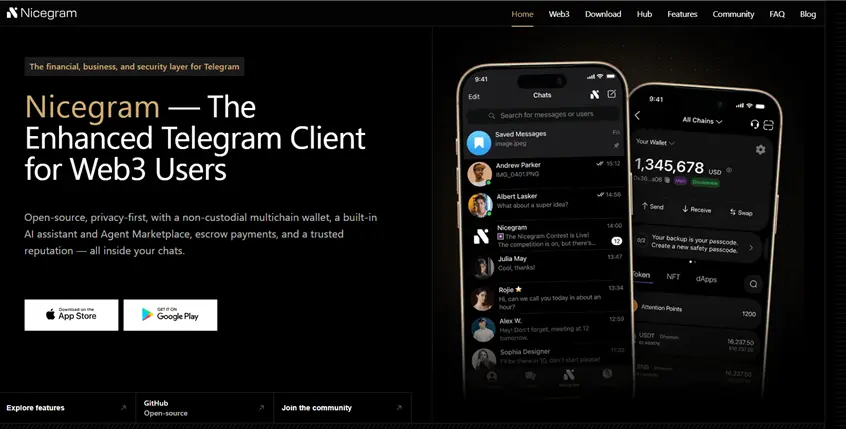
Nicegram is a popular alternative that includes a built-in “Unlock” feature.
- Download Nicegram from the App Store or Play Store.
- Log in with your Telegram account.
- Visit the Nicegram Bot (@Nicegram_bot) inside the app.
- Tap the buttons: “I’m 18+ Years Old” and “Show Sensitive Content.”
- Restart Nicegram.
⚠️ The Privacy Warning: While Nicegram is generally considered safe, using third-party clients means you are trusting another developer with your chat metadata. For maximum privacy, we recommend using the Official Telegram App + BearVPN method (Method 1), as this keeps your data strictly between you and Telegram, protected by BearVPN’s encryption.
Common Errors & Troubleshooting
Even with a VPN, you might encounter specific error messages. Here is how to translate and fix them.
Error 1: “This channel cannot be displayed because it was used to spread pornographic content.”
This is a hard block. It usually means you have not enabled the “Disable Filtering” toggle, or you are on an iPhone without that toggle enabled on the Web version.
The Fix: Go to Telegram Web (Method 2) and ensure “Disable Filtering” is checked. If it is checked and you still see this, the channel may be banned globally (removed from Telegram servers entirely), not just blocked in your region.
Error 2: “This channel is unavailable due to local laws.”
This is a 100% geo-restriction error. Telegram thinks you are in a country (like Germany or Indonesia) where this specific channel is illegal.
The Fix: This confirms your IP is the problem. Connect BearVPN to a different country. If you were on a German server, switch to a Swiss or US server. Restart the app.
Error 3: “Verification Failed” (Facial Scan)
Meaning: You tried to use the bot, but the lighting was bad, or the AI rejected you.
The Fix: Stop trying to scan your face. It is a privacy risk. Use the VPN method to bypass the request entirely.
Is Telegram Age Verification Safe? (The Privacy Risk)
You might be wondering, “Why shouldn’t I just scan my face and get it over with?”
Telegram states that their age verification is done by a third-party AI and that your face is not stored. However, privacy experts recommend caution for several reasons:
- Biometric Data Leaks: Once biometric data (your face map) is digital, it can potentially be hacked. Unlike a password, you cannot change your face if it is stolen.
- Anonymous Association: One of Telegram’s main benefits is anonymity. Linking your physical biometric identity to your Telegram account undermines the privacy the platform was built on.
- False Positives: AI age estimation is not perfect. If you are over 18 but look younger, the bot may permanently block you, and appealing these bans is notoriously difficult.
The Safer Choice: Masking your IP with BearVPN avoids the need to share any personal biological data with tech companies.
Conclusion: Don’t Trade Your Face for Content
The internet is becoming increasingly restricted, with platforms demanding more of your personal data every day. The new Telegram facial scan is just one example of how regional laws can break your user experience.
You shouldn’t have to scan your face to join a chat channel.
By using BearVPN, you take back control of your digital location. You can bypass intrusive age checks, restore missing features, and keep your biometric data where it belongs—on your own face, not in a server.
Ready to unlock Telegram?
FAQs: Telegram Age Verification
Can I use a fake ID for Telegram age verification?
No. Telegram’s age verification process in affected regions does not rely on uploading an ID card. Instead, it may use age estimation methods such as facial verification.
Using fake documents will not help complete the verification process. If Telegram restrictions are based on your region, some users try changing their IP location with a VPN to access Telegram through another network location.
Which countries require Telegram age verification?
Telegram age verification requirements depend on local regulations and platform policies. As of 2025, users in the UK and some European regions are more likely to encounter additional age-related checks due to stricter online safety regulations.
Users in many other regions may not see the same verification prompts.
Why is the “Disable Filtering” switch missing on my Telegram iPhone?
The “Disable Filtering” option may not appear in the Telegram iOS app because of Apple’s App Store content policies and Telegram’s approach to managing sensitive content on iOS.
If the option is unavailable, try accessing Telegram through the Desktop or Web version. After changing the setting there, it may sync with your iPhone app.
How do I fix “This channel cannot be displayed” on Telegram iPhone?
The “This channel cannot be displayed” message usually appears when Telegram blocks access to certain content based on regional restrictions, content settings, or iOS limitations.
You can try:
- Checking Telegram settings through Desktop or Web.
- Updating the Telegram app.
- Connecting through a different network or VPN server location if the restriction is region-based.
Does Telegram save my age verification facial scan data?
Telegram has not publicly confirmed that it stores users’ facial verification data permanently. The exact data handling process depends on the verification method and third-party providers involved.
If you are concerned about privacy, review Telegram’s privacy policies and consider using privacy-focused tools, such as a VPN, to protect your connection and IP location.
Can I bypass Telegram age verification without a VPN?
Changing your IP location is one of the common methods users try when Telegram features are restricted based on region.
Without a VPN, you can still try:
- Using Telegram Desktop or Web.
- Checking app settings and privacy options.
- Updating Telegram to the latest version.
However, if the restriction is based on your IP location or regional regulations, changing your network location may be required.


![How to Change YouTube TV Location [Still Works in 2026]](/_next/image/?url=https%3A%2F%2Fcms.bearvpn.com%2Fwp-content%2Fuploads%2F2026%2F06%2Fhow-to-change-location-youtube-tv.webp&w=640&q=75)



