


You finally find the perfect game, hit the green Play button, and instead of spawning into the world, your screen freezes and displays: “Sorry, there was a problem reaching our servers.”
This frustrating message—often accompanied by Error Code 279 or Error Code 277—means your device failed to establish a stable handshake with the game server. Whether you are searching for a “sorry there was a problem reaching our servers roblox pc” fix or troubleshooting on your mobile device, the root cause is a broken connection chain. It can be triggered by unstable ISP routing, corrupted network cache, or strict network administrators actively blocking gaming traffic.
Why Roblox Errors Out Even When I Have Full Wi-Fi Bars
You can stream a 4K YouTube video flawlessly, but Roblox still kicks you out. Why? Because video streaming buffers data in advance and can handle brief network hiccups. Multiplayer gaming, however, requires a perfect, real-time path. If your connection suffers from packet loss (dropped data) or micro-stutters, Roblox’s strict security engine will immediately sever the connection and throw an error.
Before you start altering your device settings, you must figure out who is to blame: your network or Roblox.
How to Fix “Sorry There Was a Problem Reaching Our Servers” (Step-by-Step)
Follow this progressive troubleshooting guide to quickly identify and resolve your connection error.
Step 1: Diagnose the Roblox Server Status
If thousands of players are seeing the roblox sorry there was a problem reaching our servers error simultaneously, the platform is likely down. Before you change any local settings, verify if the issue is on Roblox’s end:
- Use Our Real-Time Tracker: For the most immediate, up-to-the-minute status check, use our dedicated Roblox Status Checker to see if other players are experiencing outages right now.
- Check the Official Page: You can also confirm long-term outages via the official
status.roblox.comdashboard. - Check Social Media: Search “Roblox down” on DownDetector or check X (formerly Twitter). If there is a massive red spike in reports, stop troubleshooting immediately. The servers have crashed, and you simply have to wait for the developers to deploy a fix.
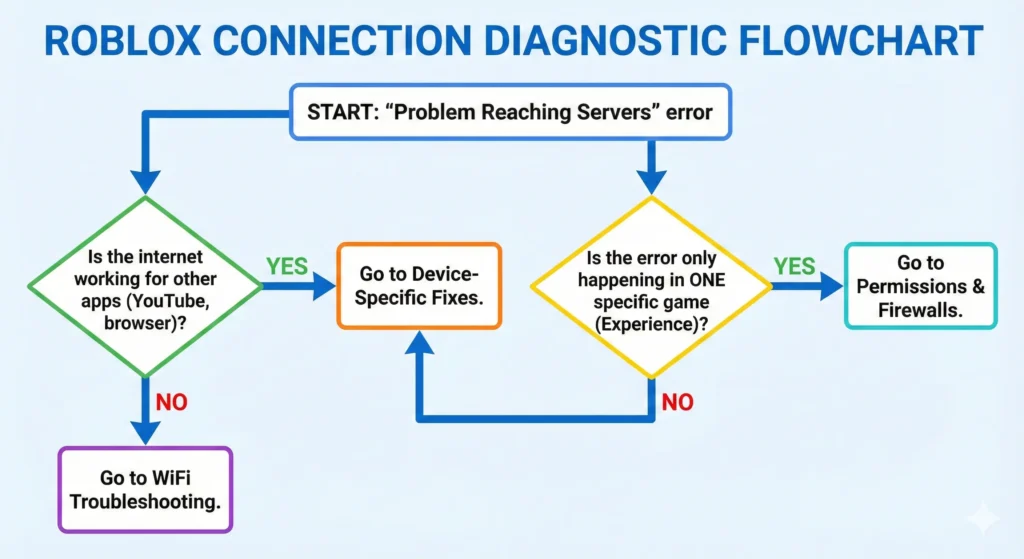
Step 2: Perform Basic Network Resets
Before diving into complex system settings, start with the most reliable local fixes:
- The Power Cycle (Router Reset): Unplug your internet modem and Wi-Fi router from the power outlet. Wait a full 60 seconds, then plug them back in. This simple action clears out temporary local connection conflicts and forces your router to establish a fresh path.
- The Mobile Radio Reset (For Wi-Fi users): If you are on a phone, tablet, or laptop, toggle Airplane Mode on for 10 seconds, then off. This instantly resets your device’s network card. Additionally, if your router has two bands, prioritize connecting to the 5GHz network. It has a shorter range but offers a much faster, cleaner connection required for gaming.

Step 3: Apply Device-Specific Network Fixes
Depending on the hardware you are using, the connection error requires a different approach.
Advanced Network Fixes for PC Users (Windows)
If you are playing on a computer and constantly searching for a “sorry there was a problem reaching our servers roblox pc” fix, the issue is usually deeply embedded in your Windows network cache or DNS configuration.
- Flush DNS & Perform a Winsock Reset: Press the Windows Key, type
cmd, right-click Command Prompt, and select Run as Administrator. Typeipconfig /flushdnsand press Enter. Next, typenetsh winsock resetand press Enter. Restart your PC. - Switch to Google’s Public DNS (8.8.8.8): Go to your Windows Control Panel > Network and Internet > Network Connections. Right-click your active connection, select Properties, and double-click Internet Protocol Version 4 (TCP/IPv4). Select “Use the following DNS server addresses” and enter 8.8.8.8 as preferred, and 8.8.4.4 as alternate. Click OK.
- Allow Roblox Through Windows Defender/Antivirus: Sometimes, your computer’s built-in security software mistakenly flags multiplayer game traffic as a threat, crashing the connection instantly. Open your Windows Settings > Update & Security > Windows Security > Firewall & network protection. Click on “Allow an app through firewall” and ensure both the “Private” and “Public” boxes next to Roblox are checked.
- Clear Browser Cache: Even if you use the desktop app, clearing your browser’s history and cookies (specifically the Roblox ones) can resolve underlying login authentication conflicts.
- PC Pro Tip: If you can get into the game but keep lagging out, press
Shift + F5on your keyboard (PC only). Watch the Network Ping in the top corner. If it is consistently over 250ms, the problem is your ISP routing.
Fixes for Mobile Users (iOS & Android)
If you are encountering the connection error on a mobile device, system-level resets are rarely necessary. Update your app first, and if the error persists, clear your application cache:
Step 4: Test a Different Route on a Restricted Network
If Roblox is online and the local fixes above did not work, compare two networks. Try the same account and experience on mobile data or another trusted connection. If Roblox works there but fails only on school, work, or your usual Wi-Fi, a firewall or poor ISP route may be blocking the connection.
BearVPN can encrypt the traffic and route it through another server, giving Roblox a different path to its game servers. Start with a nearby location to limit added latency.
- Route Roblox around a local network filter.
- Test a different path to Roblox servers.
- Choose a nearby server to limit added ping.

Don’t let arbitrary network blocks or poor ISP routing ruin your gaming session. Connect to BearVPN and jump back into your favorite experiences seamlessly.
Important Caveat: When a VPN Can Help (and When It Causes Errors)
While a premium VPN is a powerful tool, it must be used correctly for gaming.
- Use it for a network block: A VPN is most relevant when Roblox works on another network but fails on the restricted one.
- Watch the ping: Connect to a nearby server. If latency becomes worse, disconnect and continue with the local fixes.
- Do not confuse network and account errors: BearVPN cannot change an experience’s age rating, restore a deleted game, or remove an account action.
- The Ping Risk: Avoid connecting to VPN servers on the other side of the world. To maintain low latency, always select a server geographically close to your physical location or the game server. Additionally, rapidly switching between countries within minutes can trigger the platform’s security systems, leading to temporary login lockouts. Set your location and stick to it during your session.
The Final Verdict: Should You Use a VPN?
Why Can’t I Play Certain Games on Roblox?
When a game is “unavailable” or you’re blocked from playing only specific experiences (while the rest of the platform works), the issue is almost always related to your account settings or the game’s status, not a broken internet connection.
Here are the four primary reasons you might be blocked:
Conclusion
The “Sorry, there was a problem reaching our servers” error is incredibly frustrating, but it is rarely permanent. The secret to fixing it quickly is proper diagnosis: always check the official server status first. If Roblox is not experiencing a global outage, the solution lies in your local hardware (performing a router power cycle), your system configuration (flushing your DNS cache), or bypassing your network’s strict firewalls.
If Roblox works on another connection but fails on a restricted Wi-Fi network or a poor ISP route, BearVPN gives the traffic another path to the game servers. Choose a nearby server, test the connection, and keep it only if the route improves stability or restores access.
Connect to a nearby BearVPN server and retry Roblox through a different route. This can help with a local firewall or ISP path; it will not fix a Roblox outage, account restriction, or unavailable experience.
Frequently Asked Questions
No. Error Code 279 simply means your connection to the game server failed or timed out. It is a network issue, not an account ban. It usually indicates that a firewall, a bad internet connection, or an overly restrictive antivirus is blocking the necessary game ports.
Absolutely not. Your Robux, avatar items, and game progress are permanently saved to your Roblox account in the cloud, not on your physical device. You can safely clear your cache or reinstall the app on any device without losing your data.
If you are on a public, school, or corporate Wi-Fi network, administrators often block gaming traffic to save bandwidth and keep users focused. They use firewalls to block Roblox’s specific connection ports. The easiest way to bypass these restrictions is by using an obfuscated VPN to hide your gaming traffic.
Similar to 279, Error Code 277 is a general disconnection error. You can fix it by restarting your router, switching to a 5GHz Wi-Fi connection, flushing your DNS via the Command Prompt on PC, or updating the app on your mobile device.


![How to Change YouTube TV Location [Still Works in 2026]](/_next/image/?url=https%3A%2F%2Fcms.bearvpn.com%2Fwp-content%2Fuploads%2F2026%2F06%2Fhow-to-change-location-youtube-tv.webp&w=640&q=75)



