Netflix uses thousands of numeric IDs to organize broad genres and highly specific collections. Entering one of those Netflix secret codes in a browser takes you directly to that category instead of waiting for the homepage algorithm to recommend it.
Looking for the most requested answer first? Use 35800 for Steamy Romantic Movies, 81572628 for Netflix’s newer Spicy Romance collection, or 11881 for Adult Animation. These are mature-interest categories—not passwords for pornographic or unrestricted content. The titles you see still depend on your Netflix profile, maturity rating, language preferences, subscription experience, and current catalog.
Netflix Secret Codes List: What You Should Know
Netflix secret codes are category IDs attached to genre and collection pages. Netflix itself documents the browser format and says the list has grown to tens of thousands of categories. A code changes how you browse the existing catalog; it does not change the account, subscription, profile permissions, or licensing rights.
The Most Popular Netflix Secret Codes (2026)
To capture the best of what Netflix has to offer, you don’t have to rely on the homepage. Here are the master codes for the most popular general genres.
Open any category by replacing CODE in https://www.netflix.com/browse/genre/CODE. Category names, rows, and available titles can change as Netflix updates its curation. If a code redirects, appears empty, or shows fewer titles than expected, use the troubleshooting section below before assuming the code is fake.
Why These Categories Do Not Always Appear on the Homepage
Netflix’s homepage is personalized around viewing history, profile settings, language, popularity, and current promotion. It cannot display every broad genre and micro-collection at once. Direct category URLs give you another way to browse; they do not expose a separate catalog that Netflix secretly withheld from your subscription.
- Jump directly to a specific mood or subgenre.
- Explore categories the homepage has not recently recommended.
- Bookmark useful collection URLs for later.
- Search the titles already available to the active Netflix profile.
Top Netflix Secret Codes for Adults (2026)
There is no single Netflix code that unlocks an adults-only or explicit catalog. Searches for “Netflix adult code” usually refer to mature genres such as steamy romance, crime thrillers, political drama, documentaries, dark comedy, or adult animation. Every category still follows the active profile’s maturity rating and Netflix’s available catalog.
Start with the most requested codes:
- Steamy Romantic Movies —
35800: A longstanding romance subcategory with mature themes. - Spicy Romance —
81572628: A newer collection listed by Netflix Tudum. - Adult Animation —
11881: Animation created for adult audiences; it does not mean explicit sexual content. - Reluctant Adults —
3053870: Stories about characters struggling with growing up, not an age-restricted section. - Crime Thrillers —
10499: Suspense and crime stories for viewers seeking darker subject matter.
If the active profile has a lower maturity limit, entering a code will not bypass it. An account owner must change profile viewing restrictions through Netflix’s official parental-control settings.
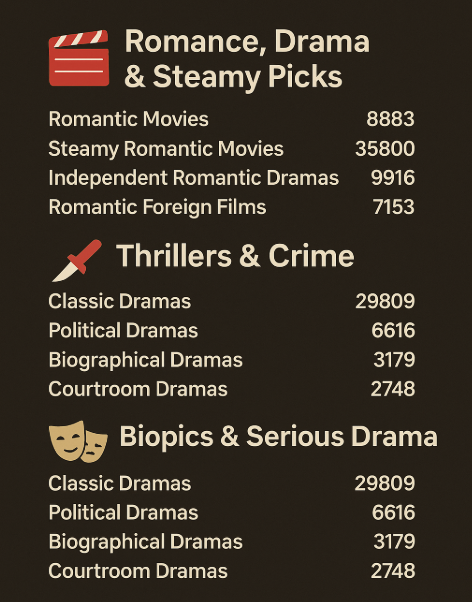
Netflix Secret Codes for Romance, Drama & Steamy Picks
For those who love deep emotions, passionate storytelling, and indie romance.
- Romantic Movies – 8883
- Steamy Romantic Movies – 35800
- Independent Romantic Dramas – 9916
- Romantic Foreign Films – 7153
- Spicy Romance – 81572628
Netflix Secret Codes for Thrillers & Crime
Perfect for fans of suspense, mystery, and psychological intensity.
- Crime Thrillers – 10499
- Gangster Movies – 31851
- Psychological Thrillers – 5505
- Film Noir – 7687
Netflix Secret Codes for Biopics & Serious Drama
Rich, story-driven content based on real life or complex human experiences.
- Classic Dramas – 29809
- Political Dramas – 6616
- Biographical Dramas – 3179
- Courtroom Dramas – 2748
Netflix Secret Codes for Global & Niche Stories
Expand your perspective with international cinema and underrepresented voices.
- Foreign Movies – 7462
- Japanese Movies – 10398
- French Dramas – 58807
- LGBTQ+ Movies – 5977
Netflix Secret Codes for Documentaries with Depth
Thought-provoking nonfiction for curious minds.
- Political Documentaries – 7018
- Crime Documentaries – 9875
- Music & Concert Documentaries – 90361
- Historical Documentaries – 5349
Netflix Secret Codes for Dark Humor & Adult Animation
Witty, weird, and wonderfully grown-up — animated or not.
- Dark Comedies – 869
- Adult Animation – 11881
- Cult Comedies – 9434
- Satirical Comedies – 4922
A category can contain different titles over time and across profiles or locations. The code filters the catalog Netflix currently serves; it does not guarantee that a specific film will appear, and a VPN is not required for the code itself to open.
How to Use Netflix Secret Codes (Step-by-Step)
The most reliable method is Netflix’s documented browser URL. Sign in first, enter the category address, and then save anything you want to watch on another device. No extension, unofficial app, or technical modification is required.
Option 1: On Desktop Browser (Windows/macOS)
This is the easiest and most flexible way to use Netflix codes.
Steps 1. Sign in at https://www.netflix.com/ in a current browser.
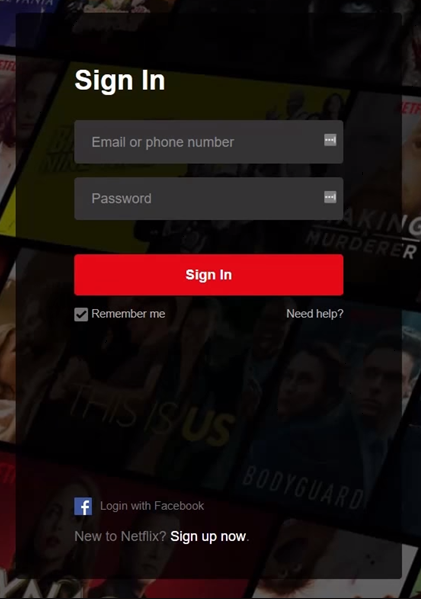
Steps 2. Enter https://www.netflix.com/browse/genre/CODE in the address bar.
Steps 3. Replace CODE with the numeric category ID—for example, 10499 for Crime Thrillers.
Steps 4. Press Enter and browse the category page.
Steps 5. Open a title to confirm it is available to the active profile, or add it to My List.
Steps 6. Bookmark the category URL if you want to revisit it quickly.
If Netflix returns to the homepage, confirm that you are signed in and that the full URL contains /browse/genre/ followed by the code.
Option 2: On Mobile Devices (iOS/Android)
Netflix officially documents the secret-code format for a web browser. App behavior can vary, so use the mobile browser first rather than promising that typing a numeric code into the app search will work.
- Open Safari, Chrome, or another current mobile browser.
- Sign in to Netflix on the web.
- Enter the full category URL, such as https://www.netflix.com/browse/genre/35800.
- Browse the results and add available titles to My List.
- Open the Netflix app and find those titles under My Netflix/My List.
If the browser forces the app open, use a desktop/laptop browser to build My List, or try the browser’s Request Desktop Website option. Searching by the genre name inside the app is a useful fallback, but it may not reproduce the exact category page.
Option 3: On Smart TVs and Streaming Devices (Roku, Apple TV, Firestick)
Most TV and streaming-device apps do not provide an address bar for the /browse/genre/ URL. Use a browser as the discovery device and the TV as the playback device.
- Sign in to the same Netflix account in a computer or mobile browser.
- Open the desired secret-code URL.
- Add available titles to My List.
- Open Netflix on Roku, Apple TV, Fire TV, a smart TV, or another supported device.
- Switch to the same profile and open My List.
A profile’s maturity and language settings still apply. If My List does not refresh immediately, switch profiles and switch back, or restart the Netflix app.
Option 4: Save Codes Without a Browser Extension
You do not need FindFlix, Better Browse, or another third-party extension. An extension may request access to pages you visit and can stop being maintained, while a normal bookmark performs the essential job without those permissions.
- Open a category URL that works.
- Bookmark it in a folder named Netflix Codes.
- Rename the bookmark to the category name, such as Steamy Romance — 35800.
- Repeat for the categories you use most.
- Periodically remove bookmarks that redirect or no longer return a useful collection.
Do You Need BearVPN to Use Netflix Secret Codes?
No. Netflix secret codes work through category URLs and do not require a VPN. BearVPN cannot make a retired code active, override profile maturity settings, create titles Netflix has not licensed, or guarantee access to another country’s Netflix catalog.
BearVPN is relevant for a different reason: protecting the broader connection when you browse or stream on hotel, airport, café, or other shared Wi-Fi. It encrypts traffic between the supported device and the VPN server, masks the normal public IP while connected, and includes a Kill Switch plus IP/DNS leak protection.
BearVPN encrypts your traffic and masks your normal public IP while you browse on hotel, airport, or café Wi-Fi. If Netflix shows a smaller catalog, the wrong country, or a VPN warning, disconnect BearVPN and reopen Netflix.

How to Use BearVPN Without Confusing the Netflix Test
- Confirm the secret-code URL opens while BearVPN is disconnected.
- Install BearVPN from its official website or official app store.
- Turn on the Kill Switch if you want traffic to stop when the VPN tunnel drops.
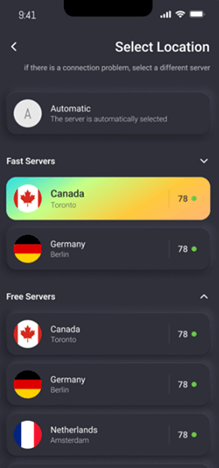
- Start with Smart Location or a nearby server for lower latency.
- Connect, reopen Netflix, and check whether the same category and titles remain available.
- If Netflix shows a reduced worldwide-only catalog, a VPN/proxy warning, E103/E106, or the wrong country, disconnect BearVPN and reopen Netflix.
Netflix states that VPN users may see only titles with worldwide licensing. Netflix also says VPN viewing is not supported for Live events or its ad-supported experience. Do not keep rotating servers and codes when the service is explicitly reporting a VPN problem.
BearVPN Features Relevant to Shared-Wi-Fi Streaming
- AES-256 Encryption: Protect traffic between the supported device and BearVPN’s server.
- Kill Switch: Stop traffic if the encrypted tunnel unexpectedly drops.
- IP and DNS Leak Protection: Reduce exposure of the normal network route.
- 2,000+ Physical Servers: Choose from 50+ locations for permitted connections.
- Cross-Platform Apps: Use BearVPN on Windows, macOS, Android, and iOS.
Why Some Codes Show “No Content” (And How to Fix It)
An empty or unusually small category does not prove that the code is region-blocked. Check these causes in order:
1. Confirm the URL and Sign-In
Use https://www.netflix.com/browse/genre/CODE with digits only at the end. Make sure Netflix has not signed you out or switched profiles.
2. Check the Active Profile
Netflix says profile maturity ratings and language preferences can affect which titles appear. Switch to an eligible adult profile only if you are authorized to use it; a category code cannot override parental controls.
3. Test the Code in a Web Browser
A TV app has no category URL field, and mobile-app search may not reproduce the category. Test the full URL in a signed-in desktop browser before deciding the code is broken.
4. Expect Catalog and Curation Changes
Netflix adds and updates collections over time. A code can redirect, be renamed, temporarily contain few titles, or no longer be useful. Try the broader parent category—for example, Romantic Movies 8883 if a narrower romance collection is empty.
5. Check Whether a VPN Is Reducing the Catalog
If a VPN is active, disconnect it and reopen Netflix. Netflix says a VPN connection may show only titles with worldwide licensing, which can make a category look much smaller rather than larger.
6. Accept Regional Licensing Limits
The titles inside a working category can differ by location because Netflix licenses content by market. The code still functions as a filter; it cannot add a title that is not available to the current Netflix catalog.
Delete the old US/UK/Canada/Japan checkmark table. It has no date-stamped Netflix source, and category availability changes too frequently for a permanent yes/no table to remain reliable.
Final Thoughts: Browse Netflix Beyond the Homepage
Netflix secret codes are useful shortcuts, not access keys. Use the browser URL to jump from the personalized homepage into broad genres or narrow collections, then save available titles to My List for your phone or TV.
For mature-interest browsing, start with 35800 for Steamy Romantic Movies, 81572628 for Spicy Romance, or 11881 for Adult Animation. None of these codes bypasses profile maturity settings or opens an explicit-content catalog.
If a category is empty, verify the URL, profile, browser, code status, and VPN state before blaming regional licensing. BearVPN’s role is connection privacy on supported networks—not guaranteeing that Netflix adds or reveals titles. Use the full image CTA in the relevant section above; the final action below stays deliberately compact.
Want BearVPN for your next hotel or airport connection? Install it before you join the shared Wi-Fi, then connect only when you need the encrypted route.
FAQs About Netflix Secret Codes
There is no single code that unlocks an explicit or adults-only catalog. 35800 opens Steamy Romantic Movies, 81572628 opens Spicy Romance, and 11881 opens Adult Animation. These are genre filters, and the active profile’s maturity rating still controls what appears.
Netflix code 9875 opens the Crime Documentaries category. Sign in through a browser and visit https://www.netflix.com/browse/genre/9875. The visible titles can change over time and by catalog.
Sign in to Netflix in a web browser and enter https://www.netflix.com/browse/genre/CODE, replacing CODE with the category number you want. Netflix does not provide one permanent page containing every possible collection.
Use a direct category URL in a signed-in web browser, browse the results, and add available titles to My List. Do not promise that typing the numeric code into every Netflix app or TV search box will produce the same category.
Yes. A VPN is not required for Netflix secret codes. In fact, Netflix says an active VPN may reduce the visible catalog to titles with worldwide licensing. If the category becomes smaller or Netflix shows a VPN/proxy warning, disconnect the VPN and reopen Netflix.
Most TV apps do not let you enter the category URL directly. Open the code in a browser while using the same Netflix profile, add titles to My List, and then open My List on the TV.
The URL may be incorrect, the code may have changed, the active profile’s maturity or language settings may filter the results, the device may not support the direct category page, the current catalog may contain no matching titles, or an active VPN may reduce the catalog. Test the signed-in browser URL and disconnect a VPN before drawing a conclusion.
Yes. They are public category identifiers used in Netflix URLs, and Netflix publishes a secret-codes guide through Tudum. They organize browsing; they do not bypass payment, account permissions, parental controls, or content licensing.


![How to Change YouTube TV Location [Still Works in 2026]](/_next/image/?url=https%3A%2F%2Fcms.bearvpn.com%2Fwp-content%2Fuploads%2F2026%2F06%2Fhow-to-change-location-youtube-tv.webp&w=640&q=75)