


Quick Answer: The Easiest Ways to Play Minecraft Unblocked at School
The fastest method depends on the layer being blocked. Match your device and goal before downloading anything:
If the restriction follows the school-managed device, only the administrator can change it. If the same personal device works on mobile data but fails on school Wi-Fi, the network route is the stronger suspect.
Trying to play Minecraft at school can fail in several different places: the website may be filtered, the launcher may need administrator rights, Microsoft sign-in may be blocked, or multiplayer may fail even after the game opens. One “unblocked” link cannot solve every layer.
Start with the official no-download and school-approved options below. If full Minecraft already runs on your own device but fails only on one Wi-Fi network, BearVPN can give that traffic a different encrypted route. It cannot unmanage a Chromebook or grant permission to install software.
Why Minecraft Is Blocked on School Wi-Fi
If you’ve ever tried to open Minecraft at school and got a “Blocked” message, you’re not alone. Schools usually restrict games like Minecraft to:
- Manage Bandwidth: School networks can’t handle hundreds of students downloading heavy game files or streaming data simultaneously.
- Enforce Focus: To keep students focused on educational content during class time.
- Restrict Multiplayer Services: Java servers commonly use TCP port 25565, but schools can also filter authentication, DNS, server domains, custom ports, Bedrock traffic, or gaming categories.
- Prevent Installations: Most school computers lock down “Admin Rights,” meaning you cannot install standard .exe or .msi files.
Identifying the exact restriction is the fastest way to choose a method that can actually work.
Method 1: Play Minecraft With No Download (Browser Options)
If you don’t have Admin Rights to install a launcher, or if you are using a locked-down Chromebook, your best bet is to play Minecraft directly in your web browser.
Eaglercraft (Unofficial Browser Option)
Eaglercraft is an unofficial browser project based on older Minecraft Java-style gameplay. It can provide Survival, crafting, and compatible multiplayer without a normal launcher, but it is not Mojang’s official browser edition.
- Pros: Runs in a modern browser and offers more gameplay than Minecraft Classic.
- Cons: Domains, mirrors, ads, scripts, builds, and server rules vary. Never enter a Microsoft or school password, install a forced extension, or download an unknown JAR, APK, or EXE from a mirror.
Minecraft Classic
Minecraft Classic is Mojang’s official free browser version at classic.minecraft.net. It recreates the 2009 game with 32 blocks and creative building, making it the cleanest no-download answer when the official domain is permitted.
- Pros: Official, free, fast to open, and requires no launcher.
- Cons: It is not the current Java or Bedrock game and does not include modern Survival, Realms, current mobs, Marketplace content, or normal modern-server compatibility.
ClassiCube
ClassiCube is a lightweight sandbox game inspired by Minecraft Classic. It can provide block-building in a browser, but it is not the current Minecraft Java or Bedrock game, and no website is “rarely blocked” by definition. Check the publisher and use it only where browser games are permitted.
Related article: 25+ Best Unblocked Game Websites to Play at School
Method 2: Cloud Gaming Platforms
Cloud gaming processes the game on a remote server and sends the video stream to your browser. That can remove the local hardware requirement, but it does not prove that the full Minecraft Java or Bedrock game is currently available.
Xbox Cloud Gaming’s current public catalog surfaces titles such as Minecraft Dungeons and Minecraft Legends; that is not the same as promising the main Minecraft game. Microsoft and NVIDIA announced plans to bring Minecraft titles to GeForce NOW, but users should still check NVIDIA’s live catalog for the exact edition. The same rule applies to now.gg or any other platform: verify the official listing before creating an account or paying.
Check these four things first:
- Search the provider’s official live catalog for the exact Minecraft title or edition.
- Confirm ownership, subscription tier, region, browser, controller, and account requirements.
- Use the provider’s official domain; do not sign in through a copied “cloud Minecraft” page.
- Test bandwidth and latency. Streaming can lag badly on congested Wi-Fi even when the site opens.
Cloud gaming removes local processing, not school filtering. If the exact Minecraft edition is absent from the official catalog, do not install an unofficial cloud launcher that claims to add it.
Method 3: Use a VPN to Unblock Full Minecraft
A VPN is the strongest fit when the official game or authorized cloud service works on your personal device through mobile data or home Wi-Fi but fails on one restricted network. That comparison points to the network route—not the Minecraft account, device permissions, game version, or server itself.
BearVPN encrypts supported traffic, masks the normal public IP, and sends the connection through another server. This can bypass an IP-, DNS-, or network-path restriction and reopen Minecraft multiplayer when the route is the actual problem. It cannot grant administrator rights, install Minecraft on a managed computer, fix a down server, or guarantee access on every network.
Why BearVPN Fits Minecraft on Restricted Wi-Fi
- Strong Obfuscation: Makes supported VPN traffic harder for restrictive networks to identify and block as VPN traffic.
- Smart Server Selection: Finds a suitable route quickly; for gaming, a nearby server usually adds less latency than a distant one.
- Kill Switch and DNS Leak Protection: Help prevent the normal connection or DNS route from taking over if the VPN drops.
- Split Tunneling: On supported platforms, route Minecraft through BearVPN while leaving selected apps on the regular connection.
- Global Coverage: Choose from 2,000+ servers across 50+ locations when another route is needed.
How to Use BearVPN to Unblock Minecraft:
Step 1. Prove It Is a Network Problem: On the same personal device, check whether official Minecraft works over mobile data, home Wi-Fi, or another permitted connection. If it fails everywhere, troubleshoot the account, launcher, version, or server first.
Step 2. Install BearVPN From the Official Source: Download the native app for your device. Do not transfer an installer to a managed school computer or use an unknown VPN extension.
Step 3. Connect to a Nearby Server: Use Smart Server Selection or choose a nearby location, wait for BearVPN to show Connected, then reopen the official launcher or authorized cloud page.
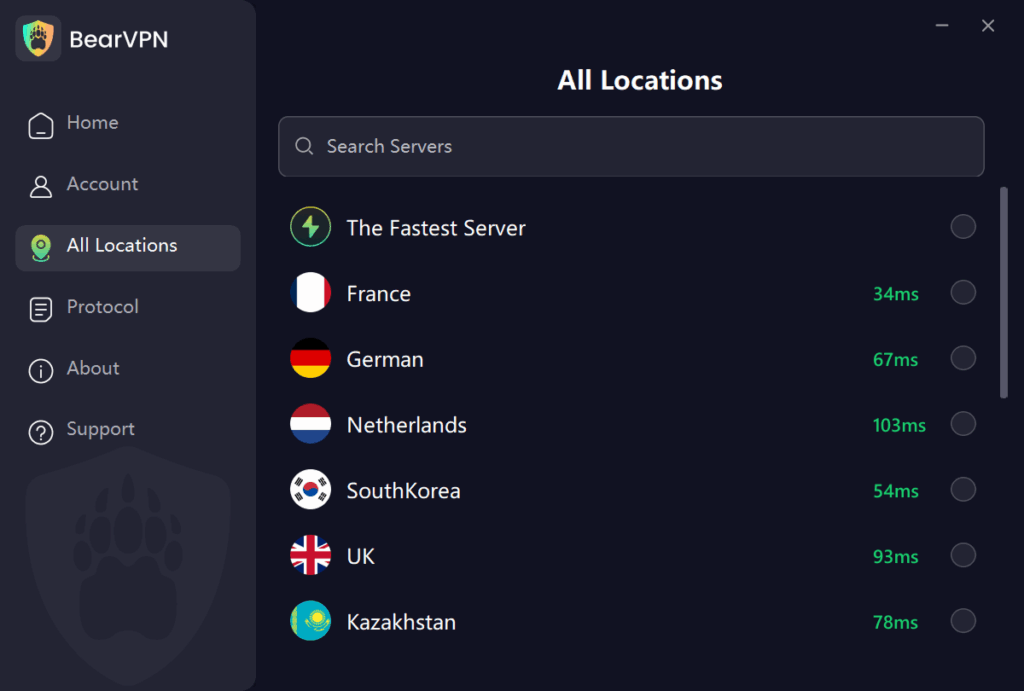
Step 4. Test the Exact Failure Again: Retry the same Microsoft sign-in, server, or multiplayer action. Compare ping and stability with VPN off. If one nearby backup server also fails, the cause is probably not the route.
Important Tips for Using BearVPN:
- Choose the plan that matches the device: BearVPN’s free Android/iOS route is auto-selected; manual locations, desktop apps, and advanced controls may require Premium.
- Use your own permitted device: Obfuscation can help a connection pass restrictive filtering, but it does not make activity invisible or override school policy.
Method 4: Minecraft Education (The School-Approved Route)
Before trying another network route, check whether your school already supports Minecraft Education. It is the official classroom edition for Windows, macOS, iPad, and Chromebook, but it is not automatically unblocked or included with every Microsoft 365 account.
A teacher or administrator may need to purchase or assign a license, deploy the app, permit the required services, and approve its use for a lesson or club.
- How to check: Ask the teacher or IT team whether Minecraft Education is licensed and approved. Use only the official app or administrator-deployed Chromebook version, sign in with the assigned school account, and contact the administrator if the app says the account is unlicensed or installation is disabled.
You may also like: How to Play Poki Unblocked at School
Troubleshooting Common Issues
1. “Connection Refused” on Multiplayer Servers
Do not assume port 25565 is the only cause. Verify the server address and custom port, game edition, client version, modpack, allowlist, Microsoft/Xbox settings, authentication status, and the server’s own status. Test a second authorized server. If every server fails only on one network but works elsewhere on the same personal device, then test BearVPN as an alternate route.
2. I Can’t Install the Minecraft Launcher
An Administrator Privileges Required message is a device-permission boundary. Do not use a portable launcher, USB package, developer mode, sideloaded APK, or unknown executable to evade it. Use official Minecraft Classic in the browser, request Minecraft Education deployment, or install the official launcher later on your own device.
3. The School Blocked the BearVPN Website
Do not transfer a VPN installer onto a managed school computer. If you own the device and VPN use is permitted, install BearVPN beforehand from its official site or verified app-store listing. If the network blocks VPN traffic or policy prohibits it, stop and use an approved connection instead.
Avoid Fake “Minecraft Unblocked” Sites
Many websites claiming to offer “Minecraft unblocked” are highly dangerous for your device. They may contain:
- Ads disguised as giant, fake “Download” buttons.
- Malware or spyware installers.
- Browser miners that steal your device’s processing power.
Quick Safety Checklist:
Close the page if it asks for a Microsoft or school password outside the official domain, forces an extension or download, requests notification/file permissions just to play, or tells you to disable browser or device security. Use official Minecraft sources whenever possible.
Conclusion
To get Minecraft unblocked at school, match the method to the real restriction. Use official Minecraft Classic for simple no-download play, Minecraft Education for an approved school setup, and a currently verified cloud catalog only when it lists the exact edition. If full Minecraft works on your personal device everywhere except one Wi-Fi network, BearVPN can change and protect that route so you can test login or multiplayer again—without relying on a fake mirror or mystery launcher.
Use the official game on your own device, then let BearVPN change the network route when Wi-Fi—not the launcher or account—is the real block.
FAQs: Minecraft Unblocked at School
Yes, but the official no-download option is Minecraft Classic, which recreates the limited 2009 creative version rather than current Java or Bedrock. Eaglercraft and ClassiCube are unofficial alternatives, and cloud platforms should be used only when their current official catalog lists the exact game you want.
Start with official Minecraft Classic or ask whether the school deploys Minecraft Education. A managed Chromebook can block apps, extensions, Play Store access, Linux, and sign-ins at the administrator level; a VPN cannot remove those controls. On a personal Chromebook, use only official supported apps and permitted networks.
Check the server address and port, Java versus Bedrock edition, game version, modpack, allowlist, Microsoft/Xbox settings, authentication status, and server outage first. If multiple servers work on another network but fail only on one Wi-Fi route, BearVPN may help by routing the connection differently.
You cannot legitimately bypass administrator privileges on a managed device. Use a browser option that requires no installation, ask the school to deploy Minecraft Education, or install the official launcher on your own computer. Do not use portable launchers, USB packages, or unknown executables.
School IT may still see that a device is using encrypted or VPN traffic, connection times, bandwidth, or contacted infrastructure. BearVPN’s Strong Obfuscation can make supported VPN traffic harder to identify as VPN traffic, but it does not make gaming activity completely invisible or authorize prohibited use.


![How to Change YouTube TV Location [Still Works in 2026]](/_next/image/?url=https%3A%2F%2Fcms.bearvpn.com%2Fwp-content%2Fuploads%2F2026%2F06%2Fhow-to-change-location-youtube-tv.webp&w=640&q=75)



