


Searching for someone online feels easy—until you actually try to verify what you find. Most people eventually run into background check services like TruthFinder, especially when trying to confirm identity, reconnect with someone, or check basic public records. The problem is that these tools often raise more questions than answers: is the information accurate, is it up to date, and most importantly, is it even legitimate or just a paid data aggregator?
This article breaks down how TruthFinder actually works, whether it’s legit or misleading, what users should realistically expect from its reports, and the common concerns people raise in real-world discussions.
What Is TruthFinder? A Look at Its FTC Track Record
When you need to look up an estranged relative, verify an online seller’s background, or simply see what information about you exists online, TruthFinder is often one of the first search results to appear. But popularity doesn’t automatically equal total trust.
What is TruthFinder?
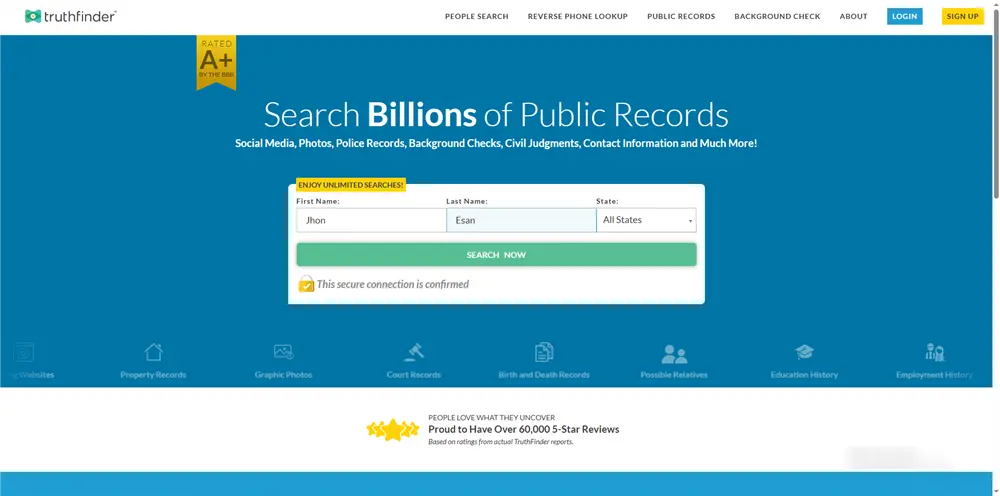
TruthFinder is a massive commercial data broker and public records aggregator. It works by scraping hundreds of millions of data points from disconnected public databases, including:
- Criminal and arrest histories
- Court registries, liens, and bankruptcies
- Contact details (phone numbers, past addresses, email aliases)
- Social media profiles and weapon permits
Instead of forcing you to visit multiple county courthouses or state archives, TruthFinder compiles these fragmented documents into a single, cohesive dossier.
The Legal Boundaries: Non-FCRA Compliance
It is vital to understand that TruthFinder is not a Consumer Reporting Agency (CRA). Under the Fair Credit Reporting Act (FCRA), it is strictly illegal to use TruthFinder for:
- Employment Vetting: You cannot use it to screen prospective employees.
- Tenant Screening: Landlords cannot use it to evaluate potential renters.
- Credit Eligibility: Financial institutions cannot use it to assess credit risk.
Commercial aggregators lack the explicit data verification checks required for official screening processes. Using them for these purposes violates federal law and exposes businesses to civil liabilities.
The Regulatory Context: FTC Enforcement Actions
To evaluate its legitimacy objectively, we have to look at its legal record. TruthFinder has been subject to regulatory scrutiny by the Federal Trade Commission (FTC) over allegations relating to past deceptive marketing and compliance failures under the FCRA. Specifically, past enforcement actions highlighted instances where background check platforms positioned themselves as tools for employment screening without maintaining the strict verification structures legally required for CRAs.
While TruthFinder remains an active, operating entity that does provide access to real public records, this history proves that commercial data platforms prioritize data accumulation and profit over absolute accuracy or user privacy.
Is it Safe to Go on TruthFinder? The Hidden Privacy Risks
Many users assume that searching for someone on TruthFinder is entirely anonymous. While the target of your search won’t receive a notification that you looked them up, the platform itself observes everything you do.
Data Transmission Risk
When you utilize TruthFinder, you aren’t just looking at data; you are providing it. To clear reports or sign up, you actively input your:
- Legal name and email address
- Payment and billing information
- Device parameters and browser fingerprints
This information is routinely cross-referenced, building a comprehensive profile of who you are and whom you are searching for.
The Ethical & Cyber-Stalking Dynamic
Massive data compilation engines blur the line between basic public accessibility and invasive personal profiling. A wealth of information that used to require hours of localized research is now available instantly for a small fee. This centralization creates systemic risks for cyber-stalking, corporate doxxing, and targeted social engineering attacks.
IP Harvesting and Ad Profiling
Every time you open TruthFinder’s webpage, its tracking scripts log your real-world IP address.
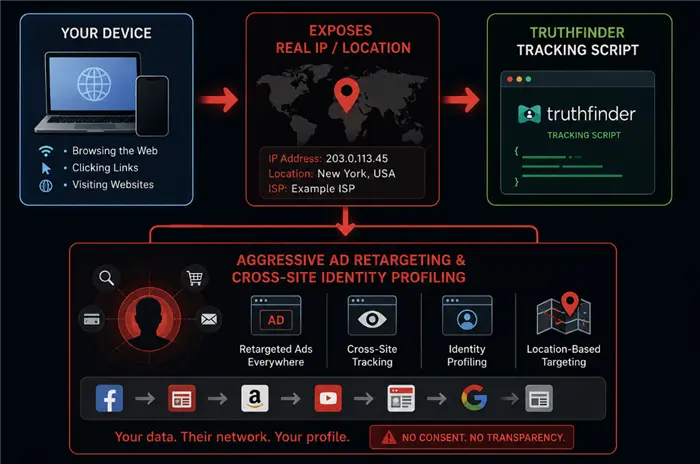
Aggregators use your IP address to track your ISP and approximate geographic location. This data is used to target you with subscription offers, feed ad-exchange profiles, or track your identity across different websites.
What Data Does TruthFinder Show?
A typical comprehensive dossier from TruthFinder pulls information into a modular report. Depending on availability, a standard report includes:
Do You Have to Pay for TruthFinder? Pricing & Billing Explained
TruthFinder is not a free background check service. While it allows users to initiate a search and preview limited information, full reports are locked behind a paid subscription.
The “Free Preview” Limitation
TruthFinder often displays partial or blurred results during the search process. These previews may include basic identity signals, but detailed background data—such as criminal records, contact information, or historical addresses—requires a paid plan to unlock.
There is no fully free, complete report available.
Pricing Overview (Typical 2026 Range)
TruthFinder operates on a subscription-based model:
- Monthly plan: approximately $28/month (standard billing rate, may vary by promotion or billing cycle)
- Multi-month plans: lower effective monthly cost when prepaid
- Trial offers: sometimes available at a low initial price, which later converts into a full monthly subscription if not canceled
Additional reverse lookup features (such as phone or email searches) are generally included within the main subscription rather than sold as separate add-ons.
Billing & Auto-Renewal
TruthFinder subscriptions are automatically renewed. If a user signs up through a trial or discounted offer, it typically converts into a recurring monthly subscription unless canceled.
To avoid ongoing charges, users must manually cancel through their account settings and confirm that the subscription has been fully terminated.
How to Browse Background Check Sites Privately with BearVPN (Step-by-Step)
If you must use background check databases, you should protect your real-world identity, location, and search intent from corporate data harvesting. The most effective way to secure your digital footprint is to run your queries behind an encrypted network connection. Here’s how to do it safely:
Step 1: Install BearVPN
Download BearVPN from the official website and install it on your device (Windows, macOS, iOS, or Android). Open the app once installation is complete.
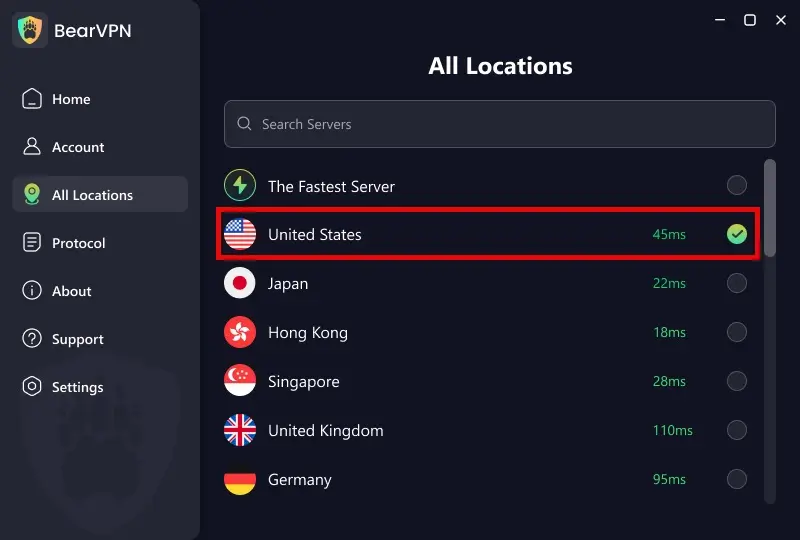
Step 2: Connect to a Secure Server
Choose a fast, privacy-optimized server and connect. This replaces your real IP address with an anonymous one, making it harder for tracking systems to identify or profile your activity.
Step 3: Enable Protection Features
Turn on built-in security features such as the kill switch and encryption settings. This ensures that even if your connection drops, no unprotected data or real IP information is exposed.
Why BearVPN is the Best Choice for Masking Your Digital Footprint
Using a generic proxy isn’t enough when dealing with sophisticated data miners. BearVPN provides a comprehensive security stack explicitly designed to counter persistent online tracking.
- Physical-Level Non-VPS Nodes: While standard privacy tools rely heavily on cheap, virtualized servers (VPS) rented from mass commercial datacenters—which are easily identified and blacklisted by data aggregators—BearVPN utilizes a clean network of true physical, non-VPS nodes. By routing your traffic through organic, bare-metal infrastructure, your connection behaves like a standard, highly trusted local consumer network, allowing you to slip past advanced IP-reputation checks completely undetected.
- RAM-Only Diskless Servers: To guarantee absolute, irreversible data privacy, BearVPN’s entire global infrastructure runs strictly on volatile RAM-only diskless servers. Traditional hard drives pose a major liability because data fragments can be extracted even after deletion. With our diskless architecture, the operating system and all operational capabilities run entirely in the server’s memory. The absolute instant a session ends or a node power-cycles, every single byte of temporary routing data, connection tokens, and session history is physically and permanently vaporized into thin air.
- Zero-Knowledge Privacy: Operating under a verified, strict No-Logs Policy, BearVPN ensures that your digital footprint can never be weaponized against you. Because our infrastructure is hard-coded to ignore data retention, we do not record, track, or store any of your online browsing history, session times, or target queries. What you research remains completely private—incapable of being leaked, seized, or sold.
- Proprietary Advanced Obfuscation: Modern data miners often deploy sophisticated tracking scripts to detect and block standard privacy tools. BearVPN utilizes proprietary SLProxy and SCProxy protocols. These protocols wrap your encrypted data in a specialized layer of structural padding, disguising your VPN traffic as standard, unencrypted HTTPS web browsing. This allows you to bypass deep packet inspection (DPI) and network tracking seamlessly without sacrificing speed.
- Cross-Device Freedom: A single BearVPN subscription supports up to 10 simultaneous device connections. This allows you to stay protected across your entire hardware ecosystem, whether you are running deep history searches on your home desktop or checking a phone number on your mobile device while on the go.
Top TruthFinder Alternatives for 2026
If you want to cross-reference your findings or explore other platforms, here is how TruthFinder compares to its main competitors:
Troubleshooting: Common Privacy Slippages When Using Background Check Tools
Even when using a VPN, residual data traces can sometimes compromise your privacy online.
What if a site detects a VPN or blocks access?
Some data broker platforms block known data center IP addresses to prevent automated scraping bots. If you encounter an access denied screen, open your BearVPN server catalog and switch to a different server node within the same region. You can also use BearVPN’s Split Tunneling feature to route your browser traffic through an encrypted tunnel while keeping your other apps on your local network connection.
Clearing Cache Overrides
Websites can still identify you if old tracking cookies are active in your browser. Before executing sensitive searches:
- Clear your browser’s cache, cookies, and location storage data.
- Open an Incognito or Private Browsing window.
- Ensure BearVPN is fully connected before navigating to the search site. This prevents platforms from linking your new anonymous IP address to your past browsing history.
FAQs on Is TruthFinder Legit and Safe
- Can the person see that I searched for them on TruthFinder?
No. TruthFinder searches are confidential on the recipient’s end; the person you are looking up will not receive an alert or notification. However, your search activity, IP address, and location details are logged on TruthFinder’s backend servers unless you mask your connection with a VPN.
- Is using a VPN to search public records legal?
Absolutely. It is 100% legal to use a VPN to browse public records platforms. Utilizing security tools like BearVPN to protect your digital identity and prevent corporate profiling is a standard online safety practice.
- Will running BearVPN slow down my report generation?
No. While encryption adds a layer of security, BearVPN uses optimized 4K-capable bandwidth infrastructure. This minimizes speed loss, allowing reports to generate quickly and seamlessly.
- Can I get a completely free background check report online?
No. True public documents are scattered across separate state, county, and federal municipal offices. Because commercial lookup platforms spend money to gather, organize, and host this data, they pass those costs on to users through paywalls. Any platform advertising a completely free, comprehensive report is using a marketing hook to collect your email address.
- Does TruthFinder share or sell my payment activity?
TruthFinder routes subscription transactions through external, PCI-compliant payment gateways. However, without a VPN or privacy-focused browser settings, your subscription sign-up, email profile, and search history can still be linked back to your commercial identity for advertising purposes.
Conclusion: Take Control of Your Public and Private Data
Public records platforms are a double-edged sword. While they offer an efficient way to find public documents, they also present significant privacy risks by tracking your searches and harvesting your digital identity.
Don’t leave your personal habits, location history, and IP address open to corporate data collection. Secure your network connection with BearVPN today to browse public records and navigate the web with peace of mind and complete digital freedom.



