


Steam (along with competing storefronts like Epic Games) is the go-to platform for PC gamers worldwide, offering an extensive library of games, community features, and frequent sales that can make your wallet cry tears of joy—or despair. But did you know that your Steam region plays a crucial role in determining the prices of games and the availability of certain titles? Changing your Steam region can unlock a treasure trove of benefits, but doing so with a VPN isn’t always the best idea. Let’s dive into how to change Steam region without VPN, and why this might be the better route to take.
Why Change Your Steam Region?
Before we get into the nitty-gritty, let’s talk about why you might want to change your Steam region in the first place.
Steam’s regional pricing means that games can be significantly cheaper in some countries compared to others. For example, a game that costs $60 in the U.S. might be available for $30 in Argentina. By changing your region, you could potentially save a lot of money, especially during those epic Steam sales. So that’s one of the most popular reasons people want to know how to change Steam region without VPN.
Another reason is to bypass Steam geo-restrictions and access games that might be unavailable or censored in your current location. But while these benefits sound enticing, there are a few things to keep in mind before making the switch.
Also read: How to Fix “Failed to Connect to Steam” Error
The Downside of Changing Steam Region with a VPN
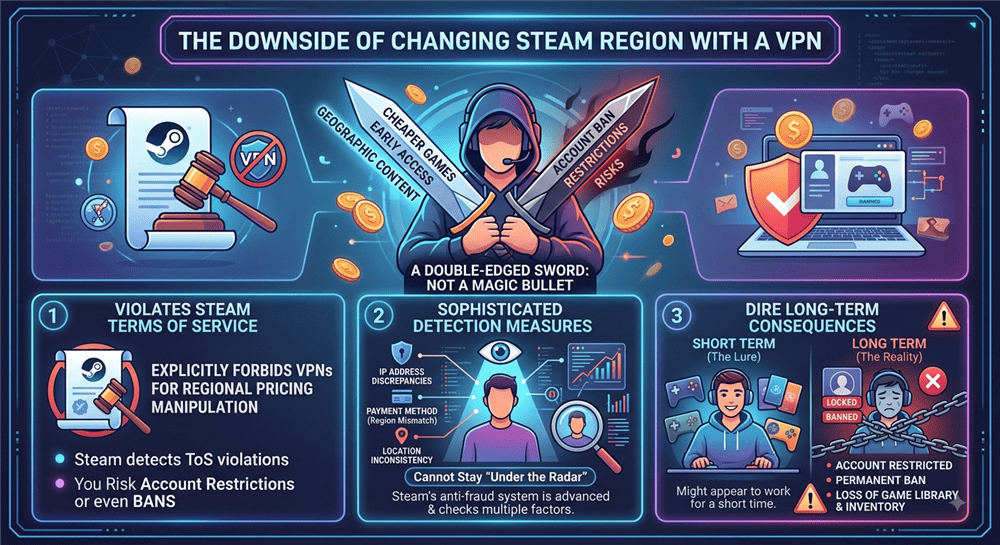
VPNs are often touted as the magic bullet for everything from online privacy to accessing geo-blocked content. However, when it comes to changing your Steam region, using a VPN can be a double-edged sword. While it might seem like a quick and easy solution, Steam’s terms of service explicitly forbid the use of VPNs to manipulate regional pricing. If Steam detects that you’re using a VPN to change your region, you risk having your account restricted or even banned.
I’ve seen gamers make this mistake, thinking that a VPN will keep them under the radar. Unfortunately, Steam’s anti-fraud measures are quite sophisticated, and they can detect discrepancies in your payment method, location, and IP address. So while you might get away with it for a short time, the long-term consequences could be dire.
How to Change Steam Region Without VPN?
To legitimately change your region on Steam, you must have a payment method tied to that new region. Here are the most effective methods to do this without triggering Steam’s VPN detection.
You will only have the option to change your store country once every 3 months. When you change your current location, you may lose access to games that are region-locked to your previous location until you revert back.
Method 1: The Gift Card Method (Most Popular)
If you haven’t physically moved but want to change your region (e.g., to Turkey or Argentina), many users utilize regional gift cards.
- Purchase a Regional Gift Card: Buy a Steam Gift Card in the currency of your target region (e.g., TRY for Turkey, ARS for Argentina) from reputable third-party sellers like G2A, Eneba, or Gamestrike.
- Log in to Steam: Open your Steam client.
- Go to Account Details: Click your profile name in the top right corner and select Account Details.
- Redeem the Code: Click on Add funds to your Steam Wallet and then select Redeem a Steam Gift Card or Wallet Code.
- Enter the Code: When you enter the regional code, Steam may prompt you to update your store region to match the currency of the gift card. Update your billing address to an address within that country.
Method 2: Use a Virtual Credit Card
Another popular workaround is using a Virtual Credit Card (VCC) registered in the target country.
- Obtain a Regional VCC: Services exist that allow you to generate a prepaid virtual credit card based in a specific country.
- Add a Game to Your Cart: Find a cheap game on the Steam store and proceed to checkout.
- Change Your Country at Checkout: In your cart, there is a “Country” dropdown menu. Change this to your target region.
- Enter VCC Details: Complete the purchase using the Virtual Credit Card and a corresponding local billing address. Once the purchase clears, your Steam region will permanently update.
Method 3: Physically Relocate (The Official Way)
If you are actually moving or traveling for an extended period, this is the easiest method.
- Log in from the New Location: Connect to a local Wi-Fi network in your new country (without a VPN).
- Make a Purchase: Add a game to your cart.
- Update Store Country: In the cart, use the dropdown menu to select your new country.
- Use a Local Payment Method: Complete the purchase using a local credit card or debit card registered in that country.

Method 4: Contact Steam Support
If you have legitimately moved but are struggling with the automated system (or your local card is being rejected), contacting Steam Support is a valid, VPN-free method. You can explain your situation, and they may request proof of residency (like a utility bill or ID) to manually update your store region.
My Experience with Changing Steam Regions without VPN
I’ve been in the gaming scene for years, and I’ve tried both methods—using a VPN and the more legitimate approach. Let me tell you, the peace of mind that comes with sticking to Steam’s rules is worth the extra effort. When I used a free VPN to switch regions, I was constantly worried about getting caught. I’d read horror stories online about gamers losing their entire library because of a misstep, and that anxiety took the fun out of gaming for me.
When I later moved abroad to change Steam region without VPN but using the right way, it was a relief. Sure, it took a bit longer, and I had to jump through some hoops, but I didn’t have to worry about getting banned. Plus, the process was seamless, and I was able to enjoy the benefits of regional pricing without any stress.

Why You Still Need BearVPN for Gaming
While we strongly advise against using a VPN to fake your location for Steam purchases, a premium VPN like BearVPN is still an essential tool for PC gamers. Here is why you should keep your VPN on while you play:
- Stop ISP Throttling: ISPs often throttle bandwidth when they detect heavy gaming or large game downloads. BearVPN hides your activity, ensuring you get the fastest download speeds possible for massive Steam updates.
- Protection Against DDoS Attacks: Competitive gamers are often targeted by DDoS attacks meant to ruin their connection. BearVPN hides your real IP address, keeping you safe from malicious players.
- Play Safely on Public Wi-Fi: If you game on a laptop at a cafe or hotel, public networks are insecure. BearVPN encrypts your connection, protecting your Steam login credentials from hackers.
- Access Geo-Blocked Games: While you shouldn’t use a VPN to buy games cheaper, you can use BearVPN to play games that have regional server locks or are restricted on restrictive networks.
You may also like: Best VPN for Steam 2026
Conclusion
Changing your Steam region can be a great way to access different game libraries, but it’s essential to weigh the risks. While using a VPN to exploit pricing might seem tempting, the potential consequences—losing your entire Steam library—far outweigh the short-term gains.
By utilizing local payment methods, regional gift cards, or Virtual Credit Cards, you can effectively update your store country without triggering Steam’s VPN detection. Ready to secure your gameplay? Get BearVPN today to protect yourself from DDoS attacks and stop ISP throttling while you game!
- RAM-only Diskless Servers
- DNS Leak Protection
- Double VPN
- Strict No-logs Policy
FAQs: How to Change Steam Region Without VPN
According to Steam’s 2026 rules, there is a strict 90-day (3-month) cooldown on region changes. Once you change your region, you cannot change it again, even back to your original country, until those 90 days have passed.
If you physically move or use legitimate local payment methods, you will not get banned. However, if you use a VPN or proxy to spoof your location solely to exploit cheaper regional pricing, you are violating Steam’s Terms of Service and may risk a permanent account ban.
Yes, purchasing a Steam Gift Card in the currency of your target region (and redeeming it) is one of the most popular methods for changing a Steam region without using a VPN.
You will not lose your current games. However, be aware that some previously purchased multiplayer games might have region locks and may not work in the newly changed region.


![How to Change YouTube TV Location [Still Works in 2026]](/_next/image/?url=https%3A%2F%2Fcms.bearvpn.com%2Fwp-content%2Fuploads%2F2026%2F06%2Fhow-to-change-location-youtube-tv.webp&w=640&q=75)



