


OnlyFans is restricted to adults aged 18 or older, but the check you see may be regional or tied directly to your account. If it is triggered only by IP location, BearVPN may change the version of the site you reach; if OnlyFans requests a selfie, ID, creator KYC, payment verification, or account review, changing servers will not remove it. The steps below show adults how to identify the difference and test a location-based solution without risky bypass tools.
- Test whether the OnlyFans prompt is tied to your IP location.
- Mask your public IP before opening a fresh session.
- Encrypt the connection without fake IDs or risky bypass tools.

Why Does OnlyFans Require Age Verification?
OnlyFans permits users aged 18 or older. It uses age assurance and identity checks to restrict minors, protect creators and subscribers, prevent fraud, and comply with rules that differ across jurisdictions.
The exact check depends on the user and location:
- Facial age estimation: A live selfie is analyzed to estimate whether the user is clearly above the required age threshold.
- Secondary age verification: If the estimate is inconclusive, the user may be offered another method, which can include an official ID or payment-card check.
- Creator identity verification: Creators must complete more extensive identity and age checks before posting or receiving payouts.
- Account review: OnlyFans may request additional verification when account, payment, or security signals require it.
In the UK, services that allow pornography have been required to use highly effective age assurance since July 25, 2025. This does not mean every user everywhere receives the same form of ID check.
OnlyFans’ operator was fined £1.05 million by Ofcom in March 2025, but the reason is often reported incorrectly. The fine concerned inaccurate information supplied to Ofcom about the threshold used by its facial age-estimation system—not a 2023 finding that OnlyFans had failed to stop minors.
What Data Can an OnlyFans Age Check Request?
An age check may involve a live selfie, payment information, or an identity document. Before submitting anything, read the notice on the verification screen and confirm:
- which company is processing the check;
- what data it collects;
- whether an image or document is retained;
- how long any retained information is stored;
- how to request access or deletion;
- what alternative verification methods are available.
A request shown inside the official OnlyFans website or app is different from an ID request sent by a creator, direct message, advertisement, or unrelated website. Never upload an identity document through an unofficial link.
A VPN protects data in transit between your device and the VPN server and prevents your ISP from directly seeing the sites you visit. It does not conceal an ID, selfie, payment card, email address, or other information that you voluntarily submit to OnlyFans or its verification provider.
Why Does OnlyFans Ask You to Verify Again?
Seeing another age check does not necessarily mean that your previous verification was lost. The prompt can be triggered by different systems, and only some of them depend on your IP address.
Your ISP normally does not operate OnlyFans’ verification portal itself. More commonly, the service uses your IP location and other signals to determine which local access rules and checks apply.
How to Test a Location-Based OnlyFans Age Check With BearVPN
These steps are intended only for adults. They will not override an account-level ID request, creator verification, or a failed payment check.
Step 1. Close OnlyFans completely.
Sign out and close every OnlyFans tab before changing your connection.
Step 2. Download BearVPN from its official website or app-store listing.
Download BearVPN from the official source for your device, connect before reopening OnlyFans, and keep the same server active throughout the test.
Step 3. Connect to a BearVPN server in a location where OnlyFans is legally available.
Age-assurance rules change, so do not rely on a permanent list of “no-verification countries.”
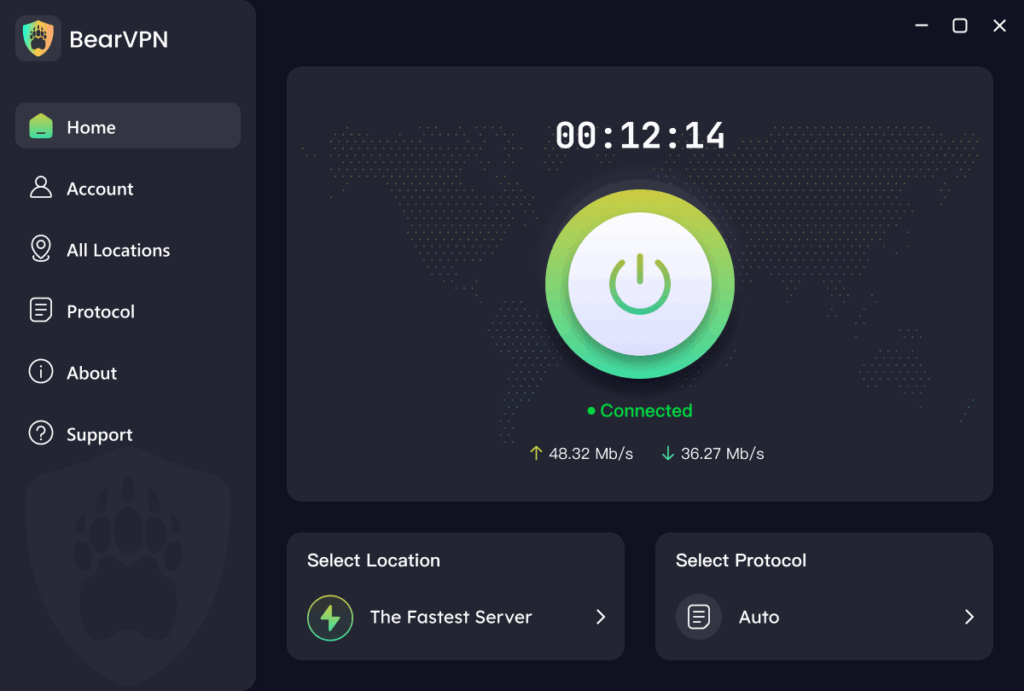
Step 4. Remove old location signals.
Clear OnlyFans cookies and site data, open a private browsing window, and deny browser location access if it is not needed. Clearing your entire browser history is unnecessary.
Step 5. Open OnlyFans in the same browser window while BearVPN remains connected.
If the prompt was triggered only by your previous IP location, it may no longer appear.
Step 6. Stop if OnlyFans still requests a selfie, ID, or account verification.
That normally means the requirement is linked to your account or the platform’s own checks. Use one of the verification options shown by OnlyFans or contact official support.

Keep BearVPN connected for the session. Turning the VPN off halfway through can expose a different IP address and cause another location or security check.
A successful connection is not guaranteed. OnlyFans can use account, device, cookie, payment, and security signals in addition to an IP address.
OnlyFans Age Verification Not Working? Try These Fixes
If the age check remains after you connect to a VPN, do not immediately assume that your payment card is the problem. Work through these checks in order:
- Confirm whether the prompt follows your account. Open OnlyFans while signed out. If the check appears only after you sign in, it is probably account-level and changing servers will not remove it.
- Clear OnlyFans site data. Delete cookies and local storage for OnlyFans, then reopen the site in a private window. You do not need to erase unrelated browser data.
- Check browser location permission. A website can receive a more precise location if you previously granted permission. Set location access to “Block” or “Ask” before testing again.
- Use a consistent VPN connection. Connect before opening OnlyFans and avoid changing countries repeatedly during the same session. Rapid location changes can look like suspicious account activity.
- Use your own accurate payment details. A VPN does not change a card’s issuing country or billing address. Do not use false billing details, borrowed cards, or virtual cards to misrepresent your identity or residency.
- Complete an offered alternative method. If facial estimation fails, check whether the official verification screen provides another approved option.
- Contact OnlyFans support. If valid documents or a facial scan are repeatedly rejected, support is the appropriate route. Include the error message, device, browser, and time of the failed attempt—but never send an ID through an unofficial email or direct message.
What BearVPN Helps With
BearVPN is useful when the obstacle is your network or apparent IP location:
- Public-IP masking: Replaces the normal public IP that OnlyFans sees.
- AES-256 encryption: Protects traffic between the device and the VPN server.
- DNS/IP leak protection: Reduces common ways the session can expose the wrong network location.
- KillSwitch: Helps prevent the normal public IP from appearing if the VPN disconnects.
These features can improve network privacy, but BearVPN cannot hide the information you submit after logging in or replace OnlyFans’ required proof of age.
- Replace the public IP OnlyFans normally sees.
- Prevent DNS and IP leaks from exposing the wrong location.
- Keep Kill Switch ready if the VPN connection drops.
Other “OnlyFans Bypass” Methods and Their Risks
A VPN is the most practical option only when the restriction is genuinely based on your network or IP location. It is not a universal OnlyFans age-verification bypass.
Is It Legal to Bypass OnlyFans Age Verification?
There is no universal yes-or-no answer. VPN use is legal in many countries, but using one to avoid a legally required age check may conflict with local law or a platform’s current terms. The rules also differ between changing your IP for privacy, accessing a blocked service, and submitting false identity or payment information.
As of September 2026:
- You must be at least 18 to use OnlyFans.
- Do not use a VPN or any other tool to help a minor access adult content.
- Do not upload a fake ID, use another person’s document, or enter false billing information.
- Check the law where you are physically located, not only the country shown by your VPN.
- Review OnlyFans’ current terms before relying on a location-changing method.
This section provides general information, not legal advice.
This guide is for adults dealing with location-based blocks, repeated prompts, verification errors, or privacy concerns. It does not explain how to defeat OnlyFans’ internal safety systems or impersonate another person.
Why Do Adults Look for Alternatives to ID Checks?
Age-verification systems create legitimate privacy questions, but those concerns should not be exaggerated into claims that every check permanently links a person’s identity to their viewing history. Read the specific processor’s notice before deciding what information to provide.
Related article: Is OnlyFans Age Verification Safe? A Complete Privacy Guide
Can You Use OnlyFans Without an ID?
Possibly, but there is no guaranteed ID-free method.
OnlyFans requires users to be adults, but an age check does not always begin with a government ID. Depending on the account and location, a user may be offered facial age estimation, a payment-card check, or another approved method. If the initial method cannot confirm that the user is over 18, OnlyFans may require secondary verification.
Creators face stricter requirements. Anyone opening a creator account must complete identity and age verification connected to platform safety and payouts. A VPN cannot bypass that process.
What Country Does Not Require Age Verification for OnlyFans?
There is no reliable permanent list of “OnlyFans countries without age verification.”
OnlyFans applies its own 18+ rules, while regional laws determine when stronger checks must be shown. Those requirements can change, and OnlyFans may also request verification based on an account or security review rather than the current country.
If you are an adult testing whether a prompt is location-based, connect to a country where OnlyFans is legally available and review the rules that apply in your real location. Do not assume that a server location removes your responsibility to follow local law or OnlyFans’ terms.
If the same face scan or ID request appears across different VPN locations, it is probably not a simple regional gate. Repeatedly changing countries is unlikely to fix it.
FAQs About OnlyFans Age Verification
A VPN cannot bypass a face scan attached to your account. If the scan appears only because of your IP region, changing location may prevent that regional prompt. If it follows your signed-in account, use an alternative method offered on the official verification screen or contact OnlyFans support.
VPNs are legal in many countries, but laws and platform rules vary. Using a VPN for network privacy is not the same as submitting false identity information or evading a legally required control. You must be at least 18 and follow the laws that apply where you are physically located.
BearVPN may help when a school, workplace, ISP, or public network blocks OnlyFans by domain or IP address. It cannot guarantee access in every country or network, and it cannot override an OnlyFans account suspension, age check, or payment restriction.
BearVPN encrypts traffic between your device and the VPN server. Your ISP can generally see that you are connected to a VPN, but not the individual websites carried inside that encrypted connection. OnlyFans can still identify activity associated with your account, browser, device, and submitted payment information.
On Android and iOS, BearVPN can be tried without signing in. The free experience includes ads and one available route. A paid account unlocks server selection and supports up to 10 simultaneous devices. Windows and macOS require a subscription.
The prompt may be connected to your account, cookies, browser location permission, device, payment information, or an internal security review. Clear OnlyFans site data and test once in a private window. If the same request returns, use an official verification option or contact support.
A VPN encrypts the network connection, but it does not hide information you intentionally submit to OnlyFans or a verification provider. Before uploading anything, verify the domain, read the privacy notice, and check the available verification alternatives.
Retention and deletion depend on which company processed the check, the data involved, and applicable legal obligations. Review the privacy notice shown during verification and submit a privacy or deletion request through the official provider. Do not assume deleting an OnlyFans account immediately deletes every compliance record.
Final Thoughts
A VPN can solve one specific problem: an OnlyFans restriction triggered by your network or apparent IP location. It cannot replace proof of age, bypass creator KYC, fix a payment problem, or remove an account-level review.
If you are an adult and the prompt appears to be regional, connect BearVPN before opening OnlyFans, clear the site’s stored location data, and test the page in a private window. BearVPN masks your public IP, encrypts your connection, and provides alternative server routes without requiring risky bypass apps or fake information.
If OnlyFans still asks for a selfie or ID, stop changing servers. Use an approved verification option or contact official support. That distinction keeps the guide useful without promising a bypass that a VPN cannot deliver.
If the prompt is regional, stop exposing the same network location. Connect BearVPN before opening OnlyFans and test the session without fake documents, modified apps, or unsafe proxy sites.


![How to Change YouTube TV Location [Still Works in 2026]](/_next/image/?url=https%3A%2F%2Fcms.bearvpn.com%2Fwp-content%2Fuploads%2F2026%2F06%2Fhow-to-change-location-youtube-tv.webp&w=640&q=75)



