


Flingster may ask an adult user to complete an approved age check because of local law or its safety rules. Before sharing an ID, selfie, or other sensitive data, confirm that you are on the official domain and review the verification provider’s privacy notice. BearVPN can protect your connection and mask your home IP, but it cannot verify your age, remove a required check, or reverse an underage ban.
Flingster is restricted to adults aged 18 or above, or the applicable age of majority in their jurisdiction. This guide covers privacy and connection security for adults only. It is not intended to help minors access age-restricted services or help banned users evade enforcement. Follow local law and Flingster’s current terms.
- Mask your home IP before starting a random video chat.
- Encrypt traffic between your device and the VPN server.
- Keep IP and DNS leak protection active while browsing.
BearVPN does not verify your age, remove mandatory checks, or reverse platform bans.

Why Is Flingster Asking for Age Verification?
Flingster’s official policy says it may use age-verification tools or request proof of age when required by law or when needed to protect users. The exact process can therefore differ by location and may change as laws or Flingster’s own compliance systems change.
Flingster collects an IP address and general location information such as country, state, or city. It says this information may be used for legal compliance, fraud prevention, matching, and enforcement. However, its current privacy policy also says that the service does not collect precise, real-time GPS location.
An age prompt is therefore not necessarily caused by one factor. It may be connected to:
- The legal requirements associated with your general region;
- Flingster’s own age-assurance or safety process;
- An account, session, device, or connection flag;
- Cookies or stored site data from an earlier session.
A different IP address may change a location-based experience for an adult user, but it will not necessarily remove a check tied to an account, device, moderation decision, or mandatory platform requirement.
Banned for Underage on Flingster? Do This First
The message “You have been banned for underage” is different from a regional age-verification prompt. Do not assume that changing servers, deleting cookies, or using a Flingster proxy will remove it.
Flingster says it can restrict users at the session, connection, device, or account level. Its current appeal policy gives users 14 days to challenge a moderation decision they believe is incorrect.
If you are an adult who was incorrectly flagged:
- Save the ban ID shown in the message, if one is provided.
- Record the approximate date and time of the ban.
- Email info@flingster.com within 14 days.
- Explain briefly that you are an adult and believe the decision was made in error.
- Include the email or sign-in method connected to the account, if you registered.
Do not send identity documents by ordinary email unless Flingster gives you a verified, secure submission method and you have reviewed the relevant privacy notice. Users who are genuinely underage must not access Flingster.
Is Flingster Age Verification Legit—and What Data Is Involved?
Flingster’s age-verification requirement is described in its official policies, so seeing an age check does not by itself mean you are on a fake website. However, adults should still verify the domain and understand how their information will be processed before submitting sensitive data.
Flingster’s privacy policy says it may work with age and identity verification providers, but it does not publicly identify those providers in the policy. Do not assume that a particular company processes the check unless its name appears on the verification screen or linked privacy notice.
Before continuing, check:
- The domain: Make sure you are on the official
flingster.comdomain and not a look-alike page, pop-up, or unsolicited link. - The requested data: Determine whether the process asks for an ID, selfie, payment method, age estimate, or another form of proof.
- The provider: Open the verification provider’s privacy notice and check what it retains, for how long, and with whom it shares data.
- The upload method: Do not send an ID through ordinary email, chat, or an unverified form.
- Your alternatives: If you do not accept the data practices, leave the process rather than uploading information you are uncomfortable sharing.
Flingster’s broader privacy policy also says the service may process IP addresses, device identifiers, general location, images, audio, video, and limited screenshots or short video samples for moderation. A VPN can mask your public IP and encrypt traffic between your device and the VPN server, but it cannot prevent Flingster from collecting information you submit or transmit through the service.
Can Adults Use a VPN for Flingster Age Verification?
A VPN changes the public IP address visible to websites. If Flingster is showing a different access flow solely because of an adult user’s general IP location, changing that IP may change the page presented. It will not reliably remove checks connected to an account, device, moderation flag, or legal requirement.
Flingster’s terms also prohibit circumventing moderation systems, blocking tools, and geographic restrictions. Before using a VPN with the service, confirm that you are an adult, that your use is lawful, and that it complies with the current platform rules.
BearVPN provides 2,000+ servers across 50+ locations, AES-256 encryption, IP masking, and DNS/IP leak protection. These features can reduce direct exposure of your home IP and protect traffic between your device and the VPN server. They do not make a Flingster session anonymous or guarantee access or lag-free video.
Step 1: Confirm What Flingster Is Blocking
Read the exact message before changing anything:
- Age-verification prompt: Follow the approved process or decide whether you accept its privacy terms.
- “Banned for underage”: Appeal the decision if you are an adult and believe it is incorrect.
- Blank or frozen video: Check permissions, browser settings, extensions, and connection quality.
- General regional error: Check local law and Flingster’s current availability and terms.
A VPN should not be used to evade an underage, account, or device-level ban.
Step 2: Protect Your Connection with BearVPN
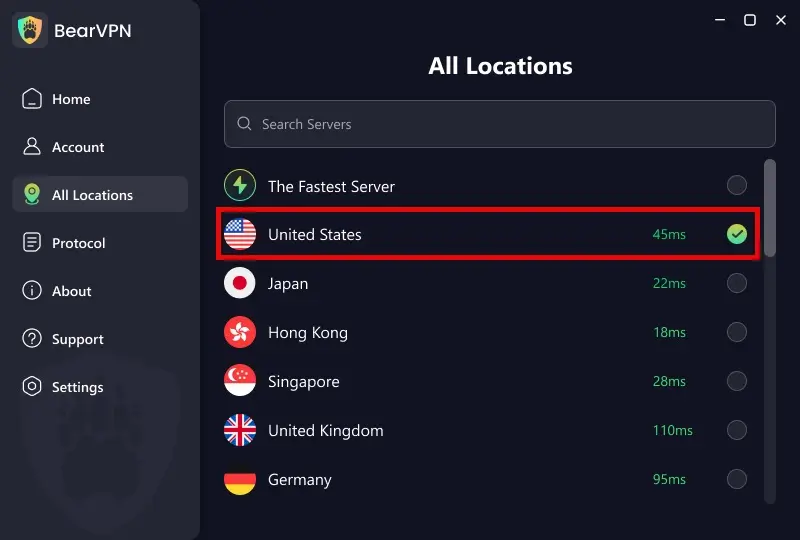
Download BearVPN for your device and connect before opening Flingster. For better video performance, start with a geographically nearby server instead of automatically choosing a distant country.
A paid BearVPN account supports up to 10 simultaneous devices and unlimited bandwidth. Actual video quality still depends on the selected server, your network, browser, and Flingster itself.
Step 3: Start a Fresh Browser Session
After connecting:
- Close existing Flingster tabs.
- Open a Private or Incognito window.
- Visit Flingster directly instead of following an unfamiliar link.
- Allow camera and microphone access only when you are ready to chat.
A private window starts a cleaner browser session, but it does not make you anonymous or stop Flingster from receiving information during the session.
Step 4: Check the Result
If Flingster still requests age verification, do not repeatedly switch servers and assume the check is broken. It may be a mandatory requirement or tied to signals other than your public IP.
If the page opens but video does not work, continue to the troubleshooting section below.
Flingster VPN vs. Proxy vs. Tor
These tools are not interchangeable:
Avoid “Flingster hacks,” unofficial apps, cracked software, and unknown proxy extensions. They cannot legitimately remove an underage ban and may expose login details, browsing data, camera permissions, or payment information.
- Connect through 2,000+ servers across 50+ locations.
- Use AES-256 encryption with IP and DNS leak protection.
- Choose a nearby server to reduce unnecessary video latency.
Server availability and video performance can vary. Access is not guaranteed.
Flingster Not Working? Check These Causes in Order
An age prompt, an underage ban, and a black video screen have different causes. Use the relevant fix instead of treating every problem as a blocked IP.
1. Check Camera and Microphone Permissions
Flingster requires access to your camera and microphone for video chat. In your browser’s site settings, confirm that both permissions are allowed and that no other application is currently using the camera.
Reload the page after changing permissions.
2. Try a Supported, Updated Browser
Update Chrome, Edge, Firefox, or Safari. Temporarily disable privacy extensions or content blockers for the site if they prevent the camera interface or scripts from loading.
Do not disable all browser security permanently.
3. Clear Only Flingster Site Data
Remove cookies and cached data for Flingster, close the tab, and reopen the official site. You can also test a Private or Incognito window.
This may fix a broken or looping session, but it will not reverse a platform ban.
4. Test Without the Current VPN Server
If Flingster loads normally without the VPN, the selected server IP may be restricted. Reconnect to another nearby BearVPN server and retry once.
If the age check remains, it may not be based solely on IP location. BearVPN cannot guarantee that Flingster will accept every server.
5. Keep WebRTC Enabled for Video Chat
WebRTC is part of how browser-based video calling works. Disabling it completely can break Flingster’s camera connection.
Do not tell users to change advanced Firefox settings unless they understand the consequences. Instead, connect BearVPN before opening the browser and use BearVPN’s IP/DNS leak protection as provided by the app.
6. Do Not Treat It as a GPS Leak
Flingster’s current privacy policy states that it does not collect precise, real-time GPS location. Mobile users can still review browser permissions, but GPS should not be presented as the likely explanation for an age prompt.
7. Appeal a Ban Instead of Evading It
If the screen specifically says you were banned for being underage or for an illegal stream, save any ban ID and contact info@flingster.com. Flingster says appeals must be filed within 14 days.
FAQ on Flingster Age Verification
Flingster’s official policies say the platform may use approved age-verification or age-assurance processes where required by law or needed for user safety. Verify that you are on the official flingster.com domain, identify the company operating the verification screen, and read its privacy notice before submitting an ID, selfie, or other sensitive data.
Some adult users may see only a basic age declaration, while others may be required to complete an approved verification process. A VPN can change the public IP and possibly the regional page shown, but it cannot guarantee removal of an age check. Minors must not use Flingster, and adults should follow applicable law and the platform’s current terms.
Flingster currently presents a Start Chatting option for basic access, and its safety policy acknowledges that many users do not register accounts. However, the terms state that some features may require an account or third-party sign-in. Availability can vary by feature, location, and the platform’s current configuration.
If you are underage, do not attempt to return. If you are an adult and believe the ban was an error, save the ban ID if one appears and email info@flingster.com within 14 days. Include the approximate date, time, explanation, and registered email or sign-in method where applicable. A VPN is not the correct way to appeal a moderation decision.
The selected VPN IP may be restricted, but camera permissions, blocked scripts, stale cookies, another app using the camera, or an account/device-level restriction can produce similar symptoms. Try another nearby BearVPN server, open a fresh private window, verify camera and microphone permissions, and test an updated browser. Access is not guaranteed.
The search terms Flingster leak or Flingster leaks do not establish that a confirmed breach occurred. Do not claim one without reliable evidence. Flingster’s privacy policy does say it may process device information, general location, images, audio, video, and limited session samples, so users should still avoid revealing personal, financial, or identifying information during random chats.
No legitimate tool can hack away an underage, account, or device ban. Unofficial Flingster apps, cracked software, scripts, and unknown proxies can expose browser data, camera access, credentials, or payment information. Use the official site, appeal incorrect bans through Flingster, and use BearVPN only for lawful connection privacy.
VPN use is legal in many jurisdictions, but not everywhere, and using one does not make prohibited conduct legal. Flingster’s current terms also prohibit circumventing moderation, blocking tools, or geographic restrictions. Adults should check local law and the latest platform terms before proceeding. This is general information, not legal advice.
Conclusion
Flingster’s age check, an underage ban, and a video connection failure require different responses. Adults should review the verification provider’s privacy terms before sharing sensitive data, appeal an incorrect ban through Flingster, and troubleshoot camera or browser problems separately.
BearVPN can mask your public IP and encrypt traffic on your network before you start a video chat. It cannot verify your age, erase a platform ban, or guarantee access, but it can give adult users greater control over connection privacy. Connect before opening your browser, choose a nearby server, and keep personal details, payment information, and identifying backgrounds out of random chats.


![How to Change YouTube TV Location [Still Works in 2026]](/_next/image/?url=https%3A%2F%2Fcms.bearvpn.com%2Fwp-content%2Fuploads%2F2026%2F06%2Fhow-to-change-location-youtube-tv.webp&w=640&q=75)



