


Facing a sudden Facebook age verification check—especially when trying to open Facebook Marketplace or log in from mobile—can instantly stall your account activity. Whether your uploaded government ID was rejected, your video selfie timed out, or strict regional laws like the UK Online Safety Act triggered an unexpected lock on your profile, resolving these barriers requires systematically clearing session bugs or addressing IP-based triggers.
What Is Facebook Age Verification and Why Does It Appear?
Facebook age verification is a process the platform uses to confirm that you meet the minimum age requirements to use its services or access features like Marketplace, dating, or sensitive groups. If Facebook suspects your account might not meet the age threshold (typically 18+ for Marketplace and some other services), it will prompt you to verify your age. This can happen for several reasons:
- You entered a birthdate under 18 when signing up.
- Facebook’s algorithms detected suspicious activity or flagged your account for review.
- You tried to access features with legal restrictions (e.g., Marketplace, gaming, or dating).
- You’re accessing Facebook from a country with strict online safety regulations.
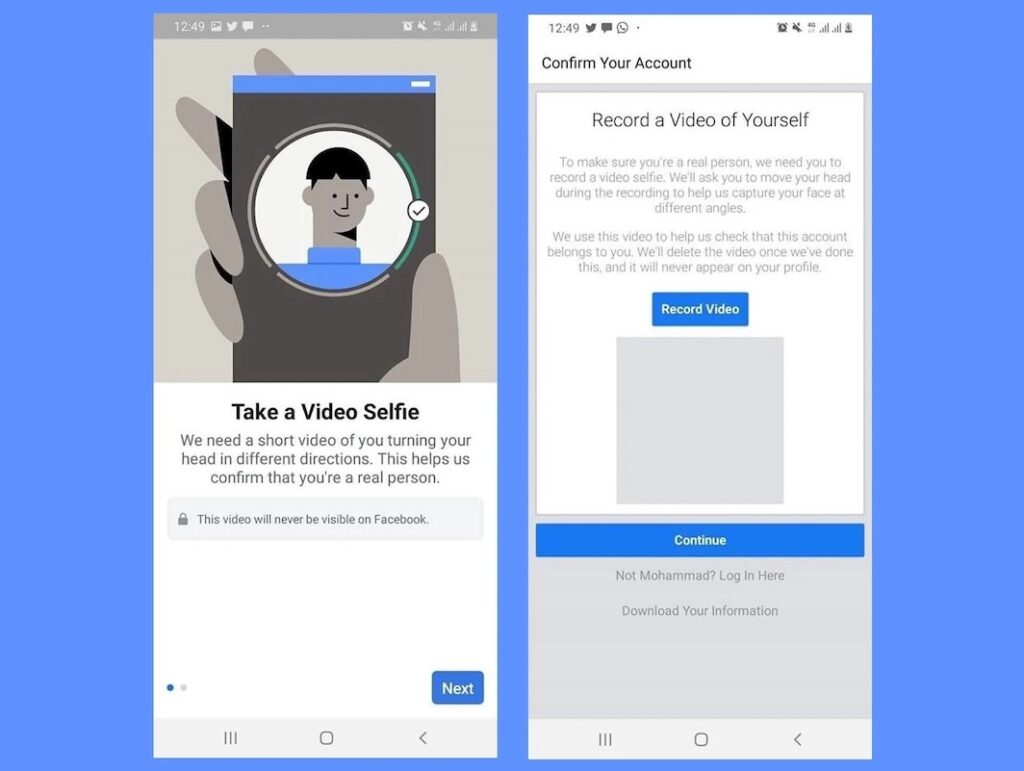
The official process for Facebook age verification usually involves one of the following steps:
- Uploading a photo of a government-issued ID (like a passport or driver’s license).
- Completing a selfie video for face matching (in partnership with third-party services like Yoti).
- Verifying with supporting documents, such as a birth certificate.
While this process is meant to keep the community safe, it can also result in real users being locked out of their accounts or facing repeated verification requests—even when they’re of legal age.
How Facebook Video Selfie Verification Works (Yoti Integration)
In 2026, Facebook heavily relies on Yoti technology to offer a video selfie age estimation option. Instead of uploading official documents, users record a short video selfie. The algorithm estimates age based on facial features and deletes the video within 30 days.
Fixes for Video Selfie Verification Loops:
- Fix Poor Lighting & Face Positioning: Ensure natural, even lighting without direct backlights. Avoid wearing glasses, hats, or masks during the scan.
- Clear Facebook App Cache: If the video selfie screen freezes during upload, go to phone settings, clear the Facebook app cache, and attempt the process via a stable Wi-Fi network.
- Request Official ID Link: If Yoti repeatedly fails to estimate your age accurately, switch to the official Help Center photo ID form to upload a driver’s license or passport instead.
Common Problems with Facebook Age Verification
Before exploring solutions, it’s important to understand the most common issues users face with Facebook age verification:
1. ID Not Accepted or Rejected:
One of the biggest frustrations is uploading a valid photo ID only for Facebook to reject it. Reasons include blurry images, poor lighting, cropped edges, or unsupported ID types. Sometimes, the system simply glitches and won’t accept your upload, no matter what you try.
2. Verification Not Working:
Many users complain about the Facebook age verification process not working—forms won’t load, uploads time out, or you get stuck in a loop even after providing the correct documents. These issues are especially common on mobile devices and can be exacerbated by region-specific requirements or bugs.
3. Locked Out of Facebook Marketplace or Account:
If your age isn’t verified, you may be blocked from buying or selling on Marketplace, joining groups, or even using your account entirely. This is particularly frustrating if you’ve used Facebook for years without issues and suddenly find yourself restricted.
To Fix Facebook Marketplace Age Restriction Locks:
- Check Account Birthdate: Verify that your registered Facebook birthdate reflects your actual age.
- Submit Verification Link: Visit the Facebook Help Center’s “Confirming Your Age” form directly through a mobile browser rather than the app.
- Resolve Location Misalignment: If you travel or use international proxy settings, Facebook may temporarily lock Marketplace access until your virtual location matches your profile region.
4. Location-Based Triggers:
In some countries, new online safety laws force platforms to impose extra verification steps or block access to certain features based on your IP address. This means you might only encounter age verification requests because of your region—not because of your actual age.
5. No Response from Support:
Even when you follow the instructions, contacting Facebook support rarely leads to a quick resolution. Many users are left waiting days or weeks without progress, which drives people to search for ways to bypass Facebook age verification or skip the ID upload entirely.
Can You Bypass Facebook Age Verification? What You Need to Know
Let’s address the big question: Is it possible to bypass Facebook age verification? The answer is nuanced.
If you simply try to create a new account with a false birthdate, you may temporarily bypass Facebook’s initial age check. However, this is not a lasting solution. As soon as you try to access age-restricted features, or if your account is flagged, Facebook will request further verification—usually requiring a government-issued ID or selfie video.
Attempts to use fake IDs, altered images, or identity “hacks” found online are risky. Not only do they rarely work (thanks to Facebook’s automated image analysis), but they also put your account at risk of permanent suspension. Sharing personal data or IDs with untrusted third-party websites is a major privacy risk as well.
It’s also worth noting that many “bypass Facebook age verification” guides circulating online are out of date or outright scams. Facebook continually updates its verification process, making older workarounds unreliable or even dangerous. For most users, the safest approach is to focus on legitimate troubleshooting, and only consider advanced methods (like using a VPN) when absolutely necessary and within Facebook’s terms of use.
Legitimate Solutions for Facebook Age Verification Issues
If you’re stuck on the Facebook age verification screen, here’s how to resolve the issue safely and effectively:
1. Ensure Your Documents Meet Facebook’s Requirements
Double-check that your photo ID is valid, not expired, and clearly legible. Make sure the entire document is visible in the photo (all four corners), and take the picture in good lighting with no glare. Accepted ID types usually include passports, national IDs, and driver’s licenses.
2. Use the Facebook Mobile App
Sometimes, verification works better on the official Facebook app for iOS or Android rather than through a mobile browser or desktop. Try switching devices if you keep encountering errors.
3. Clear Cache and Cookies
Clear your app or browser cache before starting the process again. Old session data can cause glitches in the verification flow.
4. Double-Check Account Information
Make sure your name, birthdate, and contact information on Facebook match your official documents. Even small discrepancies can lead to verification failures.
5. Retry in a Different Region (with a VPN)
If you’re getting location-based verification prompts (especially in countries with strict online safety laws), using a VPN on your mobile device can help you access Facebook as if you’re in a region with more relaxed requirements. More on this below.
6. Be Patient and Persistent
Unfortunately, Facebook support is notoriously slow, but persistence pays off. If your verification fails, try again with a different document or clearer photo.
By focusing on these steps, most genuine users can resolve age verification issues without violating Facebook’s terms or risking account bans.
How VPNs Can Help Bypass Regional Facebook Age Verification Barriers
Increasingly, Facebook’s age verification system is influenced by where you access the platform. In regions such as the UK, new regulations (like the Online Safety Act) require platforms to implement stricter age checks. As a result, even adult users may be blocked from features like Marketplace, groups, or dating, simply because of their IP address location.
Here’s where using a reputable mobile VPN can make a difference. By connecting to a VPN server in a different country, you can effectively “move” your device’s virtual location, potentially avoiding unnecessary age verification triggers tied to your region.
For example, if you live in or travel to a country with stricter Facebook rules, using a VPN allows you to access Facebook as though you’re in the United States or another country with less aggressive age gating. This is especially valuable for mobile users, as many verification issues are more common when using Facebook on iOS or Android.
However, keep in mind:
- A VPN does not change the birthdate or personal info on your Facebook account.
- You must still comply with Facebook’s terms of service.
- VPNs work best for avoiding regional restrictions and accessing features like Marketplace or groups that may be blocked in your current location.
If you decide to use a VPN, it’s critical to choose a privacy-focused provider with strong security features and mobile compatibility.
Why BearVPN Is a Smart Choice for Facebook Users on Mobile
If you’re facing repeated Facebook age verification requests due to your region—or you simply want an added layer of privacy while using social media—BearVPN is designed specifically for iOS and Android users who value simplicity, speed, and security.

Key Benefits of BearVPN for Facebook Users:
- User-Friendly Design: BearVPN is available on iOS, Android, Windows, and macOS, offering a clean, intuitive interface and one-tap connection—so you can get protected instantly without any complicated setup.
- Global Server Network: Instantly switch your virtual location to dozens of countries, letting you bypass Facebook Marketplace region locks or age verification triggers based on your IP address.
- High-Speed Performance: Stream, browse, and use Facebook smoothly with low latency, whether you’re accessing the platform for social networking, gaming, or marketplace transactions.
- Privacy and Security: BearVPN offers DNS leak protection, robust encryption, a strict no-logs policy, and RAM-only servers, ensuring your activity stays private and your real IP is hidden.
- Customizable App Routing: With per-app VPN management, you can choose exactly which apps use the VPN tunnel—so you can optimize your network for Facebook, streaming, or gaming as needed.
- Unblock Content Worldwide: In addition to Facebook, BearVPN can help you access global content across streaming platforms like Netflix (availability not guaranteed for every service).
- Game Optimized: For users who enjoy Facebook games or mobile gaming, BearVPN delivers a low-latency, stable connection across regions.
BearVPN isn’t a magic bullet—if your Facebook account has been flagged for manual review, you may still need to submit an ID. However, for the vast majority of mobile users facing region-specific age checks or access barriers, BearVPN provides a secure, user-friendly solution that keeps your social media experience smooth and private.
Pros and Cons of Bypassing Facebook Age Verification with a VPN
Using a VPN is not about breaking the rules—it’s about ensuring that genuine users aren’t unfairly blocked or forced to submit sensitive information just because of where they live or travel. BearVPN makes this process simple, especially for users who want seamless access from their mobile devices.
FAQs
Ensure your account birthdate shows you are 18 or older and submit a clear photo of an official government ID or complete the Yoti video selfie prompt directly in the app.
Yes. Facebook partners with Yoti for facial age estimation. Facial geometry is used solely to estimate age, and data is deleted within 30 days according to Meta’s privacy policy.
ID rejections usually happen if the photo is blurry, edges are cropped out, there is glare on the document, or the name/birthdate on the ID does not match your profile details.
If available in your region, you can choose the Video Selfie option instead of uploading a physical ID. Alternatively, changing your virtual network location with a VPN can resolve region-specific verification prompts.
Video selfie checks usually complete within 20 minutes to a few hours. Official photo ID reviews typically take between 24 and 48 hours.
Conclusion
Facebook’s age verification system isn’t going anywhere—and with online safety laws tightening, it’s only becoming more common. In most cases, the fastest way to resolve age verification issues is to follow Facebook’s official process and provide valid documents. Still, regional restrictions and technical hiccups can make this a real hassle, even for eligible adult users.
If you’re repeatedly running into age checks on mobile or getting blocked from Marketplace because of your location, a reliable VPN like BearVPN can be a smart, privacy-friendly solution. BearVPN’s global servers and easy mobile app help you restore access quickly and securely. Just remember to use privacy tools responsibly and always follow Facebook’s terms of service.


![How to Change YouTube TV Location [Still Works in 2026]](/_next/image/?url=https%3A%2F%2Fcms.bearvpn.com%2Fwp-content%2Fuploads%2F2026%2F06%2Fhow-to-change-location-youtube-tv.webp&w=640&q=75)



