


AdultWork now requires some users to complete age verification before accessing content. Instead of simply confirming your age, the process may ask for sensitive information such as a government ID, passport, or payment details.
For many adults, the concern is not age verification itself — it is privacy. Sharing identity documents with third-party verification providers creates questions around data storage, security, and potential breaches.
This guide explains why AdultWork age verification appears, what privacy risks to consider, and how adults can protect their online identity when accessing age-restricted websites.
This article is for informational purposes only and does not constitute legal, professional, or compliance advice. Laws and platform policies regarding age verification and adult content vary by jurisdiction. Readers are responsible for understanding and complying with applicable laws and the terms of service of any platform mentioned. We do not encourage or support any unlawful activity and are not responsible for any consequences arising from the use of this information.
Why Does AdultWork Require Age Verification Now?
To solve the problem, you must understand the mechanism behind it. AdultWork isn’t blocking you because they want to; they are blocking you because they are being forced to by a complex web of new internet laws.
The UK Online Safety Act (2025 Enforcement)
If you are in the United Kingdom, you are the primary target. The Online Safety Act, which moved into full enforcement in mid-2025, threatens adult platforms with massive fines if they do not “robustly” verify the age of their users.
Unlike previous years where a simple “I am 18” checkbox was sufficient, the new law requires “hard verification.” This means the site must check a physical document or perform a biometric facial scan. If AdultWork detects an IP address coming from the UK, it must trigger this age gate or risk being blocked by British ISPs.
The US State-Level Blocks
The United States has seen a domino effect of similar laws. As of late 2025, age verification laws are active in:
- Strict States: Louisiana, Virginia, Utah, Texas, Arkansas, Mississippi, Montana, and North Carolina.
- New Additions (2025): Florida, Kansas, and Idaho.
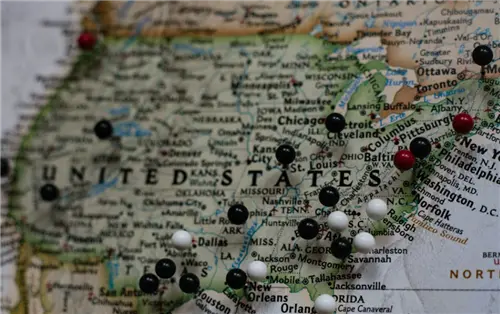
If your internet connection originates from one of these states, AdultWork detects your IP address, cross-references it with a geolocation database, and applies the local law. If you are in Texas, you get the block. If you are in New York (which currently has looser restrictions), you might not.
How the Detection Works
AdultWork uses three primary methods to pinpoint your location:
- IP Address Geolocation: The most common method. Your IP address is like a digital postcode.
- GPS Data (Mobile): If you are browsing on a smartphone, your browser often has access to your GPS coordinates.
- Payment Information: If you try to buy credits using a billing address in a restricted region, the account is flagged.
The Hidden Dangers of Uploading Your ID
Many users ask: “Why shouldn’t I just upload my license and get it over with?”
This is the most critical section of this guide. Uploading government identification to an adult content platform (or the third-party processors they use) is a cybersecurity nightmare.
- The Data Breach Risk
History has taught us that no database is unhackable.
- The Ashley Madison Lesson: When the Ashley Madison dating site was hacked, millions of users faced public shaming, divorce, and extortion.
- The Verification Risk: When you upload your ID to AdultWork’s partner (often systems like Yoti or Veriff), you are trusting them to store that data securely forever. If that database is breached, hackers don’t just have your email—they have your passport photo, full name, date of birth, and home address, linked directly to your adult browsing history.
- Blackmail and “Sextortion.”
Cybercriminals actively hunt for this type of data. If a hacker gains access to a verification database, they can cross-reference your ID with your LinkedIn or Facebook profile. The result? Targeted blackmail emails threatening to release your browsing habits to your employer or spouse unless a ransom is paid.
- Third-Party Data Sharing
By accepting the Terms of Service of these verification tools, you often permit them to retain data for “legal compliance” or “fraud prevention.” This creates a permanent digital paper trail of your adult content consumption that could theoretically be subpoenaed in legal disputes (e.g., divorce proceedings or custody battles).
The Verdict: The risk is simply too high. Anonymity is the only safety net.
How to Bypass AdultWork Restrictions INSIDE Strict Regulated Zones (UK/US)
If you are accessing AdultWork from the UK or an age-restricted US state, the site automatically detects your ISP’s regional IP and deploys an intrusive third-party age gate (like Yoti or Veriff) before allowing access to profiles or media.
Here’s the catch: standard proxies or cheap free VPNs will fail immediately because AdultWork actively blacklists known commercial datacenter IP ranges.
To break through this wall, you must route your encrypted traffic through a non-regulated “Safe Zone” location using residential-style obfuscated IP addresses. By switching to a BearVPN Netherlands or Swiss node, your connection bypasses local ISP inspection, forcing AdultWork to treat your device as a global visitor outside strict regulatory jurisdictions. BearVPN’s network of 2,000+ servers utilizes stealth obfuscation to strip VPN handshake markers, preventing firewall detection.
- Recommended Safe Nodes: Netherlands (Amsterdam), Switzerland (Zurich), Sweden.
- Nodes to Avoid: United Kingdom, France, Germany, Texas/Louisiana (US).
How to Access AdultWork Regional Services & Profiles from ABROAD
If you are traveling abroad outside the UK/US and attempting to log into your established AdultWork account or access regional provider listings, you’ll likely encounter an account-level location lock or account suspension warning.
AdultWork monitors unexpected geo-location shifts. If your session hops from London to an unverified location without proper IP masking, their security algorithms mark your account as suspicious, triggering mandatory identity re-verification.
This is where BearVPN’s dedicated physical European nodes come into play. Instead of using shared VPN server clusters that trigger fraud flags, BearVPN routes your request through clean, high-bandwidth physical nodes. This ensures a consistent, clean IP presence, allowing you to access regional profiles and manage your account seamlessly without triggering automated security locks or endless verification loops.
How to Bypass AdultWork Verification (Step-by-Step)
The only reliable way to bypass these checks without providing ID is to change your digital location to a jurisdiction where these laws do not exist. You need to make AdultWork believe you are connecting from a privacy-friendly country.
Prerequisites:
- A reliable VPN (We recommend BearVPN for its obfuscation capabilities).
- A browser with cache/cookies cleared.
Step 1: Install BearVPN
Download the BearVPN app for your device (Windows, Mac, iOS, or Android).
Why BearVPN? AdultWork actively blocks known IP addresses from popular commercial VPNs. BearVPN uses Resilient Routing technology to rotate IPs and evade detection.
Step 2: Choose the “Safe Zone” Server (CRITICAL)
This is where most users fail. You cannot just connect to “anywhere.” You must choose a country that does not have mandatory age verification laws for adult content.
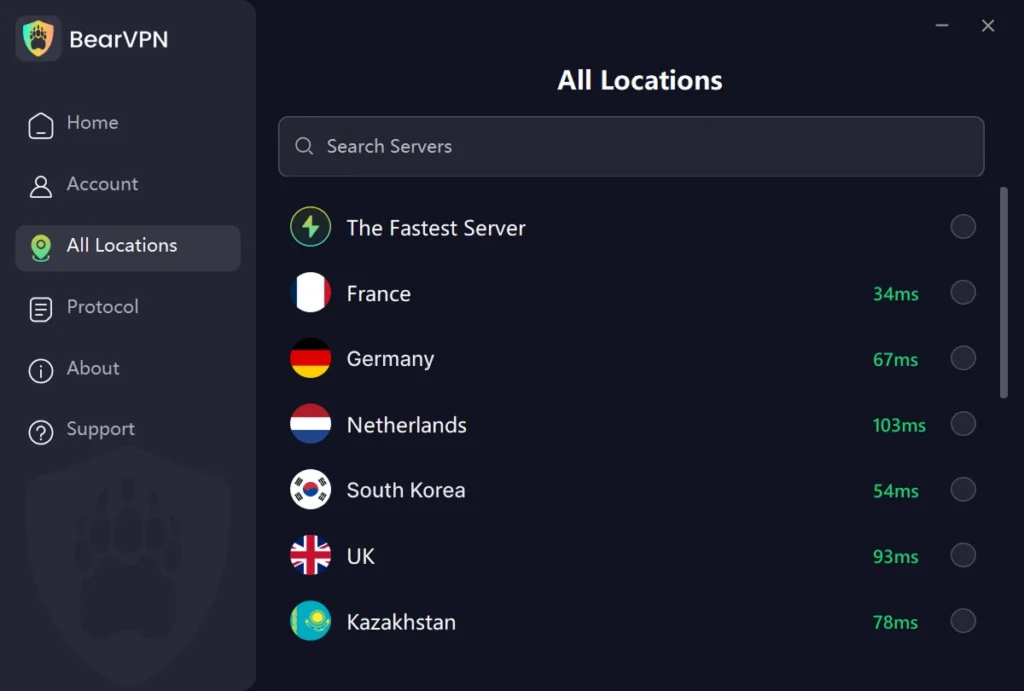
✅ Connect to these countries (The Green List):
- Netherlands (Recommended): The Netherlands has strong net neutrality and privacy laws. It is the most reliable location for bypassing UK/US blocks.
- Switzerland: Outside the EU jurisdiction with excellent privacy protections.
- Sweden: Generally safe and high-speed.
- Romania: Excellent privacy laws and rarely blocked.
❌ DO NOT connect to these countries (The Red List):
- United Kingdom: Will trigger the exact block you are trying to avoid.
- France: Strictly enforces age verification blocks.
- Germany: Enforces KJM regulations (Commission for the Protection of Minors), often blocking adult sites entirely or requiring age checks.
- USA (Texas, Virginia, Louisiana, etc.): Highly risky due to state-level variations.
Step 3: Enable “Stealth Mode” / Obfuscation
AdultWork knows that users try to bypass their systems. They use firewall technology to detect “VPN packets.”
- Open your BearVPN settings.
- Enable Stealth Mode.
- This scrambles your data so it looks like regular web traffic (HTTPS) rather than VPN traffic, allowing you to slip past the detector.
Step 4: The “Clean Slate” Browser Protocol
Before you navigate to AdultWork, you must remove the “breadcrumbs” your browser has already left behind.
- Clear Cookies & Cache: If you visited AdultWork five minutes ago from a UK IP, the site stored a cookie on your device labeling you as “UK User.” Even if you turn on a VPN, that cookie will betray you.
- Use Incognito / Private Mode: This prevents local caching.
Step 5: Access AdultWork
Now, navigate to the site. You should see the standard homepage without the verification popup. You can now log in or browse anonymously.
Troubleshooting – “Help! It’s Still Blocked!”
If you followed the steps above and still see the “Verify Your Age” popup, or if you get an “Access Denied” error, AdultWork has likely fingerprinted your device. Here is how to fix it.
Scenario A: The “VPN Detected” Error
The specific IP address you are using has been flagged by AdultWork’s security system.
- Disconnect and choose a different city within the same country (e.g., switch from Amsterdam to Rotterdam).
- If that fails, switch to a Dedicated IP (available on BearVPN). A dedicated IP is unique to you, meaning other users haven’t ruined its reputation by spamming the site.
Scenario B: Mobile GPS Leaks (The Smartphone Problem)
Mobile browsers are tricky. Even with a VPN IP in the Netherlands, your phone’s GPS chip is telling the browser you are sitting in London or Texas.
The Fix (Android/iOS):
- Go to your phone’s Settings > Privacy > Location Services.
- Find your browser (Chrome/Safari).
- Set Location Access to “Never”.
- Restart the browser entirely.
Scenario C: The “Payment Verification” Trap
You bypassed the browsing block, but now you want to buy credits. When you enter your UK or US credit card, the site recognizes the billing address and triggers the age check.
This is harder to bypass. You cannot spoof a billing address.
- Cryptocurrency: Check if the platform accepts Crypto payments, which do not carry geographic markers.
- Virtual Cards: Some users utilize virtual credit cards registered in privacy-friendly jurisdictions, though this is complex to set up.
Note: If you only want to view content, the VPN is sufficient. Payment usually forces identity reveal.
Why Free VPNs Are Dangerous for This
You might be tempted to search for “Free VPN for AdultWork.” Do not do this.
Free VPNs are free for a reason: You are the product.
- They Sell Your Data: Free VPNs often harvest your browsing logs and sell them to advertisers. Using a free VPN to access adult sites defeats the entire purpose of privacy.
- Lack of Obfuscation: Free VPNs rarely have “Stealth Mode.” AdultWork’s firewalls easily detect and block them.
- Malware Risks: Many free VPN apps inject trackers or malware into your device.
- Limited Locations: Free VPNs usually force you into crowded servers in the US or Germany—places that are blocked.
BearVPN operates on a strict No-Logs Policy. We do not track where you go, what you watch, or how long you stay. When you disconnect, your session is erased.
Conclusion: Take Back Your Privacy
The internet is changing. What used to be an open space is becoming increasingly gated and surveilled. While the intention behind age verification laws is to protect minors, the method—forcing adults to upload sensitive documents to porn sites—is a massive overreach that threatens your digital safety.
You have a right to privacy. You have a right to keep your personal life separate from your public identity.
Don’t hand your driver’s license over to a database that could be breached tomorrow. Use BearVPN to secure your connection, mask your location, and access AdultWork on your own terms.
Frequently Asked Questions (FAQ)
Q1: Is bypassing age verification illegal?
In most jurisdictions, bypassing an age gate is a violation of the website’s Terms of Service, but for an adult accessing legal content, it is generally not a criminal offense. However, laws vary by state and country. This article is for educational and privacy protection purposes; you must adhere to your local laws.
Q2: Can I use a fake ID generator to pass the verification?
No. Modern systems like Yoti use “liveness detection” (facial scans) and check ID numbers against government databases. A Photoshop fake or a generator will be rejected immediately and may permanent ban on your account.
Q3: Will AdultWork show up on my bank statement?
If you purchase credits, yes. It usually appears under a discreet billing descriptor (like “AW Services” or similar), but the transaction is still traceable to the merchant. A VPN hides your traffic from your ISP, but it cannot hide a transaction from your bank.
Q4: Does BearVPN work on mobile for this?
Yes. BearVPN has dedicated apps for iOS and Android. Remember to disable your GPS location services for the browser you are using to ensure the VPN location takes precedence.
Q5: Why did my connection stop working halfway through?
Adult sites often refresh their “blacklists.” If a server stops working, simply open BearVPN and switch to a new server in the Netherlands or Switzerland. Our team monitors these connections 24/7 to ensure uptime.


![How to Change YouTube TV Location [Still Works in 2026]](/_next/image/?url=https%3A%2F%2Fcms.bearvpn.com%2Fwp-content%2Fuploads%2F2026%2F06%2Fhow-to-change-location-youtube-tv.webp&w=640&q=75)



