You might notice that a site works on mobile data but not on hotel Wi-Fi, or that a link loads for friends but not for you. In Thailand, that inconsistency can come from several places: local network rules, ISP filtering, or broader website blocking.
This guide helps you understand which websites are commonly restricted, why blocks happen, and what you can do—legally and safely—when something you need won’t load. You’ll also get a practical checklist for diagnosing the problem and choosing privacy tools that protect you on public networks without crossing legal lines.
Commonly Blocked Website Categories in Thailand
Here are some commonly blocked site categories for your reference.
1. Microblogging & Social Platforms (e.g., Tumblr)
Tumblr is one of the most frequently reported access problems in Thailand. Users may see timeouts, blank media, or app-loading failures on some ISPs even when the same Tumblr URL works on another connection. That pattern is consistent with network-level filtering, but status can differ by ISP, hostname, and date; test the exact page before calling it a permanent nationwide platform ban.
2. Adult Content & Adult Games (Pornhub, Rule 34)
Thailand has a documented history of blocking Pornhub and many other pornography-related URLs, including the widely reported 2020 action. Adult-content URLs also appear within broader illegal-content enforcement.
Exact results can still differ by domain and ISP. Treat Pornhub, Rule 34, Redgifs, and similar services as separate tests, and do not publish a rotating list of adult mirrors that “still work.” Technical availability does not settle the legal question.
3. Specific Pages vs. Platform-Wide Bans (Facebook & YouTube)
Mainstream social media platforms like Facebook, YouTube, and X (formerly Twitter) are not banned in Thailand. However, Thai authorities frequently issue court orders requesting platform-level geoblocking for specific individual URLs, posts, or groups (such as political discussion groups).
4. Gaming & Messaging Apps (Discord, WhatsApp)
No current authoritative source reviewed for this update confirms a nationwide Discord or WhatsApp ban in Thailand. If text works but voice, media, or calls fail, test the official app on mobile data and another Wi-Fi network. Hotel, school, workplace, router, CDN, or temporary service restrictions are stronger first suspects than a national platform ban.
Popular Websites and Apps Reported Blocked in Thailand
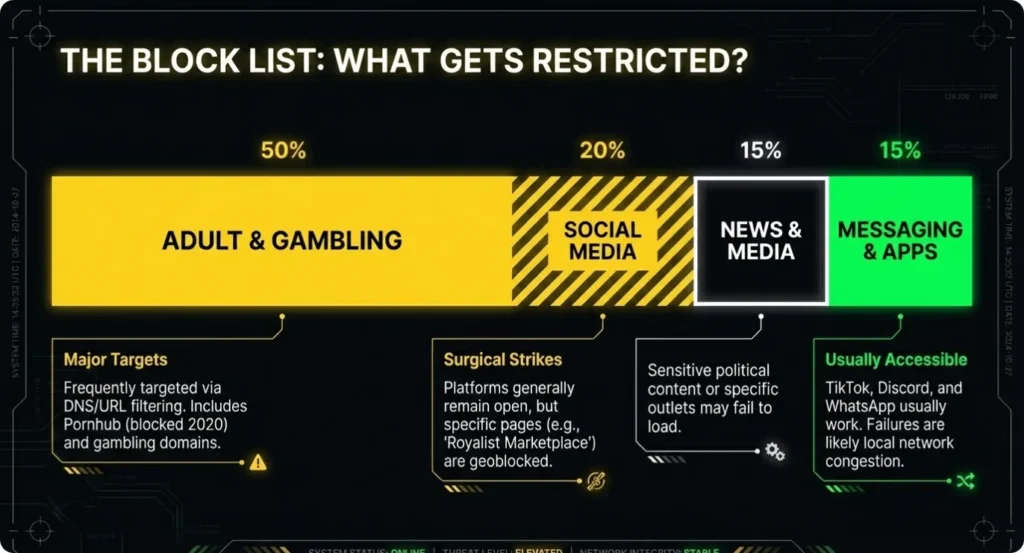
People often search for a list of blocked websites in Thailand because they want quick confirmation: is this site commonly restricted, and is it a permanent ban or something intermittent? The table below focuses on well-documented examples and uses cautious labels (reported/period-specific) because blocks can change.
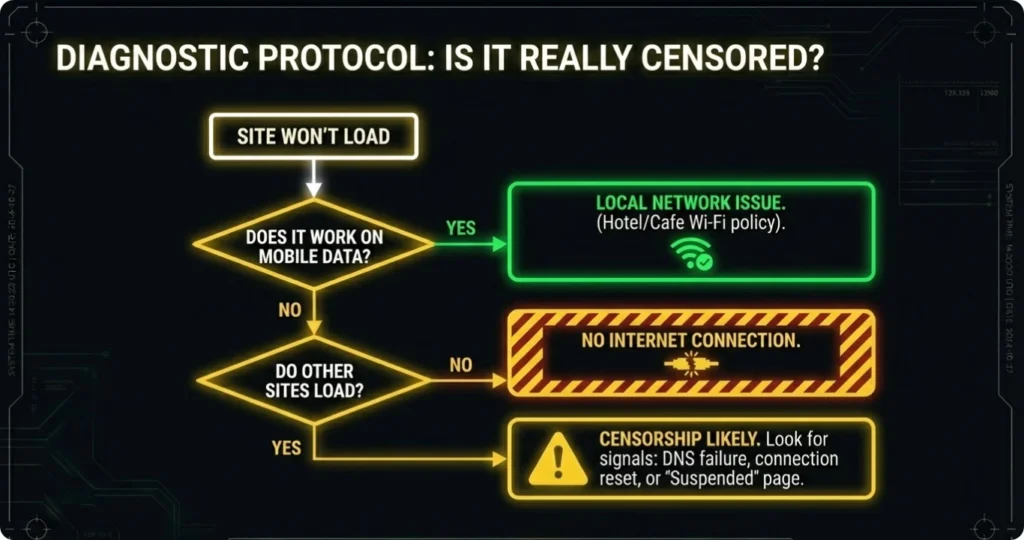
A DNS failure, redirect, timeout, HTTP error, or blank app screen does not identify the cause by itself. Record the exact URL, ISP, time, and error; compare mobile data with Wi-Fi and check independent measurements before declaring a nationwide ban.
Why Are Websites Blocked in Thailand?
If you know why a category is restricted, you can make better decisions about what to do next. Some blocks reflect ongoing policy priorities (like gambling crackdowns), while others are tied to specific cases (like restricting access to a page or group). This section keeps it practical: the goal is helping you understand patterns, not speculating about every individual block.
1) Adult content enforcement
A clear, documented example is the 2020 block affecting Pornhub and many other pornography sites, which was publicly linked to enforcement under Thailand’s Computer Crime Act in reporting.
2) Gambling and illegal web-address crackdowns
Gambling remains the largest documented blocking category. According to a Thai government release dated June 5, 2026, the Ministry of Digital Economy and Society blocked 787,899 illegal URL items between October 1, 2025 and May 31, 2026 through court orders and platform coordination. Of those, 673,699 were related to illegal online gambling.
Keep the date and unit attached to the number: these are URL/page/social-platform items, not necessarily 787,899 unique root websites. The figures show the scale of active enforcement without proving the current status of an unrelated app such as Discord or Tumblr.
3) Speech- and politics-adjacent restrictions (often content-specific)
Rather than blocking an entire platform, authorities may seek the restriction of specific pages or groups within a platform. The “Royalist Marketplace” case is frequently cited because the group was restricted within Thailand following a legal request, while the platform stayed online.
4) Network-level filtering and technical enforcement capacity
Some restrictions are implemented through ISP-level techniques (DNS interference, URL filtering, IP blocking). That’s why “it works for my friend but not for me” can be real—even inside the same country—depending on ISP and network configuration.
What Is Section 112 in Thailand—and Why Does It Matter Online?
When searching about internet restrictions in Thailand, you will frequently see references to the “112 Rule” (Section 112 of the Thai Criminal Code):
- What it covers: Section 112 of Thailand’s Criminal Code concerns defamation, insult, or threats involving the King, Queen, Heir-apparent, or Regent and can carry severe criminal penalties.
- Why it matters online: Posts, shares, comments, livestreams, group administration, and other distribution can create legal exposure. Court-ordered URL blocking and the Computer-Related Crime Act may operate alongside other criminal provisions.
- What this article cannot decide: A website loading, failing, or being reachable through another route does not establish whether the underlying content or conduct is lawful. Anyone facing a real legal issue should consult a qualified Thai lawyer.
How to Access Blocked Websites in Thailand Safely and Legally
When a website won’t load, your first job is to diagnose the cause. Jumping straight to “it’s censored” can waste time—and sometimes the fix is as simple as changing networks. The steps below focus on legal, low-risk troubleshooting first, then move toward privacy tools that are widely used for security and stability.
Step 1: Rule out ordinary network problems
Try these quick checks before anything else:
- Test the site on mobile data vs Wi-Fi (hotel, cafe, co-working space).
- Try another DNS-capable device (laptop vs phone).
- See if only one service fails (for example, WhatsApp calls drop but browsing works) or if everything is affected.
If it works on mobile data but not on Wi-Fi, you’re often dealing with local network policy, filtering, or weak routing—not a nationwide block.
Also record the failure type: government/ISP block page, DNS error, timeout, HTTP 403, certificate warning, missing media, failed voice call, or account message. Each points to a different layer.
Step 2: Use official channels when available
Use the service’s official app, status page, support channel, and primary domain. Use an alternate domain only when the service itself links to it. Do not enter Tumblr, Discord, Microsoft, or payment credentials into an unofficial mirror merely because the main page is blocked.
Step 3: Use a VPN to Bypass an IP-, DNS-, or Network-Level Block
When a lawful site works on mobile data but fails on one ISP, hotel, café, school, or office network, a VPN can send the connection through another encrypted route. It changes the public IP seen by the destination and can bypass an IP block, poisoned DNS response, ISP filter, or local Wi-Fi rule.
A VPN does not change the user’s real identity or legal obligations, restore content removed by the platform, approve an account, or repair a service outage. Keep the boundary at that layer—do not reduce the VPN to a generic Wi-Fi tool when the problem is genuinely network-based.
Securing Your Connection in Thailand with BearVPN
BearVPN gives travelers, residents, and remote workers a direct answer when a lawful site is blocked by the current route. It masks the normal public IP, encrypts supported traffic, and moves the connection through another server—so an ISP, hotel, airport, café, school, or workplace filter no longer controls the same path.
When traveling or working remotely in Thailand, maintaining stable routing and protecting your sensitive data on public Wi-Fi is essential. BearVPN serves as a reliable security companion for your daily mobile and desktop browsing:

- Strong Obfuscation: Makes supported VPN traffic harder for restrictive networks to identify and block as VPN traffic.
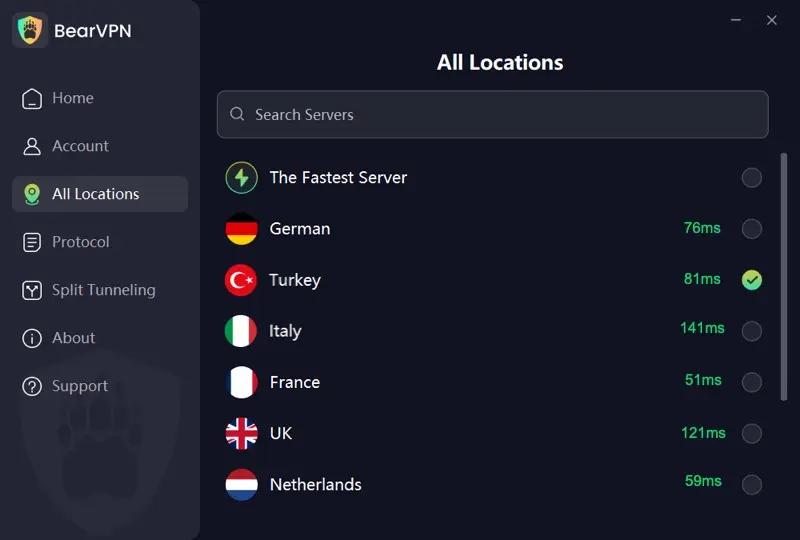
- Smart Server Selection: Quickly finds a suitable route; start with a nearby server when speed and calls matter.
- Global Coverage: 2,000+ servers across 50+ locations provide alternatives when one IP range or route is blocked.
- AES-256 Encryption: Protects supported traffic between the device and BearVPN server on shared Wi-Fi.
- Kill Switch and DNS Leak Protection: Help prevent accidental fallback to the normal route if the tunnel drops.
- Split Tunneling: On supported platforms, send the blocked app through BearVPN while selected local apps keep the regular connection.
How to Unblock a Website With BearVPN in Thailand
- Test the exact site or app on the current network and mobile data so you know whether the problem follows one route.
- Download BearVPN from the official website or verified app-store listing on your personal device.
- Open BearVPN and use Smart Server Selection or choose a nearby server for lower added latency.
- Connect and wait for the app to confirm the protected route. Enable Kill Switch and DNS leak protection where supported.
- Reopen the official website or app. For Discord, test text, voice, and media separately; for Tumblr, test the exact page and media hostname.
- If the first route fails, try one other suitable server. If every route shows the same account or platform message, changing IP again will not solve that layer.
BearVPN’s free Android and iOS option requires no signup and uses an automatically selected free route. Manual location selection, supported desktop apps, the wider server network, multiple devices, and advanced controls may require Premium.
Conclusion
Blocked websites in Thailand are a moving mix of large-scale illegal-URL enforcement, specific court or platform restrictions, ISP filtering, and local Wi-Fi rules. Pornhub has a documented blocking history; Tumblr failures should be tested by ISP and hostname; Discord is not shown by the current evidence reviewed to be under a nationwide platform ban.
Start by comparing networks and identifying the exact error. When a lawful service is blocked at the IP, DNS, ISP, or Wi-Fi layer, BearVPN can mask the public IP and route around that restriction. It cannot restore platform-removed content or change Thai law, so keep the technical block and the underlying activity as separate questions.
Mask your IP, change the network path, and reopen lawful sites through BearVPN instead of handing credentials to a risky mirror.
FAQs
First confirm that the site and intended activity are lawful, then compare mobile data with the failing network. If the block is caused by the ISP, DNS, visible IP, or local Wi-Fi, BearVPN can encrypt the connection, change the public IP, and route around that restriction on a personal device.
Thailand has documented adult-content blocking, including the 2020 Pornhub action, and pornography-related URLs remain among wider enforcement targets. Results can still differ by exact domain, ISP, and date; a timeout alone does not prove the source or scope of the block.
Do not answer every Rule 34 image, site, or action with one universal yes or no. Thailand’s Penal Code addresses obscene materials in contexts including trade, distribution, public exhibition, and related conduct, while other provisions may apply. Network availability is not legal permission; consult a qualified Thai lawyer for a real situation, and never access or share illegal material involving minors.
No current authoritative source reviewed confirms a nationwide platform-wide ban on YouTube, Facebook, or Discord. Specific URLs, accounts, groups, or posts may be restricted, while hotel, school, office, ISP, CDN, or service problems can affect individual features.
Free VPNs often impose tight daily data caps, slower speed ceilings, and limited server choices. Low-quality free apps may also show invasive ads or lack strict privacy policies.
Tumblr may fail because of ISP or DNS filtering, an affected Tumblr/CDN hostname, local Wi-Fi policy, app state, or a service incident. Compare the exact Tumblr page on mobile data and another Wi-Fi network. If it works elsewhere, BearVPN can test a different IP and route on the failing network.
References
- Freedom House. Freedom on the Net 2025 — Thailand.
- OONI (Open Observatory of Network Interference). Thailand — OONI Explorer (measurements & blocking signals).
- Bangkok Post. 220,000 illegal web addresses blocked since October (incl. gambling websites).
- Human Rights Watch. Thailand: Cyber Crime Act Tightens Internet Control.
- Thai Government, Ministry of Digital Economy and Society enforcement update, June 5, 2026: https://www.thaigov.go.th/th/news/164844
- Thailand Public Relations Department, illegal URL blocking update: https://thailand.prd.go.th/en/content/category/detail/id/52/iid/485173
- Department of Special Investigation, Computer-Related Crime Act: https://www.dsi.go.th/th/Detail/พระราชบัญญัติว่าด้วยการกระทำความผิดเกี่ยวกับคอมพิวเตอร์
- Thai government criminal-code source: https://www.dgr.go.th/law/th/newsAll/368/9305