


If you play games online, you know how even a split-second delay can make the difference between winning and losing. Nothing is more frustrating than lag, high ping, or a sudden disconnect right when you’re about to make a crucial move.
Most gamers try to fix these issues by searching for the “best dns for gaming” hoping it will lower their in-game ping. However, changing your DNS won’t magically fix a slow physical routing path. In this guide, we’ll break down what DNS actually does for your network, list the top public resolvers worth testing in 2026, and explain how a robust routing tool like BearVPN is the real key to solving your high-ping and latency struggles on mobile and desktop alike.
What Is DNS and Why Is It Important for Gamers?
Before we dive into the best DNS servers for gaming, it’s important to understand what DNS is and why it matters.
The Domain Name System (DNS) acts as the internet’s phonebook. When you enter a website address or launch an online game, your device asks a DNS server to translate that human-readable domain (like playstation.com or fortnite.com) into the numeric IP address that servers and routers actually understand.
How Does DNS Impact Gaming?
- Faster Matchmaking & Logins: A faster DNS resolver speeds up the initial secure handshake when booting up game launchers like Epic Games, logging in, or resolving matchmaking servers.
- Optimized CDN Downloads: Many gaming networks route updates based on your DNS location. A well-peered DNS ensures patches are pulled from the closest download mirror, speeding up game updates.
- What DNS Cannot Do (The Ping Myth): DNS does not lower your in-match ping. Once your game connects to the server’s IP and the match starts, DNS is out of the loop. If your in-game ping is high, your physical network routing is the bottleneck—not your DNS.
- Greater Stability: Reliable DNS servers are less likely to experience outages or attacks, meaning you’re less likely to disconnect during a match.
- Increased Security: Some DNS providers offer built-in malware filtering or block malicious domains, helping to protect your accounts and devices from online threats.
For gamers—especially those who play competitively or on-the-go with mobile devices—optimizing DNS is a smart and often simple way to gain a performance edge.
Best Public DNS Servers for Gaming
Not all DNS servers are created equal. While your Internet Service Provider (ISP) assigns a default DNS, public alternatives can offer better speed, privacy, and reliability. Here are the most recommended DNS servers for gaming in 2026, whether you’re on iOS, Android, or any other platform.
1. Cloudflare DNS
- Why it’s great: Known for its blazing-fast speeds, privacy-first policies, and zero DNS query logging. Cloudflare’s global network ensures low latency worldwide, making it a favorite for gamers seeking the fastest DNS for gaming. According to ongoing discussions on Reddit‘s gaming and tech communities, Cloudflare (1.1.1.1) remains the undisputed community favorite for the fastest response times in 2026.
- IPs:
- Primary: 1.1.1.1
- Secondary: 1.0.0.1
2. Google Public DNS
- Why it’s great: Google’s infrastructure is globally distributed and extremely reliable. For many, it’s the best DNS for gaming on Android, iOS, or even consoles.
- IPs:
- Primary: 8.8.8.8
- Secondary: 8.8.4.4
3. Quad9
- Why it’s great: Quad9 emphasizes security, automatically blocking known malicious domains. If you want a gaming DNS server that also keeps you safe from phishing and malware, Quad9 is a top contender.
- IPs:
- Primary: 9.9.9.9
- Secondary: 149.112.112.112
4. OpenDNS
- Why it’s great: OpenDNS offers content filtering and security features that are great for families and shared devices, along with solid speed and uptime.
- IPs:
- Primary: 208.67.222.222
- Secondary: 208.67.220.220
5. DNS4EU
- Why it’s great: A newer, EU-funded resolver built to keep data secure within European infrastructure. It’s an excellent, privacy-first option for gamers routing from Europe.
- IPs:
- Primary: 86.54.11.100
- Secondary: 86.54.11.1
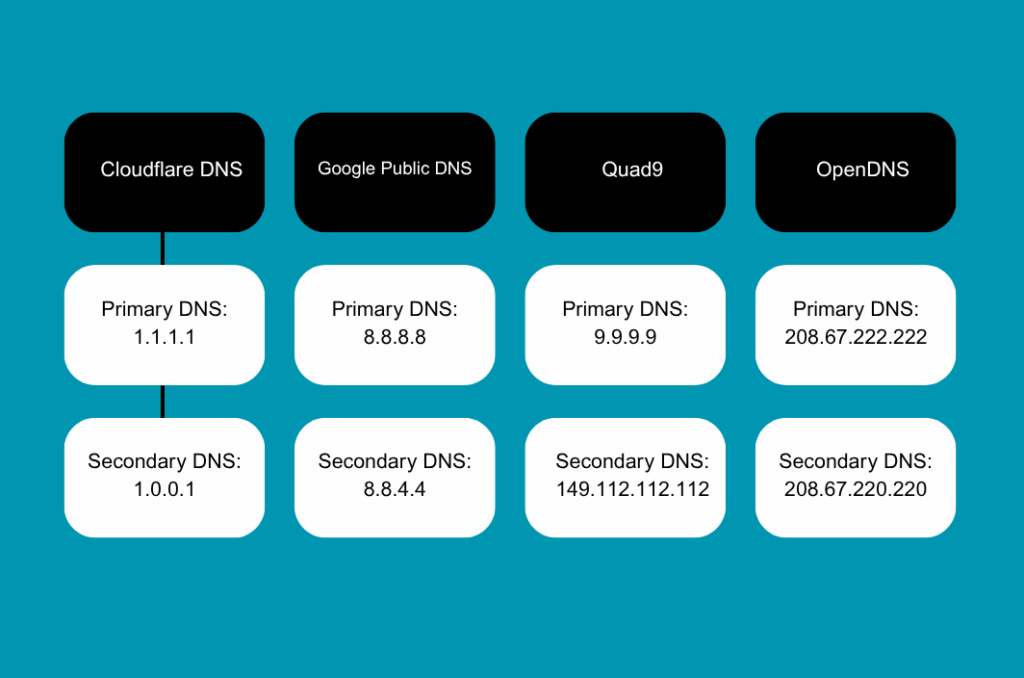
Comparison Table: Top Gaming DNS Servers
When searching for the “best DNS servers for gaming,” these options consistently rank high for both speed and reliability across independent benchmarks and user reports.
How to Change DNS Settings on iOS & Android Devices
Switching to a better DNS server on your mobile device can often reduce ping and help stabilize your gaming connection. Here’s how to set up the best gaming DNS servers on iOS and Android.
Changing DNS on iOS (iPhone/iPad)
Step1. Go to Settings > Wi-Fi
Step 2. Tap the (i) next to your connected Wi-Fi network
Step 3. Scroll to DNS and tap “Configure DNS”
Step 4. Select “Manual” and add your preferred DNS IPs (e.g., 1.1.1.1 and 8.8.8.8)
Step 5. Tap “Save”
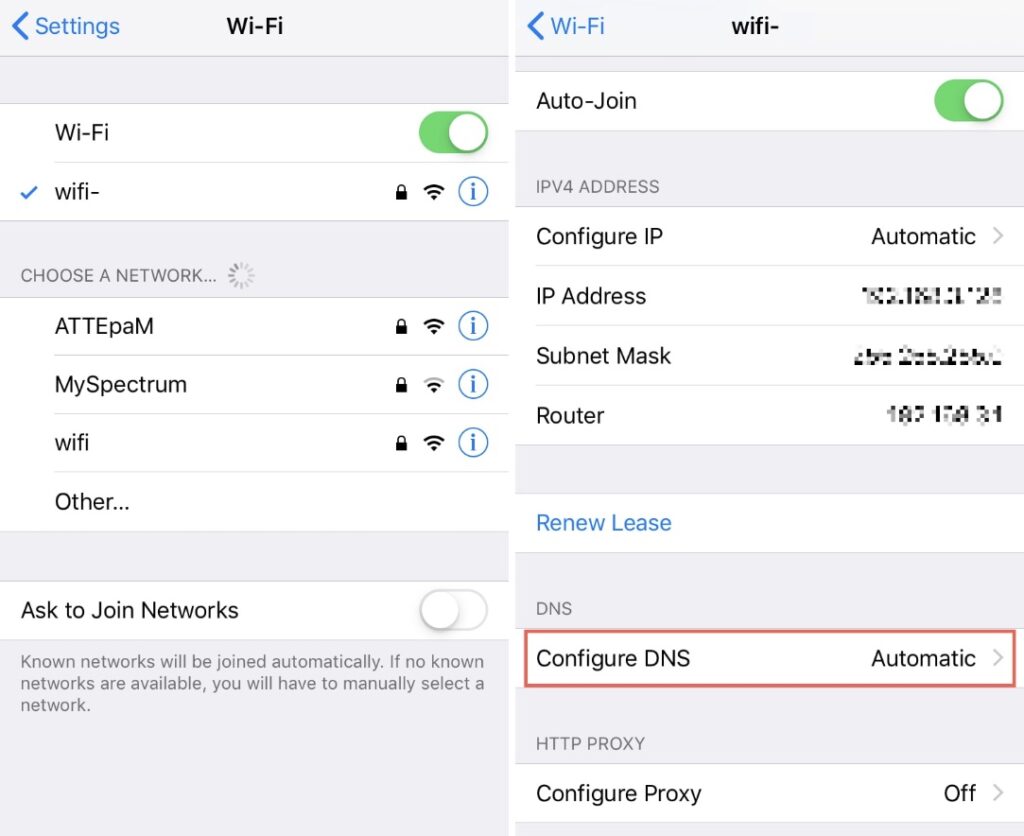
iOS and Android natively only let you change DNS for Wi-Fi networks, meaning your cellular data (5G/LTE) is left unprotected and stuck on slow carrier DNS. To bypass this restriction and enjoy automatic, high-speed DNS optimization across both Wi-Fi and mobile data, using a dedicated app like BearVPN is the easiest, one-tap solution.
Changing DNS on Android
Step 1. Go to Settings > Network & Internet > Wi-Fi
Step 2. Settings > Network & Internet > Advanced > Private DNS
Step 3. Enter your chosen DNS IPs
Step 4. Save and reconnect
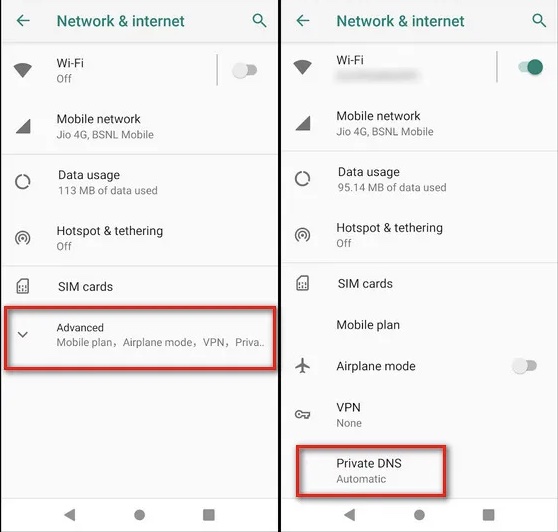
Note: Steps can vary depending on Android version and manufacturer.
Common Issues with Manual DNS Setup
- Works only for the current Wi-Fi network; if you switch networks, you must reconfigure.
- Doesn’t affect cellular data on many phones.
- Manual changes may not protect you from DNS leaks or privacy issues.
- Less convenient compared to a solution that routes all your traffic, like a VPN.
Related article: DNS Server Not Responding? Here’s How to Fix It
Beyond DNS: How BearVPN Fixes Actual In-Game Ping & Lag
While manual DNS configuration can improve performance, it often lacks the privacy, security, and simplicity that modern gamers expect. This is where VPN solutions like BearVPN step in.
What Makes BearVPN Unique for Mobile Gamers?
- Automatic Server Selection: With BearVPN, connecting is effortless. The app automatically picks the fastest and most secure VPN server, meaning less manual tweaking and more time gaming.
- DNS Leak Protection: BearVPN encrypts all your traffic, including DNS requests, ensuring that your queries stay private and protected from eavesdroppers, trackers, or hackers. This reduces the risk of DNS hijacking or interception, which can compromise your game accounts or sensitive information.
- System-wide Security: Unlike manual DNS changes that typically work only on Wi-Fi, BearVPN protects your entire device—Wi-Fi, cellular, and any app, including mobile games.
- No Complex Setup: Just install BearVPN on your device(iOS, Android, Windows, or macOS), tap to connect, and enjoy enhanced security and performance instantly.
BearVPN also features app-specific VPN controls, RAM-only servers, and advanced encryption to further protect your privacy.
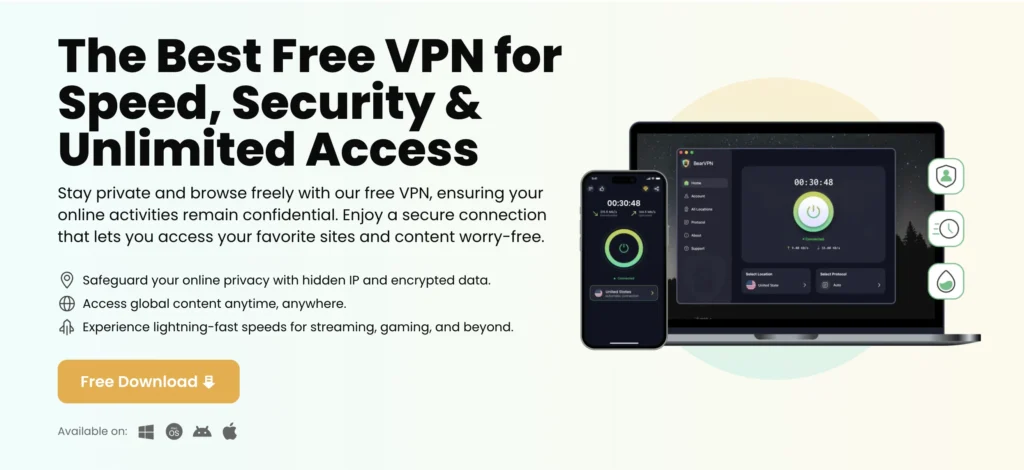
Is BearVPN a DNS Server?
No, BearVPN is not a DNS service provider. Instead, it creates a secure encrypted tunnel for your internet traffic, including DNS queries, to pass through trusted, protected servers. This helps prevent DNS leaks and provides consistent protection—something manual DNS configuration can’t guarantee, especially on mobile devices.
Why Combine VPN with Gaming DNS Optimization?
Using a VPN app with built-in DNS leak protection, like BearVPN, delivers a twofold benefit:
- Performance: It can help route your connection via the fastest available nodes.
- Security: All your traffic, including DNS, is encrypted, keeping you safe from prying eyes, especially on public Wi-Fi or unfamiliar networks—scenarios common for mobile gamers.
- Versatility: Many top VPNs, like those in our best VPN for gamers guide, provide features such as split tunneling and access to global servers, so you can easily customize your gaming experience across regions.
Manual DNS Change for PC & Console Gamers
For PC gamers, switching to the best DNS servers for gaming can still yield noticeable improvements in speed and stability.
If you are looking for the best DNS for gaming on PS5, PS4, or Xbox, Cloudflare (1.1.1.1) and Google DNS (8.8.8.8) are universally recommended for console networks due to their incredible uptime and massive global server coverage.
Below are the operation guides:
- For Windows:
Go to Network & Internet settings > Change adapter options > Right-click your connection > Properties > Internet Protocol Version 4 > Use the following DNS server addresses. - For PlayStation/Xbox:
Network settings > Set up Internet connection > Custom > Manual DNS entry.
Always test multiple DNS providers—sometimes the fastest DNS server for gaming will depend on your geographic location and ISP.
FAQs: DNS, VPN, and Mobile Gaming
1.1.1.1 (Cloudflare) is usually better. In independent benchmarks, it consistently edges out Google with lower query response times, meaning your game launchers, logins, and matchmaking lookups will feel slightly snappier. However, 8.8.8.8 (Google) is incredibly stable and has massive global coverage, so it makes an excellent backup.
Cloudflare (1.1.1.1) generally takes the crown as the fastest public DNS resolver globally. That said, “fastest” depends entirely on your physical location and your ISP’s routing. Other great, fast alternatives to test are Google Public DNS and NextDNS (if you want custom configuration).
9.9.9.9 is Quad9, a security-focused public DNS. For gaming, it offers solid, competitive speeds, but its main selling point is built-in threat blocking. It automatically blocks queries to known malicious domains and phishing sites, making it perfect if you want to protect your gaming accounts from malware without sacrificing your connection stability.
No. DNS only translates domain names before you connect. Once your match starts, your ping is determined by your ISP’s physical routing to the game server. To solve real in-game lag and optimize routing, you should run a dedicated tool like BearVPN instead.
Top public DNS providers like Cloudflare, Google, and Quad9 are highly reputable and safe. Always avoid obscure or unverified DNS servers.
Conclusion
Tweaking your DNS settings is a simple yet effective way to cut down lag and get more stable gaming, especially on mobile. Switching to a top DNS server can help you enjoy smoother, faster gameplay right away.
If you’re playing on your phone or computer, BearVPN adds extra security and makes it easy to stay protected with just a tap. No technical skills needed—just connect and play with confidence.
Try BearVPN today to see how much better gaming can feel with the right setup.
Meta Boxes
Use up and down arrow keys to resize the meta box pane.



