


A free VPN is not automatically unsafe, but the word “free” is not a safety test. Independent research has found serious privacy and security failures in parts of the free Android VPN market. Before installing a free VPN, users should examine who operates it, how it handles data, how the app is secured, and what evidence supports its claims.
Key findings
- A 2026 peer-reviewed study tested 281 operational free Android VPN apps collected from Google Play. The dataset was assembled in November 2024, and the apps were tested on physical devices running Android 14.
- 61 of the 281 apps transmitted some unencrypted app-generated content. This does not mean that all user traffic in those 61 apps traveled through an unencrypted VPN tunnel.
- 29 apps leaked some user traffic, including DNS traffic, outside the VPN tunnel.
- 76 apps transmitted the Android Advertising ID, a resettable identifier commonly used for advertising and cross-app tracking.
- Among 108 apps for which the researchers found OpenVPN configuration files, 107 had at least one potential configuration issue under the study’s evaluation criteria.
- These categories overlap. They should not be added together, and the findings apply directly only to the Android apps and versions examined in the study.
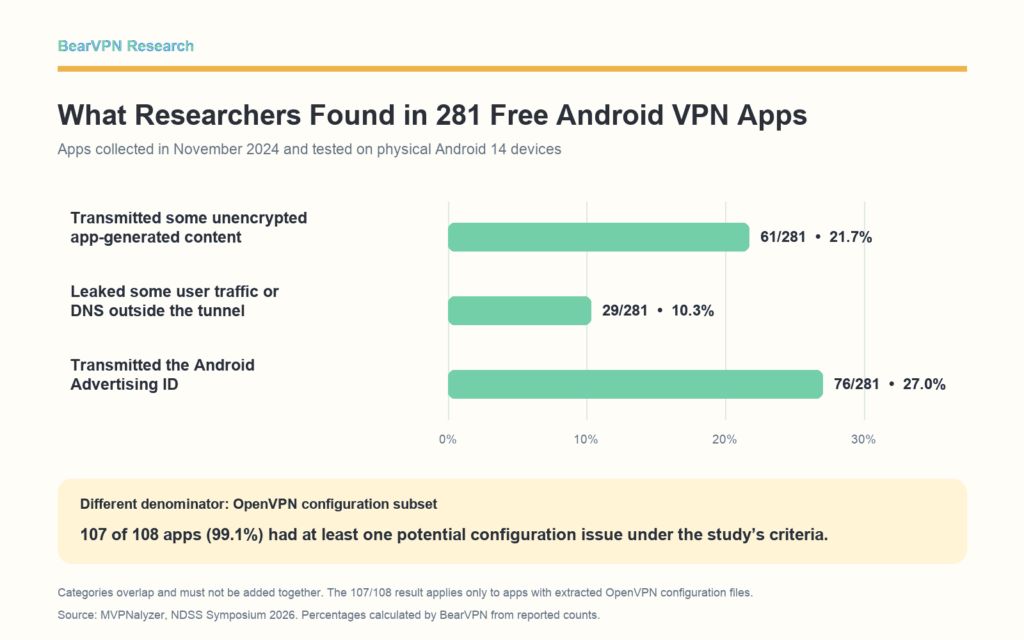
Source: MVPNalyzer, NDSS Symposium 2026.
Source: MVPNalyzer, NDSS Symposium 2026.
The short answer: are free VPNs safe?
Not necessarily—but some have serious problems that undermine the reason for installing a VPN in the first place.
Price alone cannot answer the question. A free VPN may be supported by a paid subscription tier, advertising, an institution, or another source of funding. A paid VPN can also make weak technical choices or collect more data than a user expects. “Free” describes how a service is priced; it does not describe how securely the app is built or how responsibly the provider handles data.
A more useful question is: What evidence shows that this particular VPN is worthy of trust?
That question matters because a VPN changes who can observe your traffic. It can reduce what a local Wi-Fi operator or internet service provider can see, but the VPN provider then occupies a privileged position. The U.S. Federal Trade Commission describes this as a transfer of trust and advises users to investigate the developer, permissions, encryption, privacy policy, and third-party sharing before choosing a VPN app. FTC guidance on VPN apps.
What the 2026 study actually tested
The most relevant recent evidence comes from a paper presented at the 2026 Network and Distributed System Security Symposium. The researchers created a framework called MVPNalyzer to examine the security and privacy behavior of Android VPN apps.
The study did not select 281 apps at random from every VPN in the world. In November 2024, the researchers searched Google Play across supported countries using 40 VPN-related terms and the VPN and proxy tools category. They built a global candidate set, downloaded apps from the U.S. Google Play store, and tested them on physical Android 14 devices.
Apps that were not free to download were skipped. The researchers also excluded services that required an account or an in-app payment before the VPN could be used, apps that did not use Android’s VPN permission, apps that did not work, and tools that were not general-purpose VPN services. The resulting dataset contained 281 operational free Android VPN apps.
This makes the study highly relevant to people searching app stores for a free VPN. It does not make the results a market-wide failure rate for every free VPN, every app version, or every operating system.
Four different risks found in free Android VPN apps
The headline figures are easier to understand when they are separated into four different kinds of risk.
1. Unencrypted app communications
The researchers observed 10,552 unencrypted flows generated by 61 of the 281 VPN apps. The content types analyzed included HTML, JavaScript, JSON, and VPN configuration files.
This finding needs careful wording. It does not mean that every website visit or every byte of VPN tunnel traffic from all 61 apps was unencrypted. It means the VPN apps themselves sent some content without transport encryption. That can still create risk: an attacker on the network may be able to read or modify an unencrypted request or response, depending on what it contains and how the receiving system processes it.
Five apps sent sensitive VPN configuration files in cleartext. Modifying such a file could potentially cause the client to connect using attacker-controlled settings. The researchers also separately confirmed four apps using unencrypted tunnels.
2. Traffic and DNS leaks
Across the study, 29 of the 281 apps exhibited at least one form of leakage. Twenty-four leaked DNS traffic and together had 360 million installs; six leaked browser traffic and together had 54 million installs. These groups overlap, so their app counts and install totals should not be added together.
DNS requests can reveal the domains a user is trying to reach, even when the content of a website connection is encrypted. Other traffic escaping the tunnel may reveal additional information to the local network or internet service provider. The precise effect depends on what leaked; the study does not say that every affected app exposed every part of a user’s browsing session.
Traffic leakage is only one way a VPN user may remain identifiable. For a broader explanation of IP, DNS, IPv6, WebRTC, cookies, and location signals, see Can You Be Tracked With a VPN?
3. Advertising identifiers and tracking signals
The study compared app connections against widely used advertising and tracking domain lists. It found that 246 apps contacted at least one URL on those lists. More specifically, 76 apps transmitted the Android Advertising ID, 38 transmitted the device’s IP address in application-layer fields, and one transmitted precise geographic coordinates.
The Advertising ID is resettable and is not the same as a browsing-history database. Its transmission therefore should not automatically be described as “selling browsing history.” It is nevertheless a persistent advertising identifier that can support tracking across apps if it is collected and combined with other data.
The distinction matters. Contacting an analytics or advertising service, transmitting an identifier, sharing browsing activity, and selling personal data are not interchangeable claims. A responsible report should state exactly what the research observed.
4. VPN configuration problems
The researchers found OpenVPN configuration files in 108 apps. Only one of those apps complied with all of the security practices evaluated by the study; 107 had at least one potential issue involving cryptography, authentication, deprecated directives, or missing hardening options.
The correct denominator here is 108, not 281. The result applies to the subset for which OpenVPN configuration files were available and assessed.
The issues also varied in severity. Failing to enable every optional hardening feature is not equivalent to deliberately disabling encryption. The paper identified 20 apps with potentially weak cipher settings, while other findings concerned authentication design or recommended defenses. Grouping them all under one count is useful for showing how widespread configuration shortcomings were, but not for claiming that every affected app posed the same level of danger.
Older research found related problems—but it is not current market data
A widely cited 2016 study examined 283 free-to-download Android apps that requested Android’s VPN permission. The underlying collection took place in September 2015. Only 67% of those apps were classified as conventional VPN clients; the rest included enterprise tools, traffic optimizers, filters, antivirus products, and other uses of the VPN permission.
The study reported that 75% of the 283 apps included third-party tracking libraries and more than 38% produced at least one malware-related signal in VirusTotal. Its dynamic network analysis covered a smaller group: 130 apps offering fully free services and 20 apps offering premium services. Within that tested subset, the researchers reported unencrypted tunneling and substantial DNS and IPv6 leakage. 2016 Android VPN study.
These findings show that mobile VPN security and privacy problems are not new. They should not be presented as the current percentage of the 2026 market. The 2016 and 2026 studies used different sampling methods, Android versions, definitions, and tests, so their percentages cannot establish whether free VPNs have become safer or less safe over time.
Why “free” does not automatically mean unsafe
Free VPNs do not all operate under the same business model.
Some are freemium services: paying subscribers fund a limited free tier. Some use advertising. Some are offered by institutions or projects with another funding source. Less transparent funding models require closer scrutiny because users may not know what is collected, shared, or monetized.
How clearly those business models are explained also varies. BearVPN’s study of 30 U.S. App Store “free vpn” listings found that advertising, ongoing free access, Premium differences, and billing terms were not disclosed with the same level of clarity across listings.
The existence of a plausible business model is therefore one part of a trust assessment. It is not proof of safety. A freemium provider can still make mistakes, and an advertising-supported service is not automatically malicious. Users need to know what is collected, which third parties receive it, whether those practices are clearly disclosed, and whether the provider’s technical claims have credible support.
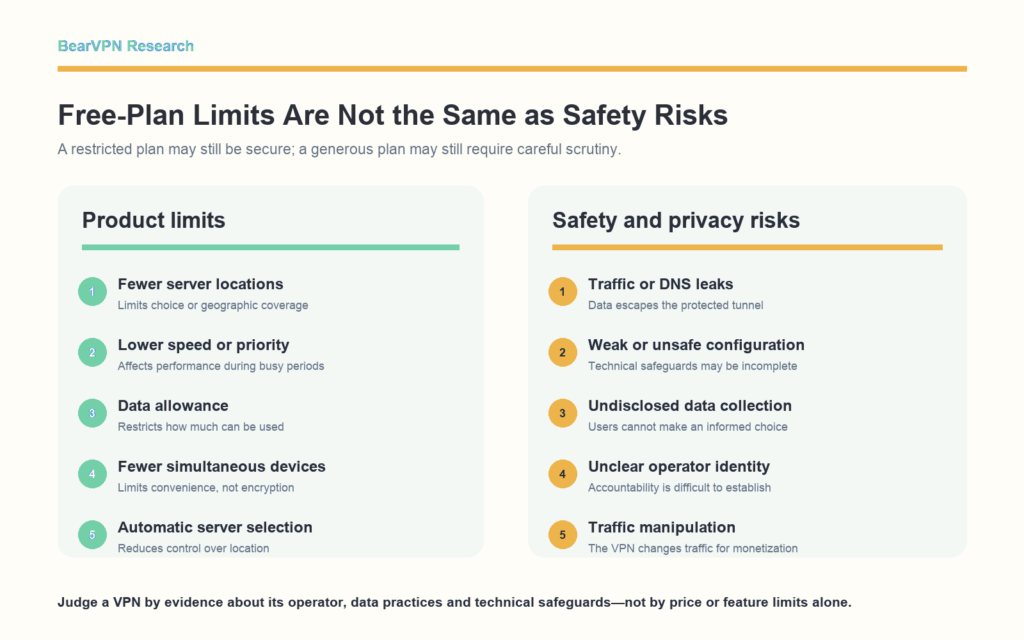
Product limitations are not the same as safety risks
Many reputable free plans are deliberately limited. They may offer fewer server locations, slower speeds, lower priority at busy times, smaller data allowances, fewer simultaneous connections, or less control over server selection.
Those are product limitations. They may make a service inconvenient, but they do not by themselves show that the VPN is unsafe.
Security and privacy risks are different. Examples include traffic escaping the tunnel, weak encryption settings, undisclosed data collection, unexplained sensitive permissions, unclear ownership, deceptive anonymity claims, or traffic being manipulated for monetization.
Separating these categories prevents a common mistake: treating a fast unlimited free VPN as safe because it is generous, or treating a restricted free tier as unsafe because it has limits.
How to check a free VPN before installing it
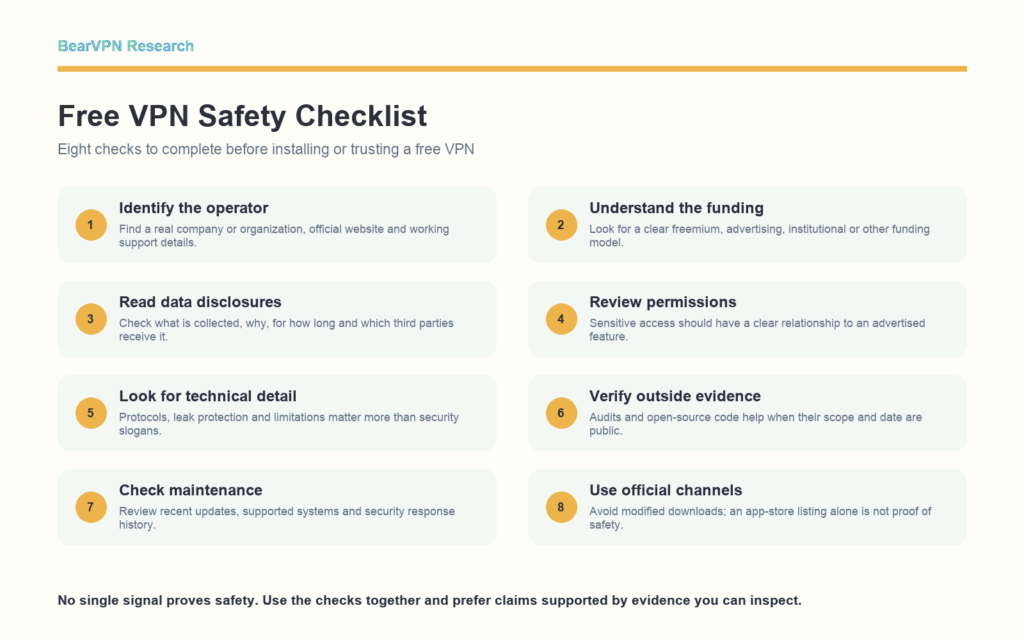
No checklist can replace a full technical audit, but the following checks can eliminate many weak or opaque choices.
1. Identify the operator
Look for a real company or organization, an official website, working support details, and a privacy policy that names the responsible entity. A generic developer name and an untraceable email address make accountability harder.
2. Understand how the free service is funded
Check whether the free tier is supported by paid subscriptions, advertising, sponsorship, or another model. Be cautious when an expensive-to-operate service offers unlimited access but provides no credible explanation of how it is funded.
3. Read the data disclosures
Look for specific explanations of what data is collected, why it is needed, how long it is retained, and which third parties receive it. Vague promises such as “we respect your privacy” are less useful than a list of concrete data practices.
On iOS, Apple requires developers to describe the data practices of both the app and integrated third-party partners and to keep the answers current. These App Privacy details are useful screening information, but they are supplied by the developer rather than produced by a complete independent network audit. Apple App Privacy documentation.
4. Check whether permissions make sense
A VPN needs permission to create a VPN connection. Other permissions should have an understandable relationship to an advertised feature. Requests for contacts, messages, precise location, or unrelated device access deserve additional scrutiny.
5. Look for technical detail, not only slogans
A provider should clearly explain which VPN protocols it supports and whether it offers protections against common connection failures or leaks. Claims such as “military-grade security,” “100% anonymous,” or “complete protection” are not substitutes for technical information.
6. Treat audits and open-source apps as evidence—not guarantees
An independent audit can evaluate a particular scope and version at a particular time. Open-source code can allow outside inspection. Both are positive signals when the scope, date, report, and remediation are public, but neither guarantees that every server, future update, or operational practice is flawless.
7. Check update and support history
Security software needs maintenance. Review the latest app update, whether the operating systems you use are still supported, and whether security or privacy questions receive meaningful answers.
8. Use official distribution channels
Download from the provider’s verified website or an official app store. Avoid modified APKs, cracked “premium” builds, and download sites that cannot prove the file came from the provider. Official distribution reduces some risks, but store availability alone is not a safety certification.
Google Play’s current VpnService policy requires eligible VPN apps to document their use of the service, encrypt data from the device to the tunnel endpoint, obtain prominent consent for sensitive-data collection, and avoid manipulating other apps’ traffic for monetization. Those rules set an important baseline; the existence of a policy does not prove that every listed app is always compliant. Google Play VpnService policy.
Red flags to avoid
Consider another service if you find several of the following:
- The company or developer cannot be identified.
- The privacy policy names a different product, appears copied, or does not explain data sharing.
- The app promises total anonymity or protection from every online threat.
- An unofficial website asks you to sideload a modified or “unlocked” version.
- The app requests sensitive permissions unrelated to its stated features.
- The service offers unlimited infrastructure with no understandable source of funding.
- Security claims rely only on app-store ratings, download counts, or marketing badges.
- The app has not been maintained for a long time or does not support current operating-system versions.
One warning sign is not always proof of malicious behavior. The purpose of the list is to identify cases that need more investigation, not to make unsupported accusations.
What a VPN cannot protect you from
Even a well-built VPN has limits.
It cannot stop you from entering a password into a phishing site, prevent malware that you choose to install, erase tracking tied to accounts you sign into, or fix an already compromised device. Websites can still identify users through logins, cookies, browser characteristics, payment details, and information submitted in forms.
A VPN can protect a network path and change the public IP address visible to online services. It is not a universal anonymity or cybersecurity tool. Research involving 1,252 U.S. VPN users found significant gaps in how people understand VPN protection and data collection, reinforcing the need to explain these boundaries clearly. USENIX Security 2023 study.
Methodology and limitations
Publisher disclosure: This report was produced by BearVPN, a VPN provider. BearVPN did not reproduce the experiments, rate individual VPN products, or include BearVPN as a tested app in this analysis.
BearVPN reviewed peer-reviewed research and official platform or consumer-protection guidance. We prioritized original publications over summaries from VPN providers, review sites, or news outlets.
The principal quantitative source is the 2026 MVPNalyzer paper. Counts and sample definitions are taken from the published paper. Percentages shown below are calculated from the reported counts and are rounded to one decimal place:
- 61/281 = 21.7%
- 29/281 = 10.3%
- 76/281 = 27.0%
- 107/108 = 99.1%
The categories overlap. The 107/108 result uses a different denominator because it concerns only apps with extracted OpenVPN configuration files.
The findings apply to the Android apps, versions, and experimental conditions examined in the cited research. They should not be extended to iOS, Windows, macOS, every current app version, or the entire VPN market.
Frequently asked questions
No conclusion about safety can be made from price alone. Some free tiers are funded by paid plans, advertising, or institutions, but each service still needs to be assessed on its operator, data practices, technical safeguards, maintenance, and independent evidence.
Some VPN services may share information with advertising, analytics, or other third parties, and the FTC notes that advertising and information sharing are common ways free apps may be funded. That does not justify claiming that every free VPN sells browsing histories. Check the specific provider’s policy, app-store disclosures, and independent evidence.
Not necessarily. App-store policies and review processes provide useful safeguards, but research has still found serious problems in apps distributed through Google Play. Store availability should be one signal, not the final answer.
The 2026 results in this report are Android-specific and cannot answer that question. On iPhone, users can review Apple’s App Privacy disclosures, the operator’s privacy policy, funding model, technical documentation, maintenance history, and any independent audit or open-source evidence.
No. Charging money may provide a clearer funding model, but it does not prove that an app is well engineered, collects little data, or follows its own policy. Apply the same evidence-based checks to both free and paid services.
Conclusion
Free VPNs are not one uniform category. Their safety cannot be inferred from price alone: research has found apps that leak traffic, expose identifiers, use weak configurations, or ask users to trust an operator that is difficult to identify.
The most reliable approach is not to judge a VPN by price, download count, or a promise of anonymity. Judge it by the operator behind it, the data practices it discloses, the technical protections it explains, its maintenance record, and the independent evidence available to verify its claims.



