


Short answer: The official xHamster website is a legitimate adult platform, but visiting it is not risk-free. Opening the correct domain or streaming a video does not automatically infect a device; the more common concerns are lookalike links, deceptive ads and pop-ups, notification prompts, unsafe downloads, tracking, and weak or reused account credentials. BearVPN can protect the network connection and mask the home IP, but it cannot make the site fully safe or anonymous.
This guide provides general privacy and security information for legal adults, not legal advice. Follow applicable law, xHamster’s current terms, and any mandatory age-assurance requirement. A VPN does not verify age or make unlawful access legal.
- Mask your home IP from the destination site.
- Encrypt traffic between your device and the VPN server.
- Keep DNS/IP leak protection and Kill Switch available while connected.

xHamster Safety Summary
Before You Open xHamster: A Safer Browsing Checklist
No single tool covers every risk. Use each protection for the problem it is designed to address:
Understanding xHamster’s Ecosystem
xHamster is an ad-supported adult platform. Advertising, analytics, embedded content, and outbound links can introduce third-party code and additional tracking or redirect risk. The presence of HTTPS protects the connection to the current site, but it does not make every advertisement, linked page, or downloaded file trustworthy.
Adult-themed phishing and extortion scams often rely on urgency, embarrassment, or fear. Treat unexpected webcam claims, payment demands, fake security alerts, and “install this update” messages as unverified. Do not pay, install software, or provide credentials from a pop-up.
Is xHamster Age Verification Safe?
Age assurance can involve privacy-sensitive information, but its safety cannot be judged from the xHamster name alone. It depends on the verification method, the company processing the check, what information is retained, and whether the request appeared on the genuine website.
As of September 2026, the UK requires pornography services within scope of the Online Safety Act to use highly effective age assurance. Accepted approaches may include photo-ID matching, facial age estimation, credit-card checks, mobile-network checks, open banking, or digital identity services. Requirements in the United States and other countries vary by jurisdiction and may change.
Before completing an age check:
- Confirm that you are on the official xHamster domain and that the verification page was opened directly from it.
- Read the named provider’s current privacy notice instead of relying on a logo or unfamiliar pop-up.
- Check what data is collected, whether an image or ID copy is retained, who receives the result, and how deletion requests work.
- Use the least data-intensive compliant method offered, provided you understand and accept its privacy terms.
- Stop if the page asks you to install software, send cryptocurrency, copy commands, or provide unrelated account credentials.
Do not assume that a particular provider or deletion policy is in use unless the current verification screen and privacy notice confirm it. Users who are under the required age should not attempt to access age-restricted content. A VPN can improve connection privacy, but it is not a substitute for legally required age assurance.
Related article: How to Bypass xHamster Age Verification
Common Risks When Visiting xHamster
1. Malware and Malvertising
The primary technical risk of using free adult sites like xHamster is malvertising – malicious advertising campaigns that deliver malware or redirect users to unsafe pages.
According to several cybersecurity reports, adult websites remain a frequent target for such campaigns because their ad spaces are lucrative and lightly regulated.
Common examples include:
- Fake “Update your player” messages that install spyware or trojans.
- Pop-ups promising “exclusive videos” that redirect to phishing sites.
- Deceptive “Download” buttons that deliver malware instead of content.
While xHamster itself is not distributing these threats intentionally, it cannot eliminate risk from external ad networks. Using an ad-blocker and maintaining updated antivirus software can significantly reduce exposure.
2. Tracking and Privacy Intrusion
Beyond malware, tracking is another persistent issue. Like many ad-driven sites, xHamster uses cookies and analytics tools to collect anonymous data. However, advertisers often combine such data with other digital fingerprints—device type, browser version, IP address—to build a detailed profile.
For most commercial websites, this is a normal part of digital marketing. But with adult content, the stakes are higher. Browsing history can reveal intimate preferences, and if such data were ever leaked or correlated with personal identifiers, the impact could be serious.
Your Internet Service Provider (ISP) can also see which domains you visit unless your traffic is encrypted end-to-end. This visibility can be uncomfortable for users in conservative environments or under strict workplace policies.
3. Phishing and Sextortion Scams
Adult platforms have long been associated with social-engineering scams.
A classic example is the “sextortion email”—a message claiming the sender has hacked your webcam and recorded you watching explicit content. These messages typically demand payment in cryptocurrency to avoid public exposure.
In reality, such scams rarely involve real footage or hacking. The attacker simply relies on embarrassment and fear. However, some users have fallen for these schemes and paid, which encourages more scams.
Similarly, pop-ups on adult sites sometimes mimic antivirus alerts or system warnings. Clicking on them can install unwanted extensions or direct you to payment pages for fake “cleanup tools.”
The rule is simple: never engage with scare tactics or unsolicited warnings while browsing. Close the page, clear your cache, and if in doubt, run a scan with legitimate antivirus software.
4. Legal and Regional Restrictions
In 2026, adult content is heavily regulated.
Adult-content, age-assurance, and website-access rules vary by country and, in some places, by state or region. They can change through legislation, court decisions, and regulator guidance. Check current official information for your location before accessing the site. A VPN does not provide legal permission or replace a required age check.
Attempting to bypass such restrictions may violate local regulations. Users must understand their country’s laws before attempting access.
5. Data Breaches and Account Exposure
While xHamster allows anonymous viewing, some users create accounts to comment or upload content. Any time personal information—emails, usernames, or passwords—is stored online, it carries breach potential.
Past incidents in the adult industry (including breaches of other major sites) exposed millions of records, leading to identity theft and public embarrassment. Even if the data seems trivial, when cross-referenced with other leaks, it can reveal much more.
Therefore, anyone choosing to register should use unique passwords and avoid linking personal emails to adult platforms.
How to Watch xHamster Safely (Step-by-Step)
Online safety isn’t about fear—it’s about layered defense. To protect your privacy and bypass invasive tracking, follow this specific sequence before opening the xHamster website:
1. Protect the Connection with a VPN
A VPN adds an important privacy layer when visiting sensitive websites. BearVPN encrypts traffic between your device and the VPN server and replaces your home IP address with the VPN server’s IP. This makes it harder for the destination site to associate the visit with your home connection and prevents people on the same local network from reading the traffic.
A VPN does not make you anonymous. xHamster and third parties may still recognize cookies, account logins, browser characteristics, or information you submit. It also does not inspect every page or replace an ad blocker and antivirus protection.
Here’s how to use BearVPN as part of a layered setup:
Step 1. Download BearVPN from the Official Source
Download BearVPN from its official website or verified app listing. Android and iOS users can try the app without creating an account; the free mobile experience includes ads and one available route. Windows and macOS require an applicable subscription. Current features and plan availability may vary by platform.
Step 2. Connect Before Opening the Website
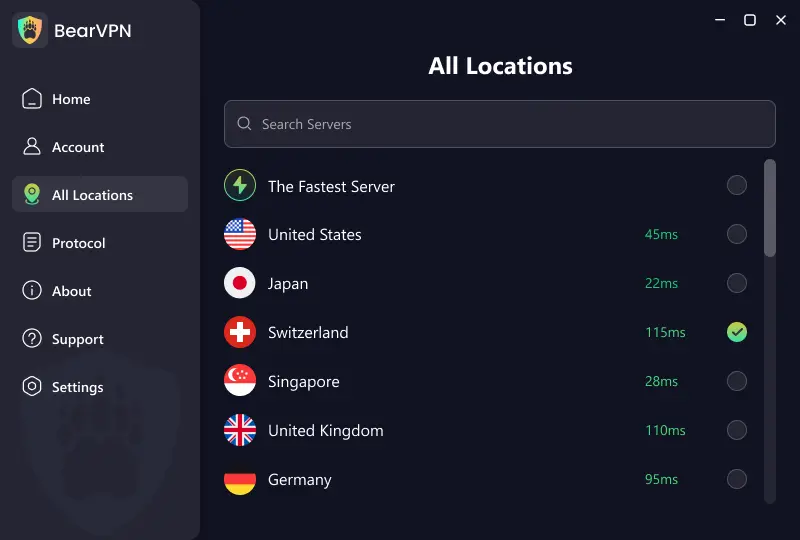
Open BearVPN and connect to an available server. Once connected, confirm that the VPN remains active before opening your browser. Server availability, speed, and website access can vary by network and location.
Step 3. Open a Private Window and Check the Address
Use a Private or Incognito window to reduce locally retained history and cookies, then enter the official xHamster address manually. Private browsing helps with traces left on the device, while BearVPN protects the network connection. Neither provides complete anonymity, so avoid signing in with identifying accounts or accepting unexpected downloads and permissions.
2. Use a “Hardened” Browser
Do not use your work or primary personal browser (like Chrome) for adult content.
- Recommendation: Use Brave or Firefox. These browsers have built-in “Strict Tracking Protection” that stops canvas fingerprinting—a common method used to identify you even when using Incognito mode.
- Action: Enable Private/Incognito Mode every time. It ensures your device doesn’t store local history or cookies that could be seen by others sharing your device.
3. Block Malicious Ads & Scripts
Adult sites are the #1 target for “Malvertising”—ads that look like play buttons but actually install malware.
- The Tool: Install the uBlock Origin extension. It is more effective than standard ad-blockers at stopping “ClickFix” attacks (scams that trick you into copying/pasting malicious code disguised as a CAPTCHA or age check).
4. Keep Devices Updated
Before browsing, ensure your system is patched.
- Why it matters: Most malware on xHamster exploits old vulnerabilities in your browser or OS.
- Verification: Ensure Windows Defender or a premium antivirus like Bitdefender or Kaspersky is active. These tools will flag “official-looking” mirror sites that are actually phishing traps.
5. Verify the Official xHamster Link and Avoid Untrusted Downloads
Search results for “xHamster link,” “xHamster web,” and misspelled versions of the name can lead to unrelated domains. Do not judge a page by its logo, design, HTTPS padlock, or the word “official” in its title.
Before entering an email address or password:
- Check that the registrable domain shown in the address bar is exactly
xhamster.com. - Treat extra words, hyphens, unfamiliar domain endings, and “mirror” or “alternative link” claims as unverified.
- Leave immediately if the page asks you to install a player, browser extension, codec, APK, desktop downloader, or security update before watching.
- Do not allow browser notifications merely to continue to a video.
- Avoid entering xHamster credentials into third-party downloaders, proxy pages, or link converters.
An unfamiliar app or downloader is not automatically malware, but it should be treated as untrusted unless its publisher, distribution source, permissions, and current security reputation can be verified.
6. Handle Age Verification with Caution
If a VPN is not an option and you must verify your age:
- Avoid ID Uploads: Choose “Facial Age Estimation” (like Yoti) if available. It estimates your age via a quick camera scan and deletes the data immediately, which is significantly safer than storing a permanent copy of your Driver’s License on a server.
Did xHamster Give Me a Virus?
Opening the official website or watching a stream does not by itself prove that your device is infected. The risk becomes more serious if you downloaded a file, installed an extension, allowed notifications, entered credentials on another domain, or followed instructions from a fake security alert.
Take these steps after a suspicious interaction:
- Close the tab without clicking any additional warning or “clean now” button.
- Check your browser’s notification permissions and remove unfamiliar sites.
- Review recent downloads and installed extensions. Do not open unknown files.
- Run a full scan using your operating system’s current security tools.
- If you entered a password on an unfamiliar domain, change it from a clean device and change it anywhere else you reused it.
- Review account sessions and enable two-factor authentication where available.
- If you pasted commands into Terminal, PowerShell, or Run after being instructed by a webpage, disconnect the device from the network and seek qualified technical help.
A pop-up saying “your device is infected” is not reliable evidence of malware. Genuine security software reports should be checked inside the security application itself, not through a webpage advertisement.
- Install BearVPN only from its official source.
- Mask your public IP and encrypt the connection to the VPN server.
- Use DNS/IP leak protection and Kill Switch on supported platforms.
Comparing xHamster with Other Adult Sites
In terms of overall structure and risk level, xHamster is comparable to other large-scale adult video sites such as Pornhub or XVideos.
All three:
- Operate under legitimate companies.
- Use HTTPS encryption.
- Rely on advertising and third-party analytics for revenue.
The size of the site offers some protection—major platforms have resources to remove malicious ads quickly—but it also makes them prime targets for exploitation. Smaller, obscure adult sites tend to be riskier, often lacking moderation or security oversight.
In short, visiting a mainstream platform like xHamster is safer than wandering through unknown adult sites, but safety still depends primarily on the user’s own behavior and precautions.
Further Reading: Top Similar Sites like xHamster >
Conclusion
The official xHamster domain is a real adult platform, but that does not make every ad, redirect, download, account interaction, or age-verification request risk-free. Legal adults can reduce exposure by checking the domain, refusing unexpected downloads and permissions, keeping the browser and device updated, using a reputable content blocker and unique credentials, and reviewing any verification provider before submitting data. BearVPN adds network encryption and public-IP masking, but it does not replace these protections or guarantee anonymity, safety, or lawful access.
If you are a legal adult and want to reduce network and public-IP exposure, download BearVPN for your device before opening the official site. Keep your browser and operating system updated, use a reputable content blocker, and avoid unexpected downloads or permission requests.
FAQs: xHamster Safety
The official xHamster website is a legitimate adult platform, but visiting it is not completely risk-free. The main dangers include lookalike domains, misleading pop-ups, notification spam, third-party tracking, unsafe downloads, and account phishing. Using the correct domain and avoiding unexpected downloads substantially reduces the immediate risk.
Simply opening the official site or streaming a video does not automatically install a virus. Infection is more likely after downloading an unknown file, installing an extension or fake update, allowing a malicious notification, or following instructions from a deceptive pop-up. Keep your browser updated and scan suspicious downloads before opening them.
The main registrable domain is xhamster.com. Check the address bar carefully before entering credentials. Do not assume that a misspelled domain, “mirror,” link converter, proxy page, or site using the xHamster logo is affiliated with the platform.
A VPN is not required to prove that the official website is legitimate, but it can improve network privacy. Without one, your home IP is visible to the destination and your network provider may be able to determine which service you connect to. A VPN does not block every ad, scam, tracker, or malicious download.
The site and third parties may receive information such as your IP address, cookies, browser characteristics, device data, account activity, and interactions with pages or ads. A VPN masks your home IP, but it does not prevent tracking through cookies, account logins, or browser fingerprinting.
No. Incognito or Private Browsing mainly limits the history, cookies, and cached data retained on your device after the session. It does not make you anonymous, hide the visit from websites or network providers, or protect you from malware already installed on the device.
An age check may be legitimate when it appears through the genuine website and clearly identifies the provider and privacy terms. Before submitting information, confirm the domain, data collected, retention period, and deletion process. Do not proceed if the page requests unrelated credentials, cryptocurrency, software installation, or system commands.
Close the page, remove unfamiliar notification permissions, check recent downloads and extensions, and run a full device scan. If you entered a password on an unfamiliar domain, change it from a clean device and update any other account using the same password. Do not call phone numbers or install “cleanup” tools advertised by the pop-up.
BearVPN encrypts your connection and masks your home IP address, which helps with network privacy. It does not replace an updated browser, content blocker, antivirus protection, careful link checking, or unique passwords. The strongest setup uses these protections together.



