This guide is intended only for adults aged 18 or older. It must not be used by minors to avoid age protections. Adult content and VPN use may be restricted by local law or platform terms. Laws change quickly, so check the rules that apply in your location. A VPN improves connection privacy and changes your visible IP address; it does not prove that you are an adult or make prohibited activity legal. Information checked September 2026.
Quick Answer: Can adults access xHamster without age verification?
Sometimes. If xHamster applies the age screen mainly from your IP location, connecting BearVPN to another location where the site is legally available may change the version of the site you receive. It will not override a check tied to your account, device, payment method, or xHamster’s platform-wide policy.
- Install BearVPN from its official website or app store.
- Connect to a nearby location where xHamster is legally available.
- Open a new private browser window and visit xHamster again.
- If the check remains, use an official age-assurance option or follow the troubleshooting section below.
Access is not guaranteed, and anyone under 18 must stop at the age gate.
If the screen is triggered by your IP region, BearVPN can replace your public IP and encrypt the connection before you reopen xHamster. It cannot remove an account- or identity-based check.

Why Is xHamster Asking for Age Verification?
xHamster must follow the laws that apply where it offers adult content. The UK requires pornography services to use highly effective age assurance, while a growing number of US states have enacted their own rules. Other countries may require age controls, restrict specific domains, or block adult sites at the network level.

These situations are different:
- Age-verification screen: The website is available, but adults must prove or demonstrate that they meet the age requirement.
- xHamster login request: The site may require an account or session before showing certain content. Logging in does not necessarily satisfy a legal age check.
- Regional site block: xHamster or the local network may block the site entirely in that location.
- Technical failure: Messages such as “looks like xHamster isn’t working for you” may come from DNS, browser, server, or network problems rather than age verification.
Identifying the correct situation matters because a VPN only addresses location- and network-related restrictions.
Where Does xHamster Require Age Verification or Restrict Access?
The exact xHamster screen can change without notice, so this table describes the type of restriction rather than promising a permanent list of “verification-free” locations.
Before changing locations, confirm that both adult content and VPN use are lawful where you are physically located. A different IP address does not change the law that applies to you.
Official Ways for Adults to Complete an xHamster Age Check
The options shown to you depend on your location and the age-assurance provider selected by xHamster. You may see one or more of the following:
- Facial age estimation: Software estimates an age range from a live image. This may not require a government ID.
- Photo ID and selfie matching: A provider checks the document and confirms that it belongs to the person completing the verification.
- Credit card, banking, or mobile-network check: An approved provider uses an existing adult account or account-holder record as an age signal.
- Digital identity credential: A wallet or identity service returns an over-18 result without necessarily disclosing all identity details to the website.
Check the Privacy Notice Before You Verify
Age assurance creates legitimate privacy questions, but the risk depends on the specific method and provider. Before continuing, check:
- Which company performs the check.
- What document, image, or account data it collects.
- Whether xHamster receives your identity or only an over-18 result.
- How long the provider retains the submitted data.
- How to request deletion or challenge an incorrect result.
Do not upload an ID through an unexpected pop-up, copied domain, email link, or unofficial xHamster app. If the provider’s privacy notice is missing or unclear, leave the page rather than submitting sensitive information.
How Adults Can Try BearVPN for Private xHamster Access
BearVPN encrypts the connection between your device and the VPN server and replaces your public IP address with the server’s IP. If xHamster’s screen is based mainly on IP location, this may change the regional version of the site you receive.
It does not confirm that you are over 18, override account-level checks, or guarantee access. Use these steps only if you are an adult and the content is legal where you are.
Step 1: Install BearVPN from an Official Source
- Android and iOS: Install BearVPN from the official app store. The limited no-login experience contains ads and provides one route. A paid plan is required to choose from more server locations.
- Windows and macOS: Download the official BearVPN app and sign in with a paid subscription.
Avoid modified APKs, cracked VPN applications, browser scripts, and unofficial xHamster apps. These can expose browsing data or account credentials.
Step 2: Connect Before Opening xHamster
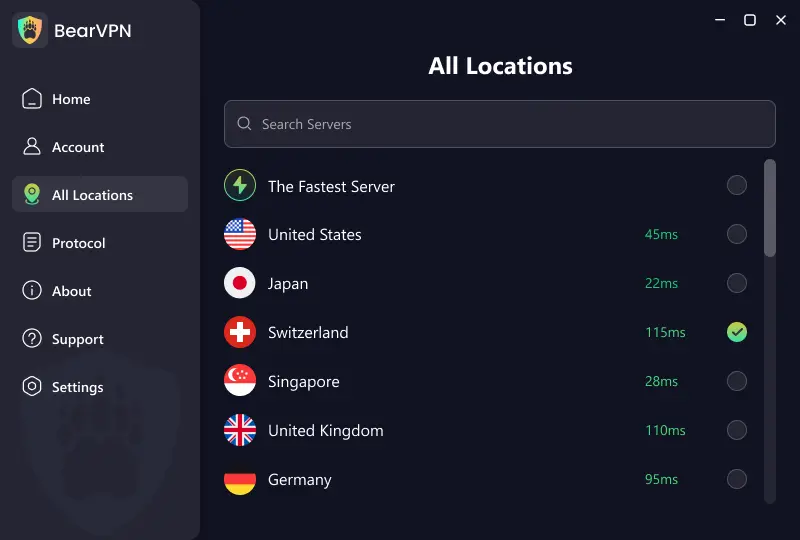
Start with BearVPN’s recommended route. If you need to select a location manually, choose a nearby location where xHamster is legally available and does not currently present the same regional restriction.
A nearby server will usually provide a better starting point than a distant one, but speed and availability depend on your network, server load, location, and xHamster’s own controls.
BearVPN provides access to 2,000+ servers across 50+ locations. Server availability can change, so use the locations displayed in the current app rather than relying on a permanent “verification-free country” list.
Step 3: Start a Fresh Browser Session
After the VPN connects:
- Open a new Incognito or Private Browsing window.
- Make sure xHamster does not have browser location permission.
- Visit xHamster directly rather than following a third-party redirect.
- If the old screen remains, delete only xHamster’s site data and try again.
Cookies do not normally reveal your live physical location by themselves, but an existing xHamster session may preserve the regional screen or account state from an earlier visit.
Step 4: Try Another BearVPN Route or Protocol
If the site does not load or the connection is unstable:
- Try another server in the same general region.
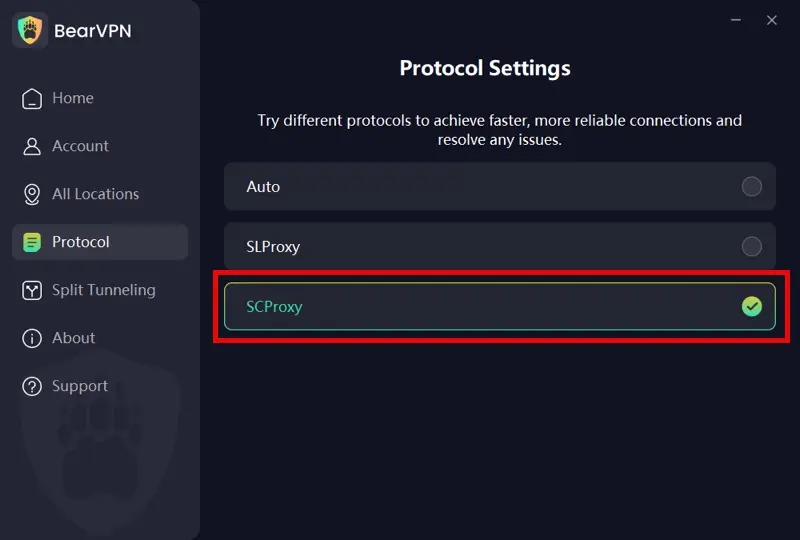
- On Windows or macOS, switch between SLProxy and SCProxy.
- On Android or iOS, try SLProxy, SCProxy, or Y2Proxy where available.
- Disconnect other VPNs, proxies, or privacy extensions that may conflict with the connection.
Changing protocols may help on networks that interfere with VPN traffic, but it does not guarantee that xHamster will remove an age check.
Step 5: Check the Result
Reload xHamster only after BearVPN is connected. You may receive the normal site, a simple 18+ declaration, an official age-assurance prompt, a login request, or a regional block.
If an official age check remains, do not repeatedly upload documents or install a “bypass” extension. Use one of the site’s approved methods after reviewing its privacy notice, or leave the site.
- Connect BearVPN before opening the browser.
- Confirm the new IP, then start a private window.
- If the official age check remains, use an approved option.
xHamster Still Not Working? Fix the Exact Problem
A VPN connection alone does not show whether the problem is an age gate, login issue, site block, or ordinary technical failure. Match the symptom below before changing more settings.
Check for DNS or IP Leaks
If a site continues to detect the previous region, disconnect and reconnect BearVPN, then confirm that the visible IP location matches the selected server. Do not grant precise browser location permission. If your normal location remains visible, restart the app or change protocols before visiting xHamster again.
Avoid “xHamster Age Bypass” Extensions
Browser extensions and user scripts that claim to remove the age screen may only hide the visible overlay without granting legitimate access to the video. They can also read page data, redirect traffic, or capture login information. Use the official site and a VPN downloaded from an official source.
Why Use BearVPN for More Private Adult Browsing?
BearVPN cannot verify your age or guarantee access to xHamster. Its role is to protect the network connection and reduce exposure of your real IP address while you browse.
- IP masking: xHamster sees the VPN server’s public IP instead of the IP assigned to your connection.
- AES-256 encryption: Traffic between your device and the BearVPN server is encrypted, so the local network or ISP cannot directly inspect the destination traffic inside that tunnel.
- DNS and IP leak protection: Helps prevent supported DNS or network requests from exposing the original connection outside the VPN tunnel.
- Kill Switch: Stops supported traffic if the VPN connection drops, reducing the chance that the browser reconnects with your normal IP.
- RAM-only, bare-metal servers: BearVPN’s server design limits reliance on persistent storage and gives the service greater control over its infrastructure.
- SLProxy, SCProxy, and strong obfuscation: Alternative connection modes can help when a local network interferes with recognizable VPN traffic.
- Double VPN: Routes traffic through two VPN servers for an additional layer of IP separation, although it may reduce speed.
- No-logs positioning: BearVPN does not position its service around recording the websites users visit.
These protections do not block cookies, browser fingerprinting, malware, phishing, account tracking, or information you voluntarily submit to xHamster.
Final Thoughts
If xHamster is reacting to your IP region, stop reopening the site on the same exposed connection. Connect BearVPN first, choose a lawful server location, open a fresh private window, and load xHamster only after the VPN is active. If the same official age-assurance screen remains, the restriction is no longer just an IP-location problem.
BearVPN masks your public IP, encrypts the connection, and gives adults a more private way to retry xHamster on restrictive networks. It will not verify your age or remove account-level controls—but it gives you a strong first move before submitting personal information to a verification provider.
Ready to retry xHamster from a protected connection?
FAQ
It depends on your location and how xHamster applies the check. Adults in some locations may see only a basic 18+ declaration, while others receive an official age-assurance screen. A VPN can change the IP location visible to the site, but it cannot remove an account-, device-, or platform-level requirement. Minors must not use a VPN or any other method to avoid age restrictions.
xHamster is an adult platform and may be legally required to prevent minors from viewing its content. The message may lead to a simple age declaration, login requirement, facial age estimate, identity check, or another approved method. Only continue if you meet the legal age requirement. Review the verification provider’s privacy and retention notice before submitting an image, document, or account information.
Some xHamster content may be available to adult visitors without a paid account, but availability depends on the page, location, and current platform policy. “Free” access does not remove legal age requirements, and logging in does not necessarily complete age verification. Avoid third-party “xHamster free” domains, copied login pages, modified apps, and extensions that request access to your browser data.
First confirm that BearVPN is connected and that your visible IP matches the selected server. Then open a new private window or remove only xHamster’s stored site data. Also deny precise browser location permission and close any other VPN or proxy. If the old region remains, reconnect, select another server, or change between the BearVPN protocols available on your device.
Yes, if xHamster is legally available on your normal connection. You can complete an official age check, use any privacy-preserving option offered by the provider, or access the ordinary site where no additional check is required. A web proxy or mirror is not a safer substitute: it may log traffic, inject advertising, imitate the login page, or expose data outside an encrypted VPN tunnel.
VPNs are legal in many countries, but some jurisdictions regulate VPN services, adult content, or attempts to circumvent access controls. Changing an IP address does not change the law that applies where you are physically located. This article is general information, not legal advice. Check current local rules and xHamster’s terms before proceeding, and never use a VPN to help a minor access adult material.
The message does not always indicate age verification. It can result from a blocked or overloaded IP address, DNS failure, browser extension, expired session, regional restriction, or a temporary xHamster outage. Try a private window, another BearVPN server, another supported protocol, and a current browser. Do not repeatedly enter login or identity information if the domain or verification provider looks unfamiliar.