


Yes—itch.io itself is legitimate. But a legitimate marketplace can still host a malicious upload before scanners or moderators catch it. That is why the real question is not only “Is itch.io safe?” but “Is this specific creator, project page, and download safe?” Before you open any game, check its history, hosting source, permissions, antivirus results, and the seven warning signs below.
Itch.io says it uses automated checks and human review for suspicious uploads. However, the company also states that it cannot guarantee every uploaded program has been tested and verified. The risk is higher when a game comes from an unfamiliar creator, an unexpected “try my game” message, a password-protected archive, or a download that asks for administrator access.
Before opening an itch.io game, verify the creator, download directly from itch.io, scan the file, and pay attention to unusual permissions or security warnings. This guide explains exactly what to check—and what to do if a download looks suspicious.
Do Not Download the Game If You See These Red Flags
Stop immediately if the game arrived through an unexpected Discord DM, redirects to an unrelated file host, comes inside a password-protected archive, demands administrator access without a clear reason, asks you to disable antivirus protection, suddenly replaced an older trusted build, or has comments reporting stolen accounts and unexplained security alerts.
Is Itch.io Legit?
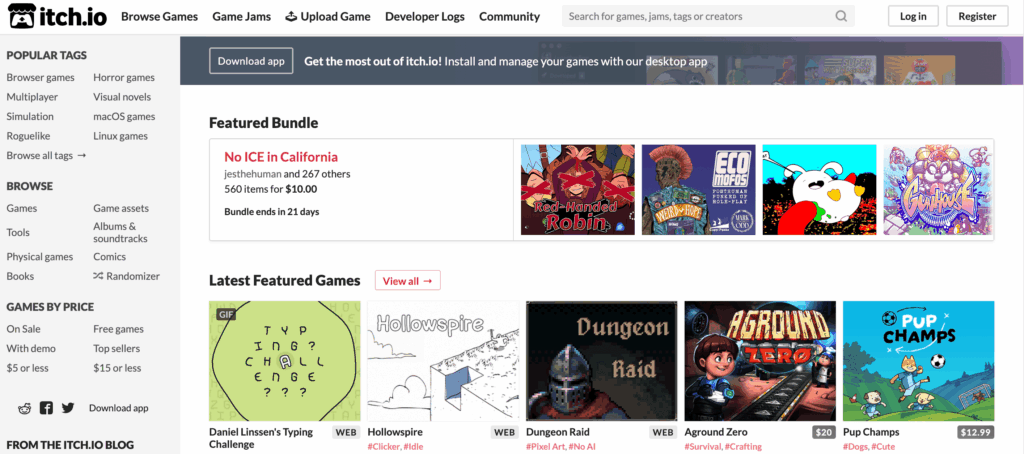
Yes. Itch.io is a legitimate self-publishing marketplace founded in 2013 for indie games, game jam projects, visual novels, assets, comics, and other digital content. Creators can design their own project pages, set prices, and upload files directly.
The important distinction is that a legitimate platform does not automatically make every user upload trustworthy. Itch.io is more open than tightly curated stores: individual creators control the files they distribute, and the platform says those files cannot all be fully tested and verified.
Purchases are handled through supported payment providers such as Stripe and PayPal, depending on the seller’s payment setup. For safer downloads, prefer files hosted directly on itch.io instead of links that send you to an unknown file-sharing site.
Is It Safe to Download Games From Itch.io?
Itch.io is generally safe to browse and use, but no one should assume that every downloadable game is safe merely because it has an itch.io page. Each file must be evaluated on its own.
The Main Risks to Watch For
1. Anyone Can Publish a Project Page
Itch.io is a self-publishing platform. That openness gives small developers an easy way to distribute games, but it also means a project can appear without the same entry cost or approval process used by some larger stores.
Itch.io prohibits malware, spyware and adware and uses automated checks, with suspicious uploads sometimes sent for human review. Even so, the platform says it cannot guarantee that every uploaded program has been tested and verified.
2. “Try My Game” Messages Can Deliver Malware
Be especially cautious if someone unexpectedly contacts you on Discord or another platform and asks you to test a game. Itch.io has published an official warning about attackers using game downloads to steal Discord accounts, browser cookies and payment information.
Do not trust the file simply because the link uses an itch.io address. A stranger’s account—or even an account belonging to someone you know—may have been compromised.
3. Real Creator Accounts Can Be Compromised
An established account, old project page or familiar artwork is useful evidence, but it is not an absolute guarantee. Attackers may take over a creator’s account and replace an existing download with a malicious file.
Look for unexplained recent changes, comments mentioning different files, a sudden switch to a password-protected archive, or behavior that does not match the creator’s previous releases.
4. External Downloads Carry Additional Risk
Prefer the download button and files hosted directly by itch.io. Treat links to unfamiliar cloud drives, shortened URLs or third-party installers with additional caution. Never disable your antivirus just because a page or creator tells you the warning is a false positive.
How Itch.io Helps Keep Users Safe
Itch.io provides several protections, but they should be treated as layers rather than guarantees:
- Automated upload checks and human review: Itch.io says it automatically scans uploads and may place suspicious content into a human review queue.
- Rules against malicious software: Projects containing malware, spyware or adware are prohibited and can be removed from the platform.
- Page reporting: Every project page includes a Report link that sends the issue to the itch.io administration team.
- Two-factor authentication: Users and developers can protect their accounts with TOTP-based 2FA, reducing the risk of account takeover.
- The itch.io app sandbox: The sandbox restricts what a game can read or modify. On Windows, sandboxed games run through a separate, less-privileged user account. It reduces exposure but does not make untrusted software harmless.
These controls make itch.io safer than an unmoderated file dump, but they do not create a certificate of innocence for every upload. Automated scanning can miss new or concealed malware; human review happens after something looks suspicious; and the sandbox reduces what a process can reach rather than proving the process is clean.
How to Check an Itch.io Game Before Downloading
Use these seven checks before opening a game, especially if the developer is unfamiliar.
- Check how you found the game. A game discovered through itch.io search, a known developer page or a trusted community is safer than an executable sent through an unexpected Discord DM. Never download a “try my game” file from someone you do not fully trust.
- Verify the creator independently. Review the creator’s profile, older projects, development logs and external website or social accounts. Make sure those accounts link back to the same itch.io page.
- Read recent comments and ratings. Look for reports of antivirus warnings, unexpected login prompts, changed files or suspicious behavior. Remember that a lack of complaints is not proof of safety, particularly for a new release.
- Prefer files hosted directly on itch.io. Avoid shortened links, unknown mirrors and unrelated file-sharing services. A password-protected archive is a serious warning sign because it can prevent hosting services from examining its contents.
- Inspect permissions before launching. Most small indie games should not need administrator access, browser passwords or security software exclusions. Stop if the game asks you to disable antivirus protection or run unexplained scripts.
- Scan the file before opening it. Keep your operating system and antivirus definitions updated, then scan the downloaded archive and extracted executable. Do not override a malware warning solely because the developer claims it is a false positive.
- Use a safer execution option when available. If you do not trust a native download, choose the browser-playable version. You can also use the official itch.io app with sandboxing enabled, although the sandbox cannot protect against every possible attack.
On Windows, download the itch.io app only from itch.io/app and verify that the installer is digitally signed to itch corp. Itch.io explicitly warns users not to trust an installer pretending to be the app without that signature. Do not exclude the entire itch data folder from antivirus scanning, because that can also prevent downloaded games from being checked.
What to Do If a Download Looks Suspicious
Do not “open it once” to see what happens. A working game can still steal browser cookies, Discord sessions, passwords, or payment information in the background. Quarantine the file, scan the device, and report the project before another player makes the same mistake.
If you already ran the file and notice unexpected logouts, new processes, disabled security tools or changes to your accounts, disconnect the device from the network and scan it immediately. Change important passwords from a separate, trusted device, starting with your email account, and review active sessions for Discord and other affected services.
Does a VPN Make Itch.io Downloads Safe?
No. A VPN cannot inspect an executable, remove malware or turn an untrusted itch.io game into a safe download. Antivirus protection, creator verification and cautious file handling remain the primary defenses.
A VPN is useful for a different part of the risk: protecting the network connection you use to browse itch.io or download a game. On public or shared Wi-Fi, BearVPN encrypts traffic between your device and the VPN server and masks your public IP address. Features such as a Kill Switch and DNS/IP leak protection can help prevent accidental exposure if the VPN connection drops.
Use BearVPN alongside—not instead of—your operating system’s security protections.
- Encrypt itch.io browsing and download traffic on public or shared Wi-Fi.
- Mask your public IP and reduce exposure with Kill Switch and DNS/IP leak protection.
- Keep antivirus enabled—BearVPN does not scan the game executable.

BearVPN protects the network connection. It cannot make a malicious file safe, replace antivirus software, or verify an individual creator.
Final Verdict: Is Itch.io Safe?
Itch.io is a legitimate website, and many people use it to discover and download indie games. However, itch.io is a self-publishing platform, so you should not treat every game or executable as automatically verified.
A download is more trustworthy when it comes from a creator you can verify, is hosted directly on itch.io, has consistent project history and does not request unusual permissions. Avoid unsolicited “try my game” messages, password-protected archives and instructions to disable antivirus software.
For the lowest-risk option, choose a browser-playable version or use the itch.io app’s sandbox when available. Scan native downloads before opening them, keep 2FA enabled and report suspicious pages.
FAQ: Is Itch.io Safe?
Yes. Itch.io is an established self-publishing marketplace for indie games and other digital content. The website itself is legitimate, but individual files are uploaded by creators, so each download must still be evaluated separately.
It is possible. Itch.io uses automated checks and may review suspicious uploads, but the platform says it cannot guarantee that every uploaded program has been fully tested. Scan downloads, verify the creator and avoid unexpected executable files sent through Discord or other messages.
Many itch.io games can be downloaded without problems, but safety depends on the individual creator and file. Prefer established creators, direct itch.io downloads, active project histories and files that do not require administrator access or antivirus exclusions.
Browser-playable games generally present less risk than installing an unfamiliar executable because they run inside the browser’s sandbox. Keep your browser updated and avoid granting unexpected permissions. If a browser game redirects you to an external download, evaluate that file separately.
The official itch.io app includes a sandbox that can restrict file access and run games with lower privileges. This provides an additional layer of protection, but it does not guarantee that every game is harmless. Leave antivirus protection enabled and vet the creator before installing a game.
Do not run the file or disable your security software immediately. Quarantine it, check whether the warning is reported by other users and ask the developer for an explanation. If the file remains suspicious, delete it and report the project to itch.io.
No. A VPN encrypts network traffic and masks your public IP address, but it does not scan downloaded files or stop a malicious program after you open it. Use a VPN for connection privacy and use antivirus software, account verification and cautious download practices for malware protection.
A malicious executable can target browser cookies, active sessions, saved passwords, or authentication tokens. Itch.io has previously warned about “try my game” attacks used to compromise Discord accounts. Never run a game sent through an unexpected message merely because the link leads to an itch.io page.
No. apkitch.io and itch.io are different domains. Do not assume a look-alike domain belongs to itch.io or inherits its scanning, reporting, payment, or account protections. For the official marketplace and app, navigate directly to itch.io rather than trusting a search ad or copied download button.
No. Multi-engine scanning is useful evidence, but new or carefully hidden malware may not be detected immediately, while legitimate indie games can also produce false positives. Combine scanning with creator verification, project history, direct hosting, sensible permissions, and sandboxing.



