With hundreds of millions of PC gamers logging in daily to battle in Fortnite, build in Unreal Engine, or claim high-profile weekly free releases, the Epic Games Store has grown into one of the largest digital gaming storefronts in the world.
Yet, for new and prospective users, downloading a new game client inevitably raises critical questions: Is the Epic Games Launcher safe for my computer? Does it contain spyware or cryptocurrency miners? Why is Epic giving away hundreds of dollars in free games? And does Tencent’s 40% ownership stake mean player data is being routed to China?
Between viral Reddit rumors, concerns over kernel-level Easy Anti-Cheat (EAC), and the historic $520 million FTC privacy settlement, separating fact from internet hysteria can be difficult. In this comprehensive 2026 security review, we examine the technical architecture of the launcher, debunk common spyware myths, explain parental safety controls, and provide actionable tips to keep your Epic account impenetrable.
What is Epic Games and the Epic Games Store?
Founded in 1991 by Tim Sweeney, Epic Games is one of the most influential entities in the global video game industry. Headquartered in Cary, North Carolina, Epic is the creator of the world-dominating battle royale Fortnite, the owner of Rocket League and Fall Guys, and the architect behind the Unreal Engine—the industry-standard 3D graphics engine powering thousands of blockbuster video games, Hollywood virtual film sets, and architectural simulations.
In December 2018, Epic launched the Epic Games Store (EGS) alongside its desktop client, the Epic Games Launcher. The platform was designed to challenge Valve’s long-standing PC gaming monopoly (Steam) by offering game developers an unprecedented 88/12 revenue split (giving developers 88% of sales compared to Steam’s traditional 70%).
Because the launcher was built rapidly and gained hundreds of millions of users virtually overnight through high-profile giveaways, online forums were quickly flooded with rumors, security debates, and technical questions.
Below is an objective, evidence-based breakdown of whether Epic Games is safe for your PC, your data, and your finances.
Is the Epic Games Launcher Safe to Download and Run?
The short answer is yes. The official Epic Games Launcher downloaded from epicgames.com or the official Microsoft Store is safe, clean, and cryptographically signed.
However, users frequently raise three specific security concerns regarding how the client interacts with their hardware:
1. Does the Launcher Contain Viruses, Malware, or Miners?
- No. When scanned through multi-engine security scanners like VirusTotal (which cross-checks files against over 70 global antivirus databases, including Kaspersky, Bitdefender, Sophos, and ESET), the official installer consistently produces a clean score with zero detections.
- Why Some Antivirus Programs Flag It (False Positives): Occasionally, heuristic scanning algorithms in third-party antivirus software (such as Avast, Norton, or Malwarebytes) may flag background game patchers or temporary cache folders as “suspicious.” This is an industry-wide occurrence known as a false positive—caused when a game client rapidly writes, replaces, or unzips thousands of files during a major update.
- Security Rule: Always download the launcher directly from the official website. Cloned “installer” links found on shady forum posts or third-party download portals frequently bundle adware or trojans.
2. Is the Anti-Cheat System (Easy Anti-Cheat) Dangerous for Your PC?
Many multiplayer titles on the Epic Games Store (including Fortnite) rely on Easy Anti-Cheat (EAC), an anti-cheat engine developed by Kamu (which Epic acquired in 2018).
- The Concern (Ring 0 / Kernel Access): EAC operates at the kernel level (Ring 0 of your operating system). This gives the software the highest administrative privileges on your computer, allowing it to inspect memory space and running drivers. Privacy-conscious gamers frequently ask whether this constitutes a privacy breach or an architectural backdoor.
- The Reality: Kernel-level anti-cheat has become an absolute necessity in modern competitive gaming. Modern cheats inject code directly into the Windows kernel to bypass standard user-level detection. EAC only monitors memory space directly associated with the active game process to detect known cheat signatures, memory injections, and tampering tools.
- Crucial Safety Fact: Unlike controversial always-on kernel anti-cheats (like Riot’s Vanguard, which boots with Windows and runs constantly in the background), Easy Anti-Cheat only launches when you launch an EAC-enabled game and completely shuts down the second you exit the game. It does not scan your personal photos, documents, browser history, or keystrokes outside the game window.
3. Does the Launcher Impact PC Performance and CPU Usage?
In its early iterations (2019–2021), the Epic Games Launcher was notoriously resource-heavy, frequently maintaining high idle CPU utilization due to constant background telemetry and store-refresh pings.
- Current Status: Following multiple major performance overhauls, the launcher’s background footprint has decreased substantially. On modern quad-core or multi-core systems, idle CPU usage typically sits below 1–2%, and RAM usage averages between 250 MB and 450 MB.
- Pro-Tip for Low-Spec PCs: If you want to conserve hardware resources while gaming, open the launcher’s Settings and toggle on “Minimize to System Tray” and disable “Run When My Computer Starts.” Furthermore, many single-player titles downloaded through Epic can be launched directly from their desktop
.exewithout keeping the client active in the foreground.
Why Does Epic Games Give Away Free Games? (Is There a Catch?)
One of the primary drivers behind the query “is epic games safe” is pure consumer skepticism. Since late 2018, Epic has given away hundreds of premium, high-budget PC games—including Grand Theft Auto V, Civilization VI, Death Stranding, Control, and the Tomb Raider trilogy—completely free of charge.
Many first-time users logically ask: If the product is free, am I the product? Is this spyware?
The Business Strategy Behind the Giveaways
There is no hidden catch, no adware bundle, and no forced recurring subscription.
The free game giveaways are a massive, multi-million-dollar corporate loss-leader marketing strategy:
[Fortnite Microtransactions & Unreal Engine Royalties]
↓
[Multi-Billion Dollar Capital]
↓
[Subsidize Developers Upfront to Give Free PC Games]
↓
[Rapidly Build a 270+ Million Userbase on PC]
↓
[Break Steam’s Monopoly & Establish Long-Term Market Share]
- How Developers Get Paid: Epic does not pirate or devalue these games. Epic enters into legal contracts with publishers and developers, paying them guaranteed lump-sum advances (often millions of dollars per title) to cover the cost of giving the game away for free during that promotional window.
- The Long-Term Play: Valve’s Steam platform held an uncontested near-monopoly on PC gaming distribution for nearly two decades. Epic understood that players with decades-old Steam libraries would never switch storefronts willingly. By giving away hundreds of dollars worth of free games, Epic systematically builds a permanent game library for millions of users, dramatically increasing the odds that players will eventually purchase full-price DLC, expansions, or new releases on their platform.
- The Bottom Line: You can claim, download, and keep every single free weekly game permanently. The game files are identical to their retail counterparts, receive official security patches, and contain zero spyware.
Debunking Epic Games Controversies: Spyware, Tencent & Steam
No discussion about Epic Games’ safety is complete without addressing the high-profile controversies that have circulated on Reddit, YouTube, and tech forums. Let’s separate corporate fact from internet myth.
1. The Tencent Connection: Is Epic Games Controlled by China?
- The Rumor: Because Chinese tech conglomerate Tencent owns a significant stake in Epic Games, some users believe the launcher acts as a backdoor for foreign surveillance or sends player telemetry to servers in Beijing.
- The Corporate Reality: In 2012, Tencent purchased a 40% minority stake in Epic Games for roughly $330 million. However, Epic Games remains an independent American corporation incorporated under US law and headquartered in North Carolina.
- Voting Control: Epic Games founder and CEO Tim Sweeney owns more than 50% of the voting shares, giving him absolute controlling authority over all company operations, board decisions, and store policies. Sweeney has repeatedly stated publicly that Tencent does not have access to user data, cannot dictate store operations, and cannot force Epic to alter privacy standards.
- Data Jurisdiction: All customer account information, payment credentials, and gameplay telemetry for Western users are stored on secure servers located within the United States (primarily hosted on Amazon Web Services – AWS), strictly subject to US federal and state privacy legislation.
2. Did Epic Games “Spy” on Steam Files? (The 2019 Controversy Explained)
- The Incident: In early 2019, security-minded Reddit users discovered that the Epic Games Launcher was accessing and generating an encrypted local copy of Valve’s Steam configuration file (
localconfig.vdf) on user hard drives without prompting for permission. This immediately led to viral accusations that Epic was scraping Steam user data. - What Actually Happened: Epic Games engineering admitted that the launcher was prematurely reading this file as part of its “Import Steam Friends” feature, pre-staging the data before the user clicked “Allow.”
- The Resolution: Epic immediately apologized, acknowledged that reading the file without prior opt-in was bad practice, and pushed an emergency patch. Today, the launcher only interacts with Steam if you explicitly click the “Link Steam Account” button, routing the handshake through Valve’s official, public API. The software does not secretly crawl your Steam library, chat history, or personal directories.
3. What Telemetry Data Does Epic Games Actually Collect?
Like Steam, Battle.net, and Discord, the Epic Games client collects diagnostic telemetry:
- Hardware & OS Specs: GPU model, CPU type, RAM capacity, and Windows/macOS version (used to ensure games run at appropriate graphical settings and diagnose crashes).
- Store Interaction: Games browsed, purchase history, and download speeds.
- Crash Reports: Anonymous memory stack traces when a game or the launcher crashes.
- Privacy Control: You can review and restrict non-essential diagnostic data-sharing anytime under Settings > Privacy Preferences in the launcher.
Is Epic Games Safe for Kids and Teens? (The $520 Million FTC Settlement)
If you are a parent asking “is epic games safe for my child,” this is the most critical section to understand.
In December 2022, the US Federal Trade Commission (FTC) announced a historic $520 million settlement with Epic Games regarding Fortnite. The enforcement action was divided into two distinct legal violations:
- Child Privacy Violation ($275 Million Penalty): The FTC found that Fortnite violated the Children’s Online Privacy Protection Act (COPPA) by turning live voice and text chat ON by default, pairing young children with strangers, which exposed minors to online harassment, bullying, and predatory communication.
- Deceptive In-Game Billing ($245 Million Refund): Epic was penalized for employing “dark patterns”—confusing button layouts that allowed children to accidentally purchase digital skins or V-Bucks with a single, unconfirmed button tap without requiring a parental password.
The Mandatory Safety Fixes Implemented Today
As part of the settlement, Epic completely overhauled its security architecture. Today, the Epic Games Store is actually one of the most heavily restricted and protected environments for minors:
- Cabined Accounts for Minors: When a new user registers and indicates they are under 13, Epic automatically assigns them a “Cabined Account.” All communication features, purchases, and real-money transactions are locked until a parent provides verified consent via email.
- Voice & Text Chat Disabled by Default: For all users under 18, text and voice chat default to the highest privacy setting (“Nobody” or “Friends Only”), preventing strangers from speaking with minors in lobbies.
- Parental Control PIN: Parents can set a 6-digit PIN that must be entered before any real-money transaction or V-Buck purchase can be finalized.
- Daily Screen Time Limits: Parents can configure automated playtime limits and receive weekly gameplay reports directly to their email.
Credit Card and Financial Security: Can You Trust the Store?
Making purchases on the Epic Games Store is as safe as shopping on Amazon, Steam, or Apple’s App Store:
- PCI-DSS Level 1 Compliance: Epic does not store your raw credit card numbers on its servers. All payments are processed through globally recognized, bank-grade payment gateways (including Stripe, PayPal, and major credit card networks) utilizing end-to-end TLS/SSL encryption.
- Two-Step Purchasing Protection: To eliminate accidental one-click purchases, Epic now requires explicit checkout confirmation screens.
- Best Financial Practice: If you prefer not to store credit cards on digital gaming platforms, Epic natively supports PayPal, paysafecard, Razer Gold, and official Epic Games / Fortnite Gift Cards, allowing you to completely isolate your primary bank account.
How to Keep Your Epic Games Account 100% Secure
While Epic Games’ corporate infrastructure is secure, individual player accounts are prime targets for cybercriminals. Stolen Epic accounts—especially those loaded with rare Fortnite skins, high Battle Pass levels, or hundreds of claimed free games—are actively traded on dark-web gaming marketplaces.
Here is the essential checklist to keep your account unhackable:
1. Enable Two-Factor Authentication (2FA) Immediately
Epic requires 2FA to claim certain free games, send in-game gifts, or compete in tournaments.
- Avoid SMS 2FA if possible (vulnerable to SIM-swapping).
- Use an Authenticator App (such as Google Authenticator, Microsoft Authenticator, or 1Password).
- How to enable: Go to
epicgames.com> Account > Password & Security > scroll to Two-Factor Authentication > enable Third-Party Authenticator App.
2. Beware of “Free V-Bucks” and Skin Generator Scams
Epic Games never gives away free V-Bucks or rare skins through third-party websites. Any YouTube video, TikTok ad, or Discord message promising “Free 13,500 V-Bucks Glitch” requires you to enter your Epic login credentials or download an .exe file. These are 100% credential-harvesting phishing scams and token-stealing malware.
3. Secure Your Connection on Public, Dorm, and Campus Wi-Fi
Many gamers log into Epic Games, download massive game patches, or play competitive matches while connected to university campus Wi-Fi, dorm networks, or public hotspot networks (such as hotels and coffee shops).
- The Risk: Shared networks are notorious for strict firewall filters that block gaming ports (frequently triggering errors like Fortnite unable to login to your Epic Games account). Furthermore, unencrypted public Wi-Fi exposes your device to localized packet sniffing and leaks your public IP address to malicious players in peer-assisted multiplayer matches.
- The Solution: Whenever connecting to gaming platforms from an untrusted public or school network, using a high-performance gaming VPN allows you to hide your IP address from potential DDoS attacks and easily unblock Fortnite at school or dorm networks.
Recommended Gaming Security Solution: BearVPN
To protect your Epic Games account credentials and bypass restrictive network firewalls without sacrificing latency, you need a network engineered for performance.
BearVPN is optimized specifically for high-speed gaming and privacy:
- 100% Dedicated Bare-Metal Physical Servers (Non-VPS): Unlike virtualized VPS proxies that suffer from jitter and packet loss due to overcrowded bandwidth sharing, BearVPN runs exclusively on dedicated physical bare-metal hardware. This ensures stable, low-ping routing directly to game servers.
- Proprietary Obfuscation Protocols (SLProxy & SCProxy): BearVPN cloaks VPN signatures into standard HTTPS web traffic, allowing gamers to effortlessly bypass strict campus firewalls and router-level gaming port blocks.
- 2,000+ Bare-Metal Servers Across 50+ Global Locations: Connect to prime gaming nodes across North America, Europe, Asia, and Oceania with specialized routing for competitive titles like Fortnite and Rocket League.
- Free Mobile Version (iOS & Android): Play mobile games securely with zero friction—no registration, no login, and unlimited bandwidth out of the box (includes 1 default connection line).
- Premium Desktop Performance (Windows & macOS): Upgrading to a subscription unlocks full desktop gaming access across all 50+ locations, featuring a built-in Kill Switch to prevent IP leaks and support for up to 10 simultaneous device connections.
- RAM-Only Zero-Logs Architecture: Operational data is wiped automatically upon server reboot, keeping your gaming habits and session tokens 100% confidential.
How to Play Epic Games Safely on Any Network with BearVPN
[1. Connect BearVPN Gaming Node] ──> [2. Launch Epic Games] ──> [3. Play Fortnite / Games With Shielded IP & Low Ping]
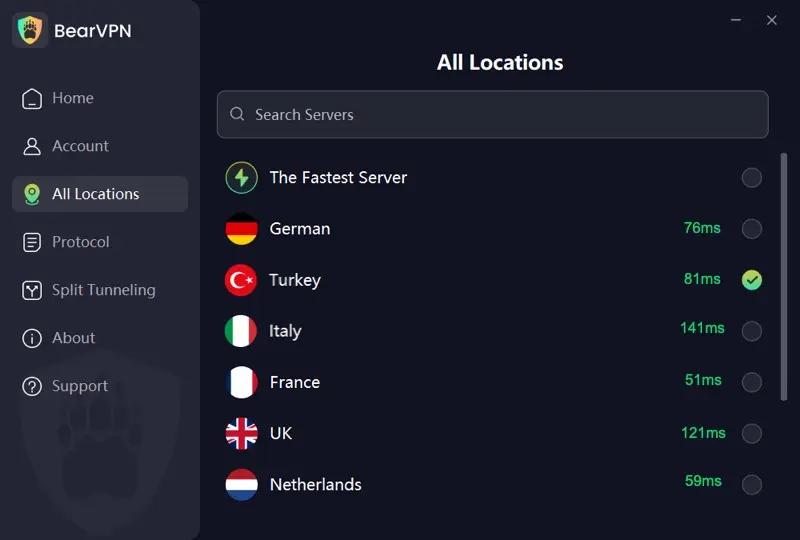
- Launch BearVPN: Open the client on your PC, Mac, iOS, or Android device.
- Select an Optimized Server: Choose a server line located closest to your game’s regional data center (e.g., US-East or US-West) for minimal latency.
- Launch the Epic Games Launcher: Sign into your account. The launcher will now communicate over an encrypted, bare-metal tunnel, shielding your real IP and bypassing local port restrictions.
- Jump into the Game: Enjoy lag-free gaming backed by dedicated Fortnite VPN optimization.
Frequently Asked Questions (FAQ)
No. The launcher only operates within its designated installation directory and game installation folders. It does not scan, upload, or index personal documents, photos, or browsing history.
This is almost always a false positive. During heavy game installations or file integrity verifications, the launcher decompresses and executes thousands of .dll and runtime files in rapid succession, which can temporarily trigger heuristic alarms in overzealous antivirus engines. Ensure your download came directly from epicgames.com.
Immediately visit Epic’s official Account Recovery portal (epicgames.com/help). You will need access to your original account creation email and proof of past purchases (such as invoice IDs or transaction receipts sent to your inbox) so Epic Support can verify ownership and revert unauthorized email changes.
Both platforms operate at the highest level of industry security, featuring two-factor authentication, encrypted payment processing, and regular penetration testing. Steam offers more mature community moderation and workshop curation, whereas Epic offers more stringent default privacy controls for minors following the FTC settlement.
Using a VPN to protect your privacy, prevent DDoS attacks, or secure your connection on public Wi-Fi is not a bannable offense. However, using a VPN to intentionally exploit regional currency pricing differences (e.g., spoofing your location to buy games at cheaper foreign rates) violates Epic’s Terms of Service and can result in store account restrictions.
Campus Wi-Fi and public networks often block Epic Games ports or expose your IP to peer-to-peer leaks. Powered by 2,000+ bare-metal servers across 50+ global locations, BearVPN delivers lightning-fast, encrypted routing for Fortnite and online gaming. Free on mobile with unlimited data.

Final Verdict: Is Epic Games Safe in 2026?
Yes. Epic Games is completely safe to download, browse, and play.
It is a legitimate American gaming giant, not malware or Chinese spyware. The weekly free games are a genuine, commercially funded marketing effort, and its payment gateways meet the highest global financial security standards.
The only real threats to your safety are user-level vulnerabilities: weak passwords, neglecting Two-Factor Authentication, falling for fake V-Buck phishing scams, and transmitting sensitive login credentials over untrusted public Wi-Fi networks. As long as you practice basic digital hygiene, you can claim your free games and jump into your favorite titles with total peace of mind.