


Visiting Eporner does not automatically mean your device is infected, but no ad-supported adult site should be treated as risk-free. The practical concerns are deceptive pop-ups, redirected pages, notification permissions, fake downloads, tracking, and unexpected requests for personal information. Use an updated browser, reject unfamiliar prompts, and remember that a VPN can protect the network connection and mask your public IP—not make every page, download, or account action safe.
Connect to BearVPN before opening Eporner to replace your home public IP and encrypt traffic between your device and the VPN server. Keep browser warnings, download scanning, and notification controls enabled—a VPN cannot make a deceptive page or file safe.

Worried After a Visit? Check These Browser Warning Signs
If you have already visited Eporner and are worried you’ve been “infected,” look for these specific symptoms of Browser Hijacking:
- Default Search Changes: Your search bar now uses a site like “SearchBaron” or “GoSave” instead of Google.
- The “Calendar Virus”: Your phone is bombarded with notifications like “Your system is infected – Click here to clean.”
- Unexpected Performance Changes: Persistent overheating, battery drain, or browser slowdowns can have many causes. Review recent downloads, extensions, and running apps instead of treating one symptom as proof of malware.
- Redirect Loops: You click a link on a reputable site and are suddenly sent to an adult or gambling domain.
If you did not open a downloaded file, install an extension, enter credentials, or grant unexpected permissions, a pop-up alone is not proof of a deep system infection. Close suspicious tabs, remove unfamiliar browser permissions or extensions, and run the device’s built-in security scan if you remain concerned.
Is Eporner Safe to Use?
There is no honest one-word safety rating for Eporner—or for most ad-supported adult websites. A visit to the correct domain is not proof that malware is on your device, but it also does not remove the usual risks of third-party advertising, redirects, trackers, fake warnings, and unsafe downloads.
Treat the site as a browsing environment that needs basic precautions, not as a trusted source for software, browser updates, “security scans,” extensions, or payment requests.
What matters more than a site-wide “safety score”
Eporner is not automatically unsafe merely because it is an adult site. However, you should not rely on a site-wide malware score, a TLS version, or an incognito window as proof that a particular ad, redirect, or download is safe. Judge each prompt by what it asks you to do.
Pop-Ups, Redirects, and Browser Permissions: The Risks That Matter
The most common problem after visiting an adult website is not an instant device infection. It is being pushed into an unsafe action: clicking a fake warning, allowing notifications, installing an extension, downloading an unknown file, or entering information into a look-alike page.
Be especially cautious if a page says your device is infected, your browser needs an urgent update, or you must install a player to continue. Legitimate browser and operating-system updates should be installed from your device settings or the software maker’s official site—not from an ad or browser tab.
Privacy Risks: Who Can See Your Activity?
Private or Incognito mode helps limit the browsing history, cookies, and form data left on your device after you close the window. It does not make you anonymous online.
Why Incognito Isn’t Enough
Incognito or Private Browsing is useful when you do not want local history and cookies left on a shared device. It does not hide your activity from the websites you visit, a school or workplace network administrator, or your internet provider.
If network privacy matters, connect to BearVPN before browsing. It encrypts traffic between your device and the VPN server and replaces the public IP visible to the destination site. That reduces exposure of your home IP address, but it does not make a logged-in account anonymous, block every tracker, or prevent unsafe downloads and scams.
Can a pop-up reveal or steal my data?
A pop-up by itself does not automatically steal files from your device. But it can redirect you to phishing pages or attempt to persuade you to provide information or install something harmful. Keep your browser and operating system updated, leave Safe Browsing or equivalent protections enabled, and close suspicious tabs instead of interacting with them.
What about browser fingerprinting and WebRTC?
Websites can collect browser and device signals for analytics, fraud prevention, and advertising. A VPN can change the public IP address the website sees, but it does not block every form of tracking or make a logged-in account anonymous.
WebRTC is not automatically a privacy leak. If you use a VPN and want to check that your public IP is not exposed through the browser, run a reputable leak test while connected. If the test shows your normal public IP, review your browser and VPN settings before relying on that connection.
Private mode limits history and cookies left on your device. BearVPN adds network privacy by masking your home IP and encrypting the route to the VPN server, while Eporner and third-party services can still receive browser, session, or account signals.
Is Downloading Content Safe? The Danger of Media Codec Exploits
Another critical gap in evaluating whether the platform is completely secure involves direct video downloads. Even if a site doesn’t offer native download buttons, users often use third-party extensions to save videos offline. Most superficial guides tell you that as long as you avoid .exe files and make sure the file extension is .mp4, you are perfectly safe from malware.
A familiar media extension is not a complete safety check. Specially crafted media files can target known vulnerabilities in outdated players, although the presence of an .mp4 file does not by itself prove that an exploit exists. Avoid downloaders or codecs promoted by pop-ups, scan unexpected files, and keep the operating system and media player updated before opening downloaded content.
Age Verification, Privacy, and Legal Requirements
Some regions require adult-content services to use age-assurance measures. The exact rules, enforcement dates, and methods differ by country and can change, so do not rely on a fixed list of states or countries in a general safety guide.
If a legitimate service requests age verification, read its privacy notice before submitting personal information. Check what data is collected, which provider processes it, how long it is retained, and how you can contact the provider about deletion or access requests.
Do not use this guide to bypass age checks or local restrictions. Follow the laws that apply where you are and the website’s terms. A VPN can improve network privacy by encrypting traffic and changing the IP address visible to a website, but it does not remove legal obligations or make prohibited access lawful.
How to Watch Eporner Safely (Step-by-Step)
Before You Start: Secure Your Browser
A VPN protects your network connection, but it cannot make deceptive ads, unsafe downloads, or phishing pages harmless. Before opening Eporner, take these quick precautions:
- Update your browser and device: Install the latest browser and operating-system security updates from official settings or the software provider’s website.
- Enable a reputable content blocker: Use your browser’s built-in protection or a trusted blocker such as uBlock Origin where supported to reduce intrusive ads, pop-ups, and known malicious pages.
- Reject unexpected permissions and downloads: Do not allow notifications or install a “video player,” codec, browser extension, cleaner, or security update promoted by the page.
- Use a separate Private or Incognito window: This limits the browsing history and cookies left on your device after the session closes, although it does not hide your activity from websites or your internet provider.
Once your browser is prepared, use the steps below to connect BearVPN, mask your home IP address, and encrypt traffic between your device and the VPN server. These steps add network privacy but do not replace browser security or safe browsing decisions.
How to Secure Your Browser Before Watching
Step 1: Download and Install BearVPN
Download BearVPN from its official source and install the correct version for your device. Connect the app before opening the browser, then use a reputable leak test if you want to confirm that the browser is not exposing your normal public IP.
Step 2: Start with Smart Server Selection
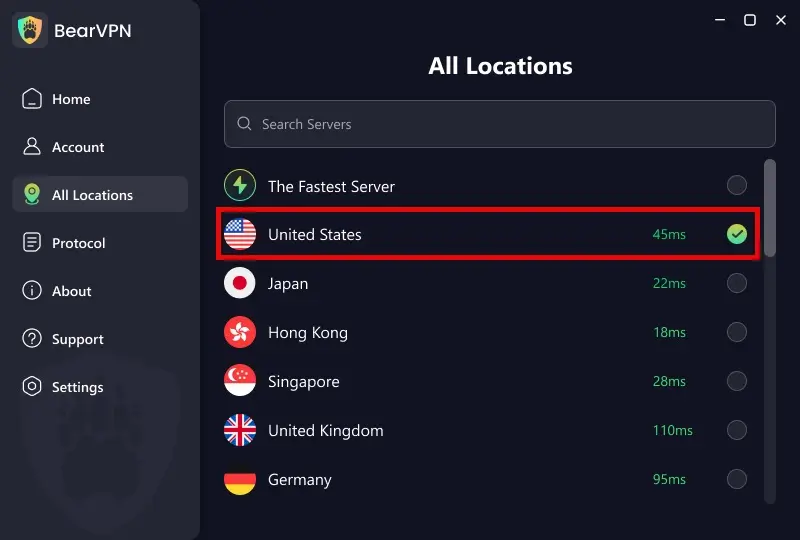
Open the server list and start with Smart Server Selection. If the connection is unstable, test another available server and keep the route that works more reliably on your network. A VPN can reduce exposure of your home IP, but it cannot guarantee that no third party will ever receive connection or account information.
Step 3: Use an Available Connection Mode
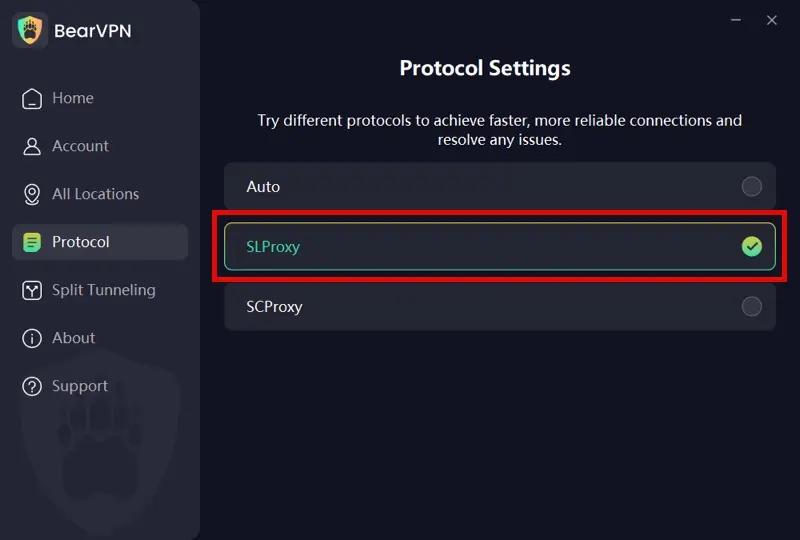
Open Settings > Protocols and start with BearVPN’s recommended mode. If the VPN connection is unstable or blocked on the current network, try another option that is available in your app. Protocol choice can change connection behavior, but it cannot stop Eporner ads, trackers, downloads, or account identification.
- Auto or Smart Selection: Start with the app’s recommended route for the current network.
- SLProxy, where available: Test this option when you want a performance-focused route. Streaming quality still depends on the server, ISP, and device.
- SCProxy, where available: Test obfuscation on a restrictive network when an ordinary VPN connection is disrupted. It does not make VPN use completely invisible or guarantee access.
Step 4: Use Split Tunneling if Supported
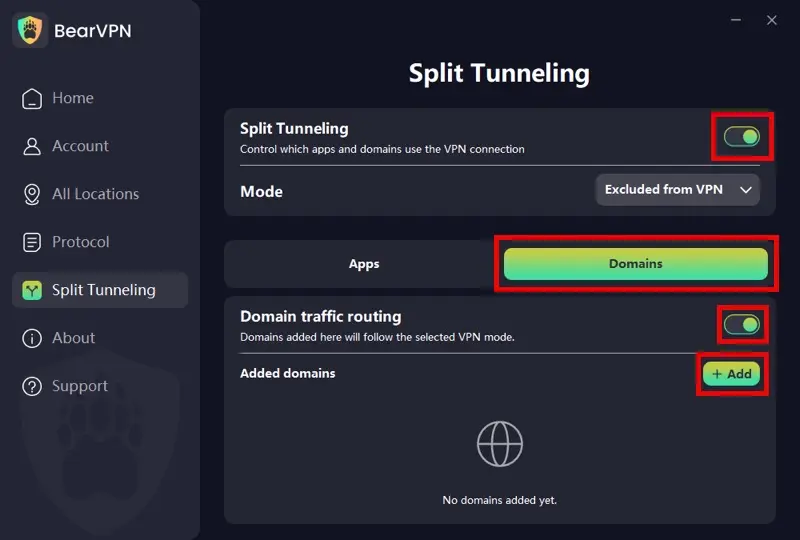
For broader coverage, route the full browser through BearVPN with App Mode where that option is supported. Adult pages may load video, images, advertising, login, payment, or CDN resources from other domains, so adding only eporner.com to Domain Mode may not cover the complete session.
- App Mode: Select the browser you will use for Eporner so that the browser’s supported traffic follows the BearVPN connection.
- Domain Mode: Use a domain-only rule only when you understand that supporting resources from other domains may follow a different route.
Feature names and availability can vary by platform and app version. Confirm that the selected browser or rule appears in the current routing list before opening the site.
Step 5: Connect Before Opening a Private Window
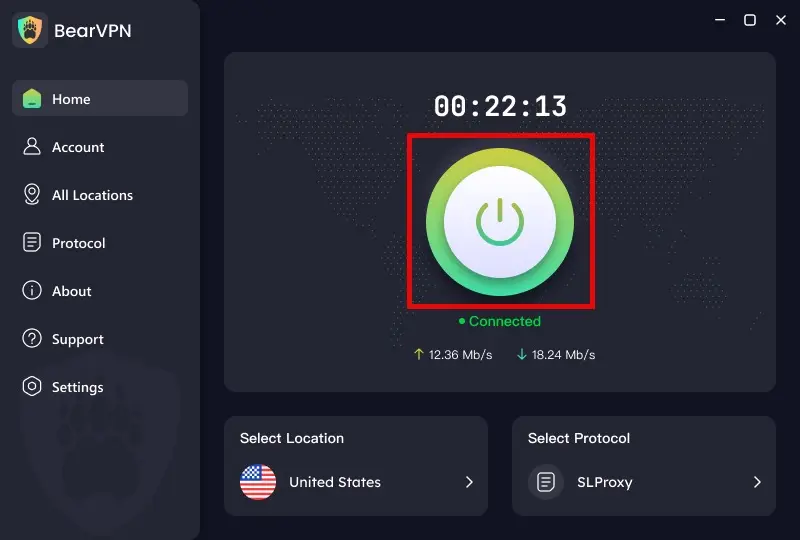
Return to the BearVPN dashboard and connect before opening the browser. Confirm that the app shows an active connection, then open a Private or Incognito window if you also want to limit history and cookies left on the device after the session closes.
Keep browser protections and a trusted content blocker enabled, and close unexpected prompts instead of interacting with them. This setup improves network and local-session privacy, but it does not eliminate malware, tracking, deceptive ads, unsafe downloads, account identification, or legal obligations.
Conclusion
Is Eporner safe? The safest answer is: a visit alone does not prove your device is infected, but you should treat unexpected ads, redirects, downloads, notification prompts, and verification pages with caution.
Use an updated browser, deny unnecessary permissions, avoid third-party downloads, and keep private browsing in perspective. If you also want to reduce exposure of your home IP and encrypt traffic between your device and the VPN server, connect BearVPN before browsing. It is an additional privacy layer—not a guarantee against malware, scams, trackers, account identification, or legal responsibility.
Ready to add network privacy before you browse? Download BearVPN for your device, connect before opening the browser, and keep the browser, operating system, and media player updated. Continue to reject unexpected downloads, notification prompts, and requests for personal information.
Frequently Asked Questions
Usually, a pop-up or redirect alone is not enough to prove that your device is infected. The risk is higher if you downloaded and opened a file, installed an extension, allowed browser notifications, entered credentials into an unfamiliar page, or disabled browser security warnings. Close suspicious tabs, review recent downloads and extensions, check notification permissions, and run your device’s built-in security scan if you are concerned.
No website can be treated as completely risk-free. The bigger concerns are typically deceptive ads, redirects, fake warnings, unwanted notifications, and downloads from third parties. Do not install software or extensions prompted by a page, and keep your browser and operating system updated.
Be cautious with any download. Do not install a downloader, codec, browser extension, or “video player” suggested by a pop-up. If you download a media file, make sure it is the file you expected, scan it with your device’s security tools, and keep your media player updated. Never assume a file is safe simply because it has a familiar extension.
Private or Incognito mode mainly limits what is saved on your device. It does not hide your browsing activity from the sites you visit, your internet provider, or a network administrator. A VPN can encrypt traffic between your device and the VPN server, but your VPN provider and the destination site still have their own visibility and policies.
No. A VPN can mask your public IP address from the destination site and encrypt traffic on the route to the VPN server. It cannot make you anonymous to every party, remove tracking from a logged-in account, stop every ad or scam, or override applicable laws and service terms.
Do not click the warning. Close the browser tab or force-close the browser if necessary. Then remove unfamiliar notification permissions, delete suspicious downloads, uninstall unknown extensions or apps, and run a security scan. If the message appears only inside the browser, it should not be treated as a genuine operating-system warning.
VPN legality and adult-content rules vary by jurisdiction. Using a VPN does not remove your responsibility to follow local laws, age-verification requirements, or the website’s terms. Check current local rules if this affects you.



