The online casino-and-gaming platform Gamdom has become a go-to for players around the world, but if you’re in a restricted region, you may hit the dreaded “Sorry, but Gamdom is not available in your jurisdiction” message.
If you want to unblock and play Gamdom from anywhere — while keeping your connection private and secure — then a quality VPN is essential. In this guide, we’ll walk you through why you’d use a VPN for Gamdom, what features matter most, the 5 best VPN for Gamdom in 2026, and how you can use a VPN to bypass geo-restrictions on Gamdom.
This article is provided for informational purposes only. BearVPN does not encourage or condone the use of VPNs to violate the terms of service of any website, including Gamdom, or to circumvent local laws and regulations.
You may also like: Is Rainbet legal in the US
What is Gamdom?
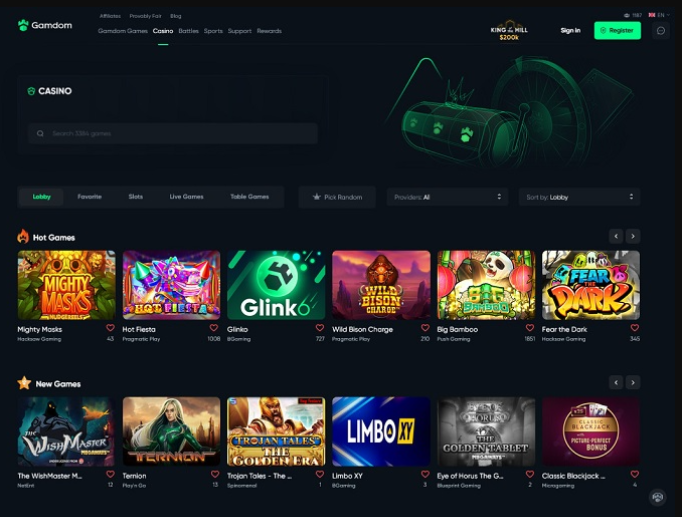
Gamdom is a crypto-friendly online casino and esports betting site. It offers a large library of games, supports cryptocurrency deposits and withdrawals, and appeals to players seeking anonymity and variety.
It holds a gaming licence and operates in over 100 countries.
Why is Gamdom blocked in some countries?
Because gambling laws differ wildly across jurisdictions, Gamdom is explicitly restricted in many countries. For example: the United States, the United Kingdom, Germany, Spain, the Netherlands, etc.
The site’s terms & conditions confirm that the use of VPNs, proxies, or other masking tools to bypass geographical restrictions is prohibited.
That means if you attempt to access Gamdom from a blocked country, you may be denied access, your account may be banned, or withdrawals may be blocked.
Gamdom allowed vs restricted countries (2026)
According to the Strafe report, Gamdom availability changes and KYC checks can still block access even if a VPN shows an allowed IP.
- Commonly allowed regions (examples): Canada, Japan, Norway, Finland, and some other jurisdictions where Gamdom is licensed.
- Commonly restricted regions (examples): United States, United Kingdom, Germany, Spain, Netherlands.
Always verify the current status on Gamdom’s official pages and comply with local laws.
Why Use a VPN for Gamdom?
1. Unblock access and bypass geo-restrictions
A VPN lets you connect to servers in countries where Gamdom is permitted, giving you access to the full game library and bonuses. For example, many sources show that users outside supported jurisdictions use VPNs to “trick” the site into thinking they’re connecting from Canada, Japan, Norway etc.
2. Privacy and anonymity with crypto gaming
Gamdom appeals to crypto-savvy players, and using a VPN adds an extra layer of privacy: it masks your IP address, encrypts your traffic and helps prevent ISP or external-tracker intrusion.
3. Better connection performance and security
While many think VPNs slow things down, a good one can improve performance (by avoiding ISP throttling) and ensure that your connection to the casino remains safe — especially if you’re using public WiFi.
4. But remember: using a VPN may violate Gamdom’s rules
Gamdom states that “accessing the Website using VPNs, proxies or other masking tools to bypass geographical restrictions” is prohibited. That means even though a VPN might technically allow access, there is risk: account suspension, blocked withdrawals, or other penalties. The player uses it at their own risk.
What to Look For in a VPN for Gamdom
Not every VPN can handle Gamdom’s restrictions. When choosing one, focus on features designed for gaming and crypto-casino performance, not just basic privacy.
- Servers in Gamdom-friendly countries: Choose providers with reliable servers in regions like Canada, Japan, or Norway for smooth access.
- High speed & low latency: Opt for VPNs using fast protocols such as WireGuard to minimize lag during gameplay or betting.
- Stealth & obfuscation: Casinos may detect VPN traffic — obfuscated servers help you stay under the radar.
- No-logs policy & strong encryption: Protect your funds and data with AES-256 encryption and zero-log guarantees.
- Crypto payment support: Keep your transactions private with VPNs that accept cryptocurrency.
- Multi-device compatibility: Ensure your VPN works seamlessly on PC, mobile, and tablet.
- Dedicated IP option: Reduces the risk of account flags or repeated IP changes.
- Reliable support & refund policy: Essential if Gamdom blocks your session or a server stops working.
The best VPN for Gamdom isn’t necessarily the cheapest — it’s one optimized for speed, privacy, and stealth in casino and gaming environments.
5 Best VPN for Gamdom in 2026
1. BearVPN
BearVPN is a strong all-rounder for Gamdom thanks to its wide server network in gaming-friendly countries, WireGuard support for low ping, and built-in stealth/obfuscation modes. It combines a strict no‑logs policy, kill switch, and AES‑256 encryption with competitive pricing and crypto payments, making it suitable for players who want both performance and privacy.
Why choose BearVPN?
- 2000+ Global Server Network: BearVPN offers a wide selection of server locations in 50+ countries. This means you can pick a server location where Gamdom is permitted and connect with minimal disruption. Having servers in less common regions also helps avoid overcrowding and keeps latency low.
- Privacy & Security Built for Gamers: BearVPN uses AES-256 encryption, maintains a strict no-logs policy, supports obfuscated or “stealth” modes to help avoid VPN detection, and includes a built-in kill switch. That means if the VPN connection drops, your real IP won’t leak to the casino site. For crypto casino players, this is especially important: you want anonymity, a clean IP history, and protection from leaks.
- Speed and Performance Testing on Gamdom: Though each user’s connection will vary, BearVPN is optimized for low latency and high throughput—important when games demand quick loads, bets, and reactions. BearVPN also regularly upgrades server hardware and networks to keep performance high. Compared to some competitors, BearVPN keeps ping times stable when routed through Canada/Japan, etc, making for smoother gameplay.
2. NordVPN
NordVPN is chosen for its large, well-distributed network and consistently fast NordLynx (WireGuard-based) protocol, which helps keep latency low during casino sessions. Its obfuscated servers, Threat Protection tools, and broad country coverage make it reliable for unblocking and maintaining stable connections in permitted regions.
3. ExpressVPN
ExpressVPN stands out for stability and ease of use, especially for console and router setups where you want Gamdom accessible on every device. Its Lightway protocol delivers strong speeds with minimal overhead, while its long track record of unblocking and 24/7 support makes it a safe, if pricier, option for Gamdom users.
4. Surfshark
Surfshark is a budget-friendly pick that still delivers solid speeds and modern WireGuard support, with unlimited device connections—ideal if you share one account across multiple devices. Obfuscation features and a large server footprint help it stay effective in regions where Gamdom is permitted, without sacrificing performance.
5. Proton VPN
Proton VPN is recommended for privacy-focused users who want a reputable no‑logs provider with strong encryption and a growing network. Its WireGuard-based performance and optional stealth features make it a cautious, security-first choice for Gamdom, particularly for players who prioritize data protection over rock-bottom pricing.
Quick Comparison Table
How to Use a VPN to Access Gamdom (Step-by-Step Guide)
Here is a practical walkthrough to get you started with Gamdom via BearVPN:
Step 1. Download & install the BearVPN app
BearVPN is available for Windows, macOS, Android, and iOS. Download the BearVPN for your device.
Step 2. Log in to your BearVPN account on your chosen device.
Step 3. Pick a server in a Gamdom-friendly country. For example, Japan, or another region where Gamdom is licensed.
Step 4. Connect to that server. Wait until the connection is established and ensure your IP has changed. You can visit a site like whatismyipaddress.com to verify.
Step 5. Open your browser/Gamdom app – Clear cache/cookies if you previously attempted access.
Step 6. Log in to your Gamdom account or create one (only if you are legally permitted to). Make sure you meet age and local law requirements.
Step 7. Start playing – You should now see the full games list, bonuses, and features available for that region.
If Gamdom still shows a restriction message (e.g., “not available in your jurisdiction”), try these troubleshooting steps:
- Switch to a different server in the same allowed country.
- Use another protocol.
- Clear browser cookies/cache or use incognito/private mode.
- Disable browser extensions or ad-blockers (sometimes they interfere).
Once your session is complete, you can disconnect or leave the VPN running (for privacy). Make sure you log out of Gamdom when done and follow any safe-gaming practices.
By following this process, you combine the power of VPN + Gamdom access + crypto payments + privacy in one streamlined workflow.
Troubleshooting & Common Gamdom Issues
Even when you have the right VPN, sometimes things go wrong. Here are some frequent issues and how to fix them.
- My Gamdom still shows “blocked” / “not available in your jurisdiction.”
- Try switching to a different server in the same allowed country. Some servers may have been flagged by Gamdom.
- Use a different protocol (e.g., switch from OpenVPN to WireGuard or stealth mode).
- Clear your browser cache and cookies (residual location info may leak).
- Confirm your IP has indeed changed by visiting an IP-check site.
- Contact BearVPN support for server suggestions that work specifically with Gamdom.
- I’m getting high ping/lag when playing – why?
- Choose a server physically closer to your actual location (even if it’s still in an allowed country). Closer proximity generally means lower latency.
- Use a lightweight device and close background apps that hog bandwidth.
- Change the VPN protocol to one optimized for speed.
- Ensure your base internet connection is stable and fast.
- My Gamdom account was closed or flagged
- Possibly Gamdom detected VPN usage, flagged your account for suspicious activity, or you violated their terms of service. This is a risk when using VPNs.
- Always ensure you meet local legal and age requirements for gambling in your jurisdiction.
- Avoid frequent switching of IPs or creating multiple accounts — such behaviour may raise red flags.
- Use a dedicated IP (if BearVPN offers it) for less obvious VPN characteristics.
- Can I use a free VPN for Gamdom?
You technically could, but it is strongly discouraged because:
- Free VPNs often have limited server locations, likely in overloaded regions → high latency, or blocked.
- They may log your traffic or show ads.
- They often lack obfuscation, making detection by casino sites more likely.
- Might not support crypto payments or be optimized for gaming.
For a casino/gaming use case, use a paid, reliable VPN like BearVPN.
Legal and Safety Considerations
Is it legal to use a VPN for Gamdom?
In many countries, using a VPN is legal. But that doesn’t mean your use of Gamdom via VPN is legal or permitted. Gamdom’s terms specifically forbid using VPNs or proxies to bypass geo-blocks.
You remain responsible for complying with your country’s local gambling laws. If online gambling is banned or your residence is restricted, VPN usage could still carry risks.
What happens if Gamdom detects VPN use?
Gamdom may lock your account, cancel withdrawals, or impose restrictions. Because their T&Cs state that VPN use to bypass geo-blocks is prohibited. Using a VPN is “at your own risk” in this context.
Responsible gaming & crypto caution
Since Gamdom is crypto-friendly, you’re dealing with funds and potentially rapid wins or losses. Make sure you:
- Only gamble what you can afford to lose.
- Use strong account security (2FA, unique password).
- Be careful with KYC/withdrawal policies. Some users report that large withdrawals trigger KYC verification.
- Use VPN as a privacy tool, not as a way to break laws or terms.
Final Thoughts
Gamdom is restricted in some countries, but you can access it with a reliable VPN for Gamdom. We have recommended 5 options for you to bypass geo-restrictions and unblock the platform. Always remember to use a VPN responsibly—follow terms, gamble safely, and protect your funds and identity. If you’re ready to proceed, free download BearVPN, pick a supported server, connect & enjoy Gamdom with higher confidence.
Ready to get started? Check out BearVPN’s plan page, install the app, connect to a supported region, and you’re ready to play Gamdom securely and confidently.
Frequently Asked Questions
You can try, but only if you connect via a server in a country where Gamdom is legally allowed. Even then, Gamdom’s T&Cs may prohibit VPN usage and your account may be flagged.
Commonly recommended countries include Canada, Japan, and Norway. Select a server located in a region where Gamdom is explicitly permitted.
Possibly. The site states that VPN or proxy use to bypass geo-blocks is prohibited. The use of dedicated IPs and a consistent server location may reduce risk, but no guarantee.
Technically, yes, but it’s not advisable. Free VPNs often have limited features, slower speeds, weaker privacy, and a higher risk of detection. A premium VPN like BearVPN is far better.
Switch to a server in the same region, change the protocol, clear the cache, disable extras like AdBlockers, or contact BearVPN support for optimized servers.