Nothing cracks a good break faster than loading Shell Shockers and slamming straight into a blocked-page warning. But do not waste that break clicking random “unblocked” mirrors, installing mystery extensions, or trusting a page simply because it uses a school-looking domain.
The fastest clean route is simple: test the official game, try URLs published by the developer, and identify whether the failure comes from the browser, device, game server, or local network. If the network is the blocker, BearVPN gives you another route on a laptop you own and are allowed to use—but it cannot remove device management or guarantee that every network will allow the game.
This guide is for educational and informational purposes only. While a tool like BearVPN keeps your connection entirely private from network administrators, always use unblocked access responsibly and follow your institution’s policies during active class hours.
Why Is Shell Shockers So Insanely Popular among Students?
Shell Shockers has managed to capture the internet by storm with its incredibly unique concept and addictive gameplay loops. Imagine being a highly weaponized egg, equipped with everything from sniper rifles to shotguns, where your sole mission is to scramble your opponents before you get scrambled yourself. It is a brilliant, light-hearted escape that delivers genuine competitive excitement without taking itself too seriously.
But what makes it an absolute favorite in school environments is its sheer accessibility.
You don’t need a high-end gaming rig or a massive storage drive to run it. It is a completely browser-based multiplayer experience—meaning as long as you have a web browser and an internet connection, you can play it flawlessly even on low-spec school laptops and school-issued Chromebooks. This simplicity is exactly why millions of students turn to it for a quick gaming fix during study halls or lunch breaks.
The Mid-Game Buzzkill: Why Do Schools Block It?
Just as you’re about to hit a massive killstreak, the infamous “Site Blocked” screen pops up. Ugh.
School IT departments utilize strict web filters to blacklist gaming domains for two main reasons: keeping students focused on their academic work and preventing massive multiplayer traffic from draining the school’s shared Wi-Fi bandwidth.
While enforcing rules during active lectures is completely fair, everyone deserves a little downtime to recharge between tough exams. Fortunately, school firewalls aren’t bulletproof. Let’s explore the two most effective methods to get Shell Shockers unblocked—either by blinding the network filter entirely with encryption or by utilizing stealthy, under-the-radar unblocked gaming mirrors.
- Use BearVPN on a personal Windows or macOS laptop.
- Connect to a nearby server and reload a developer-listed URL.
- Keep your login away from random mirrors and mystery extensions.
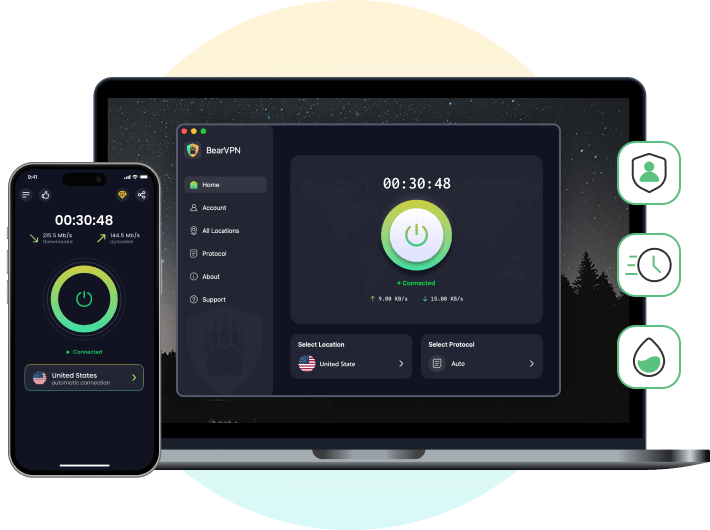
BearVPN can change the network route and visible IP address, but it cannot remove device management, override school policy, or guarantee access on every network.
Top 10 Official Sites and Alternate URLs to Play Shell Shockers Unblocked
Blue Wizard Digital maintains alternate routes for players who cannot reach the main shellshock.io domain. These are not ten different copies with different gameplay or performance—they are developer-listed doors into the same Shell Shockers experience. Availability changes, so use the official game first, work down the list, and confirm the latest developer page before entering account details.
Which Shell Shockers URL Should You Try First?
Always start with shellshock.io. It is the primary game domain and the clearest place to confirm whether the game itself is online. If it fails, try freegames.io/game/shell-shockers, followed by the remaining URLs in the order shown above. Do not open ten tabs at once: test one route, confirm that the page loads the real game, and close it before moving to the next.
How Do the Alternate Shell Shockers Sites Work?
The alternate domains are replacement entry points published by Blue Wizard Digital. They do not promise a different server, lower ping, newer weapons, or a special “school edition.” Once the game loads, browser support, WebGL, WebSockets, device performance, the selected game server, and the local network still determine whether the match works well.
A domain may open on one network and fail on another because schools, offices, ISPs, DNS resolvers, and security tools maintain different filters. That does not prove that the domain has permanently disappeared or that another random mirror is safe.
How to Check an Alternate URL Before You Log In
- Reach it from Blue Wizard Digital’s published list or
shellshock.io/unblocked. - Check the complete domain spelling, not only the page title or logo.
- Never install an extension,
.exe, certificate, configuration profile, or “unlocker” to start a browser game. - Close pages that request unrelated credentials, payment, wallet access, or repeated notification permissions.
- If the current official page shows a shorter list than this article, trust the newer developer-maintained page.
A fake “unblocked” page can cost more than a lost match. Use a developer-listed link, protect the connection on unfamiliar Wi-Fi, and keep unknown downloads off your device.
Why a Developer-Listed URL May Still Be Blocked
An alternate URL is not an invisibility cloak. A network can block browser-game categories, WebSocket traffic, newly discovered domains, or VPN connections—not only the word “Shell Shockers.” If all ten developer-listed routes fail on the same connection, stop chasing more mirrors and diagnose the browser, device, and network instead.
- Use BearVPN on a personal Windows or macOS laptop.
- Connect to a nearby server and reload a developer-listed URL.
- Keep your login away from random mirrors and mystery extensions.
BearVPN can change the network route and visible IP address, but it cannot remove device management, override school policy, or guarantee access on every network.
Related posts:
Unblocked Games G+: Safe, Mobile-Friendly Ways to Play
Unblocked Games WTF Guide: Access Methods, Tips, and Policies
Unblocked Games Classroom 6x: What It Is, How It Works
How to Play Shell Shockers Unblocked at School
There is no single trick that fixes every blocked match. Use this order so you do not confuse a browser problem, unsupported device, dead game server, or managed computer with a network block:
- Open
shellshock.iofirst. If it loads, stay on the primary game domain. - Use a supported desktop browser. The official FAQ lists current Chrome, Firefox, Edge, Safari, Opera, and Brave, with WebGL and WebSockets available.
- Use the right controls. Shell Shockers is designed for a keyboard plus mouse or trackpad; its official FAQ currently says there is no official mobile support.
- Try a developer-listed alternate URL. Work through the Top 10 above instead of searching for an unknown “unblocked” copy.
- Test another permitted network. If the same device works elsewhere, the original connection is probably filtering the game or one of its required services.
- On a personal Windows ormacOSlaptop, test BearVPN. Connect to a nearby server, reopen the official game or a developer-listed domain, and compare the result.
If the computer or Chromebook is owned or managed by the school, do not install VPN software, extensions, portable apps, certificates, or configuration profiles without permission. A VPN changes the network route; it does not remove administrator controls.
Use BearVPN on Your Personal Windows or macOS Laptop
When Shell Shockers loads on another network but not on campus Wi-Fi, the local network may be filtering the domain. On a laptop you own and are allowed to use, open BearVPN, connect to a suitable server, and reload the official game or a developer-listed alternate URL.
BearVPN encrypts the connection with AES-256, masks your public IP address, and offers obfuscation for restrictive networks. Performance depends on the server, game server, device, and network conditions, and some networks may still block gaming or VPN traffic.
Shell Shockers Lagging? Fix Ping and Browser Problems
Getting the page open is useless if every shot lands a second late. Shell Shockers recommends a ping of about 100 ms or lower, but spikes matter as much as the average. Close unused tabs, downloads, streams, and background apps; choose the nearest available game server; use Ethernet when possible; and confirm WebGL and WebSockets work in the browser. If BearVPN is connected, compare a nearby VPN server against the direct route instead of assuming a VPN will always reduce ping.
- Pick a nearby BearVPN server before reopening the game.
- Compare in-game ping with and without the VPN.
- Keep the VPN only when the new route is stable enough to play.
A VPN can sometimes improve a poor network route, but it can also add distance. Results depend on the local network, VPN server, and Shell Shockers server.
The Bottom Line: Get Back in the Arena Without Guessing
Shell Shockers unblocked access should start with the official game and Blue Wizard Digital’s own sites and alternate URLs—not a random mirror wearing an “educational” disguise. Check the browser and device first, then work through the developer-listed links. If every official route fails only on one network, BearVPN gives a personal Windows or macOS laptop another protected path to test.
Keep the setup clean: no mystery extensions, no downloaded “unlockers,” and no fake promises of being invisible to administrators. Find the real failure point, use the nearest stable route, and get back to scrambling opponents instead of scrambling through bad links.
FAQ
School IT administrators frequently block gaming sites like shellshock.io to prevent classroom distractions and to stop massive multiplayer gaming traffic from draining the school’s shared Wi-Fi bandwidth. They enforce this using Deep Packet Inspection (DPI) and URL blacklists.
Yes. The safest method is to play on your personal smartphone connected to the school Wi-Fi, but routed through a heavily encrypted tunnel like BearVPN. This hides your web traffic from the network administrators, meaning they cannot see what sites you are visiting. Always try to limit your gameplay to authorized breaks to avoid physical penalties from teachers.
The current official Shell Shockers FAQ says there is no official mobile support. The game is designed for a WebGL- and WebSocket-compatible desktop browser with a keyboard and mouse or trackpad. Do not promise a flawless Android or iPhone experience.
If you are looking for games that easily bypass school filters because they have an “educational” element, schools rarely block interactive platforms like Kahoot!, Gartic.io, Skribbl.io, Agar.io, or Prodigy. These are great backups for study halls.
Shell Shockers hits the perfect gaming sweet spot: it is incredibly easy to access, features fast-paced and highly competitive FPS mechanics, and supports seamless multiplayer lobbies. It allows friends to quickly jump into the same server during a short 10-minute break without needing any gaming hardware.
Blue Wizard Digital publishes replacement domains for Shell Shockers, including freegames.io/game/shell-shockers, iogames.space/shell-shockers, biologyclass.club, mathlete.pro, and additional domains on its official list. Because the list changes, verify the newest URLs on Blue Wizard Digital before signing in.
A VPN encrypts traffic between your device and the VPN server, but the network may still detect that a VPN connection exists and may restrict it. Use BearVPN only on a device you own and in line with applicable school rules.