


Quick Answer: HappyMod is not automatically a virus, but it should not be treated as completely safe. HappyMod distributes modified Android APKs outside the original developers’ official channels, so the risk depends on the exact installer or mod you download. A clean result for one file does not prove that another version is safe.
The main danger is not simply visiting the HappyMod website. It is installing an altered APK that may contain unwanted code, request sensitive permissions, display intrusive ads, or collect data beyond what the original app requires. Modded online games may also violate their developers’ rules and put your account at risk.
If you decide to examine a HappyMod APK, keep Google Play Protect enabled, scan the exact file before installation, reject unrelated permissions, and never enter a primary Google, social media, gaming, or payment account into an untrusted mod. If Android blocks the installation, do not disable its security protections just to continue.
What is HappyMod and How Does It Actually Work?
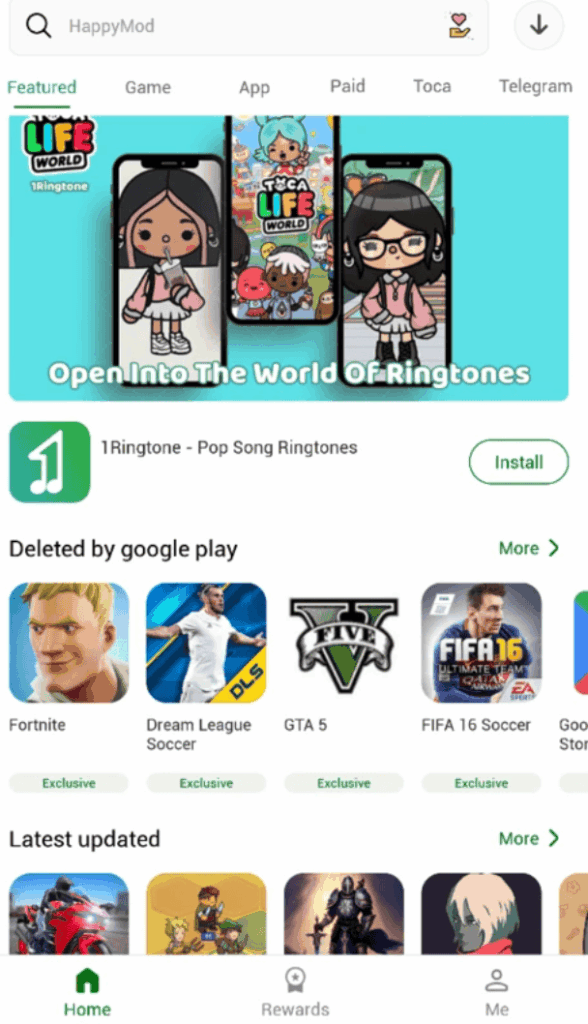
HappyMod is a prominent third-party app store that specializes in offering modded (modified) versions of Android apps and games. Unlike official platforms like Google Play, HappyMod operates as a community-driven platform. Users from around the globe upload, test, and share modified APKs, often providing premium features, unlocked content, or ad-free experiences.
- 30,000+ modded APKs across various categories.
- User-tested mods with ratings and comments to indicate functionality and potential issues.
- Fast downloads and multiple mod versions per app.
- A mod request feature allowing users to ask for specific updates or modifications.
The Role of User-Generated Content and Community Moderation
The core of HappyMod’s operation relies on user-generated content. This means that the quality and safety of any given mod can vary significantly. While HappyMod claims to employ safety measures such as “virus scanning” and “manual vetting” for uploaded files before publishing them, the sheer volume of content and the nature of modding make it challenging to ensure 100% security. The community plays a vital role through ratings and comments, acting as a form of community moderation, which can help identify problematic mods. However, users should not solely rely on these mechanisms as foolproof protections.
Is HappyMod Safe, and Is HappyMod a Virus?
The most accurate verdict is: HappyMod is not one file, so it cannot receive one permanent “safe” or “virus” label. You must distinguish between the website, the HappyMod installer, and every individual modded APK.
Therefore, it is inaccurate to say that every HappyMod download is a virus. It is equally inaccurate to say that HappyMod is completely safe. The only defensible approach is to assess the exact APK before installation and limit the damage it could cause if that assessment is wrong.
The Real Risks of Using HappyMod: An In-Depth Analysis
While the HappyMod platform strives for safety, several inherent real risks of using HappyMod exist due to the nature of unofficial modded applications. Understanding these mobile security threats is crucial for anyone considering downloading HappyMod.
Can HappyMod Give Your Phone a Virus?
A HappyMod APK can expose an Android device to malicious or unwanted software if the file has been altered to include harmful code. Google uses the broader term “potentially harmful application” for threats such as spyware, Trojans, ransomware, backdoors, billing fraud, and apps that misuse sensitive permissions.
Possible consequences include:
- persistent pop-ups or ads appearing outside the installed app;
- unexplained battery, data, or background activity;
- unauthorized access to SMS messages, notifications, contacts, files, the microphone, or the camera;
- unfamiliar apps or browser pages appearing without your approval;
- account-login alerts, changed settings, or unauthorized payments;
- an app refusing to uninstall after receiving special access.
Dynamic code loading is one general Android security risk because code obtained after installation can be tampered with or replaced. Google recommends avoiding remote dynamic code loading where possible and using integrity checks when it is necessary. However, this does not prove that HappyMod or “many HappyMod games” use DCL maliciously. That claim should only be made when a specific APK has been technically analyzed.
Do not enter a primary Google, Facebook, gaming, or payment account into a modified app that you do not trust. This is a precaution against credential theft or session abuse—not evidence that every HappyMod APK steals login tokens.
Data Privacy and Excessive App Permissions
When you install an APK, you grant it certain app permissions. Many modded apps request excessive permissions that are entirely unrelated to their core functionality. For example:
- Why would a puzzle game need access to your camera or microphone?
- Why does a simple offline tool require access to your contacts or SMS?
This permissions abuse can put your data privacy at severe risk. If a malicious mod gains access to your sensitive data, it can be harvested, sold, or used for identity theft.
3. Account Bans for Violating App Terms of Service
Many official apps and online games have strict terms of service (ToS) that explicitly prohibit the use of modified versions or any software that grants an unfair advantage. Using a modded version of a game to gain unlimited in-game currency or unlock features can lead to:
- Temporary Account Suspension: You might be locked out of your account for a period.
- Permanent Account Ban: For severe or repeated violations, your account could be permanently terminated, leading to the loss of all progress and purchases. This risk is particularly high in competitive online games.
Is HappyMod Legal? The Facts on Piracy and Copyright
The legality of HappyMod itself, and the modded APKs it distributes, exists in a legal gray area, but leans towards the problematic side.
HappyMod operates without explicit authorization or licensing from the original app developers. Therefore:
Downloading and using modded apps almost always constitutes a breach of the original application’s terms of service (ToS). While this isn’t typically a criminal offense, it gives developers the right to terminate your access to their services (e.g., ban your game account).
If a modded app bypasses payment mechanisms, removes ads that generate revenue for the developer, or directly incorporates copyrighted assets without permission, it can be considered a pirated version. This constitutes copyright infringement, which is illegal in many jurisdictions. While individual users are rarely prosecuted, distributors of such content face significant legal risks.
The specific legal implications can “depend on where you live.” However, broadly, if a modded app enables free access to paid features or content, it likely falls under copyright violation. There have been ongoing discussions and some legal actions (e.g., under the Digital Millennium Copyright Act – DMCA in the US) against the distribution of unauthorized software that infringes on intellectual property rights.
While HappyMod is widely used and isn’t known to intentionally distribute malware, its model inherently involves operating outside official developer channels, which carries both legal and ethical concerns regarding digital piracy and intellectual property.
How to Check a HappyMod APK Before Installing It
There is no procedure that can guarantee a modded APK is safe. These checks only reduce risk. The safer choice is still to obtain the original app from Google Play or its verified developer.
- Check the source and exact filename
Avoid download buttons delivered through pop-ups, ads, shortened links, messaging groups, or imitation “HappyMod Pro” websites. A familiar logo, high download count, positive comments, or a “Working” label may suggest that a file runs, but none of them proves that the APK is authentic or safe.
- Scan the exact APK before opening it
Upload the APK itself—not just its download URL—to VirusTotal or scan it with a reputable Android security product. Check the file’s SHA-256 hash if the legitimate publisher provides a trusted reference hash.
A result for a different filename, version, or hash does not apply to your file. “Undetected” means an engine did not detect the submitted file as malicious at that time; it does not certify the APK as permanently safe.
- Keep Google Play Protect enabled
Open Google Play Store > profile icon > Play Protect > Settings and make sure “Scan apps with Play Protect” is enabled. If you install apps from outside Google Play, also enable “Improve harmful app detection.”
Never switch off Play Protect simply because it blocks or warns about an APK. Treat the warning as a reason to stop and investigate.
- Compare the requested permissions with the app’s purpose
Reject a mod if an ordinary game or utility asks to read SMS messages or notifications, control Accessibility, become a device administrator, install other apps, display over other apps, or access contacts, the microphone, or the camera without a clear functional reason.
- Keep valuable accounts and data out of the app
Do not add payment details or use a primary email, social, banking, or gaming account. Avoid online games in which losing the account, purchases, or progress would matter to you.
- Use a separate test device if you accept the remaining risk
An old factory-reset phone with no personal accounts, private photos, saved passwords, SIM card, or payment apps limits the possible damage. An emulator may help observe basic behavior, but it is not proof that an APK will behave identically on a real phone.
- Turn off “Allow from this source” afterward
If you enabled installation from a browser or file manager, return to Settings > Apps > Special app access > Install unknown apps and disable that source after testing. Menu names vary by Android version and phone manufacturer.
Other Safety Tips for Using HappyMod:
Step 1: Check Community Feedback Before Downloading
HappyMod’s user community is a valuable first line of defense. Before you download any mod:
- Read user reviews and ratings: Look for mods with high ratings and numerous positive comments. Pay attention to recent feedback regarding functionality and safety.
- Look for “Working” labels: HappyMod often categorizes mods with “Working” or “Not Working” tags. Stick to those confirmed to be functional by many users.
Step 2: Scan Every APK with an Antivirus and VirusTotal
This is perhaps the most critical step. Never install an APK from HappyMod without scanning it first.
- Use a reputable Android antivirus app: Download and install a trusted mobile security solution on your Android device. Top recommended Android antivirus apps for 2025 include:
- TotalAV Antivirus
- Norton 360
- Avast Antivirus (offers a good free version)
- Scan the downloaded HappyMod APK file before installation.
- Utilize VirusTotal: For a deeper analysis, upload the downloaded APK file to VirusTotal. This free online service scans files with dozens of different antivirus engines and provides a comprehensive report, helping you identify potential threats that a single antivirus might miss.
Step 3: Verify App Permissions During Installation
When installing any app, Android displays the permissions it requests.
- Scrutinize permissions: Be highly cautious of apps asking for unrelated access. A flashlight app doesn’t need access to your contacts or SMS. A simple offline game shouldn’t require microphone or location access.
- Deny unnecessary permissions: On newer Android versions, you can deny individual permissions post-installation via Settings > Apps > [App Name] > Permissions. However, some apps may not function correctly if critical permissions are denied.
Step 4: Consider a Sandbox Environment for Testing
For advanced users or those dealing with highly sensitive data, consider testing suspicious APKs in a controlled environment:
- Emulator: Use an Android emulator on your PC (like BlueStacks or NoxPlayer) to run the modded app in an isolated virtual environment.
- Virtual Machine: Set up a virtual machine with an Android OS to create a secure space for testing.
- Dedicated Test Device: Use an old, factory-reset Android device that doesn’t contain any personal information for testing purposes.
Step 5: Mask Your Download Activity from Your ISP
Downloading modified, cracked, or pirated games operates in a legal gray area. Your Internet Service Provider (ISP) actively monitors your traffic and can throttle your connection or send copyright infringement warnings if they catch you downloading unauthorized APK files. Before accessing third-party stores, connect to BearVPN. It encrypts your download tunnel, making it mathematically impossible for your ISP to see what files you are downloading or which platforms you are visiting.
Downloading modified APKs exposes your traffic to your ISP, risking throttled speeds or flagged accounts. Launch BearVPN before downloading. Our military-grade encryption makes your activity mathematically invisible, allowing you to bypass speed limits and download safely.

Why use a VPN with HappyMod?
- Hide your IP: A VPN makes your online activity anonymous by hiding your real IP address, making it harder for third parties (including potentially malicious actors tracking traffic to unofficial download sites) to trace your online behavior back to you.
- Encrypt your traffic: When connected to a VPN, your data is encrypted, protecting it from snooping, especially when you’re on unsecured networks like public Wi-Fi. This adds a layer of security against cyberattacks.
- Stay away from potential tracking: Some websites or services might attempt to track your behavior. A VPN helps prevent this by routing your connection through a secure server.
Recommendation: BearVPN
For a simple and effective way to protect your online activities on Android, iOS, Windows, and macOS, consider BearVPN. It offers:
- Unlimited data, time, and bandwidth, allowing you to browse, stream, and download without limits.
- A no-log policy, meaning your online activity is not recorded.
- Easy one-tap connection, making it user-friendly even for beginners.
- Advanced encryption to secure your data.
- Includes a Kill Switch feature to prevent data leaks if your VPN connection drops.
By routing your connection through a secure VPN like BearVPN, you add a significant layer of privacy and protection against potential monitoring and cyber threats while exploring modded apps. Download it now!
Step 6: Keep Everything Updated
- Keep HappyMod Updated: Ensure your HappyMod app is always updated to the latest version. Developers often release updates that include bug fixes and potential security enhancements.
- Keep your Android OS Updated: Regularly install Android security patches and OS updates. These updates often fix critical vulnerabilities that malware can exploit.
- Keep your Antivirus Updated: Ensure your chosen antivirus software’s definitions are always current for the best detection rates.
Already Installed HappyMod or a Suspicious Mod? Do This Now
If the app behaves normally and Android shows no warnings, that still does not prove the APK is safe. If you notice pop-ups, unexplained battery or data use, unfamiliar apps, account alerts, or permissions you do not remember granting, take these steps:
- Disconnect the phone from the internet if you see active suspicious behavior.
- Open Settings > Apps, select the recently installed HappyMod or modded app, and uninstall it.
- If uninstalling is blocked, first remove any Device Admin, Accessibility, “Display over other apps,” notification access, or “Install unknown apps” permission granted to it. Settings names vary by device.
- Open Google Play Store > profile icon > Play Protect and run a scan. Keep “Improve harmful app detection” enabled for sideloaded apps.
- Install Android security and system updates, then restart the device.
- From a different, trusted device, change passwords for any accounts used inside the suspicious app. Sign out other sessions and enable two-factor authentication.
- Review bank, card, mobile-billing, email, Google, social, and gaming accounts for unauthorized activity.
- If intrusive ads or suspicious behavior continue, back up essential personal files and consider a factory reset. Do not restore the suspicious APK afterward.
If financial information, identity documents, or work credentials may have been exposed, contact the relevant bank, employer, or service provider immediately.
Is HappyMod Safe for iPhone or iPad?
HappyMod distributes Android APK files, and APK files cannot be installed on an iPhone or iPad. Websites claiming to offer a “HappyMod APK for iOS” or asking you to install configuration profiles, complete surveys, or download unrelated apps should be treated with caution.
Some regions now allow approved alternative iPhone and iPad app distribution. As of September 2026, Apple supports forms of alternative distribution in the European Union, Japan, and Brazil. That does not make Android APKs compatible with iOS, and it does not establish an official HappyMod version for iPhone.
Avoid jailbreaking a device solely to obtain a supposed HappyMod app. It does not convert Android APKs into iOS apps and can weaken normal platform protections.
Safer Alternatives to HappyMod
Switching from HappyMod to another modded-APK website does not remove the underlying risk. Files are still modified outside the original developer’s official distribution channel, so it would be misleading to rate another unofficial mod store as “safe” without repeatable testing of its current files.
If an app is unavailable through a verified source, the safest decision is to avoid installing an unknown replacement rather than moving to a different mod site.
Frequently Asked Questions
HappyMod is a third-party marketplace rather than one fixed file, so it cannot accurately be classified as one universal virus. However, its installer and the individual modded APKs it distributes can vary by version and source. Any specific APK could contain unwanted or malicious code and should be checked separately before installation.
It is not as low-risk as installing the original app from Google Play. HappyMod requires sideloading and distributes modified files outside the original developer’s normal release process. Keeping Play Protect enabled, scanning the exact APK, and reviewing permissions can reduce risk, but none of these checks guarantees safety.
Yes, a malicious or tampered APK obtained through HappyMod or an imitation download site could infect or otherwise compromise an Android phone. Warning signs include persistent pop-ups, unknown apps, unexplained background activity, sensitive permission requests, account alerts, and unauthorized billing.
Not necessarily. A zero-detection result means the participating engines did not identify that exact submitted file as malicious at the time of the scan. It does not cover another version or hash, and it cannot guarantee that new, concealed, or behavior-triggered threats will never be detected later.
HappyMod is widely known, but popularity, download counts, comments, and “working” labels are not security certifications. Trust should be based on the exact file, its source, permissions, signature or hash where available, Play Protect results, and independent analysis—not the platform name alone.
There is not enough evidence to claim that every HappyMod installer or mod steals data. The practical risk is that a modified APK may request or misuse access to messages, notifications, contacts, files, the microphone, the camera, or login details. Do not grant permissions that do not match the app’s purpose.
Yes. Modified online games can violate the developer’s terms, anti-cheat rules, or platform policies. The developer may suspend or permanently close the account, potentially causing the loss of progress, purchases, and virtual items. A VPN cannot prevent an app or game from detecting modifications.
There is no single worldwide answer. Simply accessing a third-party app store is different from downloading or distributing an unauthorized copy that bypasses payment, licensing, ads, or copyright controls. Laws and enforcement vary by country, and a mod can also violate the original app’s terms even when no criminal law is involved. This is general information, not legal advice.
Final Verdict: Should You Trust HappyMod?
HappyMod is not automatically a virus, but it is not safe enough to trust blindly. The platform name, a “working” label, positive comments, or one clean scan cannot certify every installer and modded APK.
The lowest-risk option is to use the official app from Google Play or the verified developer. If you still examine a third-party APK, scan the exact file, keep Play Protect enabled, reject unrelated permissions, and keep primary accounts and payment details out of the app.
BearVPN can encrypt your network traffic and mask your public IP while you browse or download, especially on shared Wi-Fi. It cannot detect malware inside an APK or make a dangerous mod safe. Use network protection and device security together—and stop immediately if Android displays a warning.



