If your VPN is not working in Saudi Arabia, you’re not alone. Users report apps that connect but don’t pass traffic, “VPN not connecting in KSA” errors, slow speeds, or WhatsApp calls that still won’t go through. The root cause is rarely your phone—it’s how Saudi networks detect, throttle, or block common VPN protocols and IP ranges.
This guide gives you practical fixes you can try today, explains why these issues happen, and clarifies key points about legality and risk. Use it as a step-by-step checklist: test the quick wins first, then move to more advanced settings only if needed.
Quick Answer: Why Your VPN Fails in Saudi Arabia
Saudi Arabia applies rigorous network controls that make routine tunneling harder than in many countries. Before you change providers, try the configuration changes below—often a protocol or port change is enough to turn a “dead” tunnel into a stable one.
In practice, failures come from a few predictable places. Deep packet inspection (DPI) identifies protocol fingerprints; popular VPN IPs get blocklisted; ISPs like STC, Mobily, and Zain can treat VPN traffic differently; and mobile OS power settings silently shut tunnels down. The good news: toggling to stealth/obfuscation, switching to OpenVPN TCP 443 or a WireGuard-based stealth mode, and refreshing DNS/cache usually restores connectivity.

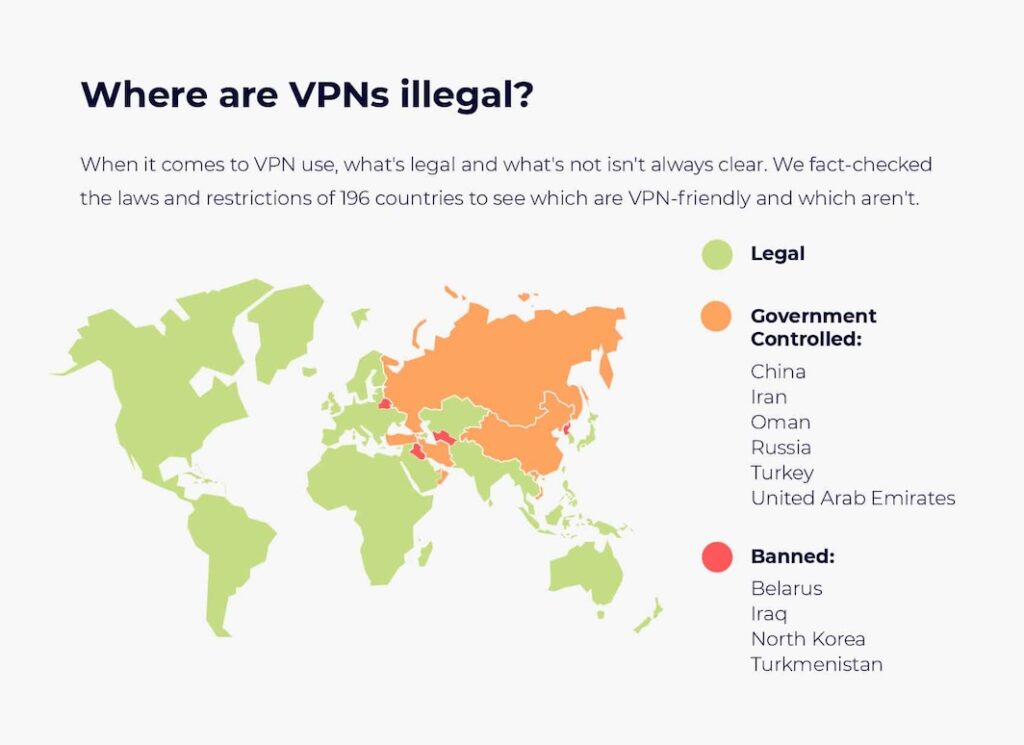
Are VPNs Legal in Saudi Arabia? What You Should Know
Users often search “Are VPNs legal in Saudi Arabia” right after a failure, wondering if they did something wrong. It’s wise to separate two ideas: the legality of using VPN software, and the blocking of specific services or sites.
While VPN apps are widespread, access to certain services, sites, or VoIP features may be restricted on local networks. That means a VPN itself isn’t necessarily the problem; it’s the specific content or traffic profile you’re trying to reach. As a user, you should always follow local laws and the terms of the services you access. The technical fixes below focus on connection reliability—what you do with the connection must remain compliant with your obligations and local rules.
The Real Reasons a VPN Is Not Working in Saudi Arabia
Before jumping into repairs, it helps to map the most common failure modes. Understanding which one you’re facing speeds up troubleshooting and prevents endless app reinstalls.
Typical causes cluster into several buckets.
- Protocol fingerprinting: standard OpenVPN or IKEv2 handshakes can be recognized and shaped.
- IP and ASN blocklists: free VPNs or overcrowded servers get flagged quickly.
- Port filtering: non-web ports draw attention; TCP 443 blends more naturally with HTTPS.
- ISP specifics (STC, Mobily, Zain): APN settings, CGNAT, or network policies can break tunnels inconsistently.
- Device hygiene: stale DNS, stuffed caches, expired certificates, or battery optimizers killing background sockets derail otherwise fine setups.
Step-by-Step Fixes (From Fastest to Most Technical)
Not every reader wants to dig through settings. Start at the top. If a step fixes your “vpn not working in Saudi Arabia” problem, stop there and enjoy your connection.
A short transition is useful here because these steps escalate from simple toggles to protocol changes and OS-level resets. Each one addresses a different root cause—speed, stability, or detectability—so you can match symptoms to solutions without guesswork.
- Change server + country
Pick a different server region and city. Choose geographically “nearby but not the same” (e.g., Bahrain, UAE, Qatar, or Europe hubs) to balance latency and blocking. If you only swapped within the same city, try a wholly different country—IP ranges matter. - Switch to TCP 443
If your app lets you choose protocol/port, try OpenVPN TCP 443. It resembles normal HTTPS and often escapes crude port blocks better than UDP. Expect slightly lower speeds but higher success in restrictive networks. - Enable Stealth/Obfuscation
Look for settings labeled Obfuscation, Stealth, Camouflage, Shadowsocks, or TLS-tunneled modes. These wrap the handshake so DPI sees something closer to generic TLS, not a recognizable VPN signature. - Try WireGuard (or a Stealthy Variant)
WireGuard is fast and modern, but its plain handshake can be flagged. If your provider offers WireGuard-over-TLS or a stealth profile, test that. Otherwise, fall back to obfuscated OpenVPN TCP 443 for “hard mode” networks. - Flush DNS and Clear Identifiers
Switch your DNS to automatic, then reconnect; or toggle to a privacy DNS if your provider supports it. Clear browser cache/cookies, and confirm your device clock is correct. DNS or certificate weirdness can look like blocking. - Update the App and Reinstall the TUN Driver
Outdated apps break more often under tough network conditions. Update to the newest version, reinstall or re-grant the VPN profile, and reboot. A fresh network driver or permission set can fix “connects but no internet” errors. - Toggle Networks: Mobile Data vs. Wi-Fi
If Wi-Fi fails, try mobile data; if mobile data fails, tether off a different phone or switch Wi-Fi networks (2.4GHz vs 5GHz). This isolates whether the blockage is local (router) or carrier-level. - Disable Conflicts
Pause third-party firewalls, antivirus HTTPS scanning, ad-blockers, or “accelerators.” On Android, turn off Private DNS temporarily; on iOS, remove legacy configuration profiles that override DNS or proxy behavior. - Rotate IPs Frequently
If a server worked yesterday but not today, the IP was likely flagged. Pick another node, or use a provider with frequent IP rotation so you aren’t stuck in a public pool everyone shares. - Last Resort: Change Providers
If your app lacks stealth profiles, can’t bind to TCP 443, or rotates IPs rarely, you’ll keep chasing issues. In high-inspection environments, capability gaps matter more than brand recognition.
WhatsApp and VoIP: Why Calls Still Don’t Work (and What to Do)
Even when a VPN shows “Connected,” users complain that WhatsApp calls are not working in Saudi Arabia or that FaceTime rings but never picks up. This is where understanding traffic type pays off.
VoIP is sensitive to latency, jitter, and packet loss, and certain signaling or media ports. If the network blocks or shapes those, a vanilla tunnel won’t fix it. To improve your odds, pair obfuscation with TCP 443 for the handshake, then prefer providers that route VoIP efficiently. If your app offers per-app routing (split tunneling), tunnel your calling app while leaving background traffic local to reduce congestion. Re-verify app permissions for the microphone/camera and reset call settings after you switch servers.
Mobile Troubleshooting for iPhone and Android
“iPhone VPN not working in Saudi Arabia” and “Android VPN not working in Saudi Arabia” are common searches. On phones, power and privacy features frequently conflict with persistent VPN sockets.
On iOS: Disable Low Power Mode during calls, remove outdated VPN profiles, then re-add your provider’s latest profile. If you use “On-Demand” rules, ensure the domains and triggers are correct. Reset Network Settings if DNS hangs around.
On Android: Allow background activity for the VPN app, turn off battery optimization for it, and check Private DNS (set to Automatic if conflicts appear). In both systems, uninstall legacy “optimizer” apps that intercept TLS, and test with a clean browser to rule out extension conflicts.
Optimizing Connections for STC, Mobily, and Zain
Network behavior varies significantly across local Saudi telecom carriers:
- STC Network: Applies strict DPI signature matching on UDP ports. Switch immediately to OpenVPN-TCP 443 or enable native stealth modes when on STC mobile data.
- Mobily & Zain: Often experience IP blacklisting on shared server pools. Regularly rotate server locations or toggle airplane mode to refresh your local IP assignment.
- WhatsApp & VoIP Calls: To fix WhatsApp calls that ring but won’t connect, enable Split Tunneling to route only WhatsApp through the VPN while keeping background data local to reduce packet loss.
Using BearVPN for Stealth Access in Saudi Arabia
Before listing features, it helps to restate the problem: Saudi networks aggressively detect standard VPN signatures. Providers that add stealth, flexible ports, and quick IP rotation generally perform better in this environment.
When navigating high-inspection networks in KSA, BearVPN provides essential tools designed to maintain connectivity:
- Stealth Obfuscation: Masks handshake signatures so local firewalls cannot easily classify your connection as VPN traffic.
- Flexible Protocol Switching: Easily toggle between OpenVPN TCP 443 and modern WireGuard configurations based on carrier performance.
- Per-App Split Tunneling: Allows you to route bandwidth-sensitive messaging or calling apps through the encrypted tunnel while leaving high-volume downloads on your local connection.
- Kill Switch & Leak Protection: Ensures your real IP and DNS requests remain shielded if mobile coverage briefly drops between cell towers.
- Broad Network Support: 2,000+ servers across 50+ locations

Free VPN for Saudi Arabia vs. Paid Options: Hard Truths
It’s tempting to install a free Saudi Arabia VPN when your primary app won’t connect. Unfortunately, that’s exactly what thousands of others do—and that popularity makes free IP pools easy to fingerprint and block.
Beyond crowding, free apps often skip obfuscation and rotate IPs infrequently, so “VPN not working in Saudi Arabia” becomes permanent rather than occasional. If you only need to read a webpage, a free tunnel might work briefly; for daily WhatsApp calling or consistent app access, you’ll want stealth profiles, frequent IP rotation, and robust TCP 443 support. Paid doesn’t guarantee success—but the right capabilities dramatically raise your success rate.
What to Look for in a Saudi-Ready VPN (A Checklist)
Choosing a new provider is less about brand names and more about specific features that counter the restrictions you face. Use the checklist below as a filter.
When you evaluate, prioritize capabilities over marketing. Ask how often servers refresh their IPs; whether obfuscation/stealth is native or bolted on; if OpenVPN TCP 443 and WireGuard variants are both supported; and how quickly issues get triaged for KSA users. The more levers you have, the less often you’ll be stuck without a route.
- Stealth/Obfuscation modes that mask handshake fingerprints
- OpenVPN TCP 443 plus WireGuard (ideally a stealthy WG option)
- Frequent IP rotation and diverse locations for failover
- Per-app split tunneling and a reliable kill switch
- DNS-leak protection with clear resolver policies
- Mobile-first UX on iOS/Android and fast fix cadence
- No-logs, RAM-only servers, and transparent privacy documentation
- Responsive support familiar with KSA-specific issues
Advanced Tips: When You’ve Tried Everything and It Still Won’t Connect
Sometimes you’ll hit a wall even after toggling protocols, ports, and servers. That’s when a few lesser-known levers can make the difference between a dead end and a clean session.
First, change transport shape: some providers allow SSH-over-VPN or TLS-wrapped tunnels that look like ordinary web traffic to middleboxes.
Second, shorten MTU slightly to reduce fragmentation on flaky paths; values around 1350–1400 can stabilize certain mobile networks.
Third, disable IPv6 temporarily if your tunnel or app handles IPv6 inconsistently.
Fourth, test a different DNS egress—some apps let you choose their resolver or your own; if lookups are blocked, the tunnel appears dead.
Finally, schedule rotations: switching servers every few hours pre-empts blocklisting patterns that build up during peak time.
Conclusion
A “vpn not working in Saudi Arabia” error usually isn’t a mystery—it’s the predictable result of DPI, blocklists, and strict carrier policies. The fixes aren’t magic, either: TCP 443, stealth/obfuscation, fresh IPs, and clean device settings solve most cases. If you still hit dead ends after working through the steps, the provider simply lacks the capabilities Saudi networks demand. Choose tools that hide the handshake, rotate IPs, and let you control routing on mobile. With the right setup, even tough KSA networks become manageable—and your calls, apps, and browsing can get back to normal.
FAQs
Saudi ISPs like STC and Mobily use Deep Packet Inspection (DPI) to detect standard OpenVPN-UDP or WireGuard protocols. Switching your app to OpenVPN-TCP on port 443 or enabling stealth obfuscation will bypass these signature checks.
Enable stealth obfuscation in your VPN settings, connect to a nearby low-latency server (e.g., Europe or Middle East hubs), and use split tunneling to route WhatsApp traffic specifically through the tunnel.
Using VPN technology is generally permissible for privacy and business security, but accessing restricted content or violating local regulations remains prohibited. Always maintain proper security practices and keep your kill switch enabled.
This usually indicates a DNS resolution conflict or IP block on the connected server node. Flush your DNS cache, switch to standard DNS settings, or select a different server region.
Free VPNs rarely work reliably in Saudi Arabia because their limited IP addresses are quickly blocklisted by local ISPs, and they typically lack advanced stealth or TCP 443 obfuscation protocols.