VPN connections in Pakistan can fail without warning. Your app may remain stuck on “Connecting,” disconnect after a few seconds, or show “Connected” while no websites load.
The problem is not always your VPN app. Since December 22, 2025, users across multiple Pakistani ISPs have reported disruption affecting standard VPN connections, with Proton VPN publicly confirming restrictions. However, the severity varies by ISP, VPN provider, server, and connection method. One failed connection does not prove that every VPN has been banned nationwide.
Try these three checks first:
- Switch between Wi-Fi and mobile data.
- Change to an obfuscated or alternative connection mode supported by your VPN.
- Try two or three different server locations.
If that does not work, follow the symptom-based fixes below. This guide was fact-checked on September 8, 2026. VPN availability and Pakistani telecommunications rules can change, so check your provider’s status page and current PTA guidance when uninterrupted access is essential.
Why Are VPNs Not Working in Pakistan Today?
There is no single cause that explains every VPN failure in Pakistan. The most likely cause depends on whether the app cannot connect, connects and then drops, or connects while websites remain unavailable.
1. Network-Level VPN Filtering
Restrictions reported since December 2025 have affected standard VPN connections on multiple Pakistani ISPs. Public reporting suggests that the level of disruption varies by network. Although traffic analysis and protocol filtering are possible explanations, Pakistani authorities have not published a technical explanation for every reported incident.
This means a VPN may work on one ISP but fail on another, or work through one connection mode while another is blocked.
2. A VPN Server or IP Address Has Been Blocked
If one server fails but another connects, the first server address may be unreachable, overloaded, under maintenance, or filtered by the network. This does not necessarily mean the entire VPN service is unavailable.
3. The Connection Method Is Easy to Identify
Standard VPN protocols can be easier for restrictive networks to disrupt. An obfuscated or stealth connection mode changes how the traffic appears and may connect when a standard mode does not. Availability depends on the provider and device.
4. DNS or Routing Failure
If the VPN says “Connected” but websites do not open, the tunnel may be active while DNS requests or traffic routing are failing. A conflicting browser proxy, stale network configuration, or an incorrectly triggered kill switch can produce the same symptom.
5. App, Device, or Local Network Problems
An outdated VPN app, damaged network configuration, antivirus interference, router restrictions, poor mobile reception, or server congestion can look like national VPN blocking. That is why you should compare networks and servers before assuming the VPN has been banned.
VPN Not Working in Pakistan? Match the Symptom to the Fix
Use the symptom below to decide what to test first.
7 Fixes for a VPN Not Working in Pakistan
Apply one fix at a time and test the connection after each step. Otherwise, you will not know which change solved the problem.
1. Check Whether the Problem Is the VPN or Your Internet
Disconnect the VPN and open two or three ordinary websites. If nothing loads without the VPN, troubleshoot your internet connection first.
If regular internet works, check your VPN provider’s status page or support channel. A provider outage or server maintenance can produce the same symptoms as ISP filtering.
2. Switch Between Wi-Fi and Mobile Data
Test the same VPN server and connection mode on a different network.
If it works on mobile data but not Wi-Fi, the issue may involve your broadband ISP, router, DNS settings, or local firewall. If it works on Wi-Fi but not mobile data, the mobile network may be handling that connection method differently.
Do not assume that PTCL, Jazz, Zong, Telenor, or another provider applies identical restrictions everywhere. Results can vary by network and location.
3. Update the VPN App and Restart the Device
Install the latest version from the provider’s official website or app store. Updates may include new connection methods, server changes, and compatibility fixes.
After updating:
- Disconnect the VPN.
- Restart the phone or computer.
- Open the VPN again.
- Test one server before changing other settings.
4. Change the VPN Connection Mode
If the default connection fails, select an obfuscated, stealth, or restricted-network mode if your provider offers one.
Standard protocols such as WireGuard or OpenVPN may work on some networks and fail on others. OpenVPN TCP can sometimes be more resilient than UDP, but it is not a guaranteed fix in Pakistan. Reports from the December 2025 disruption indicated that even standard OpenVPN connections were affected.
BearVPN users can switch between SLProxy and SCProxy on Windows or macOS. Android and iOS users can also test Y2Proxy. Try each available mode with the same server before moving to the next step.
5. Try Several Different Server Locations
A single failed server does not mean the VPN is completely blocked. Try at least two or three locations.
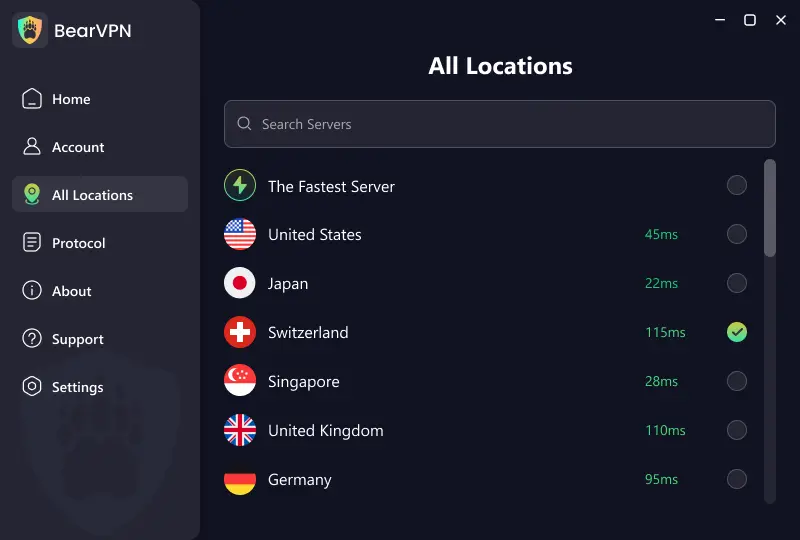
Start with a reasonably close location for lower latency, but also test a less commonly used location if nearby servers fail. Available BearVPN locations include the UAE, Turkey, and Singapore:
The closest server is not always the one that connects most reliably. Current filtering, routing, and server load all affect the result.
6. Fix “Connected but No Internet”
If the VPN connects but websites do not load:
- Disconnect and reconnect once.
- Close any separately configured browser or system proxy.
- Confirm that the VPN’s kill switch is not remaining active after a failed connection.
- Try another VPN server.
- Restart the router or device.
- If the provider allows it, test another DNS resolver such as Cloudflare 1.1.1.1 or Google 8.8.8.8.
- Restore automatic DNS if changing it does not help.
Changing DNS will not fix a blocked VPN tunnel. It is mainly relevant when the VPN connects but domain names do not resolve.
7. Reset or Reinstall the VPN
Use this step only after testing another network, mode, and server.
Remove the VPN app, restart the device, and reinstall the latest version from an official source. On Windows or macOS, also remove obsolete VPN apps that may have left conflicting network adapters or proxy settings.
If a work device is managed by an employer, contact its administrator instead of changing firewall, certificate, or network policies yourself.
Proton VPN, NordVPN, or ExpressVPN Not Working in Pakistan?
Connection status can change by ISP, server, app version, and time of day. Instead of labeling an entire provider as “working” or “blocked,” use the provider-specific settings below.
Proton VPN Not Working in Pakistan
Proton VPN publicly confirmed connection restrictions in Pakistan beginning on December 22, 2025. If Proton VPN cannot connect:
- Update to the latest official app.
- Select the Stealth protocol.
- Enable Alternative Routing in Advanced Settings.
- Try several different servers rather than only the first location in the list.
- Compare Wi-Fi with mobile data.
Do not assume that the paid plan will automatically solve the problem. The connection method, ISP, and server can matter more than the subscription tier.
NordVPN Not Working in Pakistan
NordVPN’s official restricted-network troubleshooting order is:
- Switch to NordWhisper.
- Try an Obfuscated server.
- Test OpenVPN TCP.
- Reset the device’s network settings.
- Try a different network.
If Obfuscated servers do not appear, check NordVPN’s current protocol requirements. Its settings and supported modes can change between app versions.
ExpressVPN Not Working in Pakistan
If ExpressVPN is stuck on “Connecting” or cannot reach a server:
- Update and restart the app.
- Try another recommended server location.
- Change the VPN protocol or return it to Automatic.
- Restart the device.
- Temporarily check whether antivirus, firewall, or another VPN app is interfering.
- Contact ExpressVPN support for connection advice specific to your app version and network.
There is not enough current public evidence to promise that ExpressVPN will work on every Pakistani ISP.
Another VPN Is Not Connecting
For Surfshark, CyberGhost, TunnelBear, Psiphon, or another service, look for a setting named Stealth, Obfuscation, Camouflage, Restricted Network, or Alternative Routing. If no such mode exists, test another server and network before replacing the provider.
Avoid downloading unknown “modded,” cracked, or unofficial VPN apps. They can alter certificates, request unnecessary permissions, or expose traffic before it reaches the VPN tunnel.
Try BearVPN When Your Current VPN Cannot Connect
If your current VPN repeatedly fails on the same network, BearVPN gives you several connection modes and more than 2,000 servers across 50+ locations to test.
For the best chance of reconnecting:
- Open BearVPN and connect using the recommended route.
- If the connection fails, switch between SLProxy and SCProxy on Windows or macOS.
- On Android or iOS, also test Y2Proxy.
- Change to another server location.
- Compare the result on Wi-Fi and mobile data.
- Keep the Kill Switch enabled when privacy matters, especially if the network is unstable.
BearVPN also includes strong obfuscation, AES-256 encryption, DNS/IP leak protection, RAM-only infrastructure, and Double VPN. These features can improve privacy and give you more options on restrictive networks, but no VPN can guarantee a connection on every Pakistani ISP or during every network restriction.
BearVPN is available for:
If your current VPN remains stuck on “Connecting,” download BearVPN before restrictions become more severe and test it on both Wi-Fi and mobile data.
Is VPN Banned in Pakistan? Legal Status in 2026
As of September 8, 2026, Pakistan has not announced a blanket criminal ban on all personal VPN use. However, VPN access is regulated, and unregistered or unlicensed services may face technical restrictions.
The regulatory position has developed in several stages:
- In 2024, PTA promoted VPN and IP registration for businesses, software houses, call centers, banks, embassies, freelancers, and other professional users.
- A proposed deadline for blocking unregistered VPNs was extended in November 2024 after questions were raised about the legal basis for a blanket ban.
- In November 2025, PTA began licensing VPN service providers under the CVAS-Data framework.
- Connection restrictions affecting some commercial VPN apps were reported beginning in December 2025.
Freelancers and organizations that require a VPN for business should review the current PTA VPN registration process and confirm whether registration applies to their connection.
Using a VPN does not make unlawful activity legal. Follow Pakistani law, workplace policies, and the terms of any website or service you access. This section provides general information, not legal advice.
VPN Connected but Still Not Working? Check for Leaks and Routing Errors
A “Connected” label only confirms that the app believes a tunnel has been created. It does not prove that every app is using that tunnel or that DNS and IP information are protected correctly.
After connecting:
- Check whether your public IP has changed.
- Run a DNS leak test.
- Confirm that the Kill Switch blocks traffic if you disconnect the VPN unexpectedly.
- Review split tunneling and make sure sensitive apps have not been excluded.
- Close any browser or system proxy that could override the VPN route.
- Test another browser or device on the same network.
BearVPN’s DNS/IP leak protection and Kill Switch are designed to reduce exposure when the connection drops. On mobile, remember that split tunneling works at the app level: any app you exclude will use the normal internet connection.
You normally do not need Wireshark or other packet-analysis software for basic troubleshooting. If repeated leak tests still show your ISP’s IP or DNS while the VPN is connected, stop using that connection and contact the provider.
Frequently Asked Questions
A VPN may fail because its connection method or server is being filtered, but DNS failure, congestion, an outdated app, or a local firewall can cause the same symptom. First compare Wi-Fi with mobile data, then change the VPN’s connection mode and server. A single failed service does not prove that all VPNs are banned nationwide.
Pakistan has not announced a blanket criminal ban on all personal VPN use as of September 8, 2026. However, VPN services are regulated, PTA operates registration and provider-licensing systems, and some unregistered services may be technically restricted. Businesses and freelancers should check whether PTA registration applies to their work connection.
Proton VPN confirmed restrictions affecting users in Pakistan beginning in December 2025. Update the app, select Stealth, enable Alternative Routing, try several servers, and compare Wi-Fi with mobile data. Do not assume that upgrading from the free plan will automatically bypass a network-level restriction.
NordVPN may work on some Pakistani networks, but availability cannot be guaranteed. If it will not connect, NordVPN recommends trying NordWhisper, an Obfuscated server, OpenVPN TCP, a network reset, and another internet connection. Results can vary by ISP and app version.
The VPN tunnel may be active while DNS resolution or traffic routing has failed. Reconnect, try another server, close conflicting proxy settings, and check whether the Kill Switch is still blocking traffic after a failed connection. Only change DNS if websites still cannot resolve while the tunnel is connected.
No provider can guarantee uninterrupted access across every Pakistani ISP. Look for multiple connection modes, strong obfuscation, a large server network, DNS/IP leak protection, and a Kill Switch. BearVPN offers SLProxy and SCProxy on desktop, adds Y2Proxy on mobile, and provides 2,000+ servers across 50+ locations.
A free VPN may work, but many free services offer limited servers, weak privacy protections, or no obfuscation. Avoid unofficial and cracked apps. BearVPN provides a limited free mobile experience on Android and iOS with ads and one available route; server selection and additional options require a paid plan.
Conclusion
If your VPN is not working in Pakistan, do not immediately assume the entire service has been banned. First compare Wi-Fi and mobile data, update the app, switch to an obfuscated connection mode, and test several servers. If the VPN connects but nothing loads, check DNS, proxy settings, and the Kill Switch.
Provider availability can change without warning. If your current app still cannot establish a stable tunnel, install BearVPN and test SLProxy, SCProxy, or Y2Proxy on a second network. No VPN can promise uninterrupted access under every restriction, but having multiple connection modes and server locations gives you more ways to reconnect.