Start with https://xhamster.com, then compare Wi-Fi with mobile data. A Wi-Fi-only failure usually points to the router, ISP, or network; failure everywhere may involve the browser, DNS, service status, region, or an age check. BearVPN can change the visible IP and encrypt supported traffic, but it cannot prove age or guarantee access.
Access Methods Comparison (2026 Update)
Why Is xHamster Blocked or Not Working?
xHamster may fail to open for several very different reasons. Identifying the cause prevents you from wasting time on a fix that cannot work.
- Age-assurance requirements: In the UK, services that allow pornography have been required to use highly effective age assurance since July 25, 2025. Multiple US states also require qualifying adult websites to verify that users are 18 or older. These rules may produce an age-check screen rather than a conventional website block.
- ISP or regional filtering: Some internet providers and national filtering systems restrict adult domains. Depending on how the filter works, you may see “Website Not Allowed,” a connection reset, a warning page, or a DNS error.
- Workplace, school, hotel, or public Wi-Fi rules: Network administrators commonly block adult-content categories. If xHamster works on mobile data but not the current Wi-Fi connection, the local network policy is the most likely cause. Do not bypass a network restriction unless you are authorized to do so.
- Router or parental-control settings: Family filters, security software, filtered DNS services, and router-level parental controls can block the domain across every device using the same network.
- Browser, DNS, or website problems: A broken cache, privacy extension, DNS failure, incorrect system time, or temporary xHamster outage can look like a regional block. Test another browser and connection before assuming that censorship is the cause.
That usually points to the network. Use BearVPN to test another encrypted IP route before trying an unknown proxy.

Can You Unblock xHamster with a Web Proxy?
An xHamster proxy acts as an intermediary: you enter the official xHamster URL into the proxy, and the proxy requests the page on your behalf. This can sometimes get around a browser-level or domain-based block without installing an app.
However, a proxy is not the same as a VPN. Most web proxies protect only the traffic inside the proxy page. They may not protect other browser tabs, apps, DNS requests, downloads, or background connections.
Before using any free xHamster proxy, consider these limitations:
- Unknown logging practices: The proxy operator may be able to see the sites you request and other connection data. Do not enter passwords, payment details, or identifying information through an untrusted proxy.
- Video compatibility problems: Embedded players, scripts, cookies, and age-check systems may not function correctly through a proxy. The homepage might load while videos fail.
- Ads and redirects: Some free proxy sites rely on pop-ups, redirects, or misleading download buttons. Close unexpected prompts and never install software offered by an unknown proxy page.
- Possible IP exposure: Browser configuration, WebRTC behavior, or resources loaded outside the proxy can expose connection information to websites. A proxy should not be treated as complete privacy protection.
A web proxy is reasonable for briefly testing whether a domain is filtered. For sustained browsing, a reputable device-level VPN provides broader protection.
A More Private Free Option: Use BearVPN on Mobile
If you are considering a web proxy only because it does not require payment, BearVPN offers a more private mobile alternative.
BearVPN can be used on Android and iOS without creating an account. The free mobile experience includes ads and one available route, while paid access unlocks server selection and additional features. When connected, BearVPN encrypts supported device traffic and masks your public IP from the websites you visit.
Windows and macOS access requires a subscription. Streaming quality is not guaranteed and will depend on your original connection, VPN server, distance, network congestion, and xHamster’s own availability.
The Most Reliable Method: Using a Privacy-Focused VPN
If xHamster is blocked in your location, the most reliable way to bypass xHamster restrictions is by using a VPN.
A VPN creates an encrypted connection between your device and a VPN server. This can prevent the local network or ISP from reading the destination of properly tunneled traffic and replaces your public IP with the VPN server’s IP. It does not make you anonymous, guarantee access, or override a website’s legal obligation to verify age.
How to Unblock xHamster with BearVPN:
Step 1. Choose Your Platform and Download BearVPN:
BearVPN offers tailored experiences depending on how you prefer to watch adult content. Please select the correct platform for your needs:
- Mobile devices: BearVPN can be used on Android and iOS without signing in. The free experience includes ads and one available route. Paid access unlocks server selection and additional features.
- Desktop devices: BearVPN is available for Windows and macOS with a subscription. Desktop performance depends on your connection, selected server, distance, congestion, and the destination website.
Click the download button below to install the right version for your device and protect your privacy immediately.
Step 2. Connect to a Server:
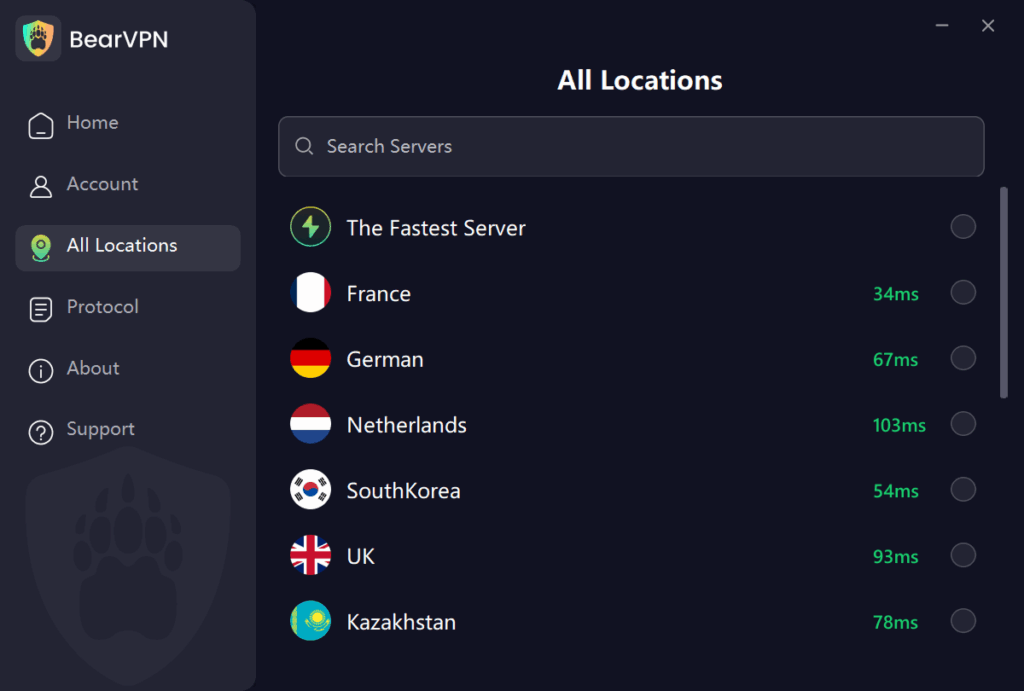
Connect to a nearby server location where xHamster is legally available. A geographically closer server will usually offer lower latency than a distant one. If the first server does not work, try another available location and reload the official xHamster website.
Step 3. Choose the Ultimate Privacy Protocol:
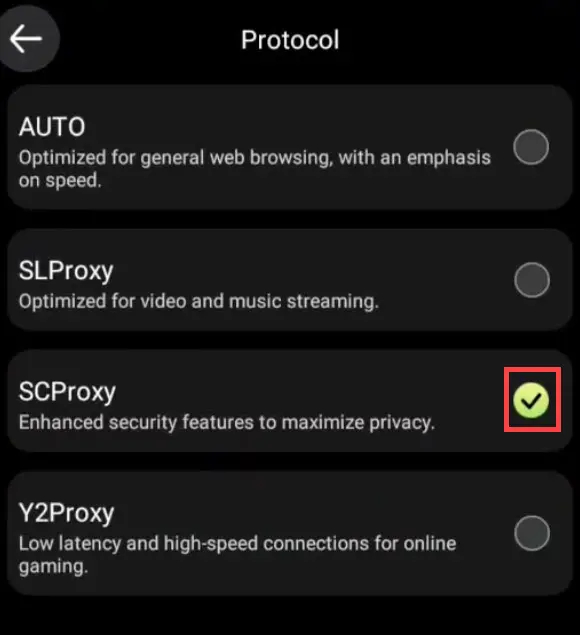
Don’t just use default settings for adult sites. Regular VPN protocols can sometimes be detected by strict ISP firewalls.
Open BearVPN and go to the Protocol menu. If the current network interferes with ordinary VPN connections, try SCProxy, which is designed for stronger obfuscation. If the network is not blocking VPN traffic, SLProxy may be a suitable alternative for streaming. Neither protocol can guarantee access or buffer-free video on every network.
Step 4. Activate the Kill Switch(iOS/Android):
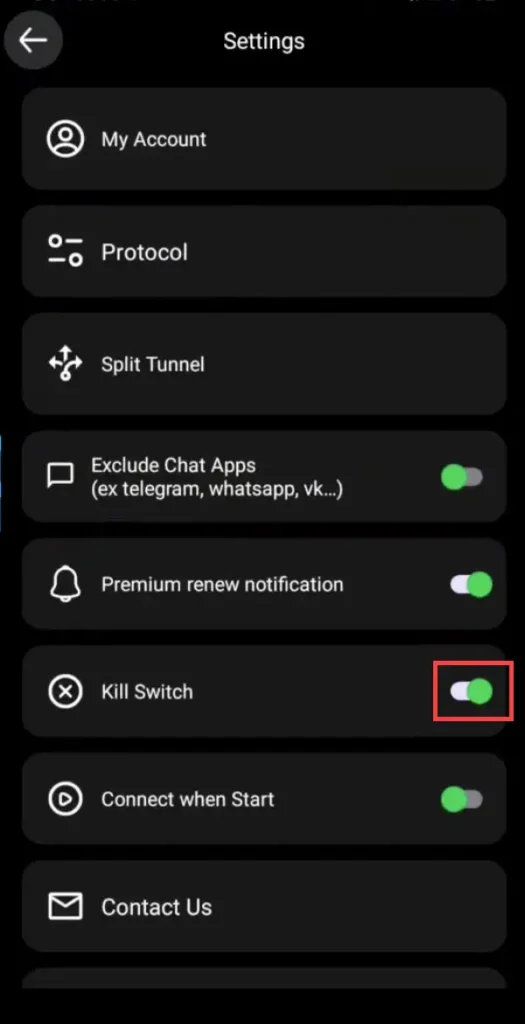
On Android or iOS, open BearVPN Settings and enable the Kill Switch if it is available on your device. If the VPN connection drops, the Kill Switch blocks internet access until the protected connection is restored, reducing the chance that your public IP will be exposed during reconnection.
A Kill Switch cannot erase browsing history, block cookies, prevent account-based identification, or make browsing completely anonymous.
Step 5. Launch Your Browser:
Open your browser and enter the official address: https://xhamster.com. If the site still does not load, clear its cookies, try a private window, disable conflicting extensions, confirm that BearVPN shows an active connection, and test another server.
A changed IP may resolve some regional or network blocks, but xHamster can still apply age checks, account requirements, VPN detection, or other access controls.
xHamster Still Not Working? Try These Fixes
If xHamster remains blocked after you connect, work through these checks in order:
- Confirm the official address. Type https://xhamster.com directly instead of using an alternative link, mirror, or old bookmark.
- Compare Wi-Fi with mobile data. If the site works on mobile data, your Wi-Fi network, router, DNS provider, or administrator is probably applying the restriction.
- Clear xHamster cookies and cache. Old location data, broken cookies, or a failed age-check session may continue to trigger an error after your IP changes.
- Try a private browser window. This provides a quick way to test whether stored cookies or an extension are causing the problem.
- Disable conflicting extensions. Ad blockers, script blockers, antivirus browser extensions, and another VPN extension can prevent the video player or verification page from loading.
- Change the VPN server. The current server may be congested or its IP may be blocked. Disconnect, select another nearby location, and reload the page.
- Check DNS and IP protection. Confirm that the VPN is connected before opening the site. If the browser continues using old DNS information, restart it or flush the device’s DNS cache.
- Check whether xHamster itself is unavailable. If the site fails across several networks, browsers, and server locations, the problem may be on xHamster’s side rather than yours.
BearVPN protects the full supported connection and masks your public IP instead of gambling on another exposed proxy tab, DNS-only fix, or lookalike mirror.

How to Unblock xHamster Without a VPN (Alternative Solutions)
If using a VPN isn’t your preference, or you’re seeking quick workarounds, these alternative methods can help you access xHamster. Be mindful, however, that they often provide less security or slower speeds compared to a dedicated VPN service.
Method 2. Utilize the Tor Browser for Anonymous Browse
The Tor (The Onion Router) browser is a free, open-source web browser engineered for profound anonymous Browse. It directs your internet traffic through a global network of volunteer-operated relays, encrypting your data multiple times.
This multi-layered “onion routing” makes it exceptionally difficult to trace your online activity, making it a powerful tool for bypassing internet censorship and accessing blocked websites like xHamster.
How it works:
Your internet request bounces through at least three randomly chosen relays (nodes) worldwide. Each relay decrypts one layer of encryption before passing the data to the next, finally reaching the xHamster website. This process provides substantial online privacy.
- Pros: Delivers a very high degree of anonymity and robust encryption, highly effective against most forms of censorship and xHamster blocks.
- Cons (The Dealbreakers): Tor routes your traffic through three random global nodes. It’s great for sending anonymous emails, but if you plan to stream 1080p or 4K videos on xHamster? Prepare for endless buffering and a severely frustrating experience. For buffer-free streaming, you need a dedicated VPN equipped with speed-optimized protocols like BearVPN’s SLProxy.
How to Use:
- Download the Tor Browser from its official website (www.torproject.org). Avoid unofficial sources.
- Install the browser bundle on your Windows, macOS, Linux, or Android device.
- Launch Tor Browser. It will automatically connect to the Tor network (this may take a few moments).
- Once connected, simply type xhamster.com into the address bar.
Method 3. Change Your DNS Settings (for Basic Blocks)
In some instances, your Internet Service Provider (ISP) might block access to websites like xHamster by filtering through their Domain Name System (DNS) servers. By configuring your device to use a public, uncensored DNS server, you can potentially unblock xHamster by bypassing these basic DNS-level restrictions.
How it works:
Your device uses DNS to translate website names (like xhamster.com) into numerical IP addresses. If your ISP’s DNS is configured to block certain domains, switching to an open DNS server means you’re using an alternative “address book” that doesn’t have these restrictions, allowing you to reach xHamster.
- Pros: Can sometimes improve general internet Browse speed, it’s completely free, and relatively straightforward to set up.
- Cons: This method does not encrypt your traffic or hide your IP address from your ISP. It is ineffective against more advanced forms of censorship, such as national firewalls or deep packet inspection. It solely addresses DNS-level xHamster blocks.
- Recommended Public DNS Servers (Choose one pair):
Google Public DNS: Primary: 8.8.8.8, Secondary: 8.8.4.4
Cloudflare DNS: Primary: 1.1.1.1, Secondary: 1.0.0.1
Simplified Steps to Change Your DNS:
Windows 11/10:
- Search for “Network Connections” or “Network Status” in the Windows search bar and open the relevant setting.
- Locate your active internet connection (e.g., “Wi-Fi” or “Ethernet”).
- Right-click on it and select “Properties.”
- Find “Internet Protocol Version 4 (TCP/IPv4)” and double-click it (or select and click “Properties”).
- Choose the option “Use the following DNS server addresses” and input the two numbers from your chosen public DNS pair.
- Click “OK” to apply and save the changes.
Mac:
- Open System Settings (from the Apple menu).
- Click on Network in the sidebar.
- Select your active internet connection (e.g., Wi-Fi or Ethernet).
- Click the “Details…” button (or “Advanced…”) and then navigate to the DNS tab.
- Use the + button to add the two DNS numbers you selected.
- Click “OK” or “Apply” to save.
Phone/Tablet (Android/iPhone):
- Go to your device’s Settings app.
- Tap on Wi-Fi.
- Tap the information icon (i) next to your connected Wi-Fi network (iPhone) or press and hold (Android) and then select “Modify network” or “Manage network settings.”
- Look for “DNS” settings (you might need to change “IP Settings” to “Static” or “Manual” first).
- Enter the two chosen DNS numbers into the respective fields.
- Save your changes.
Changing DNS may dodge a basic resolver block, but it leaves your real public IP exposed and does not create a full encrypted tunnel. If you want to stop relying on a DNS-only workaround, use BearVPN to encrypt supported traffic and replace the public IP seen by xHamster.
Method 4. Use Browsers with Built-in Proxy/VPN Features
Some web browsers come equipped with integrated privacy features that can directly help bypass xHamster restrictions, offering a convenient way to access xHamster.
- Opera Browser: Opera’s built-in “VPN” is technically just a basic browser proxy. It only protects traffic within that specific browser window and is notorious for WebRTC IP leaks. It will not secure your other applications, downloads, or hide your traffic from deep packet inspection.
- Brave Browser: Brave offers a “Private Window with Tor” option. This feature allows you to route your Browser through the Tor network directly from the browser window, providing a layer of anonymity that can assist in bypassing xHamster blocks. While convenient, for maximum anonymity, the dedicated Tor Browser is generally recommended over Brave’s integration.
Where Is xHamster Restricted in 2026?
xHamster’s availability can change as laws, court decisions, ISP policies, and the platform’s own compliance measures evolve.
- United Kingdom: Since July 25, 2025, services that allow pornography have been required to implement highly effective age assurance for UK users. Depending on the service and access method, users may encounter an age check or another access restriction.
- United States: There is no single nationwide xHamster ban. Instead, multiple states have enacted age-verification requirements for websites containing material considered harmful to minors. The resulting experience can vary by state and website.
- Filtered networks and countries: Adult domains may also be blocked by national filtering systems, ISPs, employers, schools, hotels, public Wi-Fi providers, parental controls, or security software.
Because these rules change frequently, check current local law and xHamster’s official notices before attempting to access the site. This information was reviewed in September 2026 and is provided for general information, not legal advice.
Conclusion
If xHamster is blocked by the ISP, network, DNS route, or visible IP location, stop wasting time on exposed proxy pages and half-fixes. BearVPN gives you the stronger route: encrypted supported traffic, a different public IP, obfuscated connection options, and protection beyond a single browser tab.
Tor, public DNS, and web proxies may help in narrower situations, but each leaves a major weakness—speed, encryption, device coverage, or trust in the proxy operator. When you want one protected connection instead of another workaround, use BearVPN.
Ready to leave exposed proxies behind? Open the official xHamster domain through BearVPN.
This guide is for educational purposes only. xHamster is an adult website restricted to users of legal age. We do not endorse accessing illegal content. Always verify your local laws regarding adult content and network usage before proceeding.
FAQ
The official domain is https://xhamster.com. Type the address directly or use a trusted bookmark. Be cautious with “xHamster alternative link” and mirror pages because similar-looking domains may be unofficial, contain aggressive advertising, or attempt to collect personal information.
This normally indicates that the domain is blocked by an ISP, router, workplace, school, parental-control service, filtered DNS provider, or another network policy. Test the official link on mobile data. If it works there but not on Wi-Fi, the restriction is probably being applied by the Wi-Fi network.
Your ISP can usually see that your device is connected to a VPN and can observe connection timing and data volume. When the VPN is working correctly, it generally cannot read the destination domains or content carried inside the encrypted tunnel. A VPN does not hide activity from xHamster, your account, cookies, or the VPN provider itself.
A VPN changes your public IP address, but it is not proof of age and does not guarantee that xHamster will remove an age check. Websites may use additional location, account, payment, or verification signals. Only adults who are legally permitted to access the service should proceed, using the site’s official verification process where required.
Possibly. Public DNS may resolve a basic DNS block, while Tor or a web proxy may work against some browser-level restrictions. DNS does not hide your IP or encrypt all traffic, web proxies may log activity or fail to load video, and Tor is often slow for streaming. None of these methods guarantees access.
The selected server IP may be blocked or congested, old cookies may retain location information, or a browser extension may interfere with the site. Try another server, clear xHamster cookies, open a private window, disable conflicting extensions, and confirm that the VPN is connected before reopening the site.
BearVPN can protect supported traffic on Android and iOS and can be used without signing in. The free mobile experience includes ads and one available route; paid access unlocks server selection and additional features. BearVPN cannot guarantee xHamster availability or override legally required age checks.
A proxy operator may be able to observe requested pages and connection information. Some free proxies inject advertisements, redirect users, break video players, or protect only traffic inside one browser tab. Avoid entering passwords, payment information, or identifying data through an unknown proxy.
Yes. The existing BearVPN guide to sites like xHamster can help adult users compare other platforms. Availability, content rules, privacy practices, and age requirements differ, so use only official domains and review each service’s current terms before visiting.