No—Crunchyroll does not officially offer its streaming service in Japan as of September 2026. If you open Crunchyroll from a Japanese IP address, the service or individual videos may be unavailable even when your subscription worked normally in another country.
Crunchyroll is not “banned” by the Japanese government. Its availability is determined by regional distribution and licensing rights. That distinction matters: a regional restriction requires a different response from an app outage, account problem, or unstable internet connection.
If you are temporarily visiting Japan, changing your IP address to a region where your subscription normally works may restore access. BearVPN can mask your Japanese IP and connect you through another server location. However, Crunchyroll does not officially support VPN access, can restrict VPN-associated IP addresses, and may change its detection methods without notice.
This guide explains how to identify the real cause, try the appropriate fixes, and troubleshoot Crunchyroll if it still does not work with a VPN.
This guide is for general informational purposes. Follow applicable laws and Crunchyroll’s terms and content-licensing restrictions. VPN access and streaming availability are not guaranteed.
Is Crunchyroll Available in Japan—or Is It Banned?
Crunchyroll is not officially available in Japan, but calling it “banned” is misleading. Japan’s government has not prohibited the platform. Instead, Crunchyroll limits streaming availability by region.
Crunchyroll’s own Help Center gives a direct answer: the service is currently unavailable in Japan. Its separate regional-availability guidance explains that streaming rights differ by country because each title is licensed for specific territories.
That creates three different situations users often describe as “Crunchyroll not working”:
1. Crunchyroll’s Streaming Service Is Not Offered in Japan
Crunchyroll distributes anime primarily to audiences outside Japan. The rights it holds for a show in the United States, United Kingdom, or another country do not automatically include streaming rights inside Japan.
This is why a paid account that works abroad may show limited content or fail to play videos after the user arrives in Japan. It does not necessarily mean the account is damaged or suspended.
2. Crunchyroll May Restrict VPN-Associated IP Addresses
A VPN replaces your Japanese IP address with the address of the selected VPN server. However, streaming services can restrict IP addresses associated with VPN or proxy traffic.
Crunchyroll states that using a VPN to access content not licensed in your region is not supported. If a particular server has been restricted, Crunchyroll may display a regional message, a connection error, or a limited catalog.
3. Some Failures Are Ordinary App or Network Problems
Not every Crunchyroll error in Japan is caused by regional availability. Outdated apps, corrupted cache data, browser extensions, unstable Wi-Fi, DNS problems, or a temporary service issue can also prevent playback.
If Crunchyroll fails both with and without a VPN, or fails on only one device, troubleshoot the app and connection before assuming the problem is a regional block.
Is It Legal to Use a VPN for Crunchyroll in Japan?

VPN use is generally permitted in Japan, but a VPN does not make otherwise unlawful activity legal. This is general information rather than legal advice, and users should follow applicable Japanese law.
Platform rules are a separate issue. Crunchyroll states that using a VPN to access content that is not licensed in your region is not supported. It also warns that VPN connections can cause playback problems, login errors, or limited access.
That means:
- Using VPN software in Japan is not the same as breaking a Japanese VPN ban.
- Crunchyroll can still enforce its own regional restrictions and service rules.
- A working server today may stop working later.
- Users should not assume that a VPN guarantees access or protects an account from platform enforcement.
If your priority is full compliance with Crunchyroll’s supported access methods, follow its regional-availability guidance or contact Crunchyroll Support.
How to Try Crunchyroll in Japan with BearVPN
If you normally use Crunchyroll in a supported country and are temporarily in Japan, BearVPN can change the IP address visible to websites and apps. Crunchyroll does not officially support this method, so access is not guaranteed.
Step 1. Install BearVPN Before Opening Crunchyroll
Download BearVPN on the device you use for streaming. Sign in if required, then close every open Crunchyroll browser tab or fully force-close the Crunchyroll app.
Starting with Crunchyroll closed prevents an older browsing session from interfering with the new connection.
Step 2. Connect Outside Japan
Open BearVPN and connect to a server in the country where you normally use your Crunchyroll subscription. Do not select a Japanese server, because it will still give you a Japanese IP address.
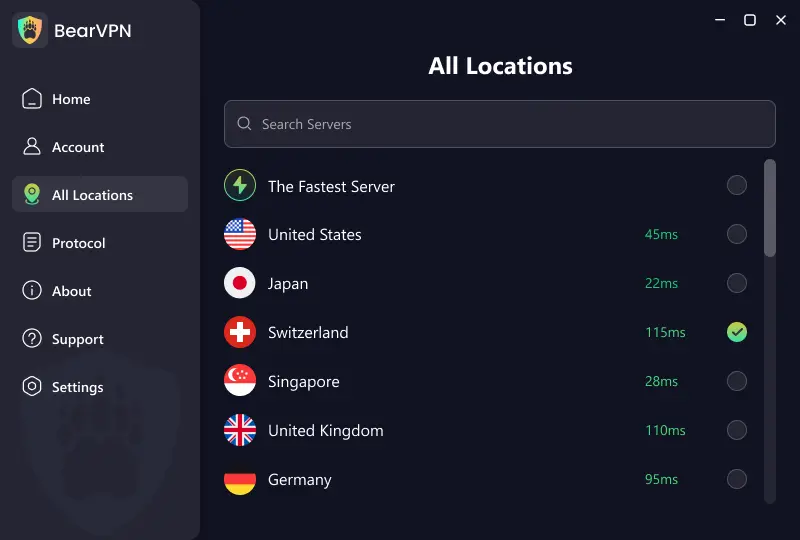
For users whose home subscription is based in the United States, a US server is the logical first choice. A geographically closer server may offer better performance, but the fastest option depends on congestion, routing, your ISP, and the specific server.
Step 3. Confirm That Your IP Address Changed
Before reopening Crunchyroll, use BearVPN’s What Is My IP tool to check the detected country.
If the result still shows Japan:
- Disconnect and reconnect BearVPN.
- Select a different server outside Japan.
- Check the IP address again.
- Do not continue until the detected country matches the server location.
Step 4. Start a Fresh Crunchyroll Session
On a desktop browser, first try Crunchyroll in a private or incognito window. If that works, clear Crunchyroll’s cookies and site data in your normal browser.
On Android, force-close the app and clear its cache if necessary. On iPhone or iPad, close and reopen the app; reinstall it only if the problem continues.
Then sign in and test one video. Catalogs, subtitles, dubs, and individual titles can differ by region.
Step 5. Keep BearVPN Connected
Keep the same VPN connection active while browsing and playing the video. Changing IP addresses during a session can interrupt playback or trigger another regional check.
If Crunchyroll detects or restricts the selected VPN IP, switch to another BearVPN server and start a fresh Crunchyroll session. BearVPN provides 2,000+ servers across 50+ locations, giving you other connection options when one route is unavailable.
Step 6. Improve Playback Performance
If Crunchyroll opens but playback buffers:
- Switch to another server in the same country.
- Test a nearby supported country if your account and desired title are available there.
- Use Ethernet or a stable 5 GHz/6 GHz Wi-Fi connection.
- Pause large downloads and other high-bandwidth activity.
- Lower Crunchyroll’s video quality temporarily.
- Restart the app, device, and router if buffering affects other services too.
Encryption and longer routes can affect speed, but there is no universal percentage loss. Actual performance depends on the server, distance, ISP, network congestion, device, and video quality.
Crunchyroll Not Working in Japan Even with a VPN?
If Crunchyroll still does not work after connecting BearVPN, use the symptom—not an assumption—to choose the next fix.
1. Verify the VPN Connection
Use an IP-checking tool and confirm that the detected country is not Japan. If it is, reconnect BearVPN before doing anything else.
2. Switch to Another BearVPN Server
A VPN can be connected correctly while its current IP is still restricted by Crunchyroll. Switch servers within the same country, then close and reopen Crunchyroll.
3. Test Crunchyroll Without the VPN
Temporarily disconnect the VPN and reopen Crunchyroll.
- If the site loads without the VPN but not with it, the VPN server is probably the issue.
- If it fails both ways, troubleshoot the Crunchyroll app, browser, or network.
- If it works on another device, focus on the original device rather than repeatedly changing servers.
Remember that normal access without a VPN may still be unavailable from Japan.
4. Refresh the Browser or App
Crunchyroll’s official troubleshooting guidance recommends refreshing the app, clearing cache and cookies, testing another browser or device, reinstalling the app, and checking the internet connection.
For browsers:
- Close all Crunchyroll tabs.
- Open an incognito or private window.
- Temporarily disable ad blockers or script-blocking extensions.
- Clear Crunchyroll cookies and cache if private mode works.
For mobile apps:
- Force-close Crunchyroll.
- Update the app and operating system.
- Restart the device.
- Clear the app cache on Android or reinstall the app if necessary.
5. Check the Network and Crunchyroll Service
Try another Wi-Fi network or mobile data. Restart the router if other video services are also slow. If Crunchyroll fails on multiple devices and networks, check its service status or contact Crunchyroll Support with the error message, device, country, and troubleshooting steps already attempted.
FAQs About Crunchyroll in Japan
Crunchyroll’s Help Center states that its streaming service is not currently available in Japan. A user visiting Japan may therefore find that the site, app, catalog, or individual videos no longer work as they did at home. This is a regional availability restriction rather than proof of an account problem.
No evidence indicates that the Japanese government has banned Crunchyroll. The more accurate explanation is that Crunchyroll does not officially provide its streaming service in Japan. Its content rights and availability vary by country.
A VPN can replace a Japanese IP address with one from another location, which may help travelers reach the version of Crunchyroll they normally use. However, Crunchyroll does not officially support VPN access to region-restricted content and may restrict VPN-associated IPs. Availability is not guaranteed.
The VPN may still be showing a Japanese IP, the selected server IP may have been restricted, or an existing browser/app session may need to be refreshed. Confirm the detected country, change servers, and try a new private browser session. If Crunchyroll also fails without the VPN, troubleshoot the app or network.
That usually points to a device-specific issue rather than a Japan-wide restriction. Update the affected app or browser, clear its cache, disable interfering extensions, restart the device, and test the same network again.
Do not assume an account is protected from enforcement. Crunchyroll does not officially support using a VPN to access content unavailable in the user’s region. Its policies and enforcement methods can change, so users should review the current terms and regional guidance before proceeding.
A paid BearVPN account supports up to 10 simultaneous device connections. Actual Crunchyroll playback still depends on the device, selected server, network quality, regional availability, and Crunchyroll’s own controls.
Conclusion
Crunchyroll is not officially available in Japan, but it is more accurate to call this a regional availability restriction than a government ban.
If you are visiting Japan and want to access the Crunchyroll subscription you normally use abroad, BearVPN can change your visible IP address to another server location. Connect before opening Crunchyroll, verify the detected country, and start a fresh browser or app session.
If Crunchyroll still does not work, switch servers and determine whether the failure comes from the VPN, the app, or the network. No VPN can guarantee permanent access because Crunchyroll controls its regional licensing and can restrict VPN-associated IP addresses at any time.





![How to Watch Bigg Boss in the USA on JioHotstar [2026 Guide]](/_next/image/?url=https%3A%2F%2Fcms.bearvpn.com%2Fwp-content%2Fuploads%2F2025%2F03%2Fwatch-bigg-boss-in-the-usa-featured-image.jpg&w=640&q=75)