Can adults bypass SpankBang age verification with a VPN? Sometimes—but only when the restriction is triggered by the location associated with your public IP address. A VPN can make SpankBang see a different IP location, but it cannot change your age, remove every type of verification, or guarantee that the site will accept a particular VPN server.
If SpankBang is still not working even with a VPN, the cause may be an old location cookie, a DNS or IPv6 leak, a VPN IP address that the site has blocked, a browser extension conflict, or a temporary problem with SpankBang itself. Switching servers without checking these possibilities often leaves users stuck in the same verification loop.
This guide explains why SpankBang may request age verification, what information a VPN does and does not conceal, and how adults can troubleshoot legitimate privacy and access problems without uploading documents to an unverified page.
This guide is for informational purposes only and is intended only for adults who have reached the legal age required to view adult content in their location. BearVPN can help keep the connection private and secure, but it does not override local law, SpankBang’s terms, or age requirements. Laws, site availability, and verification methods can change. Always follow the rules that apply in your region.
BearVPN changes the public IP and encrypts the connection. It may help with location-based prompts, but it cannot remove account- or identity-based verification.

Why Is SpankBang Asking for Age Verification?
SpankBang may request age assurance because websites that provide adult content face different legal duties in different jurisdictions. The exact result can vary: a visitor may see an age-estimation option, another verification method, restricted video playback, or a regional availability message.
For example, the UK’s Online Safety Act requires pornography services to use highly effective age assurance. Ofcom reported in July 2026 that 64 of the 100 most popular pornography services in the UK had deployed age checks, while another 10 restricted UK access. France’s regulator, Arcom, can also sanction, block, or delist noncompliant pornography services. Several US states have adopted their own age-verification requirements, although their wording, effective dates, enforcement, and court history differ.
That does not mean every law produces the same SpankBang screen. Site policies, verification providers, VPN detection, and regional rollouts can change independently.
Where Does SpankBang Require Age Verification?
SpankBang does not provide a dependable public page listing every country and US state in which each verification method appears. For that reason, a fixed “SpankBang blocked states” or “no-verification countries” list can become inaccurate quickly.
As of September 2026, users are most likely to encounter additional checks in jurisdictions that actively require strong age assurance for pornography services, including the UK and parts of the United States and Europe. However, the prompt shown to an individual visitor is the more reliable indicator of SpankBang’s current treatment of that IP location.
A VPN changes the IP location presented to a website. It does not prove that you are an adult, and location may not be the only signal used by the site. Cookies, browser data, account status, DNS requests, and known VPN IP ranges may also affect what appears.
Before submitting a selfie, ID, card, or other personal information, confirm which company is processing it, what data it collects, how long it retains the data, and whether another approved verification option is available.
Related article: Is SpankBang Safe and Legal
How Does SpankBang Age Verification Work?

The verification method you see can depend on your location and on the age-assurance provider SpankBang is using at that time. Do not assume that every visitor goes through the same process.
Age-assurance systems used across adult websites may include:
- Facial age estimation: Software analyzes a live camera image to estimate whether a person is above a required age threshold.
- Photo ID verification: The provider checks information from a passport, driving licence, or another accepted identity document.
- Payment-card or mobile-provider checks: Eligibility may be inferred through an approved financial or mobile account, depending on the country and provider.
- Reusable age credentials: A third party confirms an age attribute and returns an over-18 result without necessarily giving the website a full identity document.
- Regional restriction: Instead of offering verification, a site may limit access from a particular IP location.
Some facial-estimation systems use liveness checks to distinguish a live person from a static image. However, the exact movements, data collected, retention period, fallback method, and company processing the check must be taken from the notice displayed during the current SpankBang verification flow. They should not be inferred from another website’s system.
If a legitimate adult fails a camera-based check, better lighting, an unobstructed camera, updated browser permissions, or another verification option offered on the page may help. Do not upload an ID or selfie unless you have confirmed that the page is genuine and reviewed the processor’s privacy and retention terms.
Important: A VPN operates at the network level. It can change the IP address and approximate location seen by SpankBang, but it cannot alter the result of a facial estimate or an ID check that has already been tied to an account or browser session.
What Are the Privacy Risks of SpankBang Age Verification?
The privacy risk depends on which verification method appears and which company processes it. A simple over-18 confirmation is very different from submitting a live facial image, government ID, payment card, or mobile account information.
Before completing an age check, review these points:
- Who receives the data? Check whether SpankBang processes the information directly or sends you to an age-assurance provider.
- What is collected? Facial age estimation, identity verification, and reusable age credentials can involve different amounts of personal data.
- What is retained? Look for an explanation of whether the original image or document is deleted, retained, or converted into another identifier.
- What result is returned? A privacy-preserving service may return only an age result, while another process may collect additional identity information.
- Can you choose another method? If several approved options are offered, compare them before sending sensitive information.
A VPN can reduce one part of the exposure by hiding your home IP address from the destination site and encrypting traffic between your device and the VPN server. It does not hide information you voluntarily enter or upload. If you submit an ID, selfie, email address, or payment detail, the recipient can still process that data regardless of whether a VPN is active.
For adults concerned about privacy, the safest first step is to confirm that the verification page is genuine and read the current provider’s privacy and retention terms. Do not upload identity documents through pop-ups, cloned domains, or pages whose operator cannot be verified.

How Can Adults Access SpankBang Without Repeated Verification Prompts?
If SpankBang’s age prompt is triggered only by the location associated with your IP address, connecting through a VPN may change the version of the site you receive. It will not remove a verification requirement that is tied to your account, and SpankBang may recognize or restrict some VPN IP addresses.
Do not try to fool a facial check with another person’s photo, a prerecorded video, fake identification, or fabricated personal information. These methods may violate the site’s rules or local law and can expose you to malicious tools that claim to bypass the verification page.
For adults who are legally permitted to access the site, BearVPN offers a more private way to change the public IP address SpankBang sees. Follow these steps before deciding whether you need to provide information to an age-assurance service.
How to Use BearVPN with SpankBang
- Install BearVPN from the official source
Download BearVPN on Windows, macOS, Android, or iOS. Avoid modified APKs, cracked VPN clients, and unofficial browser extensions; they can expose the same browsing data you are trying to protect.
2. Connect before opening SpankBang
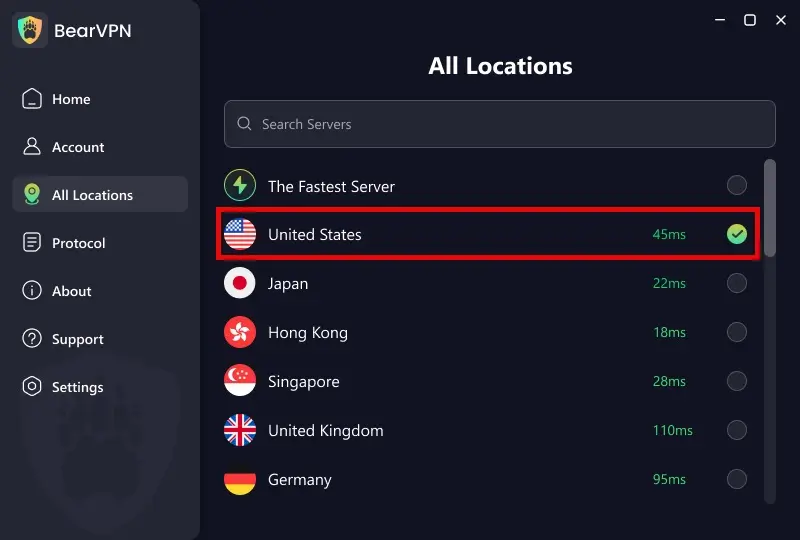
Close existing SpankBang tabs, open BearVPN, and connect to a location where the site is available and where you are legally permitted to view adult content. A geographically closer eligible location will usually provide a better connection than a distant server, although speed and availability are not guaranteed. Once connected, BearVPN replaces your public IP address with the VPN server’s IP. It does not make you anonymous to accounts you sign in to or information you submit.
3. Remove old SpankBang site data
Delete cookies and site data for SpankBang instead of clearing your entire browser history. Alternatively, open a new private-browsing window after establishing the VPN connection. Cookies do not reveal your current IP address by themselves, but they may preserve an earlier session, region selection, consent state, or verification status.
4. Check the connection before reloading
Confirm that your visible IP location has changed. If your browser or device still exposes your original DNS or IPv6 route, disconnect and enable BearVPN’s leak-protection settings before continuing.
Open SpankBang in a fresh tab Reload the site only after the VPN connection and browser session are ready. If the prompt disappears, the restriction was probably linked to the previous IP location or session. If it remains, do not assume the VPN has failed—continue with the troubleshooting checks below.
BearVPN can change your IP location and protect the network connection, but it cannot guarantee access, override local age rules, or remove every verification method used by SpankBang.
SpankBang Not Working Even with a VPN? Try These Fixes
If SpankBang still requests verification, refuses to play videos, or shows a regional error after you connect, work through the following checks in order. The VPN may be active while the browser continues using an old session or another network route.
1. Change the BearVPN server
A single VPN server can stop working even when the rest of the network remains available. Websites may restrict an IP after receiving unusually high traffic from it. Disconnect, choose another server in an eligible location, and open SpankBang in a fresh browser session.
2. Clear only SpankBang cookies and storage
Deleting all browser data is usually unnecessary. Open the browser’s site-data settings, search for SpankBang, remove its stored cookies and local data, and restart the browser after connecting to BearVPN.
3. Check for DNS or IPv6 exposure
A VPN icon alone does not prove that every network request is using the tunnel. Compare the IP and DNS locations shown by a reputable leak-checking tool. If they point to your normal ISP or location, reconnect BearVPN, enable DNS/IP leak protection, and test again.
4. Block browser location access
A website can request precise browser or device location independently of your IP address. Deny location permission unless it is genuinely required. Changing a VPN server does not override GPS or location permission that you have already granted.
5. Switch BearVPN connection modes
Some networks interfere with particular VPN protocols or recognize common VPN traffic patterns. If the connection is unstable, try another BearVPN mode available on your device. BearVPN supports SLProxy and SCProxy on Windows and macOS, while Android and iOS also support Y2Proxy.
6. Test without conflicting extensions
Privacy extensions, aggressive script blockers, antivirus web shields, or another VPN extension can prevent the page from loading correctly. Test a clean browser profile or private window first. Only disable an extension temporarily and only after confirming that the page is legitimate.
7. Determine whether SpankBang is down
A VPN cannot repair a SpankBang server outage. If the homepage, search, or video player fails across different BearVPN servers, browsers, and networks, stop repeatedly changing settings and check again later.
If none of these fixes changes the result, SpankBang may be enforcing verification at the account level or restricting the VPN IP ranges available at that time. BearVPN cannot guarantee that every server will work with every version of the site.
Why Use BearVPN for Private SpankBang Access?
The wrong VPN server can leave you trapped on the same verification page or expose your normal IP when the connection drops. BearVPN gives adults several practical tools for changing IP locations and keeping the browsing connection private:

- 2,000+ servers across 50+ locations: If one IP is restricted or overloaded, you can switch servers instead of remaining stuck on the same connection. Availability still depends on the selected location and SpankBang’s current controls.
- AES-256 encryption: BearVPN encrypts traffic between your device and the VPN server. This helps prevent an ISP or the administrator of the local network from directly reading the contents of the encrypted connection, although the VPN cannot hide activity from an account you sign in to.
- IP masking and DNS/IP leak protection: SpankBang may determine location from network signals. BearVPN replaces your public IP and helps prevent DNS or IP exposure that could reveal the original network location.
- Kill Switch: If the VPN disconnects unexpectedly, Kill Switch can stop internet traffic instead of allowing the browser to fall back to the normal connection. This reduces accidental exposure of the home IP.
- Strong obfuscation and multiple connection modes: If a network interferes with ordinary VPN traffic, another BearVPN mode may establish a more stable connection. Results depend on the network and the website’s current controls.
- Split Tunneling: On Windows and macOS, BearVPN can route selected apps or domains through the VPN. On mobile, users can apply Split Tunneling by app. This lets you send the relevant browser or app through BearVPN while other traffic uses the normal connection.
- RAM-only, bare-metal infrastructure and no-logs positioning: These privacy-focused design choices reduce unnecessary exposure compared with unknown free proxies or modified VPN applications.
BearVPN cannot verify your age, guarantee that every server will open SpankBang, or protect personal information that you submit directly. Its role is to change your IP location, encrypt the connection, and give you more control over which traffic uses the VPN.
- Change the public IP SpankBang sees.
- Block DNS and IP leaks from exposing your location.
- Use Kill Switch if the VPN connection drops.
Can You Access SpankBang Without a VPN?
Other tools may change part of the browsing session, but they are not equivalent to a full-device VPN. Some also introduce greater privacy or security risks.
For most adults who want both an IP change and connection encryption, a reputable VPN is the more complete option. BearVPN protects more of the device’s traffic than Incognito mode, Smart DNS, or a basic web proxy, but access still depends on local rules and SpankBang’s current controls.
Final Thoughts
SpankBang age verification does not work the same way for every visitor. The result can depend on local rules, the IP location detected by the site, stored browser data, the selected verification provider, and whether the VPN IP has already been restricted.
For eligible adults, BearVPN can replace the public IP address, encrypt the connection, and reduce DNS/IP exposure. If SpankBang is not working even with the VPN connected, clear the site’s stored data, test another BearVPN server, check for leaks, review browser location permissions, and rule out a site outage before submitting sensitive information.
A VPN does not change your age or override the law. If you are eligible to access SpankBang, download BearVPN, connect before opening the site, and keep Kill Switch and leak protection enabled while you browse.
FAQ
VPN use is legal in many jurisdictions, but local laws, network rules, and SpankBang’s terms can differ. A VPN does not make underage access lawful or cancel an age requirement. Only adults who are legally permitted to view the content should proceed, and they remain responsible for following the rules that apply where they are located.
The prompt may be tied to your account, browser session, age-assurance method, detected IP region, a restricted VPN server, or exposed DNS/IPv6 information. Close existing SpankBang tabs, clear only the site’s stored data, reconnect to another eligible BearVPN server, check for leaks, and reopen the site in a private window. If the same identity check remains, changing IP addresses may not remove it.
The United Kingdom (via the Online Safety Act), Germany, Italy, and France have some of the most aggressive age-assurance mandates in Europe. Furthermore, multiple Middle Eastern regions block access to explicit domains entirely, making an encrypted tool like BearVPN a necessity for open access.
SpankBang may be restricting the IP region it detects because of local rules, platform policy, licensing, or its current compliance approach. Eligible adults can connect BearVPN to a location where access is permitted and reload the site in a fresh session. This may change an IP-based regional result, but it cannot guarantee access or override account-level and identity-based checks.
Do not try to spoof an age-estimation or identity check with another person’s photo, prerecorded video, fake document, or fabricated information. The current provider may use liveness and fraud-detection controls, and attempted evasion can violate the site’s rules or local law. If a legitimate adult fails the check, use another official option offered on the page or contact the provider’s support.