![How to Get Unbanned from Grindr [2026 Guide]](/_next/image/?url=https%3A%2F%2Fcms.bearvpn.com%2Fwp-content%2Fuploads%2F2025%2F12%2Fhow-to-get-unbanned-from-grindr.webp&w=3840&q=75)
Online social networking makes it convenient for people to meet new friends or have dates. Among multiple apps, Grindr remains one of the world’s most popular location-based ones for the LGBTQ+ community. For many, it is more than just a dating app; it is a vital tool for connection, community building, and travel partners. However, losing access to this platform due to a soft or permanent ban can be abrupt and frustrating. In recent years, Grindr has significantly tightened its security protocols, utilizing advanced AI moderation and stricter community guidelines to crack down on policy violations.
While these measures are designed to keep the community safe from spam, bots, and harassment, they often result in false positives, where innocent users find themselves being banned from Grindr without a clear explanation. Whether you are facing a temporary suspension or a permanent ban, the experience is isolating.
This guide aims to help you have a full understanding of Grindr bans in 2026. We will analyze the specific reasons why bans occur, distinguish between the different types of restrictions, and provide you with five detailed, actionable methods to get unbanned from Grindr. Keep reading!
You may also like: Grindr not working how to fix
Why Did You Get Banned from Grindr?
The most important reason for frequent Grindr bans is that its updated algorithms flag specific behaviors more aggressively than ever before. Based on an analysis of the top search results and user reports, here are the primary reasons for bans:
1. Violation of Terms of Service (Spam and Bots)
This is the most common reason for bans. Grindr’s automated systems are hyper-sensitive to bot-like behavior, such as sending the same copy-pasted message to multiple users in a short period, or promoting third-party links too aggressively in your bio or chats. If you have these behaviors, you may be flagged as a spammer. Even genuine users trying to network can be caught in this net if their activity mimics automated scripts.
2. Underage Usage
Grindr has a strict policy for minors. The app is developed for users 18 and older only. If your profile photo, bio, or chat history suggests you are underage, or if you are reported underage by others, the moderators may permanently ban the account to comply with legal safety standards.
3. Nudity and Sexual Solicitation
While Grindr is a sex-positive platform, it must adhere to App Store and Google Play policies regarding public content. The following cases are more likely to get banned from Grindr:
- Profile Images: Explicit nudity, visible underwear, or suggestive poses in your public profile photo are grounds for immediate suspension.
- Solicitation: Selling sexual services is strictly prohibited. Keywords related to payment or transaction in chats can trigger an automatic ban.
4. Harassment and Hate Speech
Grindr prioritizes a safe environment. Reports of bullying, racism, transphobia, or fat-shaming are taken seriously. If multiple users block and report your profile for abusive language, the moderation team will review your chat logs. In 2025, AI tools can now detect hate speech patterns in real-time, leading to swifter bans.
5. Impersonation
Using photos that are not yours, whether they are of celebrities or just other private individuals, is a violation of personal rights. If you are reported for catfishing, Grindr will ban the account and the associated device to prevent the imposter from returning.
Types of Grindr Ban 2025
Generally, there are 3 types of Grindr bans according to how you break the rules. Not all bans are created equal. Identifying the level of your ban will determine which recovery method you should use.
1. The Account Ban
This is the most basic restriction of Grindr. With a banned account, your specific profile is disabled, together with the linked email or phone number. You cannot log in, but you can technically create a new account using a different email address.
- Duration: Can be temporary (24 hours to 7 days) or permanent.
2. The IP Address Ban
If Grindr detects suspicious activity coming from a specific internet connection, like a home Wi-Fi network used by a spam farm, it may block the IP address. In this case, any device connected to that Wi-Fi cannot access Grindr. You can easily bypass this ban by changing networks or using a VPN for Grindr.
3. The Device Ban (Hardware ID Ban)
Another Grindr ban is related to your commonly used device. This is the most severe type of ban for repeat offenders or serious violations. Grindr records your smartphone’s unique hardware identifiers, including the device ID, advertising ID, IMEI, or serial number. With this ban, even if you create a new email and use a new IP, the app recognizes your phone and blocks you immediately upon installation.
How to Get Unbanned from Grindr [5 Ways]
If you are banned on Grindr, don’t panic. By understanding what type your ban is, you can check the following 5 methods to restore your access, ranked from the official route to technical workarounds.
Method 1. Appeal for Your Ban
If your ban happens by mistake, or you don’t know why, the most effective way is to appeal for the ban. Here are the steps:
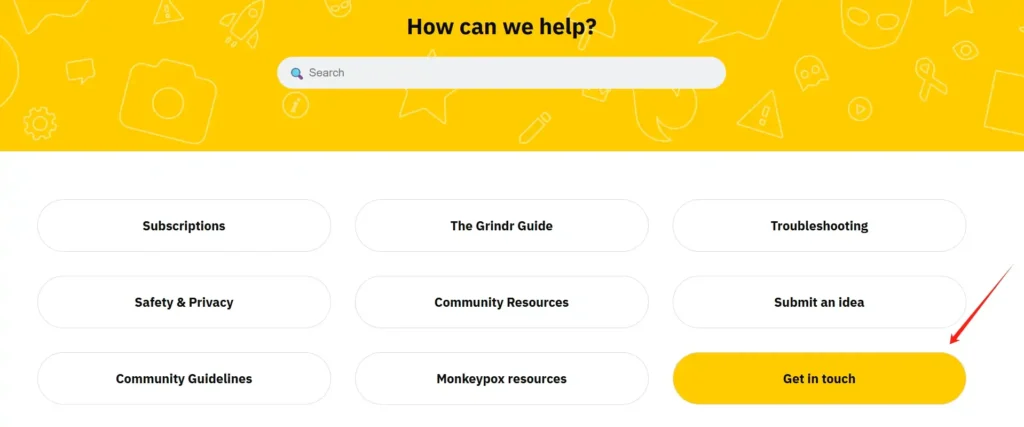
Step 1. Go to the official Grindr Help Center website. Do not reply to the “You are banned” pop-up in the app, as those messages often go unread.
Step 2. Find the Get in Touch form. Then select “I need help managing my account” as the issue type.
Step 3. Fill in the blank and submit your request.
The appeals can take 3 to 7 days. If you don’t hear back, move on to the next method.
Things to note:
- Be polite and concise. Aggression will get your appeal denied.
- State clearly that you have read the Community Guidelines and believe an error occurred.
Method 2. Use a VPN
For those who are facing an IP ban, or if you are trying to create a new account so that Grindr doesn’t link it to your normal location data, a VPN is the best choice. It encrypts your traffic and routes it through a server in a different region, providing you with a new digital identity.

BearVPN is highly recommended here if you are IP-banned from Grindr. Unlike generic VPNs that often get flagged by dating apps, BearVPN focuses on high-speed, secure connections that effectively mask your IP address without triggering Grindr’s proxy detectors.
Benefits of using BearVPN
- Strict Privacy Policy: It uses strong encryption to ensure your ISP and Grindr cannot see your true location.
- Bypass Blocks: If Grindr is banned on your local network or in your region, BearVPN allows you to tunnel through those restrictions with 2000+ servers.
- Ease of Use: It offers a simple interface that lets you switch IP addresses in seconds, which is crucial if your new IP gets flagged again.
How to get unbanned from Grindr with BearVPN
Step 1. Download and install BearVPN on your device.
Step 2. Clear the cache and data of your Grindr app if you are using an Android device. For iPhone/iPad, you can only reinstall it to clear the app data.
Step 3. Open BearVPN and connect to a server. Try a server in a nearby city for a smoother connection.

Step 4. Launch Grindr. If the ban was IP-based, you should now be able to log in or create a new account.
Method 3. Reset Your Device ID
If you got a device Ban on Grindr, you can try to reset the device ID and reuse your account. This is the hardest ban to bypass because Grindr recognizes your phone’s hardware. Here’s how:
For Android Users: Android allows you to reset your Advertising ID easily, but a full factory reset is often safer for Grindr bans.
- Reset Advertising ID: Go to Settings > Google > Ads > Reset advertising ID.
- Factory Reset: Back up your important data first. Then go to Settings > System > Reset Options > Erase all data.
Note: When setting up the phone again, do not restore from a backup that contains the Grindr app or its data. Set it up as a new device.
For iOS Users: Apple makes this harder. Apps track you via the IDFA (Identifier for Advertisers) and KeyChain data. So you may need to factory reset your iPhone and set it up with a new Apple ID to get unbanned from Grindr.
- Factory Reset: Back up your important data first. Then go to Settings > General > Transfer or Reset iPhone > Erase All Content and Settings.
- New Apple ID: When the phone restarts, it is highly recommended to sign in with a new Apple ID. If you sign in with the old Apple ID, Grindr may retrieve the old ban token from your iCloud Keychain.
Method 4. Reinstall the Grindr App
Sometimes, Grindr bans are actually caused by corrupted cache files or local glitches. Before nuking your phone with a factory reset, try a reinstall. This method is also necessary when using a VPN or creating a new account.
- Uninstall Grindr from your phone.
- Go to your File Manager and ensure the Grindr folder is gone (mainly for Android devices).
- Restart your phone. This clears the RAM and temporary system caches.
- Go to the App Store or Google Play Store and download the latest version of Grindr.
After that, you can try to log in to your Grindr account and see if it works. You can also check what to do when Grindr unable to refresh.
Method 5. Create a New Account
If your appeal was denied and your old account is permanently gone, you must start over. However, it’s not recommended to sign up with your old details directly. Grindr marks the banned email and phone number.
A better way to create a new Grindr account:
- New Email Address: Create a fresh Gmail or Outlook address specifically for this profile.
- New Phone Number: This is the most difficult part. Grindr blocks many free VOIP numbers. Use a legitimate secondary number app, a cheap prepaid SIM card, or a friend’s number to get the SMS verification code.
- New Photos: If you use the same photo that triggered a ban, the AI might flag you again. Crop your photos slightly, change the filter, or use entirely new pictures.
- Combine with VPN: Always use BearVPN during the account creation process to ensure your IP address doesn’t link you to the previously banned account. Moreover, combining a VPN with Grindr can help protect your chat privacy.
Conclusion
Getting banned from Grindr is annoying, especially when you have established a social community on it. But no worries, it’s not a dead end. Whether the ban resulted from a misunderstanding or a violation of new rules, you have options to get unbanned. Start by submitting a polite appeal if you believe it’s been banned by mistake. If not, utilizing a privacy tool like BearVPN to mask your IP, combined with a device reset and fresh credentials, is the most reliable path to unban yourself from Grindr. Always remember to adhere to the community guidelines on your account to avoid future interruptions. By following these proven methods, you can regain your access and get back to connecting safely.
FAQs About Getting Unbanned from Grindr
1. Are Grindr bans permanent?
Not all of them. Bans for minor infractions may last 7 to 30 days. However, violations regarding underage usage, illegal activity, or spam usually result in permanent device bans.
2. Why won’t Grindr let me make a new account?
When your device is banned from Grindr, you may fail to create a new account on this platform. Even with a new email, the app recognizes your phone hardware. You must reset your device or use a different phone.
3. Does Grindr track IP addresses?
Yes. Grindr tracks IP addresses to identify spam networks and enforce bans. If you connect from a flagged IP address, your new account may be suspended immediately.
4. Can you bypass the Grindr ban with VPN?
Yes, a VPN effectively bypasses IP bans. By using a service like BearVPN, you mask your digital location, allowing you to access the app if your local network is blocked.
5. Can I use a fake phone number on Grindr?
No, you should use a valid mobile number from a real carrier or a high-quality paid virtual number service for verification. Grindr will block the fake phone numbers.