


It’s common to find that when you’re browsing online, there are more ads than before. Sometimes it shows right after you have just talked about it. Why does this happen? Are you tired of targeted ads tracking you across the web? Then you should understand what anonymous browsing is in 2026. This ultimate guide walks you through comprehensive definitions, powerful tools, and overall strategies to avoid being tracked and secure your browsing online.
You may also like: How to be anonymous on Tinder
What Is Anonymous Browsing?
Anonymous browsing refers to the practice of preventing your online activities from being tracked by ISPs, websites, and hackers. During the process, you may need to use tools such as a VPN, a private browser, or an anti-tracker to conceal your personal identity, physical location, and digital footprint. When you browse the web normally, your activities leave a trail of data that third-party observers can collect and analyze to build a profile on you. Anonymous browsing aims to disrupt this data collection pipeline.
Anonymous Browsing VS. Normal Browsing
Anonymous browsing involves a combination of specialized software tools, encrypted networks, privacy-oriented browsers, and adjusted user habits to ensure your web requests cannot be traced. Whether you want to escape hyper-targeted advertisements, bypass regional censorship, or simply keep your search history strictly private, anonymous browsing is the protective shield you need.
Important Note: Achieving 100% anonymous is nearly impossible. It requires a layered approach, blending secure technology with disciplined internet habits to effectively mask who you are and what you are doing online.
Why True Online Anonymity is Hard to Achieve
Some users assume that simply opening a Private Window in the browser makes them anonymous. However, the modern web is built on data exchange, meaning tracking systems are deeply embedded in the digital ecosystem. Here are the detailed reasons why staying completely hidden is so difficult.
1. IP Tracking
Websites inherently log your unique IP address every time you visit. This numerical label is assigned to your device by your local network, acting much like a digital return address. Through IP tracking, websites can accurately pinpoint your physical location—down to your city and sometimes your specific street. Unless this IP address is intentionally masked or routed through a secondary remote server, every webpage you click knows exactly where the request originated.
2. Browser Fingerprint
Even if you manage to hide your IP address and block all tracking cookies, websites can still identify you through browser fingerprinting. This highly sophisticated technique gathers minute details about your device, such as your basic system information, browser extensions, and even your hardware’s WebGL graphics signatures. When combined, these seemingly innocent data points create a highly unique fingerprint that can identify you with startling accuracy across different websites, entirely bypassing standard cookie-blockers.
3. ISP Logging
Your Internet Service Provider is the gateway to the Internet. Because all your web traffic flows directly through their servers, your ISP can see exactly which websites you visit, when you visit them, and how long you stay on each site. Depending on the data retention laws in your country, ISPs are often legally required to log this data and can legally sell it to marketing agencies or surrender it to government authorities unless your traffic is secured by strong VPN encryption.
The Risk of Non-anonymous Browsing [Warning]
When you combine IP tracking, browser fingerprinting, and ISP logging, the risk becomes obvious. Your data is harvested, packaged, and sold to create deeply personal behavioral profiles for targeted advertising. In a worst-case scenario, this lack of privacy leaves your sensitive information exposed on unsecured public Wi-Fi networks, making your privacy highly vulnerable to identity theft, financial fraud, and cyber stalking.
How to Browse Anonymously in 2026?
To combat advanced tracking methods and protect your data, we have tested several methods and tools. Here are the most effective methods to achieve anonymous browsing today.
Method 1. Use Incognito or Private Mode in Your Browser
For basic anti-tracking browsing, the simplest step is to utilize the Private or Incognito mode built into your current web browser. When you open an incognito window, the browser creates a temporary, isolated session without logging your visit history and personal information. Once you close the window, the browser automatically deletes your local search history, cookies, and cached data from that specific session.
How to Enable Private Mode in Mainstream Browsers
Google Chrome: Click the three-dot menu in the top-right corner and select “New Incognito window,” or use the keyboard shortcut Ctrl+Shift+N (Cmd+Shift+N on Mac).
Mozilla Firefox: Click the three-line menu icon and choose “New private window,” or press Ctrl+Shift+P (Cmd+Shift+P on Mac).
Apple Safari: Click “File” in the top menu bar and select “New Private Window,” or simply press Cmd+Shift+N.
Microsoft Edge: Click the three-dot icon in the upper right and select “New InPrivate window,” or use the shortcut Ctrl+Shift+N (Cmd+Shift+N on Mac).
Brave: Click the hamburger menu and select “New Private Window with Tor,” or press Alt+Shift+N (Option+Cmd+N on Mac).
This mode only hides your activity from other people who physically use the same device. It does absolutely nothing to hide your IP address or encrypt your web traffic from your ISP, your employer, or the websites you visit.
Method 2. Use a Premium VPN
If you want legitimate privacy, a reliable VPN is trustworthy. It creates a secure, encrypted tunnel between your device and a remote server. More importantly, a VPN masks your real IP address and replaces it with the one on the VPN server, preventing your ISP from tracking you in your physical location.
Here, we recommend BearVPN as the best VPN to browse anonymously. It utilizes military-grade AES-256 encryption, operates under a strict no-logs policy, and includes essential safety features like an automatic Kill Switch and DNS leak protection. With BearVPN, you will get almost full anonymous browsing online.
How We Test BearVPN for Anonymous Browsing
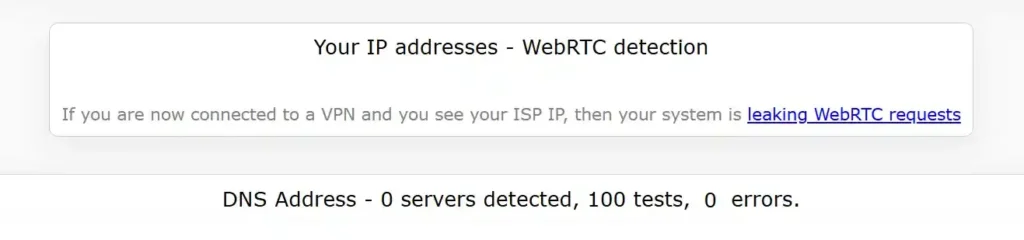
To demonstrate exactly how this works in practice, we conducted a live test using a Microsoft Surface device and the independent testing tool – ipleak.net.
- First, we ran a baseline analysis without an active VPN connection. As expected, the results were completely transparent to the open web: the site immediately detected and displayed our genuine physical location, real IP address, and our actual Internet Service Provider.
- Next, we launched BearVPN and established a secure connection to our Los Angeles server. Upon refreshing the ipleak.net dashboard, the transformation was instantaneous. Our physical country had flawlessly shifted to California.

More importantly, the diagnostic tool reported Zero DNS Leaks. This confirms that BearVPN’s encrypted tunnel perfectly encapsulated all of our web traffic and DNS requests, successfully preventing our ISP from seeing or logging our online activity.
Why Choose BearVPN?
- Strict No-logs Policy: 100% no recording or storing of your browsing history.
- DNS Leak Protection: Enhanced connection security to prevent DNS leaks in real time.
- Split Tunneling: Flexibly managing your network traffic and optimizing browsing experience.
- Strong Obfuscation: Advanced obfuscation technology to disguise VPN traffic as regular HTTPS web traffic.
Method 3. Try Tor Browser
Tor Browser is another security tool you can try to achieve anonymous browsing. It encrypts your internet traffic and bounces it through a decentralized network of volunteer-operated nodes scattered around the world. Your data is encrypted multiple times, peeling off layer by layer at each node, ensuring that no single server knows both your true identity and your final web destination.
Tips: Because your traffic is being routed globally through multiple hops, Tor is significantly slower than standard browsers, making it unsuitable for high-definition video streaming or heavy file downloading.
Method 4. Use A Privacy-focused Browser
Besides using some third-party tools, switching to a privacy-focused browser is a permanent, foundational upgrade to your daily anonymity. As mainstream browsers are notorious for collecting vast amounts of user data to fuel their proprietary ad networks, browsers such as Brave, LibreWolf, or Mullvad Browser are engineered specifically from the ground up to prioritize user privacy. They come equipped with built-in defenses against cross-site tracking, aggressive third-party cookies, and advanced browser fingerprinting.
Method 5. Use A Privacy-focused Search Engine
Even if you use a secure browser, relying on major search engines means your search queries are continuously being logged and tied back to your profile. To search the web anonymously, switch to a privacy-focused search engine like DuckDuckGo, Startpage, or Searx. These search engines do not track your IP address, do not log your search history, and do not create personal profiles to serve you targeted ads.
- How to use it: Open your browser settings, navigate to the “Search Engine” section, and permanently change your default search engine to a privacy-focused one.
Method 6. Regularly Clear Your Browser History & Cookies
When browsing online, manual maintenance is an essential requirement to prevent trackers from building a long-term profile of your daily behavior. Tracking cookies are tiny files stored on your device’s hard drive that allow advertisers to follow you from site to site over a long time.
To prevent cookies and logged cache from tracking you, regularly clear your browsing data, cache, and cookies. For better results, configure your browser settings to automatically clear all cookies and site data every time you close the application.
Method 7. Install Ad-blockers & Anti-tracking Extensions
For those who want to remove annoying ads from webpages, installing third-party security extensions can help. Ad-blockers like uBlock Origin do much more than just clear annoying pop-ups; they actively block malicious scripts and invisible tracking pixels that monitor your mouse movements and page visits. Extensions like Privacy Badger automatically block invisible third-party trackers as you browse.
Some ad-blockers and extensions claim to remove ads, but they actually steal your personal information, infect systems, or crash your browser. Always install the extensions from authorized stores.
Bonus Tips for Anonymous Browsing
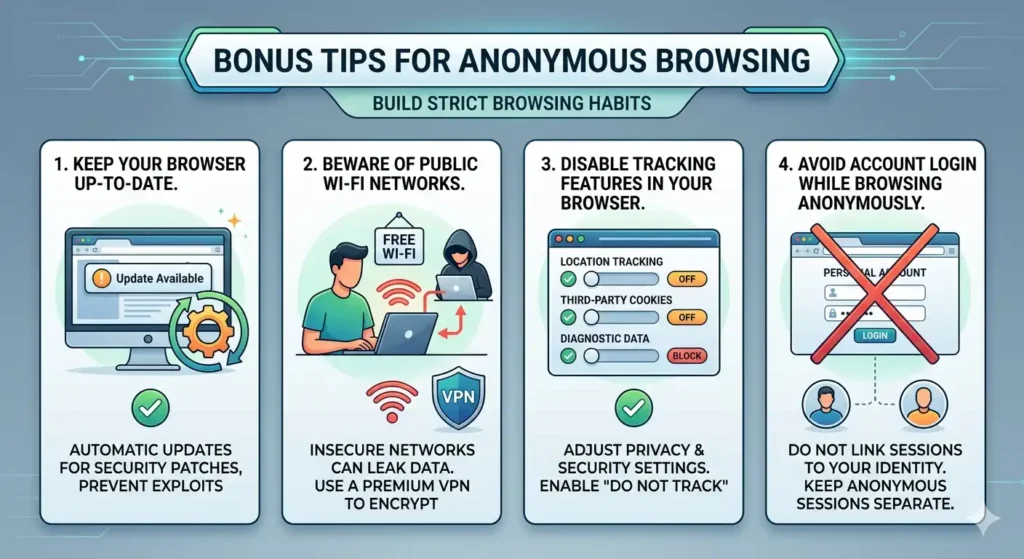
Achieving anonymous browsing is not just about using some security tools or applying privacy settings. Building strict browsing habits is also indispensable.
1. Keep Your Browser Up-to-date
Cybercriminals frequently exploit outdated software to bypass security measures and inject tracking malware into your system. To prevent these, browser developers constantly release patches for newly discovered vulnerabilities and zero-day exploits. Remember to ensure your browser is set to update automatically. A secure, fully patched, up-to-date browser is the foundational block of online privacy.
2. Beware of Public Wi-Fi Networks
Free Wi-Fi networks in public places like coffee shops, airports, libraries, and hotels are insecure. Anyone connected to the same public network can potentially intercept your unencrypted data, capturing your passwords, banking details, and browsing habits. If you must use public Wi-Fi, combining with the best VPN for public Wi-Fi to encrypt your data stream.
3. Disable Tracking Features in Your Browser
Modern browsers have deep settings that allow websites to track your physical location, access your web microphone, or run background data syncs. Simply go to your browser’s “Privacy and Security” settings and manually disable location tracking, block all third-party cookies, and turn off diagnostic telemetry data sharing. We also recommend enabling the “Do Not Track” request when browsing, though it relies on individual websites voluntarily honoring the request.
4. Avoid Account Login While Browsing Anonymously
Sometimes you get prepared for anonymous browsing, but you log in to your personal accounts. It just destroys the setup. Private information like Gmail, Facebook, or Amazon accounts can immediately tie your secure, anonymous session directly to your real-world identity. The best option is to keep your anonymous browsing sessions strictly separated from your day-to-day personal account usage.
Final Words
In a fast-paced era where personal data is constantly collected and monitored, understanding what anonymous browsing means and how to master it is your strongest defense. By combining methods like incognito modes, a premium VPN, the Tor network, privacy-focused search engines, and a trusted security extension, you can drastically increase your anonymity online.
Please note that there is no 100% perfect anonymity due to multiple restrictions. But you can still achieve true privacy through ongoing maintenance—regularly clearing cookies, blocking malicious trackers, and avoiding personal account logins during your secure sessions.
Try BearVPN now and enjoy safer, genuinely private surfing today!



