Key Takeaway
- Softonic is a legal, long-running software directory, but it carries real risks including bundled adware, misleading download buttons, and aggressive privacy-tracking ad networks.
- The platform has improved since discontinuing its notorious “Softonic Downloader” in 2015, but user complaints and security tool detections persist as of 2026.
- The biggest dangers aren’t always the software itself — they’re the deceptive ads and optional installs buried inside the setup process.
- Always choose “Custom Installation,” scan every file before opening it, and read user reviews before downloading anything.
- A VPN adds a critical layer of protection by encrypting your connection and blocking ad trackers that follow your behavior across sites.
- When possible, downloading directly from the official developer’s website is always the safest option.
Softonic has been around since 1997, and chances are it’s shown up in your search results more than once. You’re looking for a free tool, you click the first result, and suddenly you’re on a site offering fast downloads with big green buttons everywhere. Before you click anything, it’s worth asking: is Softonic actually safe?
The honest answer is: it depends on how you use it. Softonic is not a scam, and it’s not outright malware — but it does come with risks that catch a lot of users off guard. This guide breaks down exactly what those risks are, how to spot the red flags, and how to protect yourself if you choose to download from the site.
What Is Softonic, Exactly?
Softonic is a Spanish software directory founded in Barcelona that serves millions of users every month. It lists apps, PC programs, and tools for Windows, Mac, iOS, and Android — often pulling from third-party sources rather than hosting files directly on its own servers.
On the surface, that sounds convenient, especially when you can’t find a download link on a developer’s official site. But the way Softonic generates revenue is where things get complicated.
How Softonic Makes Money
Softonic operates on an ad-supported model, which means it relies heavily on advertising revenue to keep its service free. In practice, this creates a page environment packed with multiple “Download” buttons — most of which are ads, not the actual file you want. The platform also has a history of wrapping downloads in a custom installer that bundles additional software alongside the program you actually requested. While Softonic officially discontinued its proprietary “Softonic Downloader” in February 2015, user reports of bundled toolbars, browser extensions, and unwanted “PC cleaner” apps have continued well beyond that date.
Is Softonic Safe? Here’s the Honest Answer
Softonic occupies a gray zone that frustrates a lot of users: it’s not dangerous in the way that a phishing site is dangerous, but it’s not clean in the way that downloading from an official developer page is clean. The reality sits somewhere in the middle.
What Softonic Does Well
To be fair, Softonic has made genuine improvements to its security infrastructure over the years. The platform now scans over 10,000 files daily using multiple antivirus engines and maintains a partnership with VirusTotal — the same multi-engine scanning technology used by enterprise security teams. It also uses a transparent Softonic Score system (80–100 = Excellent, 60–79 = Good, 0–59 = Caution) to help users evaluate software before downloading. For mainstream, well-known programs from established developers — think VLC, 7-Zip, or LibreOffice — the actual file you download is usually clean and unmodified. The risk level rises significantly with lesser-known tools, older archived versions, or anything that routes through a third-party installer rather than a direct developer link. Knowing this distinction helps you make smarter decisions about when Softonic is a reasonable option and when it’s worth finding an alternative source.
Where the Real Risks Are
The problems tend to emerge not from the software itself, but from everything surrounding it. Malwarebytes maintains an active detection entry called PUP.Optional.Softonic, describing it as an adware-supported bundler that uses manipulative UI options to prompt users into installing further adware. As recently as February 2026, a widely upvoted thread in the r/software subreddit warned users that downloads from Softonic frequently contain unwanted extras. Even users who avoid full-blown malware infections consistently describe the download experience as ad-heavy, confusing, and difficult to navigate safely.
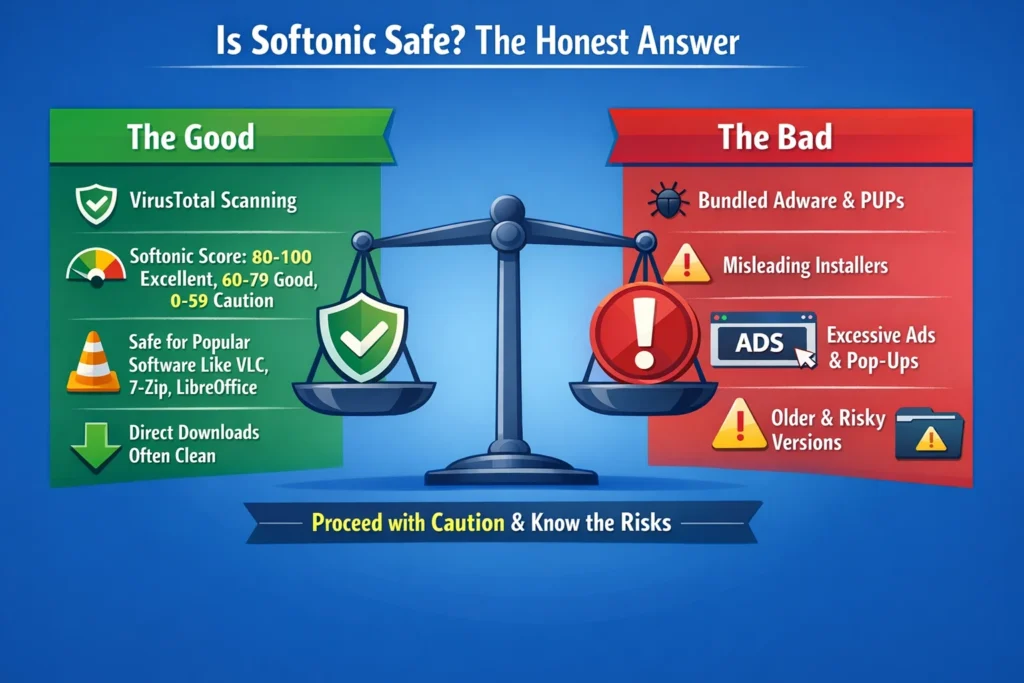
As recently as February 2026, a widely upvoted thread in the r/software subreddit warned users that downloads from Softonic frequently contain unwanted extras — a pattern documented by multiple security communities with screenshots and real detection reports.
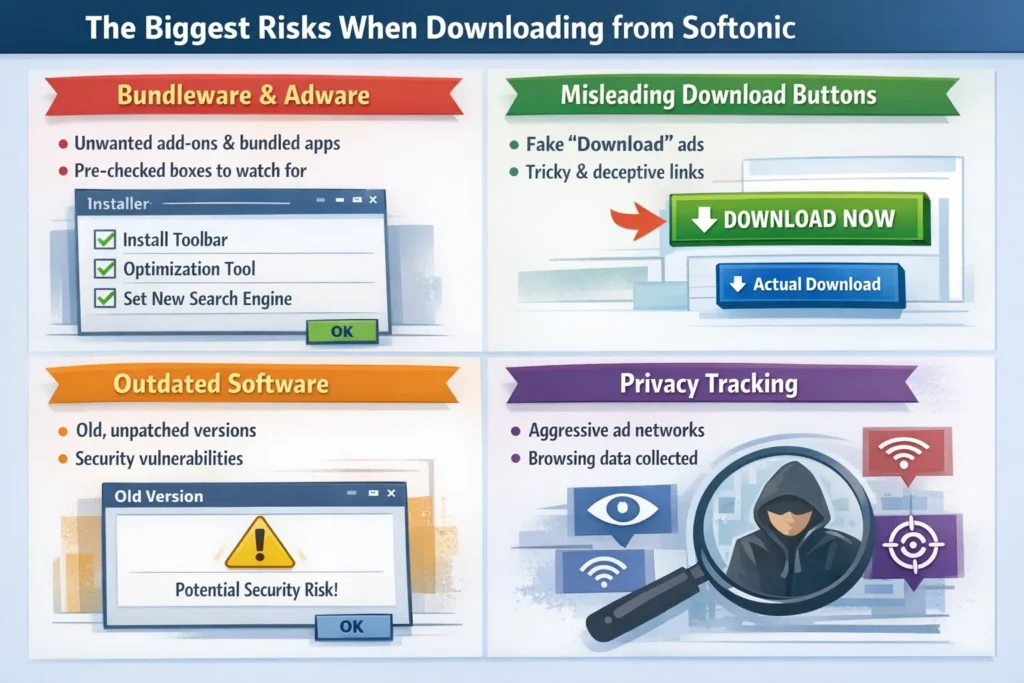
The Biggest Risks When Downloading from Softonic
Understanding where the danger actually comes from helps you make smarter decisions. These are the four areas that consistently cause problems for Softonic users.
Bundleware and adware. Even when the core software is safe, the installer may prompt you to accept additional programs — browser toolbars, search engine changes, or “optimization” tools — with pre-checked boxes that are easy to miss. Unchecking them requires attention and a willingness to click through every screen carefully.
Misleading download buttons. The page layout on Softonic is cluttered with ad-based download buttons that look identical to — or larger and more colorful than — the real download link. Clicking the wrong one can initiate an entirely different installation, sometimes without you realizing it.
Outdated software versions. Softonic sometimes lists older versions of apps that are no longer maintained. Outdated software is a known attack vector: security patches don’t exist for vulnerabilities discovered after the version’s release date, leaving your device exposed.
Privacy tracking through ad networks. Beyond the files themselves, Softonic’s aggressive ad networks track your browsing behavior across sessions. These networks can build a detailed profile of your online activity and serve targeted or misleading content based on what they’ve collected — a risk that continues even after you close the tab.
How to Download from Softonic More Safely
If you do choose to use Softonic, taking a few deliberate steps significantly reduces your exposure. None of these are complicated — they just require slowing down and paying attention before you click.
- Identify the real download button. The legitimate Softonic download link is usually smaller and less eye-catching than the surrounding ads. Look for a button that shows the exact file name and size.
- Always choose Custom Installation. Never accept the default installation settings. Selecting the custom or advanced option reveals hidden checkboxes for bundled software. Uncheck everything that wasn’t in the original program you wanted.
- Scan the file before opening it. Run every downloaded file through your antivirus software before executing it. You can also upload the file to VirusTotal.com for a free multi-engine scan.
- Read user reviews first. Softonic includes user ratings and comments on most listings. If recent reviewers mention unexpected software installs or suspicious behavior, trust that signal.
- Avoid the Softonic Downloader prompt. If the page asks you to use a downloader app to get your file, skip it. Look for a direct download link instead.
Why Your Connection Needs Protection on Sites Like Softonic
Following safe download practices handles the file-level risk, but there’s a layer of risk that most users overlook entirely: what happens to your data while you’re on the site itself.
Softonic’s ad networks are designed to track your browsing behavior across the web — not just on Softonic, but on other sites you visit before and after. On public Wi-Fi, that exposure is significantly worse. Anyone monitoring the same network can potentially intercept unencrypted traffic, and ad trackers can use your real IP address to link your activity across sessions. A VPN adds a layer of protection that works quietly in the background, keeping your connection private regardless of what site you’re on.
BearVPN is built for exactly this kind of everyday protection. Here’s what it brings to the table:

- AES-256 Encryption — Your traffic is encrypted with the same standard used in banking, making it unreadable to anyone trying to intercept it — whether that’s an ad tracker, your ISP, or someone on the same public Wi-Fi network.
- Strict No-Log Policy — BearVPN never records your browsing activity, IP address, or connection history. Nothing you do online is stored or linked back to you.
- Kill Switch — If your VPN connection drops unexpectedly, BearVPN automatically cuts your internet access to prevent your real IP from being exposed, even for a split second.
- Obfuscated Servers — VPN traffic is disguised as regular browsing traffic, making it harder to detect or block — particularly useful in regions with restricted internet access.
- Split Tunneling — Choose exactly which apps route through the VPN and which connect directly. You stay protected where it matters without affecting the rest of your connection.
- Cross-Platform Coverage — BearVPN works across Android, iOS, Windows, and macOS, so you’re covered on whichever device you’re downloading from.
- Free on Mobile, No Sign-Up Required — On Android and iOS, BearVPN is completely free with no registration needed. You can start protecting your connection in under a minute.
Whether you’re downloading software on a home network or a café’s public Wi-Fi, BearVPN keeps your connection encrypted and your browsing habits private — so the only thing sites like Softonic can see is an anonymous, protected connection.
Better Alternatives to Softonic
For most software, there’s a safer path that doesn’t require navigating a minefield of misleading ads and bundled installers.
The most reliable option is always the official developer website. Whether you’re downloading a media player, a productivity tool, or a game client, going directly to the source means you get the current, verified version with no third-party modifications. Most developers make this easy to find with a clearly labeled Downloads or Get Started page.
For open-source software, repositories like GitHub and SourceForge offer transparent, community-reviewed downloads where the code itself is publicly visible. The Microsoft Store and Mac App Store are also solid choices for mainstream applications — both platforms vet submissions and handle updates automatically. For Windows users specifically, Ninite is a clean, no-adware alternative that lets you install and update multiple popular programs in a single batch without any bundled extras.
Conclusion
Softonic isn’t the digital minefield it was in its early years, but it’s still not a site you want to browse carelessly. The real risks — adware, deceptive download buttons, and pervasive privacy tracking — are subtle enough to catch plenty of experienced users off guard. The good news is that most of those risks are avoidable if you know what to look for and take a few deliberate precautions before clicking anything.
When in doubt, go straight to the source. And whenever you’re navigating sites with aggressive ad ecosystems, make sure your connection is protected. Download BearVPN free on mobile — no sign-up needed — and browse with the confidence that your data stays yours, no matter where the internet takes you.
FAQs
1. Is Softonic legal?
Yes, Softonic is a fully legal, registered company. Using the site and downloading software from it does not put you in any legal jeopardy. The concerns around Softonic are about security and privacy, not legality.
2. Can I get a virus from Softonic?
A direct virus from Softonic’s own files is unlikely, but not impossible. The more common issue is adware and bundled software that arrives alongside programs you intentionally download. Malwarebytes maintains an active detection for adware associated with the Softonic platform, and user reports of unwanted software installs remain common in 2026.
3. Should I use a VPN when downloading from Softonic?
Yes, and for reasons beyond just the download itself. Softonic’s ad networks actively track your browsing behavior and can expose your real IP address and online habits. A VPN like BearVPN encrypts your connection and prevents these trackers from building a profile on you — especially important if you’re on public Wi-Fi.
4. Is Softonic safe for Mac users?
Mac users face the same ad-related and bundleware risks as Windows users, though the specific programs bundled may differ. One extra layer of protection Mac users have is Gatekeeper — macOS’s built-in security feature that flags apps from unverified developers with a warning before they open. If you download something from Softonic and macOS throws up a Gatekeeper alert, treat that as a serious signal to stop and verify the file’s source before proceeding. Beyond that, the same precautions apply: use Custom Installation, scan files with Malwarebytes before opening them, and avoid any Softonic-branded downloader prompts.
5. What is the safest alternative to Softonic?
Downloading directly from the developer’s official website is always the safest choice. For open-source tools, GitHub and SourceForge are reliable options. On Windows, the Microsoft Store or Ninite offer clean, verified installations with no bundled extras.