Key Takeaways: Quick Summary
| Cause | Quick Solution |
| IP Blacklisting | Change the server and access a non-blacklisted residential-like IP. |
| Geo-Mismatch | Clear Browser Cache or use Incognito mode to remove conflicting location data. |
| Leak Detection | Disable WebRTC in your browser settings to stop your real IP from leaking. |
| Protocol Block | Enable Stealth mode to disguise VPN traffic as normal HTTPS web traffic. |
| Browser Cache | Clear the cookies/cache, or use incognito mode in your browsers. |
The Ultimate Fix: Most Bazoocam blocks are caused by common data center IPs used by free VPNs. Switching to a premium provider like BearVPN with stealth protocols and fresh IP addresses usually restores access instantly.
When you use a random online video chat service, such as Bazoocam, it’s common to enhance your privacy with a VPN. However, some users reported that Bazoocam doesn’t work with VPN these days. When they load Bazoocam, ready to meet new people, only to get a spinning wheel on a blank screen, or the dreaded “Error: Connection to server failed” message. Some people also encountered a “camera not detected” issue on Bazoocam.
Why does this happen, and how can I regain access to Bazoocam with a VPN? No worries, this guide covers the technical reasons behind the VPN inefficiency and provides 6 proven fixes to get Bazoocam working again in 2026.
You may also like: How to fix OmeTV not working with VPN
Why Is Bazoocam Not Working with VPN?
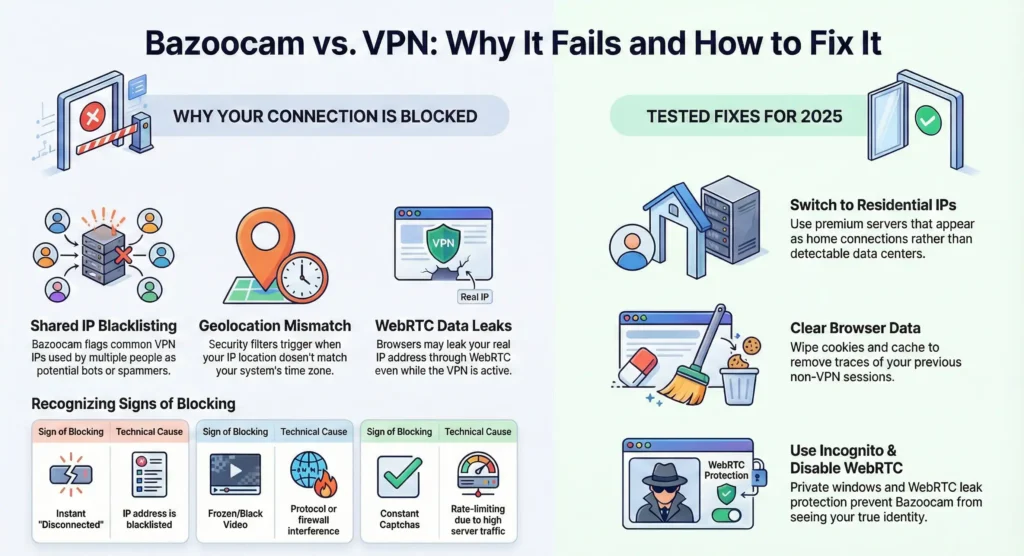
Bazoocam uses increasingly sophisticated detection methods to block VPNs, primarily to enforce bans or filter out spam bots. But according to some user feedback, this mechanism often catches legitimate privacy-conscious users in the crossfire. The causes are shown below:
1. Shared IP Blacklisting
The most common reason for Bazoocam not working with your VPN is IP blocks. Most VPNs, especially free ones, assign the same IP address to thousands of users simultaneously. If one user on that server violates Bazoocam’s terms, Bazoocam bans that specific IP address. Consequently, every other user connected to that same VPN server gets blocked as well.
2. Geo-Location Mismatches
Bazoocam’s algorithms look for inconsistencies in your digital fingerprint. If your VPN says you are in the United States, but your browser’s time zone is set to Singapore, and your GPS data says London, the system flags this as suspicious behavior. This geo-mismatch is a primary trigger for soft bans.
3. WebRTC Leaks
This is a critical vulnerability in most browsers. WebRTC (Web Real-Time Communication) is the technology that powers video chat directly in the browser. However, to establish a direct video feed, WebRTC often bypasses the VPN tunnel and requests your real IP address. If Bazoocam sees your VPN IP on the web request but your real ISP address via WebRTC, it immediately blocks the connection.
4. Deep Packet Inspection (DPI)
Some networks and sophisticated firewalls use DPI to analyze the shape of your data. Standard OpenVPN connections have a distinct signature. If Bazoocam’s firewall detects this signature, it can drop the connection before you reach the chat screen.
How to Fix Bazoocam Not Working with VPN (Step-by-Step)
If you are connecting to a VPN and stuck on the Bazoocam connecting screen, follow these methods in order. They range from simple browser tweaks to advanced network changes.
Method 1: Clear Browser Cookies and Cache
Even if you switch to a VPN, your browser might still be holding onto cookies that store your previous session information. If you previously visited Bazoocam without a VPN, these cookies act like a tracking beacon and leave a trace on the website. To clear the browser cookies:
- Chrome: Press Ctrl + Shift + Delete. Select “Cached images and files” and “Cookies and other site data.” Set the time range to “All time.”
- Firefox: Go to Settings > Privacy & Security > Cookies and Site Data > Clear Data.
- Restart: Close the browser entirely and reopen it after connecting to BearVPN.
Method 2: Use an Obfuscated Protocol
If Bazoocam is using Deep Packet Inspection to block VPN traffic, changing your server won’t help sometimes. You need to change how you connect to the server.
- Go to your VPN settings and find obfuscation or stealth mode.
- Enable it so that your traffic will be encrypted and access Bazoocam like a common user.
Method 3: Disable WebRTC in Your Browser
As mentioned earlier, WebRTC is the most common cause of VPN failure on video chat sites. You must prevent your browser from leaking your local IP.
For Chrome Users:
You will need a third-party extension because Chrome does not allow you to fully disable WebRTC in the default settings.
For Firefox Users (Recommended):
- Type about:config in the address bar.
- Search for media.peerconnection.enabled.
- Double-click it to set the value to False.
Note: Disabling WebRTC might stop the video chat from working entirely on some older platforms.
Method 4: Use Incognito or Private Mode
Extensions and browser plugins often interfere with connection scripts. Ad-blockers, specifically, can break the code Bazoocam uses to pair users.
Using Incognito Mode or Private Windows in your browser loads a clean version of the browser without cache, cookies, or interfering extensions. This can be a fast way to resolve the loading errors.
Method 5: Change Your GPS/Time Zone Data
If you are technically inclined, ensure your system time matches your VPN location.
- Scenario: You connect to a VPN server in New York.
- Conflict: Your PC clock is set to London Time.
- Result: Bazoocam detects the discrepancy and blocks the connection.
- Fix: Manually adjust your system clock to match the time zone of the VPN server you selected.
Method 6: Switch to a Powerful VPN – BearVPN
If the above methods don’t work, or you find it difficult to apply the settings. Switching to BearVPN is the ultimate fix for Bazoocam not working with VPN. While free services rely on a small number of public data center IP addresses, BearVPN offers obfuscated servers that ensure reliable access to Bazoocam and many other services without interruptions.

With over 2,000 servers globally, BearVPN allows you to instantly swap to a fresh IP if one is blocked. Its servers are optimized to mimic standard user traffic, reducing the likelihood of triggering anti-bot filters.
Steps to Restore Bazoocam Access with BearVPN:
Step 1. Download and install BearVPN on your computer or mobile.
Step 2. Open the app and register an account with your email address.
Step 3. Go to the server list and connect to a server with low ping.

Step 4. After connecting, go to your browser and visit the Bazoocam website. Make sure you have cleared the cache
Why BearVPN Is the Best Choice for Bazoocam in 2026
While many VPNs claim to unblock chat sites, BearVPN is engineered with more features that specifically benefit video chat users.
1. Low Latency for Video Chats
Nothing kills a conversation faster than lag or pixelated video. BearVPN maintains a massive network with 4K-ready bandwidth capabilities. Our servers are optimized to handle the high-throughput demands of live video streaming without buffering.
2. Advanced Stealth Protocols
In 2025 and 2026, site blocks have become smarter and more targeted. Standard OpenVPN is no longer enough. BearVPN’s support for SLProxy and SCProxy protocols ensures you can bypass even the strictest firewalls, whether they are imposed by Bazoocam, your school Wi-Fi, or national censorship.
3. Strict No-Logs Policy
Random chat sites can be unpredictable. You need a VPN that guarantees your activity is not recorded. BearVPN operates with a strict no-logs policy, meaning we do not track, store, or share your connection data. Your conversations remain private.
Tips to Avoid Bazoocam Connecting Issues with VPN
You can refer to the following tips to avoid other Bazoocam connection errors:
- Update Your App: Ensure you are running the latest version of the VPN app. VPN developers frequently update the IP pools and server lists to stay ahead of blacklists.
- Switch Protocols: If the Auto protocol isn’t working, try manually selecting the SCProxy or SLProxy protocol. It is more reliable for bypassing network restrictions.
- Check Your Antivirus: Sometimes, over-aggressive antivirus software blocks WebRTC connections. Temporarily disable your firewall or antivirus program to see if that resolves the connection error.
Final Words
Bazoocam not working with VPN is annoying, but it can be fixed with several proven methods. By understanding the mechanics of Bazoocam IP bans and WebRTC leaks, you can easily regain control of your online chatting experience. Try clearing the browser cache, changing the protocol, enabling obfuscation, disabling WebRTC, or using private mode. You can resolve the problem and make Bazoocam work again with your current VPN. For a more reliable solution, switch to BearVPN to enjoy unrestricted, private, and lag-free online video chatting.
FAQs About Bazoocam
1. Is it legal to use a VPN on Bazoocam?
Yes, using a VPN for privacy and security is generally legal in most countries. However, using a VPN to bypass a ban for illegal activities violates Bazoocam’s Terms of Service and may break local laws. Always use a VPN to access Bazoocam responsibly.
2. Does BearVPN slow down my video chat speed?
Any VPN adds a small amount of overhead, but BearVPN is designed for speed. With 4K-level bandwidth support and nearby server options, the impact on video quality is virtually unnoticeable.
3. What if Bazoocam bans my VPN IP?
This can happen if another user on the same server misbehaves. If you get blocked, simply disconnect and choose a different server location in the BearVPN app. With 2000+ servers, you will always find a working alternative.
4. Can Bazoocam detect that I am using BearVPN?
It is pretty difficult for them to detect it if you use our obfuscated servers. By using the SCProxy protocol, your VPN traffic looks like standard web traffic, effectively hiding the fact that you are using a VPN at all.
5. Should I use a free VPN for Bazoocam?
No, it’s not recommended to use a free VPN for Bazoocam because they are likely to get blocked with just limited IP addresses shared by millions of users. Furthermore, many free VPNs sell user data to cover costs, which defeats the purpose of using a privacy tool.