Key Takeaways
- Persistent Blocking: Qatar’s ISPs employ advanced Deep Packet Inspection to identify and block standard VPN protocols, such as WireGuard and OpenVPN.
- VoIP Restrictions: The primary target of these blocks is VoIP services; apps like WhatsApp, FaceTime, and Skype are restricted to text-only modes without a VPN.
- Effective Fixes: Solutions include using obfuscated servers, changing protocols, updating DNS settings, or switching to specialized providers like BearVPN.
- Legal Nuance: Using a VPN is generally not illegal in Qatar for personal privacy purposes. However, using it to access prohibited content, such as gambling sites, adult content, or for criminal activities, is punishable.
As a traveller in Doha, you may encounter network inefficiency when connecting to the hotel WiFi and making a call on WhatsApp. To solve this problem, you try connecting to a VPN. The frustration is that your VPN is not responding, but keeps connecting. This is the common case of the internet in Qatar.
Why does the VPN app you use flawlessly in Europe or the US suddenly refuse to connect in the Middle East? This frustration is not a technical glitch on your device, but a deliberate feature of Qatar’s sophisticated digital perimeter. This guide will walk you through exactly why these blocks happen and provide detailed methods to bypass them so that you can restore your connection effectively. If you are struggling with a VPN not working in Qatar, this comprehensive article is your roadmap to getting back online.
Common VPN Issues in Qatar
When a VPN is not working in Qatar, it doesn’t refer to the app failing to connect. Sometimes you are notified with a connected status, but you still can’t access restricted content in Qatar. Here are the most common scenarios reported by travelers and residents:
1. The “Infinite Connecting” Loop
This is the most frequent issue. When you tap the “Connect” button in a VPN app, the wheel spins, the status changes to “Authenticating…” or “Handshaking…”, but the tunnel never actually establishes. Eventually, the app times out and displays an error message, such as “Connection Failed” or “Server Unreachable.” This usually indicates that the ISP’s firewall has intercepted the initial handshake packet of your VPN protocol and dropped it before a connection could be made.
2. Immediate Disconnection
In this scenario, the VPN appears to connect successfully. You can see the green lock icon, and the timer starts. However, within just a few seconds to minutes, the connection drops abruptly. This is a classic sign of Active Probing or Deep Packet Inspection (DPI) kicking in after the connection is established. The firewall analyzes the traffic pattern, realizes it is encrypted VPN data, and disconnects the link.
3. Drastic Speed Throttling
Sometimes, the VPN connects and stays connected, but the internet becomes unusable. It takes minutes to load a web page. What’s worse, the VoIP calls become extremely laggy. This is often bandwidth throttling. The ISP detects the VPN traffic, but instead of blocking it outright, it throttles the speed to such a low rate that the users give up and turn it off.
4. Inability to Download VPN Apps
For some travellers in Qatar, the problem is that they fail to install a VPN app because some major VPN providers, such as NordVPN and ExpressVPN, are blocked. The App Store and Google Play Store may also have restricted versions of apps depending on the region settings, or the download simply fails to start.
Why Is My VPN Not Working in Qatar?
Qatar utilizes some of the world’s most advanced internet filtering technologies. While the country is highly connected and technologically advanced, its internet landscape is heavily regulated. According to the ExpatFocus report, the state-owned internet service providers, primarily Ooredoo and Vodafone Qatar, filter traffic to comply with cultural, religious, and economic policies. You can check the detailed information below:
1. Deep Packet Inspection (DPI)
This is the core reason. Traditional firewalls look at the header of a data packet, just like reading the address on an envelope. However, the DPI technique opens the envelope and inspects the contents. Qatar uses enterprise-grade DPI systems that can identify the unique fingerprint of VPN protocols.
- OpenVPN: This common protocol has a very distinct digital signature. DPI systems can spot an OpenVPN header instantly and block it.
- WireGuard: While newer and faster, standard WireGuard is easily identifiable because it uses UDP and has a fixed packet size during the handshake. Qatar’s firewalls are tuned to spot this instantly.
2. Economic Protectionism (VoIP Blocking)
The blocking of VPNs is closely tied to the blocking of Voice over IP. Telecommunications in Qatar are a state monopoly. Services like WhatsApp Calling and FaceTime offer free calls, which directly compete with the paid international calling revenue of Ooredoo and Vodafone. By blocking VPNs, the ISPs ensure that users cannot bypass the VoIP ban, effectively forcing them to use traditional, paid phone lines for international communication.
3. IP Address Blacklisting
ISPs subscribe to global threat intelligence feeds that list IP addresses associated with data centers and VPN services. If you are using a popular VPN server that thousands of other people are using, the IP address may have already been flagged and blacklisted by Qatar’s firewall. This is why free VPNs rarely work in this country. Their small pool of IP addresses is permanently banned.
4. DNS Poisoning
When you search for VPN providers, your computer asks a DNS server to translate that name into an IP address. In Qatar, the ISP-controlled DNS servers are configured to return an error or a wrong address for VPN websites, preventing you from even accessing the download page or the authentication servers required to log in.
That’s all about why your VPN is not working in Qatar and how the ISPs prevent you from connecting to a VPN server.
Is VPN Banned in Qatar?
No, VPNs are not banned in Qatar, but the apps are restricted. Here is the detailed information:
The Legal Grey Area
There is no law in Qatar showing that using a VPN is a crime. Instead, many businesses, banks, and government agencies use VPNs daily for secure remote work and data transfer. If VPN protocols were banned entirely, the country’s corporate sector would grind to a halt.
The Restricted Status
While the VPNs are not officially banned in Qatar, the services you access with a VPN might be restricted. The Cybercrime Prevention Law No. 14 of 2014 is broad. It criminalizes accessing content that violates social values or public order.
Allowed: Using a VPN to secure your connection on public Wi-Fi, to access your home bank account, or to watch legal streaming content from your home country.
Prohibited: Using a VPN to access pornography, gambling sites, or to spread false news or content critical of the state.
The ISP Perspective
From the perspective of Ooredoo and Vodafone, VPNs are a nuisance because they allow users to bypass the VoIP blocks. Therefore, they block VPNs technically, and people will not be considered criminals for simply using a VPN. The ban is a technical barrier, not a legal prohibition for average users. You will not get into legal trouble simply for having a VPN app on your phone, as long as you are not using it to commit cybercrimes.
How to Fix VPN Not Working in Qatar
No matter what kind of VPN issues you are facing, do not panic. There are several methods you can try to restore your connection in Qatar. Check them one by one.
Method 1. Use BearVPN – Quickest Solution
Based on recent user reports and effectiveness against aggressive DPI, BearVPN is often cited as a robust solution for VPN not working in Qatar. It is designed with stealth features specifically tailored for high-censorship environments in MENA regions. With the advanced SCProxy and SLProxy protocols, BearVPN is 100% safe to hide your real IP address when accessing restricted content in Qatar. To the Qatari firewall, your VPN connection looks like a regular visit to a secure website, allowing it to pass through the DPI filters undetected.

How we tested BearVPN in Qatar:
User: Yousuf
City: Doha
Problem: “I clicked the connect button in my VPN app. It keeps connecting, but nothing. Have restarted the app, switched the protocol, still failed to connect.”
Step-by-Step Guide:
Step 1. Access the BearVPN website: Search for BearVPN in the Chrome browser and enter the website. Download and install it on his laptop. – Success
He also tried to install the BearVPN app from the App Store on his iPhone. – Success
Step 2. Connect to a server: He chose a UK server, then connected to it in only 3 seconds.
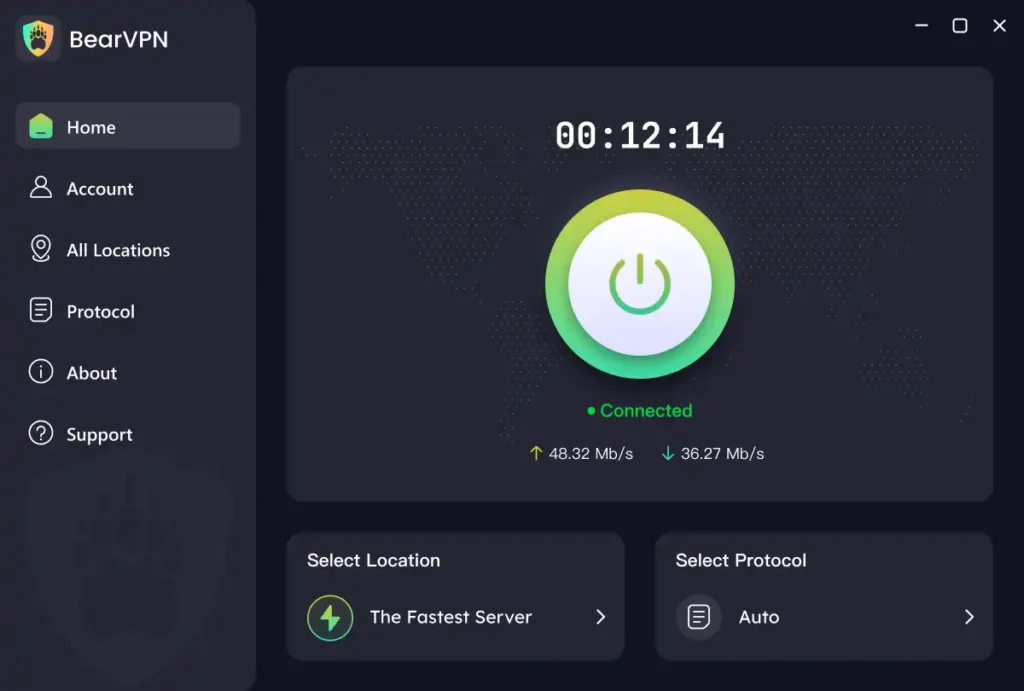
Step 3. Visit the website: After connecting, Yousuf went to the Disney+ website and unlocked UK content directly.
Stability: During the usage with BearVPN, Yousuf can watch movies on Disney+ without lag or stuttering. No connection drops, no risk warning on the website.
Tips when using BearVPN in Qatar:
- If you use BearVPN to access a restricted website, it’s better to clear your browser history before entering.
- If you use BearVPN to access restricted apps, you should clear the app cache before using.
Method 2. Update Your VPN App
VPN providers are constantly fighting back against ISP blocks. They release updates frequently so that the latest version contains new server IP addresses and patched protocols to evade detection. If you are using a version of your VPN app from six months ago, you are using IP addresses that Ooredoo likely blacklisted five months ago. How to do it:
Step 1. Check for Updates: Open your App Store or Google Play Store.
Step 2. Force Update: If you cannot access the store due to restrictions, try clearing the cache of your App Store app or connecting to another Wi-Fi to trigger the update.
Step 3. Re-login: After updating, log out and log back in. This forces the app to fetch the latest list of server configurations and certificates from the provider.
Method 3. Use Obfuscation/Stealth Mode
If you are using a standard VPN like BearVPN, you cannot simply use the one-click connection. You must enable their specific anti-censorship tools, such as obfuscation mode or stealth mode. It wraps your encrypted VPN data into an additional layer that makes it look like regular web traffic.
How to enable it:
- Go to the app settings and enable stealth mode.
- Choose a server to connect to.
- Open your target app and start browsing.
Method 4. Change the Protocols
The protocol is the language your VPN uses to talk to the server. Qatar blocks some languages (like WireGuard) but may let others pass.
Recommended Protocols for Qatar:
- SLProxy: Disguises VPN traffic as standard HTTPS web browsing to bypass firewalls and evade detection by network administrators.
- SCProxy: Uses advanced obfuscation to defeat Deep Packet Inspection, ensuring connectivity in highly restrictive censorship environments.
- OpenVPN TCP: Slower than UDP but more reliable. TCP traffic is the same type used by websites. It is harder for ISPs to block TCP port 443 without breaking the entire internet.
- IKEv2: Excellent for mobile devices because it handles network switching very well. It is sometimes less blocked than OpenVPN.
How to Switch: Go to your VPN app’s Settings > Connection > Protocol. Do not leave it on Auto. Manually cycle through them. Try OpenVPN TCP first.
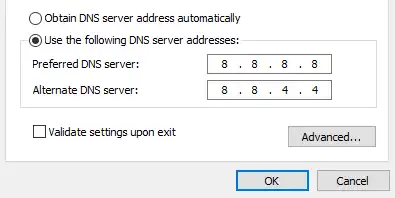
Method 5. Change DNS Settings
Sometimes the VPN tunnel is established, but you still can’t browse. This is often a DNS leak or block. Changing your DNS servers can force your traffic to resolve domains correctly. Here’s how to do it:
- In your VPN settings, ensure Custom DNS is disabled.
- Alternatively, if you are not using the VPN app but a manual setup, set your device’s DNS to Cloudflare (1.1.1.1) or Google (8.8.8.8) to bypass ISP DNS blocks.
- Restart your browser to apply the settings effectively.
Is It Illegal to Use a VPN in Qatar?
No, using a VPN in Qatar is not illegal. The technology used on VPN is neutral. The legality depends on how you use a VPN.
- Article 66 of the Telecommunications Law: Penalizes “disturbing, irritating, or offending any persons” via a telecom network. This is vague but generally applies to harassment.
- Content Laws: Accessing anti-Islamic material, pornography, or content criticizing the Emir is illegal. If you use a VPN to do this, and you are somehow caught, the crime is the accessing of content, not the use of a VPN.
Security Note: Avoid using VPNs to engage in political activism online while in Qatar. The cybercrime laws regarding fake news and rumors are strict. Keep your online footprint low-profile.
Conclusion
Whether you are a resident or a traveller, finding your VPN not working in Qatar can be inconvenient. It causes your disconnection from family and essential services. The blocks are the result of advanced ISP firewalls protecting local telecom monopolies and enforcing content laws. However, they are not insurmountable.
By switching to the best VPN for Qatar – BearVPN, you can easily get connected from 2000+ global servers. Additionally, you can update your VPN app, enable the obfuscation mode, change the protocol, or change the DNS settings to avoid tracking by ISPs. No matter which method you choose to fix the VPN issues, you will finally restore the connection and regain access to your target content.
FAQs About VPN Not Working in Qatar
1. Which VPN works in Qatar?
BearVPN still works in Qatar. It offers specific stealth modes designed to bypass the strict DPI firewalls used by Ooredoo and Vodafone. You can simply download and install the app from its official website or through the official app stores on Android and iOS.
2. How to connect VPN in Qatar?
To connect to VPN in Qatar, you can download and install BearVPN on your computer or mobile phone. Then choose a server to connect directly. BearVPN’s stealth mode will help mask your IP address and bypass the DPI filters.
3. Does WhatsApp work in Qatar with a VPN?
Yes. While WhatsApp text works without a VPN, voice and video calls are blocked in Qatar. Connecting to a VPN unblocks the calling feature, allowing clear video and audio chats.
4. What apps are restricted in Qatar?
VoIP apps (WhatsApp Call, FaceTime, Skype, Viber, Telegram Call), dating apps (Tinder, Bumble), adult websites, gambling sites, and some politically sensitive news outlets are restricted. You have to use a VPN to access restricted content in Qatar.
5. Is the internet monitored in Qatar?
Yes, heavily. ISPs use Deep Packet Inspection to monitor traffic for banned keywords and protocols. A VPN is essential to encrypt your data and prevent this surveillance.