Key Takeaways
- New Regulations: The primary reason for VPN issues in India is the 2022 CERT-In directive, which requires VPN providers to log user data for five years.
- Server Exodus: Major VPN providers like NordVPN, ExpressVPN, and Surfshark removed physical servers from India to protect user privacy, leading to connection errors.
- Legal Use: It’s legal to use a VPN in India, though the government has tightened control over providers.
- Common Fixes: Connectivity issues can often be solved by switching protocols, using obfuscated servers, changing DNS settings, or turning to an alternative VPN like BearVPN.
If you are finding your VPN not working in India, you are not alone. Over the past few years, Indian users have experienced a significant shift in Internet privacy. What used to be a simple click-to-connect process has become complicated due to new government regulations, server removals, and stricter ISP firewalls. Whether you are an Indian resident trying to secure your data or an expatriate trying to access Indian streaming services like Hotstar from abroad, you may encounter some disruptions.
In this article, we will analyze the main VPN issues in India, explain why your VPN is not working, and provide a detailed, step-by-step guide on how to fix them without effort.
You may also like: How to choose the best India VPN
Why Is My VPN Not Working in India?
If you are facing VPN connection issues in India or your VPN cannot provide an Indian IP address, it is likely due to one of the following reasons, ranging from policy changes to technical glitches.
1. The CERT-In Data Logging Law
In 2022, India’s Computer Emergency Response Team (CERT-In) enforced a directive requiring all VPN providers with physical servers in India to collect and store extensive user data for five years, according to India Briefing news. This data log includes:
- Real names and physical addresses.
- Phone numbers and email addresses.
- IP addresses and usage patterns.
To refuse compliance and protect their No-Logs policies, top-tier VPN providers, such as ExpressVPN, Surfshark, and NordVPN, refused to comply with the law and shut down their physical servers within India. If you are trying to connect to an old India server location that no longer exists, your connection will fail.
2. App Store Removals
The second reason why your VPN is not working in India is the absence of VPN apps. As of late 2024 and early 2025, the PCMag report indicates that Apple and Google have begun removing non-compliant VPN apps from the Indian App Store and Google Play Store. If your app is outdated or was removed from the store, it may stop functioning or fail to receive critical updates required to get connected.
3. ISP Blocking and Throttling
After releasing the new regulations, Indian Internet Service Providers, like Jio, Airtel, and Vi, frequently block known VPN ports (such as UDP 1194 for OpenVPN) or throttle encrypted traffic to comply with government censorship requests. If your VPN connects but the speed is unusable, your ISP might be identifying and strangling the VPN protocol.
4. Technical Conflicts
Besides the above reasons related to the government censorship requests, some standard technical issues remain a common culprit for VPN not working in India:
- Firewall interference: Antivirus software or Windows Defender may flag the VPN connection as suspicious.
- Outdated Credentials: If you recently changed your password, the app may still be trying to authenticate with old data.
- Protocol Mismatch: The default protocol might fail on restrictive Indian networks.
Is VPN Banned in India?
No, VPN is not banned for users in India. Instead, the government has created a hostile environment for VPN companies, resulting in some servers being blocked.
The Shadow Ban
While the Indian government hasn’t criminalized the act of using a VPN, it has made it difficult for privacy-focused VPNs to operate legally. By enforcing the data-logging rule, the government effectively banned No-Log physical servers.
- For Users: You can legally download and use VPN software.
- For Providers: You must either log data or stop providing the services. That’s why most reputable VPN providers chose to leave.
Localized Restrictions
There are exceptions where blanket bans occur, especially in areas with strict controls. According to the Kashmir Life report, authorities in regions like Jammu and Kashmir have occasionally issued temporary orders banning the use of VPNs to curb the spread of anti-national propaganda. In these specific scenarios and regions, using a VPN can be scrutinized heavily by local law enforcement. You’d better check the local laws before using a VPN when arriving in a new place.
How to Fix VPN Not Working in India
If your VPN is stuck on the connecting issue or you cannot access the content you need, there are several methods you can try to fix it.
Method 1: Use Virtual Indian Servers
Since many VPN providers have removed their physical servers in India, you must use virtual locations to ensure a successful connection.
- How it works: These virtual servers are physically located outside of India, such as Singapore, the UK, or Germany, but they assign you an Indian IP address.
- Solution: Open your VPN app and look for locations labeled like India (via Singapore) or Virtual – India. Do not connect to a server in specific Indian cities like Mumbai or Delhi unless your provider explicitly supports them via virtual routing.
Method 2: Change the Tunneling Protocol
If ISPs block the standard OpenVPN protocol, you may face the VPN not working in India. Then you can switch to a stealthier or more modern protocol like WireGuard or SLProxy. Here’s how:
- Go to your VPN app’s Settings.
- Find the Protocol tab.
- Switch from Automatic to WireGuard (faster, harder to block) or IKEv2 (good for mobile data).
- If those fail, look for a Stealth or Obfuscation protocol (often called OpenVPN TCP).
Method 3: Use Obfuscated Servers
If your ISP is using Deep Packet Inspection (DPI) to detect VPN traffic, you need to hide the fact that you are using a VPN. Here are the checks in common VPN apps.
- BearVPN: Go to the app settings and enable “Stealth Mode”.
- NordVPN: Enable the “Obfuscated Servers” option in the settings.
- Surfshark: Use the Camouflage Mode (enabled automatically on OpenVPN).
- ExpressVPN: Set the protocol to Automatic, which typically obfuscates traffic by default in restrictive regions.
Method 4: Change DNS Settings
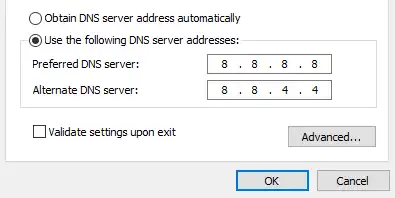
Sometimes the VPN tunnel is established, but DNS requests fail, preventing websites from loading. Follow the steps:
- In your VPN settings, ensure Custom DNS is disabled.
- Alternatively, if you are not using the VPN app but a manual setup, set your device’s DNS to Cloudflare (1.1.1.1) or Google (8.8.8.8) to bypass ISP DNS blocks.
Method 5: Clear Cache and Flush DNS
If you are trying to access a blocked site and it still won’t load, your PC might remember the blocked state. In this case, you can simply clear the cache on your Windows computer and flush DNS. Here’s how:
- Windows: Open Command Prompt and type ipconfig /flushdns. Wait for the process to finish.
- Browser: Clear cookies and cache for the specific site.
Method 6. Use a VPN Alternative – BearVPN
If you have tried the above methods but they don’t work, or you are experiencing difficulty with the current VPN, the best solution is to switch to a new VPN. To get connected to India smoothly, BearVPN is highly recommended for its worldwide servers and advanced security protocols. Most importantly, it doesn’t comply with the CERT-In Data Logging Law and follows strict no-logs privacy, ensuring your privacy and security.

How to access restricted content in India with BearVPN:
Step 1. Download and install BearVPN on your Windows, Mac, iOS, or Android device. It supports connecting 10 devices simultaneously.
Step 2. Open the app and choose an India server to connect to.

Step 3. Once connected, you can go to your browser or use a restricted app directly.
Note: It’s better to clear the browser history or app cache before going to your target pages.
Common VPN Issues in India
In addition to the VPN not working in India, there are some common problems Indian users may encounter when using a VPN, even with a working connection.
1. High Latency
Nowadays, Indian servers are physically located in Singapore or Europe, so the data has to travel further from the server to your device. A ping of 10ms previously is now likely 50-80ms. This is unavoidable for gaming, but shouldn’t affect streaming.
2. Captcha Loops
When you connect to a VPN server, you share an IP address with thousands of other users. Google and other sites may flag this traffic as bot-like, forcing you to solve endless Captchas.
Fix: Try connecting to a different server IP or use a dedicated IP if your VPN offers it.
3. UPI and Banking Failures
Indian banking apps, like Paytm, PhonePe, or Yono SBI, are highly sensitive to VPN usage. They may detect the location change and block transactions for security concerns.
Fix: Use Split Tunneling. Configure your VPN to exclude banking apps from the VPN tunnel so they use your direct mobile data while everything else is encrypted.
Is It Illegal to Use a VPN in India?
No, it’s not illegal to use a VPN in India. As we have mentioned above, VPNs are not banned in this country. You can still use a VPN to access geo-blocked games, streaming content, etc.
The Risk Factor
While the tool is legal, how you use a VPN and what you do with it matter most.
- Accessing Blocked Sites: Using a VPN to access restricted content in India, such as specific torrent sites, adult content, or banned Chinese apps like TikTok, occupies a legal gray area. While users are rarely prosecuted for this, bypassing government censorship can theoretically be construed as a violation of government orders.
- Illegal Activity: Planning cybercrime, fraud, or terrorism using a VPN is obviously illegal and carries severe penalties.
The No-Log Dilemma
If your VPN provider complies with Indian law and keeps physical servers in India, your data is not private. The government can legally request your browsing logs from that provider. To stay legal and private, you can choose a provider like BearVPN that operates outside Indian jurisdiction.
Conclusion
The issue of VPN not working in India is mostly caused by the 2022 CERT-In directives that forced privacy-centric providers to remove their physical infrastructure from the country. While this has made connecting to a VPN server more complex, it has not made it impossible or illegal. By changing your DNS settings, potentially adjusting your tunneling protocols, clearing the cache in your VPN app, or switching to BearVPN, you can restore your online privacy and access. Always ensure you are using a reputable provider that operates outside Indian jurisdiction to ensure your data remains truly private, despite the stringent local regulations.
FAQs About VPN Not Working in India
1. How to make VPN work in India?
Try to switch your connection protocol from one to another. If you need an Indian IP, ensure you select a Virtual Server location in the VPN app.
2. What VPN still works in India?
BearVPN, NordVPN, ExpressVPN, and Surfshark still work reliably. They removed physical servers but provide stable virtual Indian IPs and refuse to log user data, ensuring both access and privacy.
3. Can Indian police track VPN?
They cannot track live encrypted traffic. However, they can demand logs from Indian ISPs to see that you used a VPN or request data from compliant VPN providers that have stored logs.
4. What’s the punishment for using a VPN in India?
If you use a VPN legally, there will be no punishment. However, accessing illegal content or restricted sites can lead to fines or jail time.
5. Which VPN is legal in India?
All VPNs are legal to use; providers must log data for physical Indian servers. However, reputable No-Log VPNs, like BearVPN, ProtonVPN, or ExpressVPN, are safe to use as they do not comply with the mandatory data-logging laws.