The digital landscape in Russia has undergone seismic shifts in recent years, with popular international communication platforms facing increasing restrictions. For Apple users, the most recent and significant blow has been the blocking of FaceTime. As of December 2025, reports from the Guardian confirm that the Russian government has restricted access to Apple’s signature video-calling service – FaceTime, leaving millions of users disconnected from friends, family, and colleagues abroad.
Is FaceTime banned in Russia? This article provides a comprehensive analysis of FaceTime’s current situation, explains the reasons behind the blockade, and offers a detailed guide on how to safely access FaceTime in Russia with VPN services.
Is FaceTime Banned In Russia?
Yes, as of December 4, 2025, the Russian telecommunications watchdog, Roskomnadzor, has officially blocked access to Apple’s FaceTime service.
Current Status (December 2025)
Users across Russia, particularly in Moscow and St. Petersburg, began reporting issues with FaceTime in early December. Attempts to make calls often result in a “User Unavailable” message or a connecting screen that never establishes a link. Unlike previous glitches or temporary outages, this disruption is the result of a deliberate state-imposed blockade. Roskomnadzor has confirmed that the measure was taken due to alleged non-compliance with Russian laws regarding data and information sharing.
The Timeline of the Ban and Restrictions
The blocking of FaceTime in Russia did not happen in a vacuum. It has been years of tightening control over the Russian internet. Here is the timeline leading up to the current ban:
- March 2022 – Following the onset of geopolitical conflicts, Apple paused all product sales in Russia and limited services like Apple Pay. However, services like the App Store and FaceTime remained largely functional for existing users.
- July 2023 – The Russian government banned thousands of state officials and employees from using iPhones and other Apple devices for official work, citing fears of US espionage.
- 2024 – Access to encrypted messaging apps like Signal and Viber was blocked or severely throttled in several countries, especially in Russia.
- August 2025 – Roskomnadzor began limiting voice and video calls on WhatsApp and Telegram, accusing the platforms of failing to curb illegal activities. While text messaging remained accessible, the high-bandwidth calling features were targeted.
- October 10, 2025 – The Snapchat ban was quietly processed, though the official announcement was delayed.
- December 4, 2025 – FaceTime was officially added to the list of blocked services. The regulator released a statement claiming the app was being used to organize terrorist attacks and recruit perpetrators. It is a common justification used for banning encrypted platforms.
- December 5, 2025 (Latest) – FaceTime is currently inaccessible on most Russian mobile networks and ISPs without using circumvention tools.
Why Does Russia Block FaceTime Now?
The decision to block FaceTime is driven by a combination of security concerns, surveillance laws, and a desire to promote domestic alternatives. You can check the details below:
1. Inability to Decrypt Calls
The primary concern is likely FaceTime’s robust security architecture. FaceTime uses end-to-end encryption for all calls. This means that the audio and video data are scrambled on the sender’s device and only unscrambled on the receiver’s device. Apple itself does not hold the decryption keys. Under Russia’s Yarovaya Law, telecom operators and internet organizers are required to store user data and provide decryption keys to the Federal Security Service upon request. Since Apple cannot technically provide these keys for FaceTime calls, the service remains a mystery to Russian intelligence, which is unacceptable to the current regime.
2. Anti-Terrorism and Crime Prevention
Officially, Roskomnadzor justified the ban by stating that FaceTime was being used to coordinate criminal activity, fraud, and terrorism. The agency cited a lack of cooperation from Apple in identifying and blocking specific users involved in these alleged activities. By framing the ban as a public safety measure, the government attempts to legitimize the restriction of private communication tools.
3. Promotion of State-Approved Alternatives
The Russian government has been actively promoting domestic alternatives that comply with local data laws. A state-backed app called MAX has been pushed as a replacement. These apps are legally required to store data on servers within Russia and grant access to authorities. By degrading or blocking the user experience on foreign platforms like FaceTime, WhatsApp, and Snapchat, the state incentivizes the population to migrate to these controllable domestic platforms.
Can You Still Access FaceTime in Russia?
Yes, it is still possible to access and use FaceTime in Russia, but you should first bypass the network restrictions imposed by ISPs. The most effective method to do so is using a VPN like BearVPN.

What Does a VPN Do for FaceTime Unblock?
A VPN creates an encrypted tunnel between your device and a server located in a different country. When you use a VPN, your internet traffic will be masked as if it’s from a foreign server rather than your actual location in Russia. This allows you to bypass Roskomnadzor’s blocks, as the FaceTime servers see a connection from an allowed country, and your Russian ISP only sees encrypted data going to a VPN server.
Why Choose BearVPN?
To solve the FaceTime ban in Russia issue, BearVPN’s 20,000+ servers across more than 50 countries help you quickly find a safe route so you can reconnect to the FaceTime server and make calls. Additionally, BearVPN is known for its user-friendly interface and ability to bypass strict firewalls, especially in Russia, where standard VPN connections might be throttled.
Download BearVPN and follow the steps below to access FaceTime in Russia.
Step-by-Step Guide to Using FaceTime with BearVPN
Step 1. Open the BearVPN app on your iPhone, iPad, or Mac computer.
Step 2. From the main page, choose a server that is outside of Russia and connect.
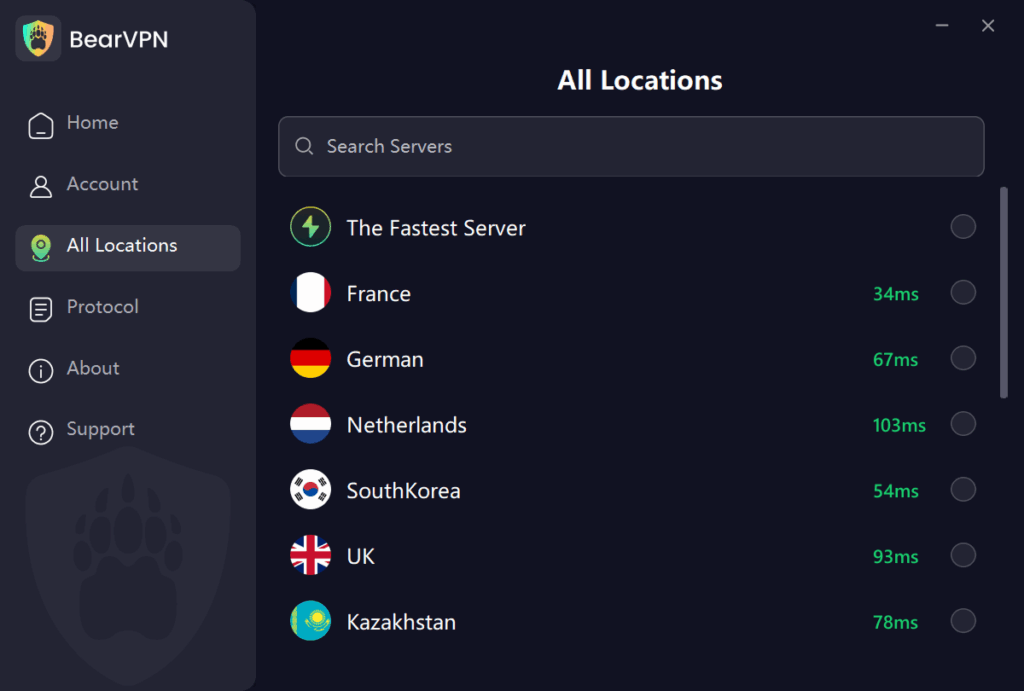
Step 3. Once it’s connected, you can open the FaceTime app and use it normally as before.
Note: If your FaceTime app was launching before connecting to a BearVPN server, you’d better close the background apps and reopen the app.
Is It Safe and Legal to Access FaceTime with a VPN?
Generally, it’s both safe and legal to use a VPN for FaceTime calls. But you should make sure that you are using it for personal contacts and without malicious purposes.
The Legality Concerns
Technically, using a VPN is not illegal for individual citizens in Russia. There is no law currently on the books that penalizes a private individual simply for having a VPN app on their phone.
- The Nuance: The law targets the VPN providers, not the users. Russia maintains a centralized list of banned VPNs. If a VPN provider refuses to block the websites Roskomnadzor wants blocked, the VPN service itself gets banned. This is why you might find that some VPNs suddenly stop working.
- Extremist Content: While using the VPN is legal, using it to access or spread content deemed extremist is illegal. Since FaceTime is blocked but not strictly labeled as extremist material, simply using it for private family calls is generally considered low-risk for individuals.
The Safety Concerns
- Data Privacy: Using a reputable VPN like BearVPN to protect your data from being snooped on by the public Wi-Fi owner or the ISP. Moreover, ensure your chosen VPN has a strict no-logs policy, meaning it does not store records of what you do.
- Police Checks: In rare instances, police in major cities have been known to spot-check the phones of people detained for other reasons. It is advisable to keep your phone clean of any politically sensitive material. Also, avoid using it to discuss sensitive political topics or organizing protests.
- Reliability: The biggest safety risk is the false sense of security. If the VPN disconnects mid-call, your traffic might leak to the ISP. Ensure your VPN has a Kill Switch feature, which cuts the internet connection entirely if the VPN drops, preventing accidental data leaks.
FAQs About FaceTime Ban in Russia
1. Will FaceTime be banned permanently in Russia?
While the Russian government hasn’t officially declared a permanent block on FaceTime, the strict crackdown on encrypted apps suggests the ban will likely remain.
2. What’s the best VPN for FaceTime calls?
There are several VPNs you can try to access FaceTime on your iOS or macOS device in Russia. However, to ensure your privacy security, it’s necessary to choose VPNs that strictly follow the no-log policy. BearVPN is one of such services.
3. What’s the best alternative to FaceTime in Russia?
Video contacting services like MAX, VK Calls, Zoom, etc., can be alternatives to FaceTime if you want to video call your friends.
The Bottom Line
Is FaceTime banned in Russia? Yes, the blocking of FaceTime in Russia marks a significant turning point in the country’s digital isolation, severing one of the last remaining encrypted video links to the outside world. Driven by strict data localization laws and anti-terror initiatives, the restriction forces users to navigate a complex web of censorship. While the ban is official and effective on standard networks, the desire for private communication remains strong.
By using a reliable VPN service like BearVPN, you can reclaim your digital freedom and restore access to FaceTime. Most importantly, it’s legal and safe to use a VPN for FaceTime communication, but you can only use it personally with caution. Always stay informed about the latest security regulations, and choose connectivity tools that value your privacy.