Key Takeaways
- For everyday simplicity + stable use: BearVPN is a strong “turn it on and go” option, especially if you want a straightforward app flow and safety defaults like a kill switch.
- For more restrictive networks: Look for obfuscation/stealth support (some VPNs can blend VPN traffic to reduce block rates).
- If you need an Omani IP address: Choose a provider that explicitly offers Oman servers (not all do).
- If your VPN connects but nothing loads: Switching servers/protocols and enabling obfuscation are the fixes that most often help.
If you’re searching for the best VPN for Oman, you’re usually not looking for “more privacy” in the abstract—you’re trying to make something work in real life. Maybe WhatsApp calling won’t connect, a website loads on mobile data but not on hotel Wi-Fi, or your accounts keep flagging logins when you travel. Oman’s network environment can be inconsistent across ISPs and locations, so a VPN that’s great elsewhere may feel unreliable here.
This guide helps you pick a VPN based on your task, shows which features actually matter in Oman, and gives you a short, practical shortlist with clear pros and cons.
Oman VPN Reality Check: What Usually Breaks (and What Usually Works)
Oman can feel “normal” one day and frustrating the next, depending on where you are and which network you’re on. Before you compare apps, it helps to know the failure patterns you’re trying to avoid—because they point directly to what features matter.
Common situations that trigger the “I need a VPN in Oman” search:
- VoIP calling reliability: Apps and call features can be restricted or inconsistent, so you end up searching “WhatsApp call in Oman” or “VoIP blocked in Oman.”
- Public Wi-Fi risk + login friction: Hotels, airports, and cafés are convenient but noisy networks; you want encryption and fewer interruptions.
- “Connected, but not working” VPN sessions: You see the VPN icon, but pages hang or certain services fail—often a sign you need stealth/obfuscation or a different protocol.
What usually works better in Oman than “random server hopping”:
- Nearby regions first (lower latency, fewer timeouts), then widen the search only if needed.
- Stealth/obfuscation modes when a network is actively identifying VPN traffic.
Is a VPN Legal in Oman? What to Know Before You Connect
This is the question most people want answered first, and it’s worth handling clearly. The practical takeaway is that legality depends less on “VPN = illegal” and more on what you do while connected and whether you comply with local laws and platform terms.
A useful way to frame it:
- A VPN is a security tool (encryption + safer network routing).
- Local rules and service terms still apply—a VPN doesn’t change your responsibilities.
Some mainstream providers explicitly note that VPN use can be legal while emphasizing that users must follow local laws and regulations.
If you’re using a VPN for normal tasks—protecting data on public Wi-Fi, accessing your own accounts while traveling, reducing tracking on shared networks—stick to reputable providers, keep your apps updated, and avoid shady “free proxy” shortcuts that create bigger risks than they solve.
How We Picked These VPNs for Oman: The 5-Point Checklist
Instead of drowning you in generic “how to choose a VPN” advice, this checklist is tailored to what actually determines success in Oman. You can scan these five points quickly, then jump straight into the shortlist where each recommendation maps back to them.
The Oman-specific checklist:
- Stealth/Obfuscation option (helps when networks detect and throttle/block VPN traffic).
- Kill switch + leak protection (prevents accidental exposure if the VPN drops).
- Good performance on nearby regions (stable real-world speed > headline speed).
- Simple, consistent apps across devices (you’ll likely switch between phone and laptop).
- Oman server availability only if you truly need an Omani IP (many people don’t).
Best VPN for Oman: 5 Top Picks (Pros, Cons, and Who Each Fits)
You don’t need 20 options—you need a shortlist you can actually test. Below are five mainstream choices that align well with common Oman use cases, with honest trade-offs included.
1) BearVPN — Best for simple everyday use and stable habits
If your priority is “open the app, connect, and stop thinking about it,” BearVPN is built around a straightforward workflow. It’s especially practical when your main goal is consistent day-to-day protection on public networks and fewer disruptions from unstable connections.

Why it’s a good Oman fit (general):
- Safety defaults matter more than fancy features when you’re on hotel/airport Wi-Fi, and a kill switch is one of the most important toggles to have enabled.
- If you deal with repeated logins or admin tools, Dedicated IP can be a useful “consistency upgrade” for certain workflows (not mandatory, but helpful when you want fewer verification loops).
Highlights
- Kill switch concept and use are clearly positioned as a protection layer when networks drop.
- Dedicated IP option can support “trusted access” routines in some scenarios.
Potential downsides
- If your main problem is aggressive VPN blocking, you should evaluate how it performs on your specific network conditions and prioritize solutions with explicit obfuscation/stealth if needed.
2) NordVPN — Best for anti-blocking features (obfuscated servers)
When your VPN is “detected” on a restricted network, obfuscation can be the difference between working and wasting time. NordVPN is commonly recommended in Oman-focused lists and also provides official guidance on connecting to obfuscated servers.
Highlights
- Obfuscated servers are specifically designed to help when VPN traffic is being identified.
- Frequently appears in “best VPNs for Oman” roundups.
Potential downsides
- Oman server availability is not the main reason people pick it; if you must have an Omani IP, confirm that requirement first and consider an option that clearly states Oman servers.
3) Surfshark — Best budget-leaning pick with stealth features
If price matters but you still want a credible feature set, Surfshark is often positioned as the “value” option in list-style coverage. Its obfuscated server messaging is also straightforward, which matters when you’re troubleshooting quickly.
Highlights
- Explicit positioning around obfuscated servers (useful in restricted environments).
- Often included as a strong value pick in Oman VPN lists.
Potential downsides
- Some third-party reviews note limitations and reliability quirks (including platform-specific issues), so it’s worth testing on your exact device and network rather than assuming.
4) ExpressVPN — Best “works out of the box” travel option
ExpressVPN tends to show up as the “it just works” pick in many country guides. If you’re traveling and you want minimal setup complexity, this category can be appealing—especially if your network conditions change every day.
Highlights
- Frequently included as a top mainstream option in Oman-focused rankings.
- Strong “simplicity” reputation in list-style guides (low learning curve).
Potential downsides
- As with other generalist providers, an Oman server is not guaranteed; if you require an Omani IP for local services, verify before committing.
5) Proton VPN — Best if you specifically need an Omani IP address
Most people searching “best VPN for Oman” don’t actually need an Oman IP—they just need a stable connection. But if you do need an Omani IP for local services, Proton VPN has a clear Oman server page, which makes this requirement much easier to satisfy.
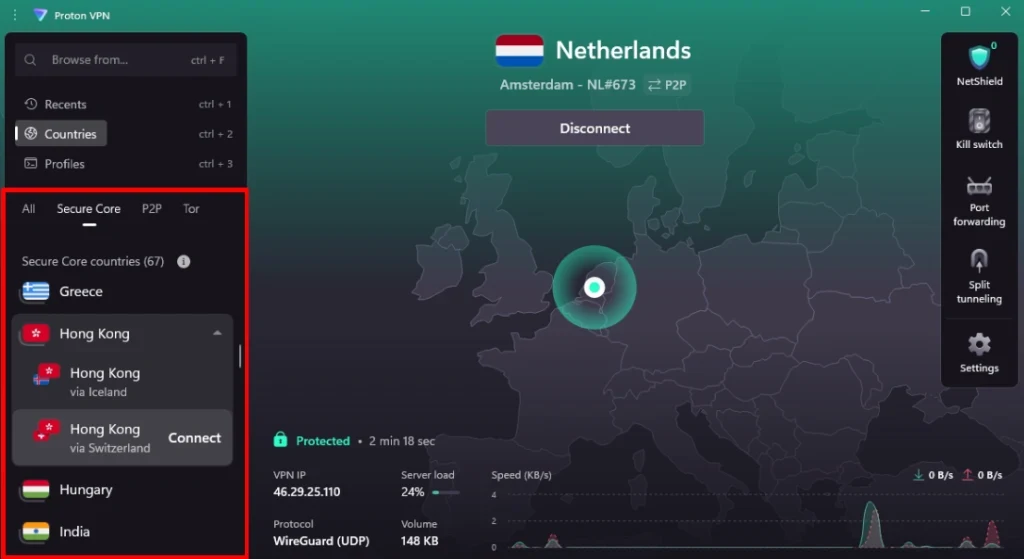
Highlights
- Explicit Oman server availability and guidance for obtaining an Omani IP.
Potential downsides
- Having an Omani IP doesn’t automatically mean the VPN will perform best on every restricted network; you still may need to switch protocols or use stealth features depending on where you connect.
If You Only Care About One Task, Pick Like This
If you’re overwhelmed by choices, this section helps you choose in under a minute. You’re not picking “the best VPN” in a vacuum—you’re picking the best VPN for what you’re doing today.
- You want WhatsApp/VoIP calls to work more consistently: prioritize providers with obfuscation/stealth and strong stability on nearby regions (NordVPN, Surfshark are commonly discussed in this context).
- You want safer public Wi-Fi + simple daily protection: favor the easiest app flow + kill switch defaults (BearVPN fits this “daily tool” profile well).
- You need an Omani IP address for local services: choose a provider that clearly offers Oman servers (Proton VPN is explicit here).
- You want a “set it once” travel VPN: choose a mainstream option known for low friction setup (ExpressVPN is often presented that way in country lists).
How to Set Up a VPN in Oman in 2 Minutes (and the Safe Defaults)
Setup shouldn’t be the hard part. What matters is turning on the few settings that prevent the most common “oops” moments—like a brief disconnect that exposes your real IP on a public network.
Do this in order:
- Install the VPN app on your phone first (you’ll likely use it on the go).
- Log in and open Settings.
- Enable Kill Switch (this is your “no accidental exposure” guardrail).
- Connect to a nearby location (start close for stability).
- If you’re on a restrictive network, enable obfuscation/stealth (if your provider supports it).
A simple testing rule: don’t judge success by “random browsing.” Test the thing that made you install a VPN—your VoIP call, the site that fails, or the account login that keeps looping.
VPN Not Working in Oman? Fixes That Help in the Right Order
When your VPN “connects but doesn’t work,” it’s tempting to uninstall and start over. Don’t. Most failures in restricted or noisy networks are fixable with a short sequence of changes.
Try these steps in order (stop when it works):
- Switch servers (nearby first)
Pick another nearby region. You’re looking for stability, not distance. - Switch protocol
If your app lets you choose protocols, try the alternative option—this can change how the connection behaves on the same network. - Turn on obfuscation/stealth (if available)
If a network is identifying VPN traffic, this is often the key move. - Change networks
Hotel Wi-Fi and mobile data can behave very differently. If it fails on one, quickly test the other to confirm the issue is the network, not your device. - Check leak protection / kill switch settings
Misconfigured DNS or a partial disconnect can create weird “some apps work, some don’t” symptoms. A good kill switch and leak protection reduce that risk.
Conclusion
The best VPN for Oman is the one that matches your real task. If you need reliable everyday protection on public Wi-Fi and a low-friction routine, choose something simple and stable (BearVPN is a solid fit for that style of use). If you’re dealing with tougher restrictions, prioritize providers with clear obfuscation/stealth options and test on the exact network that gives you trouble. And if your must-have requirement is an Omani IP, pick a VPN that explicitly offers Oman servers rather than assuming every provider does. A short, honest test—VoIP call, login flow, and a few key sites—will tell you more than any speed chart.
FAQs
1. Is a VPN legal in Oman?
Providers commonly frame it as: VPN use may be legal, but you must comply with local laws and regulations regarding your online activity. If you’re unsure, treat your VPN as a security layer, not a “permission slip.”
2. Why don’t WhatsApp calls work reliably in Oman?
Oman is frequently mentioned among places where VoIP calling features can be restricted or inconsistent, which is why so many Oman VPN guides emphasize VoIP as a core use case.
3. Why does my VPN say “connected” but websites won’t load?
That pattern often indicates the network is interfering with VPN traffic or your route is unstable. Switching servers/protocols and enabling obfuscation are common fixes.
4. Do I need an Omani IP address?
Only if you’re trying to access services that require Oman-based IPs or behave differently when you’re abroad. If you do need it, choose a provider that clearly offers Oman servers.
5. Are free VPNs safe to use in Oman?
Free VPNs often come with trade-offs: limited server choices (hurts stability), weaker transparency, and sometimes aggressive data practices. If your goal is secure public Wi-Fi or reliable calling, “free” is usually a false economy.